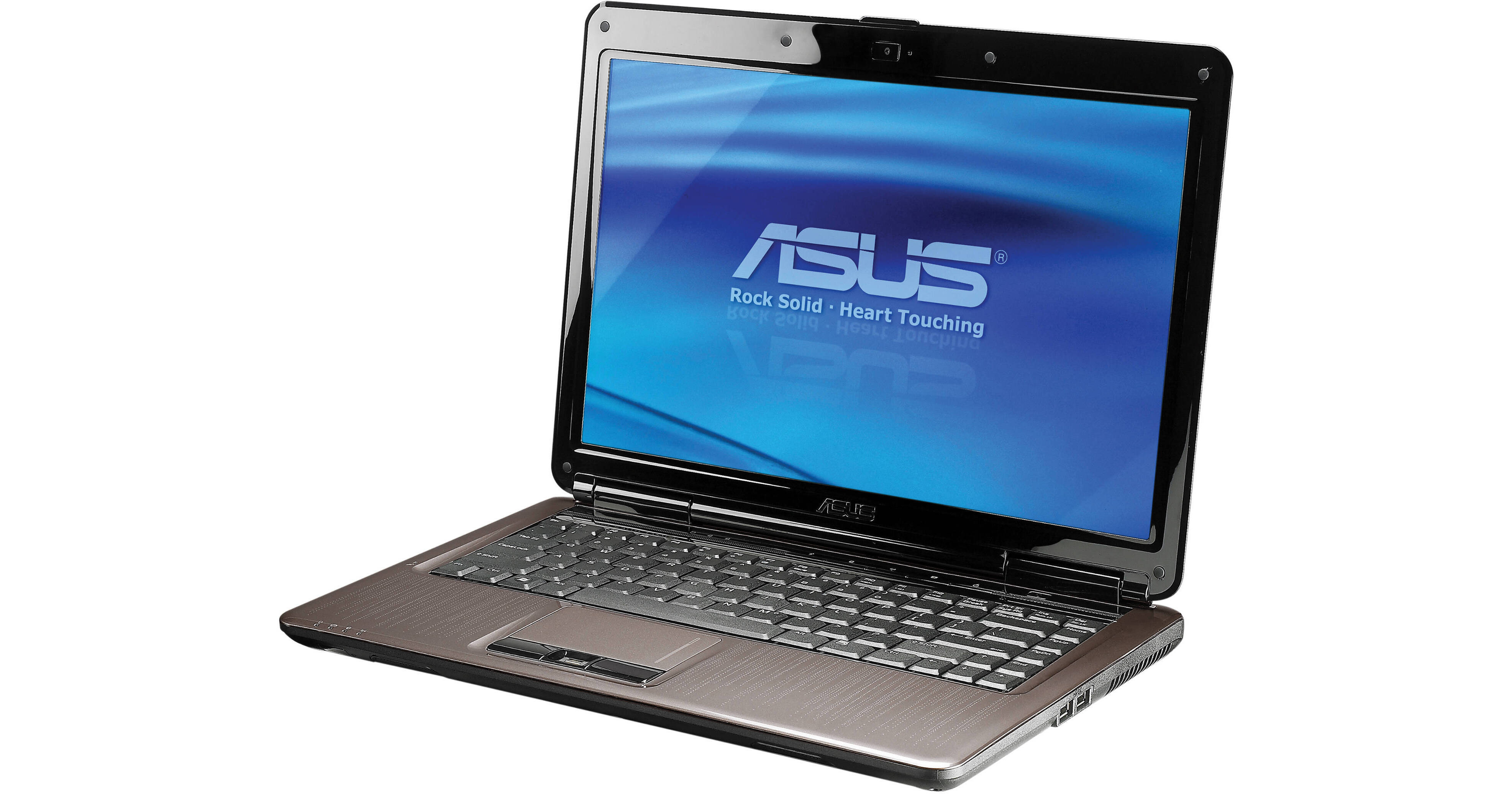
The N81Vp-D2 Notebook Computer from ASUS is a 14" notebook, perfect for day-to-day use. It is loaded with the Windows 7 Home Premium (64-bit) operating system, and features a 16:9 aspect ratio display. Graphics are provided by the ATI Mobility Radeon HD 4650, loaded with 1GB of DDR3 VRAM for gaming and multimedia.
The laptop is housed in a scratch-resistant case, which retains its finish even after prolonged use. Shiny metallic inlaid patterns, inspired by modernist art-deco designs accentuate the computer's design. Audio output is handled by Altec Lansing speakers with Dolby Home Theater technology.
The system is powered by a 2.8GHz Intel Core 2 Duo Processor T9600 CPU and boasts 4GB of RAM, 320GB hard drive capacity, a SuperMulti DVD Burner, Bluetooth, wireless Ethernet, eSATA, FireWire, and 5 USB 2.0 ports.
| Performance | |
|---|---|
| Processor | 2.8GHz Intel Core 2 Duo Processor T9600 |
| Cache | L2: 6MB |
| System Bus | 1066MHz |
| Memory |
Slots: 2 Type: DDR2 SO-DIMM Installed: 4GB (2x2GB) Capacity: 4GB |
| Display |
Type: Widescreen TFT-LCD with LED Backlight Size: 14" Native Resolution: 1366 x 768 |
| Graphics Display Card | ATI Mobility Radeon HD 4650 with 1GB DDR3 VRAM |
| Storage and Expansion | |
|---|---|
| Hard Drive |
Bays: 1 Installed: 320GB, 7200rpm SATA |
| Optical Drive | SuperMulti DVD Burner |
| Expansion Slot | 1x ExpressCard/54 Slot |
| Input/Output Connectors | |
|---|---|
| Ports |
5x USB 2.0 1x FireWire-400 1x eSATA |
| Display Output | 1x VGA |
| Audio |
Speakers: Integrated Stereo Speakers Headphone: 1x with S/PDIF Microphone: 1x Input, 1x Integrated |
| Video | 1x HDMI |
| Webcam | Yes (1.3MP) |
| Flash Media Slot | 8-in-1 Card Reader with support for MultiMediaCard (MMC), Memory Stick, Memory Stick PRO Duo, miniSD Card, Secure Digital (SD) Card, Memory Stick Duo, Memory Stick PRO |
| Communications | |
|---|---|
| Wired |
Network: 10/100/1000Mbps Gigabit Ethernet Connector (RJ-45) Modem: 56k Modem (RJ-11) |
| Wireless |
Wi-Fi: 802.11b/g/n Bluetooth: Yes |
| General | |
|---|---|
| Operating System | Windows 7 Home Premium (64-bit) |
| Security |
BIOS Booting HDD User Password Protection Kensington Lock Slot Fingerprint Reader |
| Keyboard | 87-key 19.02mm with MS Windows function keys |
| Pointing Device | Touchpad |
| Battery | 6-Cell Lithium-Ion (4800mAh) |
| Power Requirements |
AC: 100-240VAC, 50/60Hz Consumption: 90W |
| Environmental Requirements | None |
| Dimensions (WxHxD) | 13.5 x 1.4-1.5 x 10.1" (34.2 x 3.6-3.7 x 25.6cm) |
| Weight | 5.5 lb (2.5kg) |
REVIEW SNAPSHOT®
by PowerReviewsPros
Cons
Best Uses
Most Liked Positive Review
I would buy it again even with the bugs!
I did my research, read about a hundred reviews, had ASUS on the phone during initial set up, and about a week of having it, I still got random shut downs, this happened...Read complete review
I did my research, read about a hundred reviews, had ASUS on the phone during initial set up, and about a week of having it, I still got random shut downs, this happened after a system restore and during a game. I'm pleased to share my accumulated knowledge with you. One thing you need to do if you buy any laptop/notebook from ASUS is have a blank CD ready and MAKE A FACTORY SETTINGS CD when it prompts you and TURN OFF WINDOWS AND ASUS AUTO UPDATES STRAIGHT AWAY!!! ASUS uses their own components and drivers so if you allow it to auto update with windows drivers your going to have conflicts! I only have one main issue besides the shutdowns..(which I was half expecting when I purchased it) and that is when I'm in steam (a gaming network for those who don't know) my keyboard language randomly switches to Chinese, I have not figured out why or if its the PC or my Steam settings yet, but every time I get a lag type stall in movement with a beeping while in a game, I go into my Steam console and there it is in Chinese again, and I have to switch it back to English, then I'm fine for a while. Even with these little bugs I LOVE THIS LAPTOP/NOTEBOOK!!! Here's why:1) ASUS has the best factory warranty in the business! (what you'll pay hundreds more for at the big retail stores) They obviously stand behind there products [...] not to mention you can get a polite English speaking service tech on the phone 24/7 in about 4.2 minutes or less on average, now that's what I call service!2) It is the perfect size for all around use and travel (if traveling for long periods of time get an auto/air adapter, they cost a bit, but well worth it for mobility because battery life is short. -keep in mind it is a 14.1" laptop packed full of high power technology, all the bells and whistles don't leave much room for a battery. -life is aprox 3 hrs with word processing and 1 hr with movies when using power saving settings. Also remember to remove battery when running only from your wall outlet power. (this will save the long term life of your battery)3) It has top power and technology for its class, nothing will touch it! It easily plays Counterstrike Source on high settings.4) Screen size is perfect for all around use, High Def and in 16:9 golden aspect ratio for movie fans.5) You can plug it straight into your surround sound optical -by way of your fiber optic cord with a "Toslink to 3.5mm Optical Plug Adapter" Yes that's how you do it, and yes your headphone jack is also an optical! Marry Christmas to all!6) Windows 7 is nice, very user friendly and Ribbons screen-saver is back!7) Runs cool on hard surfaces all on its own, even with hours of gaming. (During Source engine gaming, gadget gauges show about 60% processor use and about 40% ram use. 8) 5 USB ports! -that means room for ALL your external gadgets to plug in at the same time.9) Good built-in sound thanks to Dolby home theater processing and Altec Lansing speakers.10) Dedicated HD4670 graphics card with 1GB of video RAM. (despite the spec of 4650, the 4670 came in mine and many others)11) Comes with a bag and travel mouse.12) [...]I am extremely picky with my purchases and do my research, this was an excellent buy and a beautiful machine! I would recommend it to anyone and would buy it again over other brands without hesitation -even considering the bugs I've experienced, because if it really bothers me and I can't figure it out, the shop will. ASUS takes care of their customers.
VS
Most Liked Negative Review
Loved it, until it stopped working!
As a graduate design student, I need a light but powerful full-featured laptop. The Asus fit the bill with the fastest processor available for the price. The product is beautiful and feels well made...Read complete review
As a graduate design student, I need a light but powerful full-featured laptop. The Asus fit the bill with the fastest processor available for the price. The product is beautiful and feels well made, and was able to easily handle my coursework.When I first used the laptop, everything seemed fine.The first issue I noticed was the charged battery indicator light wasn't on. The orange light came on while charging, but stayed dark once it was fully charged.The keys aren't very sensitive and I find I have to press considerably harder than other machines I've used.Within a couple of weeks, it began switching between battery and AC while plugged in. Now less than a month later, it will charge only if placed on a flat surface with the cord carefully arranged. There must be a short somewhere, as the heat from the adapter plug has started melting the plastic around the input port.B&H was exceptional about issuing an RMA quickly, and hopefully the replacement will not have these issues. I'd give the notebook five stars if it still worked! [...]
REVIEWS
Reviewed by 29 customers
Sort by
Displaying reviews 1-20
Previous | Next »
Pros
Cons
Best Uses
Comments about ASUS N81Vp-D2 Notebook Computer:
As a graduate design student, I need a light but powerful full-featured laptop. The Asus fit the bill with the fastest processor available for the price. The product is beautiful and feels well made, and was able to easily handle my coursework.When I first used the laptop, everything seemed fine.The first issue I noticed was the charged battery indicator light wasn't on. The orange light came on while charging, but stayed dark once it was fully charged.The keys aren't very sensitive and I find I have to press considerably harder than other machines I've used.Within a couple of weeks, it began switching between battery and AC while plugged in. Now less than a month later, it will charge only if placed on a flat surface with the cord carefully arranged. There must be a short somewhere, as the heat from the adapter plug has started melting the plastic around the input port.B&H was exceptional about issuing an RMA quickly, and hopefully the replacement will not have these issues. I'd give the notebook five stars if it still worked! [...]
Pros
Cons
Best Uses
Comments about ASUS N81Vp-D2 Notebook Computer:
I'm using this laptop for travel it is awsome!
It is small and light and very fast!
Pros
Cons
Best Uses
Comments about ASUS N81Vp-D2 Notebook Computer:
I bought this laptop primarily as a mostly portable gaming laptop. It is not billed as a gaming laptop, but it definitely has the muscle to play all the recent games. So far I've tested Supreme Commander, Dawn of Discovery, and Left 4 Dead 2 and they all run great.[...] the GPU is extremely powerful for driving only 1366x768 pixels.In my opinion, this is the best 14" laptop you can buy.
Pros
Cons
Best Uses
Comments about ASUS N81Vp-D2 Notebook Computer:
I did my research, read about a hundred reviews, had ASUS on the phone during initial set up, and about a week of having it, I still got random shut downs, this happened after a system restore and during a game. I'm pleased to share my accumulated knowledge with you. One thing you need to do if you buy any laptop/notebook from ASUS is have a blank CD ready and MAKE A FACTORY SETTINGS CD when it prompts you and TURN OFF WINDOWS AND ASUS AUTO UPDATES STRAIGHT AWAY!!! ASUS uses their own components and drivers so if you allow it to auto update with windows drivers your going to have conflicts! I only have one main issue besides the shutdowns..(which I was half expecting when I purchased it) and that is when I'm in steam (a gaming network for those who don't know) my keyboard language randomly switches to Chinese, I have not figured out why or if its the PC or my Steam settings yet, but every time I get a lag type stall in movement with a beeping while in a game, I go into my Steam console and there it is in Chinese again, and I have to switch it back to English, then I'm fine for a while. Even with these little bugs I LOVE THIS LAPTOP/NOTEBOOK!!! Here's why:1) ASUS has the best factory warranty in the business! (what you'll pay hundreds more for at the big retail stores) They obviously stand behind there products [...] not to mention you can get a polite English speaking service tech on the phone 24/7 in about 4.2 minutes or less on average, now that's what I call service!2) It is the perfect size for all around use and travel (if traveling for long periods of time get an auto/air adapter, they cost a bit, but well worth it for mobility because battery life is short. -keep in mind it is a 14.1" laptop packed full of high power technology, all the bells and whistles don't leave much room for a battery. -life is aprox 3 hrs with word processing and 1 hr with movies when using power saving settings. Also remember to remove battery when running only from your wall outlet power. (this will save the long term life of your battery)3) It has top power and technology for its class, nothing will touch it! It easily plays Counterstrike Source on high settings.4) Screen size is perfect for all around use, High Def and in 16:9 golden aspect ratio for movie fans.5) You can plug it straight into your surround sound optical -by way of your fiber optic cord with a "Toslink to 3.5mm Optical Plug Adapter" Yes that's how you do it, and yes your headphone jack is also an optical! Marry Christmas to all!6) Windows 7 is nice, very user friendly and Ribbons screen-saver is back!7) Runs cool on hard surfaces all on its own, even with hours of gaming. (During Source engine gaming, gadget gauges show about 60% processor use and about 40% ram use. 8) 5 USB ports! -that means room for ALL your external gadgets to plug in at the same time.9) Good built-in sound thanks to Dolby home theater processing and Altec Lansing speakers.10) Dedicated HD4670 graphics card with 1GB of video RAM. (despite the spec of 4650, the 4670 came in mine and many others)11) Comes with a bag and travel mouse.12) [...]I am extremely picky with my purchases and do my research, this was an excellent buy and a beautiful machine! I would recommend it to anyone and would buy it again over other brands without hesitation -even considering the bugs I've experienced, because if it really bothers me and I can't figure it out, the shop will. ASUS takes care of their customers.
Pros
Cons
Best Uses
Comments about ASUS N81Vp-D2 Notebook Computer:
Been using the keyboard for 3 weeks. It runs incredibly fast with under 30 second boot times, cool, and quiet, despite the incredible hardware that's packed under the hood. It is slightly bigger in size compared to other 14 inch laptop I have used in the past, but that's understandable with all the ports it has built in.
The N81VP has surprisingly very few junkware installed, and some of the software that Asus has included is actually worth keeping. It even has this feature called Express Gate, where it this separate OS that looks like Ubuntu (not exactly sure what it is, but looks like a modified Ubuntu), and has all the necessary drivers to surf the net, listen to music, watch videos, despite the fact that Windows might be incapacitated.
The drawbacks I have come across is the somewhat spotty keyboard and annoying touchpad button. The keyboard is sometimes not very responsive, and it often doesnt register some key strokes when typing very fast. The touchpad buttons need to be pressed very hard and make a pretty loud clicking noise.
Overall the drawbacks are very minor compared to the overall performance the laptop has to offer for the price.
Win 7 Experience Index
(Not the best measurement or benchmarking tool, but it can provide some quick reference)
CPU 6.4
RAM 6.4
Win Aero GFX 6.6
Gaming GFX 6.6
Hard Disk 5.9
Pros
Cons
Best Uses
Comments about ASUS N81Vp-D2 Notebook Computer:
This PC is quite amazing. The gaming abilities are insane for a 14 inch. I just played Mass Effect 1 without any problems and plan on starting up on Mass Effect 2.
Pros
Cons
Best Uses
Comments about ASUS N81Vp-D2 Notebook Computer:
What I like about ASUS N81VP-D2:
1. Global warranty - Since I live outside of the USA, this was one of the main reasons why I chose this product over HP TouchSmart TX2. Has 2 years global warranty and 1 year accidental damage warranty
2. 2.8 Ghz Core 2 Duo processor and 1GB DDR3 video card - for this price range, you won't be able to find a laptop that has processor as fast as this, and a 1gb DDR3 video card to go with it
3. LED widescreen
4. Altec Lansing Speakers rock!
5. 7200rpm hard disk. Copying & Searching files can be fun with a hard disk such as this one.
6. 5 USB ports, Bluetooth, and can read almost all types of memory cards
7. Already includes bag and mouse (although the bag is not really that great but still useful)
8. Comes with a $100 rebate.
9. It's light.
What I wish it had:
1. I wish the battery was better, but it's understandable that the battery goes out quickly because of the fast processor. Better use outlet power.
2. Keyboard is OK but I wish the keys were as soft as the Dell Inspiron keys. Trackpad buttons can be a bit irritating at times but for me, it's not a big deal. I always use the mouse.
3. Windows 7 64-bit is great and super fast but it can sometimes be a bad thing as it's not compatible with a few old programs. It's not Asus's fault though.
For people looking for a desktop replacement, a gaming laptop, or simply just a light, functional computer--this is the one, folks.
Bootup is fast and loading programs is a breeze. Try using Google Chrome with this laptop and browsing is just even faster.
I've been using this for almost a month now and I'm very proud of this purchase. I play games, watch movies, edit photos and audio on this laptop and it really does all the work...fast. Highly recommended.
Pros
Cons
Best Uses
Comments about ASUS N81Vp-D2 Notebook Computer:
I bought this laptop as a replacement for my HP tablet TX1000 which is about to die. I had sworn that my next laptop would not be HP & the processor would not be AMD. And I stuck with my self promise.This new ASUS laptop is almost all that I wanted in a laptop at the price I was ready to pay for it. I use it for every day computing, some online movie streaming, online chatting with webcam, etc & it works perfect for that. I am not a big gamer, but do like audio-video stuff and the HDMI connection works great for me. I use an HDMI cable to connect it to my Onkyo NR-906 receiver and I get hi-def sound from my speakers & HD video on my Samsung LCD. The AV quality even for online content (esp HD stuff on youtube) is just awesome. It also is very user friendly to watch TV via the laptop on my regular Samsung LCD TV (watch some great international channels).The laptop is not overwhelming but works just fine. Wishful thinking on my part is to have a blueray player included, but probably would remain wishful thinking for the price I paid ([$]). Another wishful thought was some models has a slot for SIM card (3G) & if mine had one, it would effectively doubled as a netbook as well!However, the specks are great: 2.8 GHz intel core 2 duo, 4 GB ram, 320 GB HDD @7200 rpm, discrete ATI radeon graphics card with 1 GB separate video ram, dolby speakers (altec lansing), built in webcam & mike, bluetooth, wireless card. The only complaint I have is (and it is minor): the touch pad is bit too smooth for me and does not respond that well to my fingers. I may have to get used to it as I am still used to my HP tablet touchpad which was uneven surface (with depressions) & responded quite well to my fingertip.Also, I had downgraded my HP tablet from vista to xp & this new ASUS one has windows 7 and I am still getting used to windows 7. Windows 7 appears much more stable and better than vista, but my personal opinion is xp remains the best windows OS for me! I have not used it much on battery so can't comment yet on the battery life, but it is definitely much better than my previous HP tablet (which lasted less than 90 min on battery with regular net surfing).Also, it is definitely gets much less hot than my HP tablet. It is quieter as well and boots up quite fast.The screen size is fine (14"), would have preferred it slightly smaller (better on cramped planes these days since I travel relatively often), but overall the size and weight are still good.
Pros
Cons
Best Uses
Comments about ASUS N81Vp-D2 Notebook Computer:
Great Piece of Technology at a Great Price!
Awesome ASUS build quality and a super config.
Pros
Cons
Best Uses
Comments about ASUS N81Vp-D2 Notebook Computer:
I've been in graphic design and web design for the last 3 years and when I looked for a laptop, I needed a powerhouse with a good price tag. This machine definitely meets and exceeds expectations. Having the HD 4670 graphics is pretty helpful when connecting to large monitors. And for [$], you simply can't beat this machine.One of my few qualms is the battery life. With only a 6-cell battery, the Core 2 Duo 9600 drains a little quick, even with battery saving settings. The case is a little hard to keep fingerprints off and the keyboard is nothing to brag about, but this is really an economical model that packs a lot of punch where it really counts.
Comments about ASUS N81Vp-D2 Notebook Computer:
I just used as a web browser and listen to the CD, it is good and sleek.
Pros
Cons
Best Uses
Comments about ASUS N81Vp-D2 Notebook Computer:
The laptop is quite all right if you are willing to put up with the poor keyboard design. That is my chied complain. The keyboard seems to be very poorly built. The left hand keys make a different sound than the right hand keys. The worst is the scroll pad. But again, these is not such a big deal when you consider the power and speed you get for the price. I hope ASUS will continue improving its product.
Pros
Cons
Best Uses
Comments about ASUS N81Vp-D2 Notebook Computer:
I've owned this laptop for a few weeks now and very happy so far. I installed Linux Ubuntu 9.10 64 bit on it and it was the easiest install ever, a few simple questions and it was done. All major harware works there's even an ATI supplied video card driver available for it enabling 3D and accelartion. It is capable of multi display output. Tons of output ports all over, it even includes a digital audio out (optical) which is a hard feature to find. The keyboard is terrible but worth living with.
Pros
Cons
Best Uses
Comments about ASUS N81Vp-D2 Notebook Computer:
This is a great laptop loaded will all the bells and whistles. 5 USB ports, HDMI, Firewire, card reader and DVD dual layer. Great screen and runs cool. Also, nice sound for small speakers.
Beware word processing or other software, but you do get windows 7. Limited battery life is a downside.
All in all a nice package at a great price.
Pros
Cons
Best Uses
Comments about ASUS N81Vp-D2 Notebook Computer:
powerful and light, especially for the price [$], bing cashback, credit card rewards.7200 rpm drive good, core 2 duo 2.8 great, and what's better that this actually a 4670 gpu instead of the advertised 4650. i checked for the top 50 laptop gpus and this is rank 41 as of 1/22/10.win 7, 4gb ram, woot. technology prices.. man. this thing has great usb ports as well.
Pros
Cons
Best Uses
Comments about ASUS N81Vp-D2 Notebook Computer:
Overall I am very satisfied. The keyboard is the only complaint I have.
Pros
Cons
Best Uses
Comments about ASUS N81Vp-D2 Notebook Computer:
I'm very satisfied with the ASUS N81vp. I'm not sure you can find a faster processor in a laptop for the price, and it runs smoothly and quietly. I had a design program, an image processing program, an image manipulation program and Excel 2007 all running simultaneously and it didn't even break a sweat. (Each of these programs would cause lag on my old laptop).
My only complaints are minor: the left side of the keyboard is pretty noisy when you type it, and it occasionally seems to drop a letter when I'm typing quickly. The mouse buttons were very stiff when it arrived, but have loosened up a bit... hopefully they will continue to do so. The fingerprint reader is a nice piece of hardware to have, and according to the manual it should interface with a web browser to use as a password online, but the version of the managing software that comes with the computer is a "lite" version, and browser functionality will be available in the full version, supposedly available for purchase (sigh) later this year. This last information I got via email from Authentec, the company that makes the reader.
But, every machine is going to have a few things that you'd just prefer differently, and none of these detract from the machine as a whole.
Pros
Cons
Best Uses
Comments about ASUS N81Vp-D2 Notebook Computer:
I use for gaming and wath movies
the grat is the processador fast and the storage and the video card
not complain
Pros
Cons
Best Uses
Comments about ASUS N81Vp-D2 Notebook Computer:
It has a fast cpu, a lot of ports and a video card enough for most games. Mostly use it as desktop replacement. [...]
Pros
Cons
Best Uses
Comments about ASUS N81Vp-D2 Notebook Computer:
This laptop gets everything done!!!!
It booted up windows 7 in under 30 seconds, and has many features that many laptops at this price don't have.
Displaying reviews 1-20
Previous | Next »