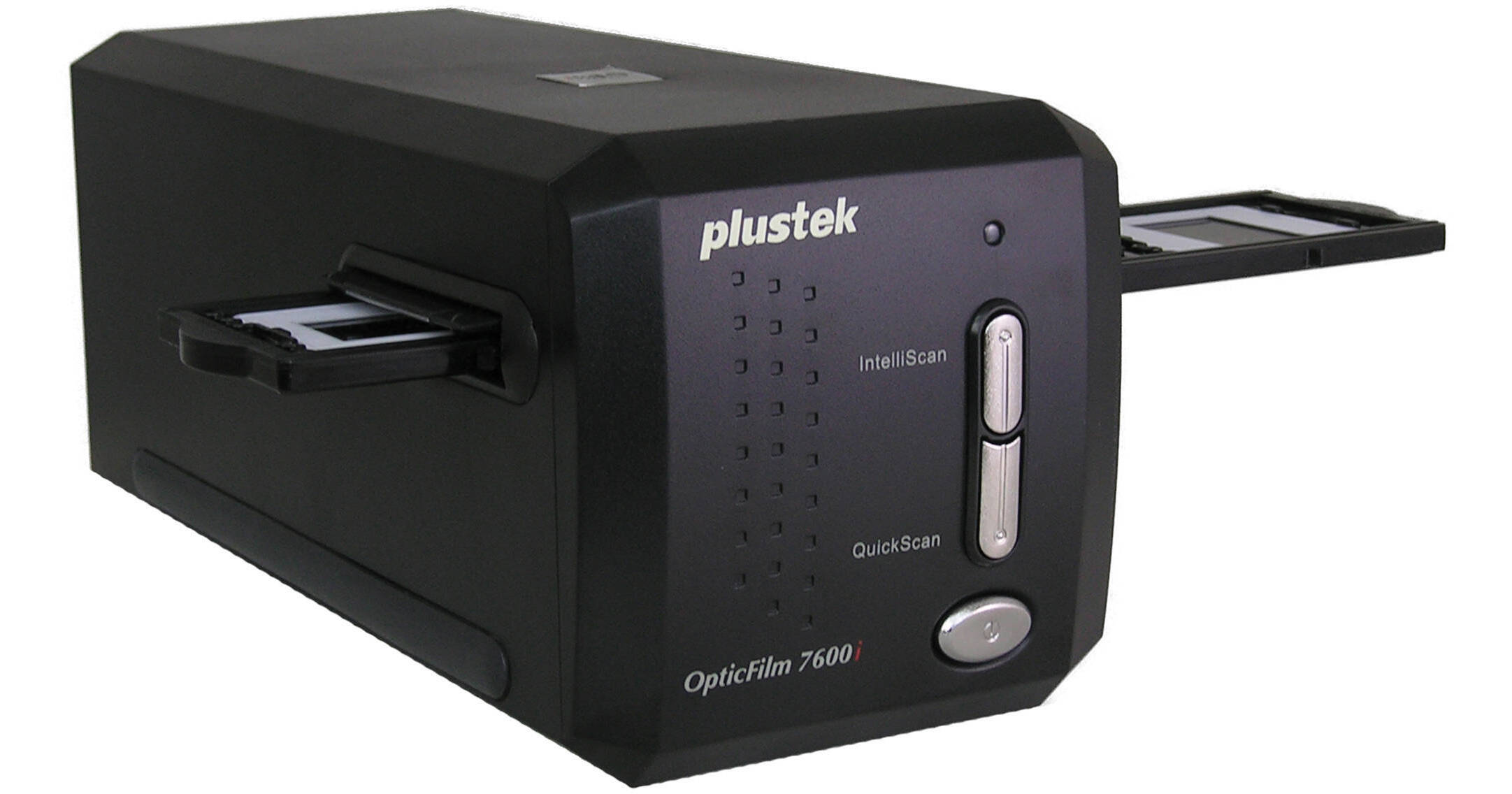
The Plustek OpticFilm 7600i Ai Scanner has a 7200dpi sensor and produces a 7200dpi file natively. It also has a lower resolution mode -- 3600dpi -- in which only half of the pixel sites are used. So the hardware resolution is user-selectable between 3600 and 7200dpi. Scanning at a resolution lower than 3600dpi will still result in scanning at 3600dpi, and then the software interpolates the resolution down. The scanner's light source comes from a white LED which makes images vivid and dimensional.
The OpticFilm 7600i Ai scans at 48-bit color for extremely accurate and vibrant color images that retain subtle details in the highlight and shadow areas of the scanned image. To minimize noise, the scanner's multi-sampling function makes 4 scan passes that are averaged together so image noise is cancelled out. It has a multi-exposure function that is utilized with negative film or slides to provide improved shadow & highlight detail and provide images with richness and depth that makes your pictures look as if they are three-dimensional.
To achieve high-quality images in under a minute, the 7600i Ai comes with the amazing SilverFast Ai Studio iSRD + MultiExposure software bundle. It includes the iT8 Calibration target which allows users to obtain accurate colors and generates ICC-profile by just one click, and New Soft Presto! ImageFolio 4.5, a comprehensive multimedia image-processing program that allows you to create new images by using a set of image-editing tools and quickly create new images or enhance pre-existing ones.
Also included is New Soft Presto! PageManager 7.10, a powerful document management software for OCR, PDF creation, or format conversion to Microsoft Word or Excel, and the LaserSoft SilverFast Ai Studio iSRD + MultiExposure software bundle, a world class professional scan software equipped with iSRD (Infrared Smart Removal of Defect), which utilizes a combination of hardware and software to automatically eliminate minor flaws, such as dust and scratches, using an infrared channel to detect the flaws.
OpticFilm 7600i Ai's outstanding performance makes it a great solution for photographers, photo amateurs, archivists and image lovers.
SilverFast 6.6 Ai Studio iSRD + MultiExposure comes with more powerful functions featuring Multi-Exposure, SilverFast Basic, AACO, iSRD, SRD, Auto-Adjust, USM, SCC, NegaFix, and many other advance features.
| Film Types |
Up to 6 frames x 35mm filmstrips Up to 4 x 35mm mounted slides |
| Scan Quality | |
|---|---|
| Scan Sensor | Color CCD image sensor |
| Light Source | White LED |
| Hardware Resolution |
3600 or 7200dpi (user selectable) Scanning at a resolution lower than 3600dpi will still result in scanning at 3600dpi, and then the software interpolates the resolution down |
| Color Depth | 48-bit |
| Dynamic Range | 3.6 |
| Scan System | Single pass |
| Buttons |
Quickscan Intelliscan |
| Performance | |
|---|---|
| Preview Speed |
7.57 sec for slides 8.01 sec for negative film 1 Please Note:Without calibration time close |
| Scan Speed |
3600dpi: Approx. 36.02 sec Interpolated 7200dpi: Approx. 112.82 sec 2 Please Note:Under 24-bit true color close |
| Scanning Area | 1.45 x 1" (36.8 x 25.4mm) (max) |
| Special Features |
Multi-sampling Built-in infrared function Hardware multi-exposure on negative film |
| Batch Scanning | No |
| Automation | No |
| Connectivity | |
|---|---|
| Computer Interface | USB 2.0 |
| Software |
Utility: Plustek Quickscan SilverFast Ai Studio NewSoft! PageManager 7.10 NewSoft! Presto! ImageFolio 4.5 |
| System & Software Requirements |
Windows: Windows 2000, XP, Vista CPU: Pentium III or faster CPU Mac: Mac 10.3.9 and higher including Leopard CPU: PPC G4, PPC G5, Intel CD-ROM Drive 1 x available USB port 512MB RAM 500MB free HDD space High Color graphic card (VGA or higher) 3 Please Note:These are minimum requirements only. It is HIGHLY RECOMMENDED to use a higher performance computer close |
| Operating Systems Supported |
Windows 2000 Windows XP Windows Vista Windows 7 Mac |
| Physical | |
|---|---|
| Power Requirements |
100-120VAC, 50-60Hz Power adapter(included): output: 15V, 1.0A |
| Dimensions (WxHxD) | 10.7 x 4.7 x 4.73" (120 x 119 x 272mm) |
| Weight | Approx. 3.5 lb (1.6 kg) scanner only |
REVIEW SNAPSHOT®
by PowerReviewsPros
Cons
Best Uses
Most Liked Positive Review
I was amazed!
I needed a scan of one of my old slides for a client who wanted to use it for a calendar. My old Nikon 2000 scanner failed long ago, and I never replaced it ...Read complete review
I needed a scan of one of my old slides for a client who wanted to use it for a calendar. My old Nikon 2000 scanner failed long ago, and I never replaced it because I went completely digital. My client wasn't satisfied with the old scan of the slide, and wanted a raw scan. So I went to my stock agent and we used his Nikon 4000 to rescan the slide. I thought it was a little soft, so I purchased the Plustek 7600 Ai and immediately upgraded for free to version 8 through the Plustek website. After a quick review of the instructions, I scanned the slide. It was much sharper, with much better detail than the Nikon scan. There are about 500 pages of instructions with this scanner, but I found that the 33 page introduction manual was good enough for most people with a background in scanning. However, I'll probably read the entire 500 pages eventually. Also, there are video clips explaining each step of the scanning process. There is a learning curve here, but if you have the time and interest, it can actually be a lot of fun and a great learning experience. I almost never do reviews, but this scanner is so good I felt compelled to try to help some of my "brother" photographers looking for a decent, well priced scanner.
I have included small clips of portions of a 45 MB image so you can compare the difference. Also included the full blown image (low resolution). I hope this helps you make your decision.
VS
Most Liked Negative Review
Buy the other 7600 instead
The only difference between the two versions is the software bundle. This package gives you the full Silverfast suite and an IT8 calibration slide. The software is just awful, do yourself a favor and...Read complete review
The only difference between the two versions is the software bundle. This package gives you the full Silverfast suite and an IT8 calibration slide. The software is just awful, do yourself a favor and use VueScan instead. The hardware is so well made you really don't need the $80 calibration slide. And don't waste your time trying to improve the image with the scanner software, just use Photoshop.
Reviewed by 111 customers
Sort by
Displaying reviews 1-20
Previous | Next »
Pros
Cons
Best Uses
Comments about Plustek OpticFilm 7600i Ai Scanner:
The scanner comes with an older version of the needed software. B&H was great in getting the factory to supply me with the correct information to download the correct version of software for the Mac.
The scanner works great and fast!
Pros
Cons
Best Uses
Comments about Plustek OpticFilm 7600i Ai Scanner:
Although there was a little bit of a learning curve working with the software/start up at first, I found the OpticFilm 7600i Ai scanner wonderful to work with, especially with the use of its scan pilot and sliver fast software. Slides that were showing age came out better, even sharper than the original. What a great piece of equipment!!
Pros
Cons
Best Uses
Comments about Plustek OpticFilm 7600i Ai Scanner:
My Nikon Coolscan 4000 refused to work with Windows 7 and even began to have issues with Vista after years of working with it. I bought Plustek since no new Coolscans available.Plustek seems to be doing a pretty good job of scanning my stock images. The 3600 dpi is not as good as 4000 dpi on Nikon. But certainly seems better than trying to use a fladbed system. Would have greatly appreciated it if Nikon had just sold their scanning business to someone who would have continued to support it.
Pros
Cons
Best Uses
Comments about Plustek OpticFilm 7600i Ai Scanner:
This scanner is simple to use. Easy to install. Needed a small upgrade that I downloaded for my apple "lion" but that was not big deal. Its small enough to keep set up on my work desk. I have made enlargements up to 13x19 so far with no problem what so ever. The unit itself is sturdy however I can see that I may have to replace the negative holder in the future because its a bit flimsy. Again, not a big deal. For the price this is great. I enjoy shooting in in B&W film. Its simply and cheap to develop the film home. The enlarger is the major expense. Now I don't need one. Simply develop my film and scan the negatives myself. Beautiful!
Pros
Cons
Best Uses
Comments about Plustek OpticFilm 7600i Ai Scanner:
I bought this product to scan 35mm slides at my work. The machine was easy enough to set up, but I am still working on producing a nice quality image. If you are already familiar with using slide scanners then I think this is a great scanner, but if you are a first timer, then you may need some additional assistance working with this machine.
Pros
Cons
Best Uses
Comments about Plustek OpticFilm 7600i Ai Scanner:
To date, I have only used this product to copy slides at the default setting. However, the results are better than expected. I see no reason why it wouldn't perform just as well on negatives.
It is fast and intuitive.
Perhaps a little pricey, but then those memories are worth it. Passed down from generation to generation.
Pros
Cons
Best Uses
Comments about Plustek OpticFilm 7600i Ai Scanner:
Like the infrared and multi exposure features.Scaning old kodachrome with silverfast8.
Pros
Cons
Best Uses
Comments about Plustek OpticFilm 7600i Ai Scanner:
The image quality of this scanner is second to none and I would highly recommend it. The issue I had was installation on a Mac OS X 10.7 which involved generated a lot of errors during install that required me to go to the website, register, download the latest drivers, re-register, etc. Was very time consuming but worth it in the end.
Pros
Cons
Best Uses
Comments about Plustek OpticFilm 7600i Ai Scanner:
I have film strips and slides that I have taken starting in the mid-1950s. I purchased this scanner because I was not completely satisfied with my Cannoscan. This product does an excellent job in digitizing film and it integrates nicely with PhotoShop. This scanner does it all: up to 48 Bit color, up to 3600 dpi resolution, multi sampling, multi exposure, dust removal functions, and more. The scanner includes Silverfast 8 scanning software which is also excellent. I have used these products fist on a PC and now a Mac with great results.
Pros
Cons
Best Uses
Comments about Plustek OpticFilm 7600i Ai Scanner:
This is a very good scanner for the money. I've used several film canners over the years, all more expensive, and this is as good as any of them. Much better than any in it's price range.
I'm scanning 40 years worth of negatives and slides. So far, maybe 200-300 images into this, I'm very happy with this Plustek 7600i.
The only reasons I didn't give it 5 stars is the film holder. I'd like it better if it were a bit sturdier. And make it scan full frame with black borders around image and I'll be in heaven.
Pros
Cons
Best Uses
Comments about Plustek OpticFilm 7600i Ai Scanner:
I have fantastic control with this scanner. The Silver Fast software that comes with it allows creative adjustments such as dust and scratch removal, multiple exposures and sharpening. The scanned slide is well prepared to import into editing software such as Lightroom.
Pros
Cons
Best Uses
Comments about Plustek OpticFilm 7600i Ai Scanner:
The scanner itself is very good with the exception of the slide tray which at times is difficult to center. The supplied Silverfast software however is a nightmare. Its way to complicated for the casual user and the support is awful. Do yourself a favor and don't even bother with Silverfast. Download the $30.00 version of Vuescan and be happy!
Pros
Cons
Best Uses
Comments about Plustek OpticFilm 7600i Ai Scanner:
I wanted to get a Nikon Coolscan 5000 because a friend has that model and works very well. But Nikon no longer makes that model, and even used ones go for thousands. Based on review I saw at this site, I bought the OpticFilm. The quality of the scan of 35mm negatives is excellent for my purposes. The software has more settings than most of us will ever need but it is manageable even by those of us that are not photo wizards. Just make sure your computer has a good size memory. I run on a iMac using Windows 7 with VMWare Fusion. I originally had the memory set for 1G but the software was sluggish. I increased to 4G and it is much better.
Pros
Cons
Best Uses
Comments about Plustek OpticFilm 7600i Ai Scanner:
After thorough testing of the scanner, I have come to the conclusion that the scan quality/resolution as such is sufficient for what I was looking for (up to 16x20" images from 35mm negatives). However, still unresolved, is the fact that each scan comes out at a tilted angle of about 2-3° clockwise, so the upper left and lower right corner of the negative gets cropped in the scan, even after counter-tilting the neg. holder (see att. photo). Three weeks after contacting Plustek service, I am still waiting for a solution that will fix this unacceptable cropping. The first set of instructions I received did not get me there. Now waiting for the next steps, or possibly have to send in for repair. I get the impression Plustek is understaffed for customer service, at least around Christmas holidays. More to be seen later. I sure hope they can fix it for me, because overall I like the scanner.
JD
Pros
Cons
Best Uses
Comments about Plustek OpticFilm 7600i Ai Scanner:
A great scanner. I highly recomend it to anyone looking for very sharp images, bright colors, and fast scanning capabilities I have not found anything to complain about. A great investment for the price!!
Pros
Cons
Best Uses
Comments about Plustek OpticFilm 7600i Ai Scanner:
The only difference between the two versions is the software bundle. This package gives you the full Silverfast suite and an IT8 calibration slide. The software is just awful, do yourself a favor and use VueScan instead. The hardware is so well made you really don't need the $80 calibration slide. And don't waste your time trying to improve the image with the scanner software, just use Photoshop.
Pros
Cons
Best Uses
Comments about Plustek OpticFilm 7600i Ai Scanner:
I purchased this film scanner after getting opinions from several other railroad enthusiasts who like me have lots of Kodachrome color slides. For a long time I've wanted to share them on the internet and use them in projects in combination with digital photos. This scanner makes that possible. After a week of infrequent use, I am making progress on establishing a repeatable work flow with the included SilverFast scanning software. The software is very powerful although not very intuitive to a color software newcomer. The included documentation (text and movies) is helpful although hard to read from start to finish. Better to bounce in and out as tasks are done. There is also an active online forum. Positive aspects are quality of the scans (multiple scan passes), size of the scanner, and features of the software for use with Kodachrome. Negative aspects are the speed of scans, quirkiness of the software user interface, only being able to scan one slide at a time. I also considered the Epson V700 which can scan 12 slides at a time. The infrared dust detection/removal feature that is integral to the scanner and software works well and saves some post processing time. I've been trying to understand the manual controls in the software before starting to use the work flow automation tools. Important aspects for me were quality (resolution and density), price, and speed, and footprint to a lesser degree. So far I am happy with my choice. The time used to scan the next slide is easily used to file, name, organize and do any post processing necessary on the previous scan.
Pros
Cons
Best Uses
Comments about Plustek OpticFilm 7600i Ai Scanner:
Not fast
Easy to use
Old square negative can't be scanned
But a good machine that do the job
Pros
Cons
Best Uses
Comments about Plustek OpticFilm 7600i Ai Scanner:
Plustek OpticFilm 7600i Ai 35mm Film ScannerI am still getting to know the workings of this scanner but thought a preliminary analysis might be helpful.The Setup:Thinkpad laptop W520I72720QM @ 2.20GHzRAM 16GbWindows 7Have an external e-SATA drive that serves as the depository for all the images. The images are viewed on a HPZR30w (30 inch monitor). Image sizes ranged from 1.5Mb to 500Mb. Scanning took from 15 secs to about 2 minutes per image. Have not used the multiscan feature yet – goes over the slide some 16 times if needed.I have scanned B&W, Color and transparencies (E-6 and Kodachrome). I am using the software that comes with the scanner, Silverfast, for all my scanning endeavors. I have then brought the scanned images into photoshop v7 and played around with them and printed a few of them up on a color laser printer (I do not have the appropriate color profile loaded so I don't want to comment on the whole printing of images in this review). The software as many reviewers have commented is [*]I wish the [*] creators would hire someone from the U.S. to go through and simplify and make what is clearly very powerful and useful software more lucid. I am fairly computer literate and am not entirely sure what version of the software I have, what upgrades I might qualify for, what the latest upgrade is, what the …..you get the picture. I have been playing around with the software and have been quite successful in this initial beta testing phase, despite the unintelligible software instructions!B&W:I have been impressed with how well the scanner handles the gray scale images. I have scanned images from 100 dpi all the way out to 6000dpi. Sizes vary from 1x3 to 16x20s. The image size and the resolution (dpi) are inversely related – larger the image size the resolution drops (lower the dpi). I have played around most with this format (B&W) so far and have been very pleased. The scanning results are impressive. I used to shoot quite a bit and was very picky about using prime lenses with 100ASA Tmx film to get high resolution images. This scanner does give me a scanned image with very little loss of resolution. Keep in mind I am scanning at a 16x20 or higher image size and viewing the image on a 30inch hi-res monitor. A soft focus image or a poor scan is really amplified at such a large size and so I have actually been amazed by the incredible job this fairly inexpensive scanner does. The Grayscale is true to the original zone system I see in the image. I have several of these enlarged from my forays in the darkroom and have been comparing the images on the screen with the 11x14 -16x20ish prints I have on hand (traditional b&w images) – and I am blown away. The next step is obviously to print and get the same quality with the printer as I do in the darkroom, but that goes beyond the remit of the scanner alone.Color:I have not scanned very many color negatives but did want to try different formats. I have very old negatives (126 format) and also some 110 negatives. The 126 format works on this scanner – no problem. The 110s are a challenge but I have been able to get ok images. Not great but fair. I really need to play around with all the settings in the software a lot more before I comment on the color negatives. Again, I did get some very good results from 126 negatives that are 40+ years old. The original prints that I have from these negatives have faded with age but the scanned images came right back to life with very nice colors. The Silverfast software that comes with this scanner has an infrared scanning mode to remove dust and scratches – blew me away! The 126 negatives I mention above were dust laden and scratched. I was handed these negatives by my father and they had been stored poorly and the prescan image looked good but was covered in dust specs and large scratches ( covering 1/3 of the image ) and going every which way! The final scanned image though was quite remarkable – all the dust/scratches were gone. Not sure I would have believed this was possible in such an automated manner! The infrared scan picks up dust/scratches (can't be used with b&w because of the silver emulsion) and then the algorithm goes through and removes it all in the final scan.Slides:I have wanted a scanner because I have a large collection of slides and have been wanting to digitize them. I have played around least with this group but will end up using the scanner mostly on slides. The scanner comes with a separate holder for slides and I was a bit concerned that the focus on some of the slides could be affected because of the thickness of the mounts and holder. Given how crisp the B&W images were I wanted to test the sharpness of the scanned slides (50ASA Fuji Velvia). Keep in mind I have tested precisely 4 slides! I scanned a slide in its cardboard mount (installed on the slide holder for the scanner) and then cut the mount and placed the unmounted slide in the film holder and rescanned the image (all parameters being constant). The images were identical (I think) and sharp. I am not sure the slides scanned quite as well as the b&w images but I need to play around more with this format before I can come to anything very meaningful. So far I have had a ball going through the negatives and slides and would definitely buy this scanner if I had to do it all over again!
Pros
Cons
Best Uses
Comments about Plustek OpticFilm 7600i Ai Scanner:
I have only had the product for a short time, so I will say this. I see a ton of potential in this scanner, but its functionality is not for the amateur. There is a definite learning curve to using the device, so only get this if you have plenty of time and the inclination to scan a lot of images. As of Dec 2012, the product is shipping with out of date SilverFast software for Mac. To get the free upgrade, you will need to upload a copy of your receipt to Silverfast to get the current version. A minor inconvenience, at least you get the current version free.
Displaying reviews 1-20
Previous | Next »