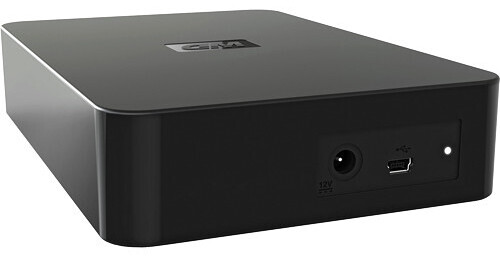
The 2TB Elements Desktop Hard Drive from Western Digital is a high-capacity desktop hard drive with a no-frills design. The disk is housed in a compact metal enclosure, and boasts the ubiquitous USB 2.0 interface.
The drive is preformatted for use in Windows, and can be reformatted for use with Mac OS X using Apple's Disk Utility application. The drive is ready to use right out of the box -- you won't have to load any software from a CD to get the drive to work. It is an excellent option for users who would like to add storage capacity to their system.
| Performance | |
|---|---|
| Capacity | 2TB |
| Interface | 1x USB 2.0 (mini B) |
| Drive Speed | Not Specified by Manufacturer |
| Buffer | Not Specified by Manufacturer |
| Average Seek Time | Not Specified by Manufacturer |
| Sustained Data Transfer Rate | Not Specified by Manufacturer |
| System Requirements |
Windows XP, Vista, 7; Mac OS X 10.4, 10.5, 10.6 USB 2.0 port |
| General | |
|---|---|
| Mounting | Desktop |
| Power Requirements | AC: 100-240VAC, 50-60Hz |
| Environmental Requirements |
Operating Temperature: 41-95°F (5-35°C) Storage Temperature: -4-149°F (-20-65°C) |
| Dimensions | 4.59 x 7.01 x 1.42" (11.65 x 17.80 x 3.6 cm) |
| Weight | 2.2 lb (1kg) |
REVIEW SNAPSHOT®
by PowerReviewsPros
Cons
Best Uses
Most Liked Positive Review
Very Good Hard Drive So Far
I bought this hard drive to replace a Seagate 1.5 that appears to be dying after about a year of fairly heavy use. The ease of use straight out of the box lent a great...Read complete review
I bought this hard drive to replace a Seagate 1.5 that appears to be dying after about a year of fairly heavy use. The ease of use straight out of the box lent a great deal to the otherwise hassle and fear associated with this task. The act of restoring my 850GB volume of music took about 30 hours, pretty good for a USB connection, with no pauses, no errors, and NO pre-installed WD backup software to muck things up.The appearance of the drive is quite simple, smaller than expected with a shiny cover on the sides that is typical for WD cases. I would rather the cases be flat to avoid finger smudges though that did come in handy once when pulling fingerprints after a robbery. The drive is silent as far as I can tell and it stays warm at best, though there is no ventilation that I can see. I touch tested the temparature several times during the 30 hour restore and it was cooler than the other drive that I was backing up, never uncomfortably hot even after a full minute.The box is made to sit flat, not upright and has four rubber feet that barely lift the case off the surface, but apparently enough to not cause significant temparature issues. Some might find the resulting footprint less desirable, but I prefer to sit my drives flat anyway when the case design offers the choice, as I don't like hard drive stands, don't trust them. Anyway, I would feel comfortable stacking the drives without the fear of overheating, since no hot air is being forced out of the casing to contribute heat to the other drive(s).I have since begun using this drive as my primary music library, which I use for my internet radio show. The Seagate in its prime would pause at times when I would click play for a song (slow startup after not in use for several minutes). So far this WD drive has not displayed any lag in access times, boots up quickly and can remain connected to the PC for days without any degragation in speed or access.My current computer does not support SATA or other higher speed connectors, so this drive right now was the perfect choice for my needs, especially at the great price. If I had to make a complaint about anything, it would be that the activity light is in the back of the drive where it can't be seen. As long as the drive performs like it has so far, I won't need the warm fuzzy of the blinking light to assure me that it is working, but it is helpful to be able to see it when the system slows down or becomes unresponsive. The other possible negative is the short USB cable, though I just swapped it out for a longer one I already had.On a side note, this is my first experience with B&H and I have zero complaints. [...]and were in flawless condition. I am usually hesitant about electronics stores out of NYC due to the massive amount of cheap product stores out there, but this company proved my usual stereotype completely wrong. [...] and the opportunity to shop somewhere other than[...]
VS
Most Liked Negative Review
I think it is slower than the 1.5TB
I purchased the 1.5TB version of this drive model maybe ten months ago and have been very happy with it. I recently bought the 2TB version and have been experiencing some problems - I am...Read complete review
I purchased the 1.5TB version of this drive model maybe ten months ago and have been very happy with it. I recently bought the 2TB version and have been experiencing some problems - I am concerned it isn't really adequately 'fast' for playing/encoding video files, despite its advertised usefulness as a media drive. I'm not sure I'll ever know whether or not this is what's been causing problems for me, so I feel I wouldn't have better insight with further usage time, frustratingly. But my impression is that video files that played fine from the 1.5TB model aren't playing smoothly from this 2TB one. I recognize that other factors could be at work instead, but I am disappointed with the 'vibe' I'm getting. Take it for what it's worth -- maybe not much, but maybe something.
Reviewed by 460 customers
Sort by
Displaying reviews 1-20
Previous | Next »
Pros
Cons
Best Uses
Comments about Western Digital 2TB Elements Desktop Hard Drive:
Plug in and go. Great for my movies and music.
Pros
Cons
Best Uses
Comments about Western Digital 2TB Elements Desktop Hard Drive:
have the 1TB version, this one performs good also.
Pros
Cons
Best Uses
Comments about Western Digital 2TB Elements Desktop Hard Drive:
Bought this on 12/10/10, a 2tb model. Used it as a backup for my iTunes library which has grown to over 1tb with all my movies, tv shows and music. I bought two of them, one as a primary drive, one as a backup drive for the data. On 12/14/11, the backup drive began failing. Input/Output errors out the whazoo. I contacted WD, got told it only has a one year warranty, thanks for playing, have a nice day! I expect my hard drives to last more than a year and a couple days. I had great experience with BH here, they are a reputable company, WD on the other hand is becoming a buyer beware, make sure you read the fine print company for sure. So now I have 2 of these things in the bottom of my trash can after copying the data to a couple new "other manufactured" drives. I don't trust the one that is still working to last much longer anyway.
Pros
Cons
Best Uses
Comments about Western Digital 2TB Elements Desktop Hard Drive:
This was incredibly easy to set up. It's very compact as well. Access speed is really good too. I must also give kudos to B&H for having the best price that I could find on the internet.
Pros
Cons
Best Uses
Comments about Western Digital 2TB Elements Desktop Hard Drive:
I'm happy enough with this hard drive for backing up and for storing my iPhoto library. It would be improved, however, if it had a power switch! It is a nuisance to have to turn it on and off by disconnecting power to it or by turning on and off the power bar.
I also found that information about formatting this drive for Mac is a little hard to come by. I had to Google my problem (a persistent error message in Disk Utility) before I found a solution.
Pros
Cons
Best Uses
Comments about Western Digital 2TB Elements Desktop Hard Drive:
I have bought two of these; for my backup at work about 6 months ago and recently for my personal use. No problem with any of them yet.
Pros
Cons
Best Uses
Comments about Western Digital 2TB Elements Desktop Hard Drive:
Arrived very quickly, plug and play, quiet and seems very reliable. Great external device
Pros
Cons
Best Uses
Comments about Western Digital 2TB Elements Desktop Hard Drive:
Easy to set up. Works as advertised. No issues.
Pros
Cons
Best Uses
Comments about Western Digital 2TB Elements Desktop Hard Drive:
Extremely affordable 2TB drive. Fast film transfer, fast loading. Excellent backup drive.
Pros
Cons
Best Uses
Comments about Western Digital 2TB Elements Desktop Hard Drive:
Plug it in, power it up and it mounts. There is nothing complicated about this drive. I decided to reformat it for my macintosh system but that wasn't even necessary. Now I use it for TimeMachine backup. It's small enough to pack when traveling so I have everything from my desktop machine available for my laptop.
Pros
Cons
Best Uses
Comments about Western Digital 2TB Elements Desktop Hard Drive:
Terrible device. Worked fine for a year than one day decided it doesn't want to work anymore. Customer support was bad, typical can't speak english well bs. Said I could send it back and they send a new but they failed to send me the email with the info. Probably wrote the wrong email down since he couldn't understand english. I don't want send it in with all my info in there hands, no thanks. I'll take it as a loss. 5 stars for B&H though.
Pros
Cons
Best Uses
Comments about Western Digital 2TB Elements Desktop Hard Drive:
Compact, Modern, Sleek. Plug it in and GO!
No complaints, No Issues, Tons of Space.
Pros
Cons
Best Uses
Comments about Western Digital 2TB Elements Desktop Hard Drive:
I've owned one for a year or so, it's the perfect drive for storing digital video and playing it through a PS3, or similar device. I rememeber getting it for about $100 on sale at [@] because it's a no-frills drive. Comes 100% empty with none of that pesky SmartWare or other nonsense. But what I don't get.. lists for [$] here, add to card it goes to [$]... in the print catalog, it's listed for [$]... which is a steal. Why all the price differences?
Pros
Cons
Best Uses
Comments about Western Digital 2TB Elements Desktop Hard Drive:
easy to install, but not working with my older powerpc computer. i'm sure the operating systems that it works with were listed, i just assumed there wouldn't be a problem. so if you have an older computer, be sure to check if it will work.
Pros
Cons
Best Uses
Comments about Western Digital 2TB Elements Desktop Hard Drive:
Used this to backup my harddrive and I am storing it in a firesafe box since it has all of my digital pictures and videos on it.
Pros
Cons
Best Uses
Comments about Western Digital 2TB Elements Desktop Hard Drive:
I bought this drive in January to use as a Time Machine backup disk for MacOS X. Took only a few minutes to hook up and format, and it has been running smoothly ever since. I have about 1.6 TB of data on it and backups occur every hour. It is always on, but so quiet I don't even notice it's there. I'm back to buy a 2.5 TB version.
Pros
Cons
Best Uses
Comments about Western Digital 2TB Elements Desktop Hard Drive:
so far, works as expected.
Pros
Cons
Best Uses
Comments about Western Digital 2TB Elements Desktop Hard Drive:
great for backup
Pros
Cons
Best Uses
Comments about Western Digital 2TB Elements Desktop Hard Drive:
This HDD works well for me - gets about 1.8TB net space. No issues. The only minor drawback if you ask me would be that there is no on-off switch on the HDD - but, unless you connect the USB cable to your computer the HDD seems to be kind of a standby mode - so, didn't have a problem with it.
Pros
Cons
Best Uses
Comments about Western Digital 2TB Elements Desktop Hard Drive:
The drive is used as an archive storage to off load my mirrored network storage from old data.
Displaying reviews 1-20
Previous | Next »