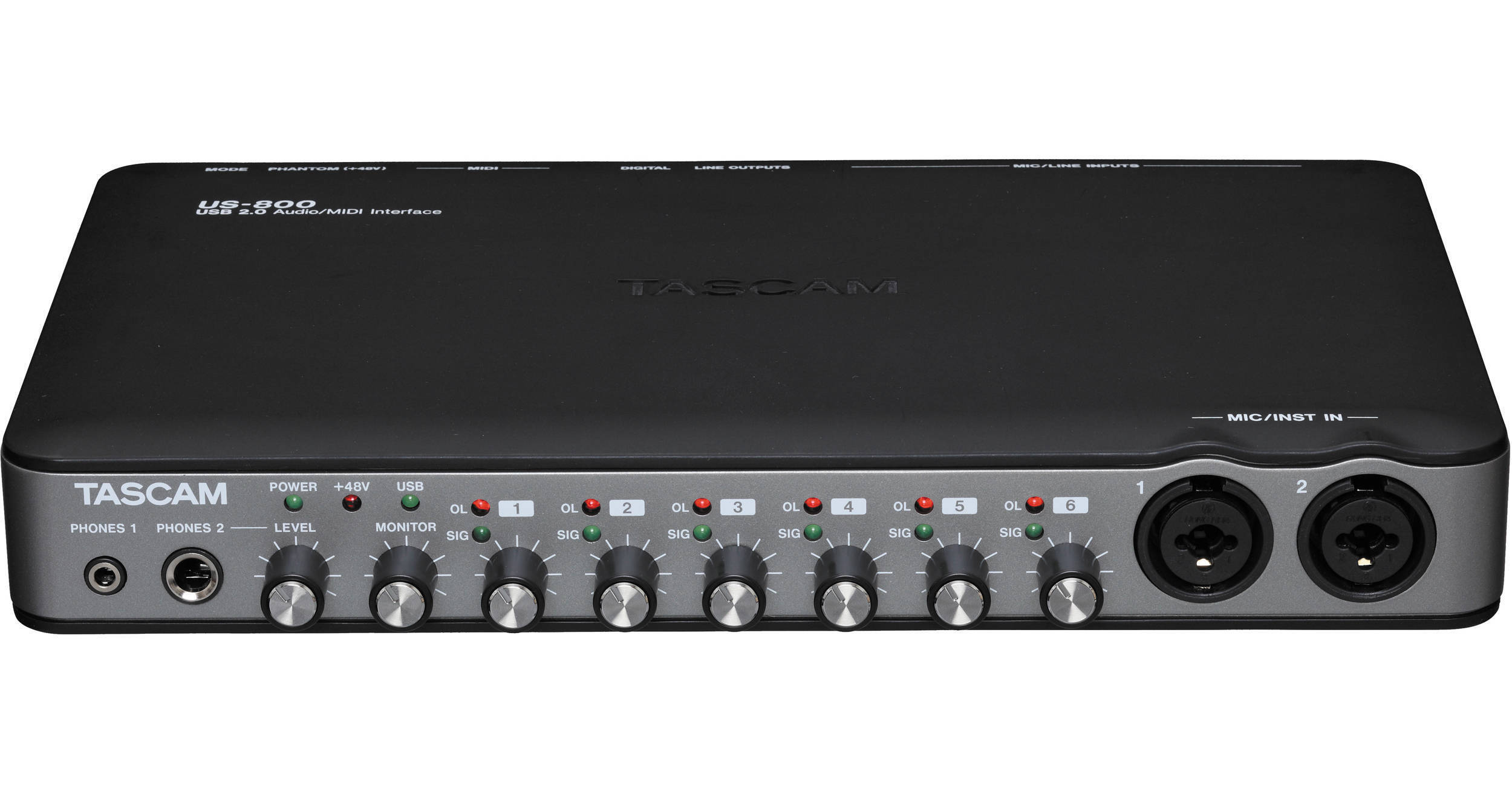
The US-800 from Tascam is a compact and portable USB 2.0 audio and MIDI interface for both Mac and Windows computers. It enables you to record up to 8 channels simultaneously, and it also acts as a stand-alone multi-channel microphone preamp when not attached to a computer. The US-800 is really lightweight and a great choice for mobile recording with a laptop.
All of its 6 microphone inputs can provide +48 volts of phantom power to condenser microphones. Six of the channels feature a 2-segment LED meter to help you avoid clipping. If you have any equipment with digital connections, you can take advantage of the US-800's coaxial S/PDIF digital input and output. The main analog outs of the US-800 are stereo RCA jacks. Both 1/4" and 1/8" headphone outputs are available on the front panel.
| Connectivity | USB 2.0 |
| Inputs |
6 x XLR & 1/4" TRS Combo 1 x Coaxial S/PDIF |
| Outputs |
2 x RCA Line-Level 1 x 1/4" Headphone 1 x 1/8" Headphone 1 x Coaxial S/PDIF |
| MIDI |
MIDI In MIDI Out |
| Phantom Power | Yes, +48V, Global Switch |
| Meter | 6 x 2-Segment LED Meters |
| Resolution | Up to 96kHz/24-bit audio resolution |
| Dimensions | Not Specified by Manufacturer |
| Weight | Not Specified by Manufacturer |
REVIEW SNAPSHOT®
by PowerReviewsPros
Cons
Best Uses
REVIEWS
Reviewed by 11 customers
Sort by
Displaying reviews 1-11
Pros
Cons
Best Uses
Comments about Tascam US-800 - 8 Input, 4 Output USB 2.0 Audio/MIDI Interface:
When using logic it syncs really well together to record
Pros
Cons
Best Uses
Comments about Tascam US-800 - 8 Input, 4 Output USB 2.0 Audio/MIDI Interface:
I have a M-Audio audio interface which is better than this, but it was also more money. For traveling it works very well. The only problem is when you shut off your computer or restart it; you must unplug the power adapter and plug it back it to be recognized.
Pros
Cons
Best Uses
Comments about Tascam US-800 - 8 Input, 4 Output USB 2.0 Audio/MIDI Interface:
plug and play for uses with osx 10.6
no regrets and use 6 channels all at once
but doesn't work with lower versions of mac software
Pros
Cons
Best Uses
Comments about Tascam US-800 - 8 Input, 4 Output USB 2.0 Audio/MIDI Interface:
This product was definitely worth the price. I am just starting out in recording, but this is more than enough for what I am doing. You get 6 Mic Preamps which is unheard of in this price range. You can mike a drumset really well with 6 mics. It has full 48V phantom power. On my Mac it worked perfectly. Just make sure to use the drivers on the website, because the CD they send you will most likely be outdated. Also if you have a Mac, remember to turn off sleep mode, or else you will be restarting your computer often. The only thing I HATE is that they didn't put an on off switch on the thing. Other than that it's a great starter interface.
Pros
Cons
Best Uses
Comments about Tascam US-800 - 8 Input, 4 Output USB 2.0 Audio/MIDI Interface:
running on a MacBookPro as my portable DAW to record at shows. No latency issues, easily pairs up with other USB audio devices as an aggregate device. Clean audio through. Great device for the buck. I do not run the US-800 with its onboard P48, because it supplies power to all or none, and I run P48, active and passive mics.
Pros
Cons
Best Uses
Comments about Tascam US-800 - 8 Input, 4 Output USB 2.0 Audio/MIDI Interface:
Tascam US 800 is the niche product I was waiting for. Actually capable of six (3 stereo)simultaneous microphone inputs and separate monitor and headphone outputs, it gives location recording a new portablility. More versatile than typical stereo/2channel interfaces and less portable rack units able it provides for separate monitoring anyewhere. Setup was simple and Tascam instructions are clear. The Tascam software control is logical and the enclosed Cubase5LE software, (although instructions still refernce earlier hardware), complements the box well. Surprisingly, the drivers worked with older audio sftwe programs still on my laptop including early SF Vegas product from @ 1999. The box fits in the front pocket of my laptop bag and lets me carry the recording/monitoring setup anywhere I can find AC. Only quirk is loss of connection with USB patching needing power connector reset.
Pros
Cons
Best Uses
Comments about Tascam US-800 - 8 Input, 4 Output USB 2.0 Audio/MIDI Interface:
I bought this USB interface for tracking and some mixing while remote on my Macbook Pro/Logic 9 rig. I know I have the Apogee Duet and MOTU Traveler for this purpose, but just wanted something not quite as near and dear to me as the Duet and something that would allow me to connect my external fw hdd to the FW800 port on the laptop (the Duet requires me to daisy-chain). I will update once I've had a chance to record vocals (cannot comment on the pres yet). For now, I say we've got some pretty decent converters based on some of the guitar and bass parts I've recorded through the US-800. Further, I am really pleased with how well the US-800 stands up against the Duet on Digital to Analogue conversion. I did extensive A/B testing with the US-800 versus the Duet in listening to my mixes in Logic and in just playing my reference monitor test tracks from ITunes. The US-800 hangs in there in a major way for well less than half the price of a Duet! Yes, the Duet is slightly better -- more rich in my ears and perhaps better bass and low-mid clarity. But if you're looking for a quality interface at a very reasonable price --- and you want a USB 2 device that requires NO driver BS for Mac Snow Leopard --- this little guy is hard to beat. Size-wize it is in between a Duet and a MOTU Traveler. Just an FYI, my home studio is nicely treated with appropriate geometric portions and I use KRK VXT6 monitors --- I'm not a pro and I'm not espousing that the US-800 is pro-grade. I'm just a very passionate artist/self-producer who's very pleased with this purchase decision.
Pros
Cons
Best Uses
Comments about Tascam US-800 - 8 Input, 4 Output USB 2.0 Audio/MIDI Interface:
The US-800 fills a need for a recording device that that has more mike inputs than the usual 2-4, but not 8 to 16. Most of my work requires 4 to 6 inputs. The 6 inputs of this compact device are very useful, because working in mainly classical music quiet channels is required, and the channels are very perceptually quiet. The gain is adequate, I use all capacitor mikes so I can't speak to dynamics. The software does require a bit of time to learn, but when mastered it seems totally stable. The only con I can say is the control knobs tend to be small and a bit too smooth making them a somewhat difficult to make subtle adjustments. In all it has proved excellent for the 5 to 6 channel area I work in. I would give it a high marks.
Pros
Cons
Best Uses
Comments about Tascam US-800 - 8 Input, 4 Output USB 2.0 Audio/MIDI Interface:
only complaint is it cannot be powered by the USB cord. but love how I can monitor all channels levels separately with a knob.
Pros
Cons
Best Uses
Comments about Tascam US-800 - 8 Input, 4 Output USB 2.0 Audio/MIDI Interface:
I'm a FOH engineer and bought this to replace the US-144 I've been using for a couple years to make basic 2 track recordings. Wanted to be able to record 2-4 more tracks without the bulk or hassles of a big interface. This is just a little bit bigger than my US-144 and easily fits into my laptop bag. Thought about buying the US-1641 but knew I'd also have to lug around a small rack case and an external harddrive if I wanted to record 10+ tracks. I have a 7200rpm harddrive in my laptop and at around a 0.75mbps transfer rate needed to record 6 24/44.1 tracks, I'll be fine recording straight to that.
As for the unit itself, the quality of the build seems average. Knobs seem kinda cheap but don't see it being a problem. My US-144 is made a lot more solid and would probably be fine if dropped. Can't say the same about the US-800 as it's all plastic and would probably shatter into a few pieces if dropped. But I bought it for function, not durability. Once installed, it works great. But there is something very important to know about this unit. After a reboot or unplugging the USB cable, the driver sometimes won't load when you plug the USB cable back in unless you unplug the power cord and plug it back in, and then plug the USB back in. Took me about 20 minutes of frustration at a show when I used this to record for the first time. There shouldn't be this problem but once you figure out an easy fix, not really a big deal. Once the driver loads and everything is set, it works great without any issues. Recorded 3+ hours of audio without any dropouts whatsoever.
I downloaded an updated driver from Tascam's site and ended up not using what was on the disc that came with it. I'm running Windows 7 Ultimate 32bit and recording into Nuendo 4.
Can't comment on the monitoring as I just use this to record live music where I'm just setting levels.
Pros
Cons
Best Uses
Comments about Tascam US-800 - 8 Input, 4 Output USB 2.0 Audio/MIDI Interface:
For a review of the Tascam US-800, I must preface by saying that computer interfaces tend to get a bad rap due to the inconsistencies in operating systems, software and OPERATORS. Reviews are usually written on the basis of extreme satisfaction or vice versa. They are rarely objective. There is no useful information given by frustration rants in other reviews and operator error is no reason to blame the product. I try to provide the need for informative, comprehensive and neutral product evaluation.
The first requirement for successfully employing the US-800 and this type of equipment is thorough knowledge of your DAW software parameters and the driver settings. First, the driver has a separate control panel which must be configured. Then, your device parameters must also to be established in the recording software (DAW) preferences. These items must be set properly. Read! Read! Read the manuals!
Now about the Tascam US-800 ; This is a fine unit. I wish this were available sooner. I wouldn't have purchased some of the other units I have. It is also a great contender to the Fastrack Ultra Pro which is significantly more expensive and has fewer inputs.
The US-800 has six combo inputs which can operate as independent tracks in your DAW. They are monitored in pairs at the output and headphone jacks. Odd numbers are routed to the left channel and even are on the right. This is the same configuration used in the stand alone mode (simply not connected to a computer). There are no pan controls. Stand alone means this device can be used as an analog preamp providing six extra mic/line inputs to a mixer.
I've read complaints of the USB device not being recognized when the computer is re-booted. I have experienced this as well. I found applying power (there is no switch) to the unit after connecting to the USB port each time, corrects the problem. That being said, the US-800 is probably not the interface for casual daily stereo application. I'll still use my Cakewalk for that. If you need to do serious simultaneous multitrack recording, The US-800 is a very worth-while investment. Plug it in to the (always the same) USB port, turn it on, set your DAW device parameters properly and you have a very good portable studio. There is unlimited potential and flexibility. It works great and provides excellent sound quality. It's lightweight and is about ten by six inches. I think it's pretty tough plastic so I'm confident it will hold up well. There are no moving parts beside the controls so there's little concern for mechanical wear.
I hope I gave you useful information and some which is hard to find elsewhere. Again, Knowing your device settings is key to solving compatibility issues. It isn't all that complicated. I'm just an average guy and I figured out what I needed to do. I'm using Reaper so I don't see a need to review the included Cubase LE which in my opinion is just a bonus. My Tascam US-800 is definitely a keeper.
Displaying reviews 1-11