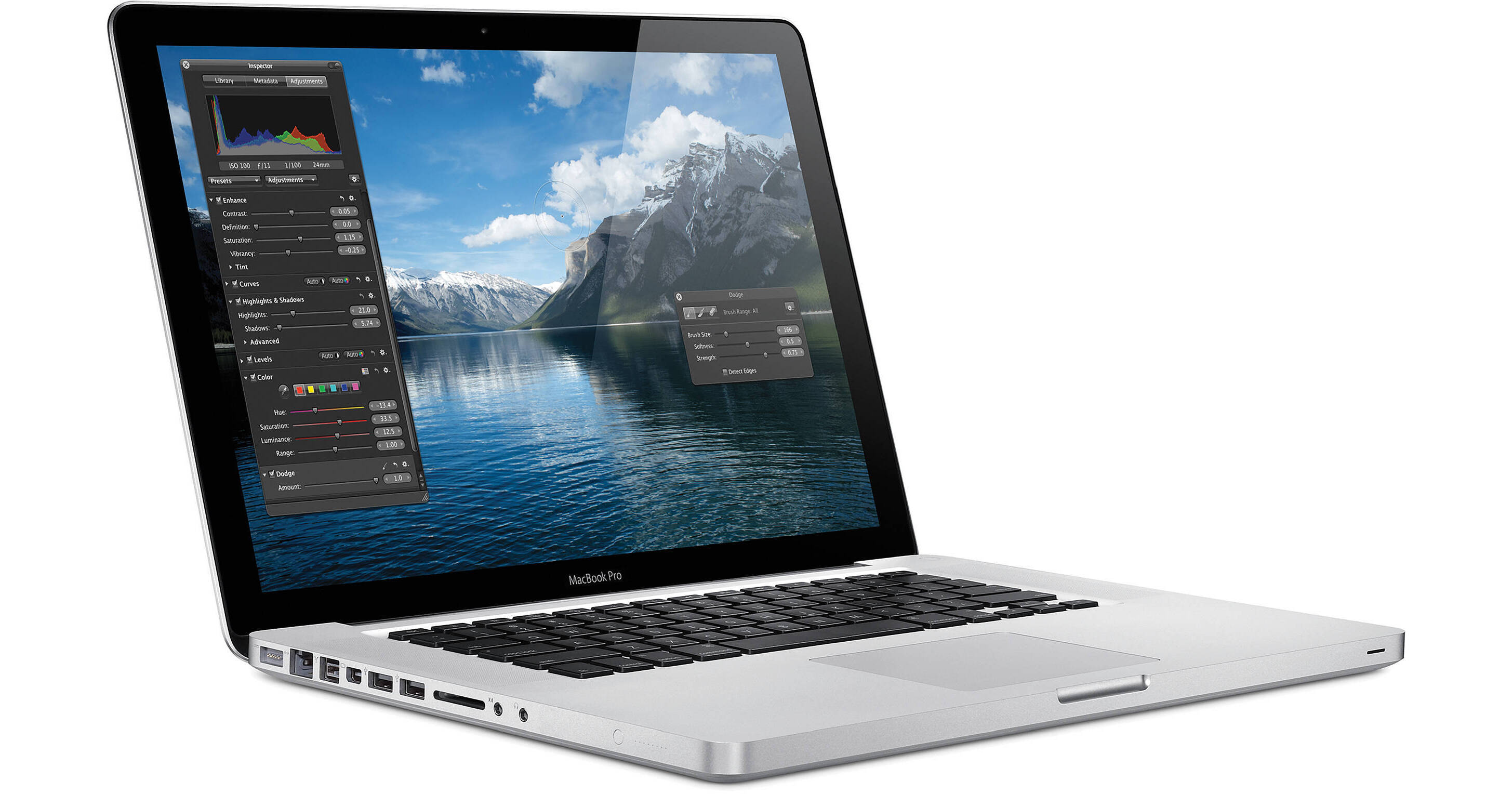
The 15.4" MacBook Pro Notebook Computer from Apple is a powerful notebook computer with an innovative aluminum unibody design. It is loaded with advanced power management features, including an intelligent hybrid graphics system, which allow it to run for up to 9 hours on a single charge.
The computer's 15.4" display features a LED backlight and a glossy finish. Its 1440 x 900 native resolution gives you ample screen real estate with which to work. You'll be able to output to an external display at up to 2560 x 1600 resolution thanks to the computer's Mini DisplayPort output.
The system is powered by a 2.4GHz Intel Core i5 and is loaded with 4GB of memory and a 320GB 5400rpm hard drive. The CPU can be overclocked to 2.93GHz using the Turbo Boost system. Graphics are handled by a hybrid system, which includes a discrete nVIDIA GeForce GT 330M GPU with 256MB of GDDR3 memory and integrated Intel HD graphics. The computer automatically switches between the two GPUs to best handle the task at hand, perfectly balancing performance and power consumption.
The computer features a comfortable backlit chiclet-style keyboard, which features space between each key for improved accuracy and comfort when typing. It also sports a glass Multi-Touch trackpad with a clickable design. Rather than having a separate button for mouse clicks, the entire surface of the pad is clickable. This increases the active surface area, and allows you to quickly click, even if your finger is near the top of the trackpad.
What's more, the smooth surface fully supports Multi-Touch gestures -- you can tap the trackpad with one finger to click, with two fingers to right click, scroll through documents using two fingers, pinch to zoom, navigate through Safari or iPhoto with three-finger left and right swipes, or use two fingers to rotate a photo or PDF.
iLife '11, a complete suite of digital creativity applications, is installed on the system. Easy enough for anyone to use, iLife will help you edit your home movies, organize digital photos, and compose original music.
The computer is loaded with Apple's Mac OS X 10.6 Snow Leopard operating system. The 64-bit OS features Time Machine backup, which automatically backs up system data to an external hard drive. It also features intuitive Cover Flow navigation, the powerful Spotlight search tool, and Quick Look document preview. You'll be able to use Boot Camp to run Windows on your Mac, or Front Row to turn your Mac into an impressive media player.
| Performance | |
|---|---|
| Processor | 2.4GHz Intel Core i5-520M |
| Cache | L3: 3MB |
| System Bus | 2.5GT/s |
| Memory |
Slots: 2x SO-DIMM 204-Pin Type: PC3-8500 1066MHz DDR3 SDRAM Installed: 4GB (2x2GB) Capacity: 8GB |
| Graphics Card |
Type: Hybrid Graphics System Installed: nVIDIA GeForce GT 330M with 256MB GDDR3 SDRAM Dedicated; Intel GMA HD with 256MB DDR3 SDRAM Shared |
| Display | |
|---|---|
| Type | Widescreen |
| Size | 15.4" |
| Backlight | LED |
| Aspect Ratio | 16:10 |
| Finish | Glossy |
| Native Resolution | 1440 x 900 |
| Supported Resolutions |
1440 x 900 at 16:10 Aspect Ratio 1280 x 800 at 16:10 Aspect Ratio 1152 x 720 at 16:10 Aspect Ratio 1024 x 640 at 16:10 Aspect Ratio 800 x 500 at 16:10 Aspect Ratio 1024 x 768 at 4:3 Aspect Ratio 800 x 600 at 4:3 Aspect Ratio 640 x 480 at 4:3 Aspect Ratio 1024 x 768 at 4:3 Aspect Ratio Stretched 800 x 600 at 4:3 Aspect Ratio Stretched 640 x 480 at 4:3 Aspect Ratio Stretched 720 x 480 at 3:2 Aspect Ratio 720 x 480 at 3:2 Aspect Ratio Stretched |
| External Resolution | Up to 2560 x 1600 |
| Dual Display | Yes |
| Video Mirroring | Yes |
| Storage | |
|---|---|
| Hard Drive |
Bays: 1x Installed: 320GB 5400rpm Type: SATA |
| Optical Drive |
8x-Speed Slot-Load SuperDrive Reads DVD: 8x CD: 24x Writes DVD-R: 8x DVD-RW: 4x DVD-R DL: 4x DVD+R: 8x DVD+RW: 8x DVD+R DL: 4x CD-R: 24x CD-RW: 10x |
| Input/Output Connectors | |
|---|---|
| Ports |
2x USB 2.0 (A) 1x FireWire-800 (9-Pin) |
| Display Output |
1x Mini DisplayPort 1x DVI via optional cable 1x VGA via optional cable 1x Dual-Link DVI via optional cable 1x HDMI via optional cable |
| Audio |
Integrated Stereo Speakers with subwoofers Integrated Omnidirectional Microphone 1x Combo Analog Headphone/Optical Digital Audio Out 1x Combo Analog Line-In/Optical Digital Audio In |
| Expansion Slots | None |
| Flash Media Slot | 1x SD |
| Communications | |
|---|---|
| Network | 10/100/1000Mbps Gigabit Ethernet (RJ-45) |
| Modem | None |
| Wi-Fi | 802.11n Airport Extreme |
| Bluetooth | Bluetooth 2.1+EDR |
| Webcam | Yes |
| General | |
|---|---|
| Operating System | Mac OS X 10.6 Snow Leopard |
| Security | Kensington Lock Slot |
| Keyboard |
Keys: 78 Type: Standard Notebook Keyboard Features: Backlight, Chiclet Style |
| Pointing Device | TouchPad with Double-Tap, Drag, Four-Finger Swipe, Inertial Scrolling, Multi-Touch Control, Pinch, Precise Cursor Control, Rotate, Tap, Three-Finger Swipe, Two-Finger Scrolling |
| Battery | Built-In Lithium-Polymer Providing up to 9 Hours per Charge (77Wh) |
| Power Requirements |
AC: 100-240 V AC, 50-60Hz Consumption: 85W |
| Dimensions (WxHxD) | 14.35 x 0.95 x 9.82" / 36.45 x 2.41 x 24.94 cm |
| Weight | 5.6 lb / 2.54 kg |
REVIEW SNAPSHOT®
by PowerReviewsPros
Cons
Best Uses
Most Liked Positive Review
A Cut Above...
I provide IT support to individuals and small businesses. I've been a PC guy from the beginning but the recent surge in popularity of the Mac platform has forced me to learn a little more...Read complete review
I provide IT support to individuals and small businesses. I've been a PC guy from the beginning but the recent surge in popularity of the Mac platform has forced me to learn a little more about them. Fortunately, Mac OSX is a great operating system. I've had little difficulty transitioning a number of my clients from PC to Mac and assisting them when they have questions.
Because of this, I decided it was time to get my feet wet with a Mac of my own. I decided to purchase a new unibody MBP (MacBook Pro) when Apple released the refresh that included the Arrandale chips from Intel (Core i5 & i7). I could not be happier with the performance of this laptop to date. It's very fast while remaining quiet and cool to the touch.
Apple's hardware and software design are top notch. There's not another laptop design like the MBP. It's sleek, smooth and beautiful but what do you expect from a perfectly crafted, solid piece of aluminum?
My favorite feature of the MBP has to be the touchpad. It is amazing what you can accomplish with multi-touch gestures and because of this I don't require an external mouse. I often find myself trying to use multi-touch gestures on PC touchpads now which leads to disappointment. The large touchpad also offers integrated click and can be customized in other ways as well via the System Preferences.
The screen is beautiful although because of the gloss finish it is highly reflective. The base resolution of 1440x900 is a little low too but not bad. A matte screen and higher resolution are upgrade options if purchased via the Apple Store.
The chiclet-style keyboard is one of my favorites. Typing is effortless and it just looks so cool with the lines of aluminum separating each key. The keyboard is also backlit providing for easy typing in dark environments. I couldn't believe the difference when I turned off the keyboard backlight in a dark environment. Definitely worth keeping it lit.
Battery life has so far proven to be excellent. I can't complain about being able to use the laptop for 5+ hours at a time. The power adapter design and magsafe charging tip are pure genius.
As for some of the cons, I find it to be a bit heavy at 5.6lbs. I had originally planned to get a 13" MBP until Apple decided not to grace them with the Arrandale chips. This was a deal breaker for me. Light weight is pretty important to me and while the 15" MBP is not unwieldy, the weight is noticeable.
I was also hoping that Apple would include USB 3.0 and Blu-ray support but apparently that wasn't in the stars for this refresh. I also wish Apple would add a third USB port to the 15" model. Hopefully those features won't be offered in the next refresh either so I don't end up with a big dose of buyer's remorse 8-)
My only other quip is that the edges of the palm rest are very sharp and dig into my hand and wrist while using the touchpad. I don't have an issue while typing but while using the touchpad I usually rest my hand on the edge and use all of my fingers to mouse around. The edges definitely present a problem for me. I've tried modifying how I utilize the touchpad but it ends up with my hand in awkward positions and causes equal discomfort. I'll probably look for some type of solution to this issue soon such as application of a protective film.
Overall, I love my new laptop. It's a cut above all others in terms of styling and refinement. Of course this is reflected in the price of the unit but it's worth the expense.
VS
Most Liked Negative Review
It's okay
Not impressed I expected it to be much better than my 2.0 ghz, but it's not.
REVIEWS
Reviewed by 62 customers
Sort by
Displaying reviews 1-20
Previous | Next »
Pros
Cons
Best Uses
Comments about Apple 15.4" MacBook Pro Notebook Computer:
I'm a film student and I do a lot of video editing on my PC. It was a pain in the neck because my PC kept crashing.
Ever since I bought this MacBook Pro, I was amazed how stable it was while I was editing my projects. I don't think I'll be going back to PC anytime soon.
Pros
Cons
Best Uses
Comments about Apple 15.4" MacBook Pro Notebook Computer:
I use this for school and a few other things but it has been an awesome computer. I love that the battery has a very long life. The computer is light weight and durable. I heard that it was really hard to learn how to use so I was hesitant to purchase a Mac. However, it took me about 5hours to learn how to use the machine and has been easier than Windows. I much prefer this computer over every I have had which includes Dell, Acer, and Toshiba. I also prefer this over Windows.
Comments about Apple 15.4" MacBook Pro Notebook Computer:
Nice machine, plenty fast.
Pros
Cons
Best Uses
Comments about Apple 15.4" MacBook Pro Notebook Computer:
I just bought this computer, for multiple uses- my one and only. I've only used it a few times. So far, so good. I haven't found anything wrong with it. (don't feel qualified to give it a 5, tho) The screen is nice to look at (big enough), and I love the back lit keys. I haven't checked out the free software it came with yet. It runs efficiently and has all the great mac features.
Pros
Cons
Best Uses
Comments about Apple 15.4" MacBook Pro Notebook Computer:
After years of pleading and money saving…just a few days ago my dad bought me my new (and first ever) MacBook Pro! I love it. Everything downloads in seconds, in contrary to my old computer, which took light years to do anything. Because of its super sick processor I can run several programs at once. So while I'm catching up with Glee I can be rendering an image form Sketchup podium and working on autoCAD floor plans. This super fast, reliable computer has cut my architectural homework time in half! I love it I love it I love it!
Pros
Cons
Best Uses
Comments about Apple 15.4" MacBook Pro Notebook Computer:
No need for anti-virus protection, has fast boot up time and is smooth moving from one window to the next. No need for disk clean up and defragmentation A little pricey but worth it.
Pros
Cons
Best Uses
Comments about Apple 15.4" MacBook Pro Notebook Computer:
This has been set up for travel that involves editing and retouching of photo images. My digital-photo-lab for the road.
Pros
Cons
Best Uses
Comments about Apple 15.4" MacBook Pro Notebook Computer:
as with all apple products, this laptop does not disappoint. after several windows based machines, making the jump was the best move i ever made. they cost more but are worth every extra penny.
Pros
Cons
Best Uses
Comments about Apple 15.4" MacBook Pro Notebook Computer:
I love my new macbook pro. This is one of Apple's best, yet!! [...]. This is the second computer I've purchased from B&H. When it comes time to buy a third, I'll look to them first!!
Pros
Cons
Best Uses
Comments about Apple 15.4" MacBook Pro Notebook Computer:
Great build, smart redesign and improvements.
Pros
Cons
Best Uses
Comments about Apple 15.4" MacBook Pro Notebook Computer:
I bought my wife a 15.4" MacBook Pro to replace her aging Toshiba Win XP notebook. The Mac is a perfect fit for her, it just works. You don't have to be a computer geek to keep it running like you do with Microsoft products. Apple support is outstanding, they really know their products and they speak unstanderable English. However, I wish Apple would add an HDMI port and DVD-RAM support to the MacBook.[...]
Pros
Cons
Best Uses
Comments about Apple 15.4" MacBook Pro Notebook Computer:
Not impressed I expected it to be much better than my 2.0 ghz, but it's not.
Pros
Cons
Best Uses
Comments about Apple 15.4" MacBook Pro Notebook Computer:
Easy to use! And cheaper here then anywhere else!!!
Pros
Cons
Best Uses
Comments about Apple 15.4" MacBook Pro Notebook Computer:
Home use.
Fast, easy to setup. Screen clarity is superb. track pad got some getting used to, but it's just like a mouse (need to use multiple fingers, but is easy once you get the hang of it).
Pros
Cons
Best Uses
Comments about Apple 15.4" MacBook Pro Notebook Computer:
This has to be the best computer out today. If you are thinking about a Mac I would get the 15.4" screen it is the right size. The hard drive size is big enough and the memory is fast enough. Greatest computer ever.
Pros
Cons
Best Uses
Comments about Apple 15.4" MacBook Pro Notebook Computer:
The product works perfect. I'm a film director & editor, that's why mac works perfect for editing my videos.
I'm very happy to have made this purchase.
Pros
Cons
Best Uses
Comments about Apple 15.4" MacBook Pro Notebook Computer:
I love Apple computers, they are durable and easy to use. The computer works great, I needed something that could handle photoshop and I got it :) The screen has a bit of a glare to it if you are working in a well lit situation but it isn't something that bothers me too much.
Pros
Cons
Best Uses
Comments about Apple 15.4" MacBook Pro Notebook Computer:
I use this laptop for web, email, web design and photo cleanup. It's way faster than my previous laptop (PC) and comes with so much and ready to use out of the box. I love the ease of use and organization of the OS. I can write a novel here, but I'll finish by saying good bye to PC and hello to everything Mac.
So far I have nothing bad to say! Easy to use and it comes with a great deal of software to be productive with out of the box.
Pros
Cons
Best Uses
Comments about Apple 15.4" MacBook Pro Notebook Computer:
I'm a student/future architect and always been a PC user up until now. I am really glad I switched to mac it is so much faster and it allows you to work on many programs at the same time without decreasing speed. I still haven't experimented with a lot of programs but so far battery life and speed are a big pro.
Pros
Cons
Best Uses
Comments about Apple 15.4" MacBook Pro Notebook Computer:
Its a mac thats all
Displaying reviews 1-20
Previous | Next »