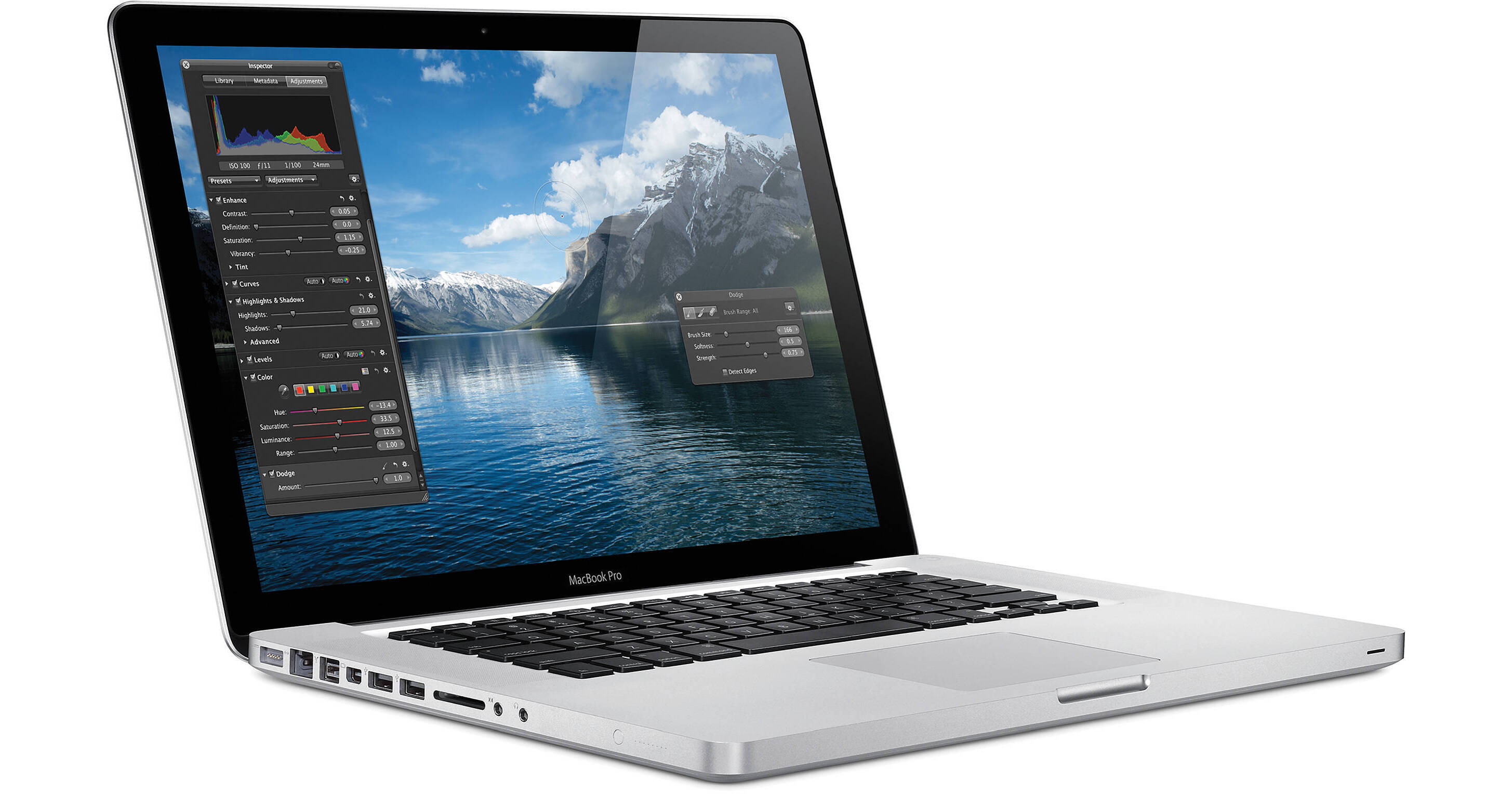
Apple 15.4" MacBook Pro Notebook Computer

  • Discontinued
  • B&H # APMBP25I515
  • Mfr# MC372LL/A

Product Highlights

  • 2.53GHz Intel Core i5
  • 4GB (2x2GB) RAM
  • 500GB 5400rpm Hard Drive
  • SuperDrive
  • nVIDIA GeForce GT 330M 256MB Graphics
  • 15.4" Glossy Widescreen LED Backlit Display
  • Secure Digital (SD) Card Slot
  • iSight Webcam, Bluetooth 2.1+EDR
  • 802.11n AirPort Extreme
  • Mac OS X 10.6 Snow Leopard, 5.6 lb

Protect Your Purchase


What item is right for you?

Ask our Experts!

800.831.2434
Live Chat

The 15.4" MacBook Pro Notebook Computer from Apple is a powerful notebook computer with an innovative aluminum unibody design. It is loaded with advanced power management features, including an intelligent hybrid graphics system, which allow it to run for up to 9 hours on a single charge.

The computer's 15.4" display features a LED backlight and a glossy finish. Its 1440 x 900 native resolution gives you ample screen real estate with which to work. You'll be able to output to an external display at up to 2560 x 1600 resolution thanks to the computer's Mini DisplayPort output.

The system is powered by a 2.53GHz Intel Core i5 and is loaded with 4GB of memory and a 500GB 5400rpm hard drive. The CPU can be overclocked to 3.06GHz using the Turbo Boost system. Graphics are handled by a hybrid system, which includes a discrete nVIDIA GeForce GT 330M GPU with 256MB of GDDR3 memory and integrated Intel HD graphics. The computer automatically switches between the two GPUs to best handle the task at hand, perfectly balancing performance and power consumption.

The computer features a comfortable backlit chiclet-style keyboard, which features space between each key for improved accuracy and comfort when typing. It also sports a glass Multi-Touch trackpad with a clickable design. Rather than having a separate button for mouse clicks, the entire surface of the pad is clickable. This increases the active surface area, and allows you to quickly click, even if your finger is near the top of the trackpad.

What's more, the smooth surface fully supports Multi-Touch gestures -- you can tap the trackpad with one finger to click, with two fingers to right click, scroll through documents using two fingers, pinch to zoom, navigate through Safari or iPhoto with three-finger left and right swipes, or use two fingers to rotate a photo or PDF.

iLife '11, a complete suite of digital creativity applications, is installed on the system. Easy enough for anyone to use, iLife will help you edit your home movies, organize digital photos, and compose original music.

The computer is loaded with Apple's Mac OS X 10.6 Snow Leopard operating system. The 64-bit OS features Time Machine backup, which automatically backs up system data to an external hard drive. It also features intuitive Cover Flow navigation, the powerful Spotlight search tool, and Quick Look document preview. You'll be able to use Boot Camp to run Windows on your Mac, or Front Row to turn your Mac into an impressive media player.

Features

Aluminum Unibody Enclosure
Carved from a single block of aluminum, the MacBook Pro is a true engineering achievement. Its patented unibody enclosure is the product of precise machining. From the thumbscoop to the now-you-see-it-now-you-don't sleep indicator, no detail is unaccounted for. The end result is a notebook that's not only breakthrough, but thin, light, polished, and refined. The unibody also makes MacBook Pro more durable than ever. So you can throw it in your briefcase or messenger bag and pull it out at an airport, at school, at the office, or on location without a second thought.
All-Day Battery
The energy-efficient architecture in every new MacBook Pro, along with automatic graphics switching, gives you dramatically longer battery life. On a single charge, the battery in the MacBook Pro lasts up to 9 hours. And you'll get up to 1000 full charge and discharge cycles -- that's nearly three times the lifespan of typical notebook batteries. Advanced chemistry and Adaptive Charging allow the battery to maintain charging capabilities longer and determine the optimal way to charge the battery's cells. Because the battery lasts up to five years, MacBook Pro uses just one battery in the same time a typical notebook uses three. That makes for less waste. And that, in turn, makes for one environmentally friendly battery.
Hybrid Graphics System
The MacBook Pro gives you even more power for graphics-intensive 3D games and pro applications, and longer battery life for everyday tasks like checking e-mail or browsing the web. Depending on which application you're running, the computer automatically switches between the blazingly fast discrete nVIDIA GeForce GT 330M processor and power-efficient integrated Intel HD Graphics. So you don't have to compromise performance for battery life -- and vice versa.
LED Backlit Display
Every MacBook Pro has a pristine LED backlit display with wide-angle viewing and a color gamut usually seen only on a desktop display. So whether you're watching a movie or making one, you've got the perfect canvas. The ultrathin, seamless glass enclosure makes the display strong and durable. And because it's power efficient and free of mercury and arsenic, this display is greener than ever.
Chiclet Keyboard with Backlight
The rigid aluminum keyboard webbing has been cut precisely to hold the keys. And the keys are curved to perfectly fit fingers. The result? Pure typing bliss. The keyboard is also illuminated, so when you're in low-light settings, such as airplanes or conference rooms, you can always see what you're typing.
Multi-Touch Glass Trackpad
The first thing you might notice -- or not notice -- about the MacBook Pro trackpad is the button. The entire trackpad is the button, so you can click anywhere. Without a separate button, the spacious trackpad gives your hands plenty of room to move on the large, silky glass surface. Use two fingers to scroll smoothly up and down a page with inertial scrolling. Pinch to zoom in and out. Rotate an image with your fingertips. Swipe with three fingers to flip through your photo libraries. Swipe with four fingers to show your desktop, view all open windows, or switch applications. If you're coming from a right-click world, you can right-click with two fingers or configure a right-click area on the trackpad. The more you use the Multi-Touch trackpad, the more you'll wonder what you ever did without it.
Spacious Hard Drive
The MacBook Pro comes with a large hard drive offering 500GB of storage capacity, so there's plenty of room for your photo libraries, video projects, and files. The computer also features 4GB of high-speed 1066MHz DDR3 memory, so you can run more applications at once and quickly access your data and media.
Intel Core i5 CPU
The system is powered by a 2.53GHz Intel Core i5 CPU, one of the fastest dual-core processors on the market. It supports Turbo Boost, which can increase its speed to 3.06GHz. The CPU features 3MB of shared L3 cache, allowing it to run applications up to 50% faster than before.
Ports Aplenty
The MacBook Pro is iPod, iPhone, digital camera, and external hard drive ready. If it has a cable, there's a place for it. You'll find two USB 2.0 ports and a FireWire-800 port for connecting faster peripherals. You'll be able to connect headphones and a microphone via the audio input and output ports, both of which support analog audio and S/PDIF digital audio. The computer also features a Gigabit Ethernet port and a Kensington security slot.
Mini DisplayPort
The Mini DisplayPort delivers a pure digital connection to external displays -- even large 30" displays -- quickly and easily. It gives you plug-and-play performance with the Apple LED Cinema Display and supports VGA and DVI via optional adapters, as well as the latest multimedia standards such as DisplayPort and HDMI.
Secure Digital Card Slot
Transfer your photos and videos to and from your MacBook Pro just as fast as you're able to take them. Built into the MacBook Pro is an SD card slot, so you can edit and share your photos and digital video on the spot.
802.11n AirPort Extreme and Bluetooth 2.1+EDR
With the latest 802.11n wireless technology built into MacBook Pro, you're always seamlessly and effortlessly connected to the wireless world out there, at home, and at work. MacBook Pro automatically finds available networks and allows you to join them with just one click. Bluetooth wireless technology is also built in, so brilliant accessories can become your wireless accomplices. With a built-in battery that lasts longer than ever before, you can do everything you need to do, where you need to do it.
SuperDrive
After editing and applying the finishing touches to your home movie masterpiece in iMovie and iDVD, use the ultrafast 8x SuperDrive on your MacBook Pro to burn it to DVD. And because the SuperDrive also writes to double-layer discs (DVDs with nearly 9GB of space), it's great for backing up data.
iSight Camera
Cleverly integrated -- almost hidden -- at the top of the MacBook Pro display is an iSight camera. Use it with iChat, and you can be anywhere without actually being there. Video chat with up to three of your friends, share a video with a colleague, or present to a client. Use iSight with Photo Booth for fun photo effects. And there's no need to waste valuable primping time installing software or configuring the camera. Like everything Mac, iSight just works.
MagSafe Power Connection
The MagSafe Power Adapter uses a magnetic connection rather than a physical one. If anyone happens to trip over your computer's power cord, they won't send the computer flying along with it. Rather, the cord will break cleanly away from the system, without damage. The cord even features a LED indicator that changes from amber to green when your computer is fully charged.

Performance

Intel Core i5 CPU
The Intel Core i5 processor boosts performance up to 50 percent over the previous generation. Based on Intel's latest 32-nanometer process technology, this is one of the fastest dual-core processors available and it sets an all-new benchmark for Mac notebooks.
Turbo Boost
The Intel Core i5 processor also features Turbo Boost. If you're using processor-intensive applications like Aperture 3 or Final Cut Pro that would benefit from an extra performance kick, Turbo Boost dynamically increases the speed of one or both cores, taking your MacBook Pro all the way up to 3.06GHz.
Hyper-Threading
Built-in Hyper-Threading allows two threads to run simultaneously on each core, so Mac OS X recognizes four virtual cores instead of just two. When you're running multiple applications at once, the Intel Core i5 processor spreads tasks more evenly across a greater number of cores -- so you can get more done, faster.
Integrated Memory Controller
Unlike systems that connect memory to the processor through a separate controller, the MacBook Pro uses an integrated memory controller to connect memory directly to the processor. In a sense, this cuts out the middleman. With faster access to memory, each core gets right to work on your data, rather than waiting for it to arrive. Together with 3MB of shared L3 cache, the integrated memory controller ensures MacBook Pro can keep up with you.
Next-Generation Graphics
Inside the MacBook Pro is the nVIDIA GeForce GT 330M discrete graphics processor -- the fastest graphics ever in a Mac notebook. With 48 processing cores and 256MB of dedicated video memory, this graphics processor delivers even more horsepower than the previous generation. And you don't have to sacrifice efficiency for speed: The nVIDIA GeForce GT 330M is up to 30 percent more energy efficient than its predecessor. For even greater power savings, MacBook Pro also includes integrated Intel HD Graphics.
On-Demand Performance; Off-the-Charts Efficiency
The MacBook Pro comes standard with automatic graphics switching. It's a breakthrough technology from Apple that switches graphics processors on the fly to give you performance when you need it (when you're playing the latest 3D game, for example) and better battery efficiency when you don't (such as when you're reading e-mail). MacBook Pro transfers the workload between the powerful discrete nVIDIA GeForce GT 330M graphics processor and integrated Intel HD Graphics so seamlessly, you won't even notice. Whether you're using applications like Aperture, Motion, or Final Cut Pro or just browsing the web, your MacBook Pro always knows which processor to use. You don't have to log out, shut down, or change your preferences. Automatic graphics switching does it all for you.

Design

Aluminum Unibody Enclosure
Until now, all notebooks were designed the same way: by assembling multiple pieces to create a single enclosure. But once you include all the necessary parts, you add size, weight, complexity, and more opportunities for failure. Solving a problem like this required more than an incremental change. It required a breakthrough. To create the MacBook Pro, the design and engineering teams devised a way to replace many parts with just one. That one part is called the unibody -- a seamless enclosure carved from a single piece of aluminum.

Of course, building only one part creates its own set of challenges. When you have multiple parts that are fastened together, tolerances don't need to be perfect. You have wiggle room, both literally and figuratively. But when one part is responsible for many functions, it's critical to manufacture that part with absolute precision, down to the micron. Every time. Millions of times over. There was only one way to achieve this level of precision: mill the unibody from a solid block of aluminum using computer numerical control, or CNC, machines -- the kind used by the aerospace industry to build mission-critical spacecraft components.

When you pick up a MacBook Pro, you immediately notice the difference. The entire enclosure is thin and light. It looks polished and refined. And it feels strong and durable -- perfect for life inside (and outside) your briefcase or backpack.
LED Backlight
The thickness of a notebook display depends on the technology inside. LCD displays typically use cold cathode fluorescent lamps, or CCFLs, to create light and project a picture onto a screen. But that poses two problems. First, these lamps require more space, so the display can be only so thin. Second, just like the fluorescent lights in your home or office, the ones inside a CCFL display take time to warm up before they reach full brightness. That's a lose-lose situation. And it's why Apple engineers chose LED backlight technology for the MacBook Pro.

A LED backlight creates the same amount of brightness in less space. So you can make the structure that houses a LED display much thinner. And unlike fluorescent lamps, a LED backlight reaches maximum brightness instantly.

Look at the MacBook Pro display and you'll see another big difference. Glass. That edge-to-edge, uninterrupted glass display does more than look good. It also adds structure to the LED display beneath it.
Multi-Touch Trackpad
The trackpad has no button because it is the button. That means there's more room to track, more room to click -- left, right, center, and everywhere in between -- and one less part. Apple designers and engineers spent countless hours considering things like sensitivity (how much pressure triggers a click?), audio feedback (what does the click sound like?), and friction over the smooth glass surface (what does it feel like?).

And that's just the hardware. Apple software engineers had a large part to play in the development of the trackpad, too. They incorporated Multi-Touch gestures -- including swipe, pinch, rotate, and four-finger swipe -- and even more natural inertial scrolling. The result is the largest, smartest, most ergonomic MacBook Pro trackpad ever. It's one of many details considered and reconsidered during the design process.
Details Matter
There's a story behind each part. Take the thumbscoop, for example. It's the indentation that allows you to open the display. If the scoop is too deep, you put too much pressure on the display to open it. If it's too shallow, you struggle to open the display. It may seem incidental, but if the thumbscoop is well designed, it makes the difference between a bad experience and a good one. The challenge of the thumbscoop was to create a crisply machined scoop that was still comfortable to use. The designers at Apple worked on hundreds of versions of the thumbscoop -- even examining them under an electron microscope -- to get it right.

Then there's the sleep indicator light. An indicator is functional only when it's indicating something. Look to the right of the thumbscoop. You see nothing. Until you close the display and your MacBook Pro goes to sleep. Then a LED glow appears from inside the enclosure. How? During the CNC process, a machine first thins out the aluminum. Then a laser drill creates small perforations for the LED light to shine through. These holes are so tiny that the aluminum appears seamless when the light is off.
Efficient Design
The marriage of electronics and mechanical design makes the MacBook Pro as advanced on the inside as it is on the outside. The internal architecture has been reengineered from the silicon up, with a cutting-edge logic board, chipset, and graphics architecture.

The MacBook Pro now delivers the perfect combination of graphics performance and long battery life, thanks to automatic graphics switching. For everyday tasks like e-mail and surfing the web, MacBook Pro uses integrated Intel HD Graphics. But for graphics-intensive 3D games and applications like Aperture and Motion, the MacBook Pro automatically switches to the nVIDIA GeForce GT 330M discrete graphics processor for amazing performance. There's no need to log out or restart: The transition takes place behind the scenes, based on the applications you're running. So you don't have to lift a finger.

Because Apple designs both the hardware and the software for the MacBook Pro, it's easier to improve things like energy efficiency. Software tells the hard drive to spin down when it's not in use. It tells the display and battery indicator lights to dim in low-light conditions. And it helps decide whether the CPU or the graphics processor would be best suited to the task at hand. That's the kind of smart, integrated design that sets MacBook Pro apart from other notebooks.
Top-to-Bottom Integration
Top-to-bottom integration also makes MacBook Pro greener than ever. Complete control over how the MacBook Pro is designed, how it's manufactured, and how it's packaged gives Apple an environmental edge. Take the MacBook Pro display, for instance. Conventional CCFL displays use mercury to create a backlight and arsenic to prevent irregularities in the glass. The LED backlit display on the MacBook Pro, on the other hand, is both mercury- and arsenic-free. LED backlight technology also conserves energy: This display requires up to 30 percent less power than a CCFL display.

Just how green is the MacBook Pro? Every MacBook Pro model is ENERGY STAR 5.0 compliant, which means it meets the government standard for energy efficiency. And every MacBook Pro is shipped in packaging that's 34 to 41 percent smaller than the original generation. That translates to fewer trees used for boxes and less fuel used to transport more systems on fewer planes. And at the end of its long, productive life, you can recycle almost all of your MacBook Pro.
Uniquely Apple
Only Apple could make a notebook like this. Hardware and software. Design and engineering. Production and manufacturing. They're all part of a single process at Apple. When you start using your MacBook Pro, you'll discover what that means. The light and sturdy unibody protects the components inside. The LED backlit display -- along with the graphics processor that helps power it -- gives you faster games and a brilliant canvas for your photos, movies, and more. The glass Multi-Touch trackpad feels as good as it functions. From the smallest detail to the biggest engineering breakthrough, the MacBook Pro truly is the next generation of notebooks.

The Mac Experience

Every Day Use
Every Mac is designed to make your life easier, not more difficult. The system ships with Mac OS X "Snow Leopard," which gives you all the tools you need for e-mail, personal organization, Internet browsing, watching movies, and more. Its software and hardware are designed work to together seamlessly, eliminating the compatibility nightmares that often plague PC users. What's more, the MacBook can run Windows via Boot Camp, perfect for users who have a Windows-only application that they absolutely need to use.
iLife '11
The included iLife '11 suite is a suite of applications that help you organize your digital life. It includes iPhoto for photo management and editing, iMovie for HD video editing, iDVD to burn your movies to disc, GarageBand for music production, and iWeb for web publishing.
Secure and Reliable
Worried about viruses and malware? Don't be. The MacBook Pro isn't plagued by constant attacks from the outside world. It is designed to be secure out of the box, eliminating the need for additional software to protect your system from danger. OS X will warn you if a downloaded file is potentially dangerous, ensuring that you don't accidentally open a malicious application. Apple responds quickly to any security threats, prompting you to download updates that keep your Mac up to date and safe.
Advanced Technology, Standard
Powered by an Intel dual-core CPU, the MacBook Pro is fully loaded with 3D graphics, an iSight camera, Bluetooth, and Wi-Fi. You'll find features on this system that are foreign to the PC world, including the MagSafe power adapter design. A powerful 64-bit operating system built on a UNIX foundation, Snow Leopard, is pre-installed on the system.
Environmentally Friendly Design
Apple understands that the Earth is our most precious resource. They've worked to create a computer that is energy efficient, free of many toxins, and highly recyclable. Because Apple designs both hardware and software, the MacBook is able to use a highly efficient power supply that reduces wasted power. The computer is free of mercury and arsenic, and its internal components are free of polyvinyl chloride (PVC) and brominated flame retardants (BFRs). When the computer reaches the end of its long life, you can rest assured that it can be recycled. It is constructed from materials that are highly desirable to recyclers. The MacBook Pro has been awarded EPEAT Gold status for responsible manufacture, energy efficiency, and recyclability.
Tech Support
Have a problem with your Mac? Get support and advice at the Genius Bar, located at every Apple Retail Store. Apple also provides online tutorials, troubleshooting forums, and 90 days of phone support for users who aren't able to make it to an Apple store.
Optional AppleCare
Apple provides 90 days of free phone support and a 1-year limited hardware warranty on the computer. You can opt to add an AppleCare Protection Plan, at additional cost, which covers support and repairs for 3 years from the date of purchase. AppleCare can be purchased at any time within the first year of ownership of the computer.
Performance
Processor 2.53GHz Intel Core i5-540M
Cache L3: 3MB
System Bus 2.5GT/s
Memory Slots: 2x SO-DIMM 204-Pin
Type: PC3-8500 1066MHz DDR3 SDRAM
Installed: 4GB (2x2GB)
Capacity: 8GB
Graphics Card Type: Hybrid Graphics System
Installed: nVIDIA GeForce GT 330M with 256MB GDDR3 SDRAM Dedicated; Intel GMA HD with 256MB DDR3 SDRAM Shared
Display
Type Widescreen
Size 15.4"
Backlight LED
Aspect Ratio 16:10
Finish Glossy
Native Resolution 1440 x 900
Supported Resolutions 1440 x 900 at 16:10 Aspect Ratio 
1280 x 800 at 16:10 Aspect Ratio 
1152 x 720 at 16:10 Aspect Ratio 
1024 x 640 at 16:10 Aspect Ratio 
800 x 500 at 16:10 Aspect Ratio 
1024 x 768 at 4:3 Aspect Ratio 
800 x 600 at 4:3 Aspect Ratio 
640 x 480 at 4:3 Aspect Ratio 
1024 x 768 at 4:3 Aspect Ratio Stretched
800 x 600 at 4:3 Aspect Ratio Stretched
640 x 480 at 4:3 Aspect Ratio Stretched
720 x 480 at 3:2 Aspect Ratio 
720 x 480 at 3:2 Aspect Ratio Stretched
External Resolution Up to 2560 x 1600
Dual Display Yes
Video Mirroring Yes
Storage
Hard Drive Bays: 1x
Installed: 500GB 5400rpm
Type: SATA
Optical Drive 8x-Speed Slot-Load SuperDrive

Reads
DVD: 8x
CD: 24x

Writes
DVD-R: 8x
DVD-RW: 4x
DVD-R DL: 4x
DVD+R: 8x
DVD+RW: 8x
DVD+R DL: 4x
CD-R: 24x
CD-RW: 10x
Input/Output Connectors
Ports 2x USB 2.0 (A)
1x FireWire-800 (9-Pin)
Display Output 1x Mini DisplayPort
1x DVI via optional cable
1x VGA via optional cable
1x Dual-Link DVI via optional cable
1x HDMI via optional cable
Audio Integrated Stereo Speakers with subwoofers
Integrated Omnidirectional Microphone
1x Combo Analog Headphone/Optical Digital Audio Out
1x Combo Analog Line-In/Optical Digital Audio In
Expansion Slots None
Flash Media Slot 1x SD
Communications
Network 10/100/1000Mbps Gigabit Ethernet (RJ-45)
Modem None
Wi-Fi 802.11n Airport Extreme
Bluetooth Bluetooth 2.1+EDR
Webcam Yes
General
Operating System Mac OS X 10.6 Snow Leopard 
Security Kensington Lock Slot
Keyboard Keys: 78
Type: Standard Notebook Keyboard
Features: Backlight, Chiclet Style
Pointing Device TouchPad with Double-Tap, Drag, Four-Finger Swipe, Inertial Scrolling, Multi-Touch Control, Pinch, Precise Cursor Control, Rotate, Tap, Three-Finger Swipe, Two-Finger Scrolling
Battery Built-In Lithium-Polymer Providing up to 9 Hours per Charge (77Wh)
Power Requirements AC: 100-240 V AC, 50-60Hz
Consumption: 85W
Dimensions (WxHxD) 14.35 x 0.95 x 9.82" / 36.45 x 2.41 x 24.94 cm
Weight 5.6 lb / 2.54 kg

REVIEW SNAPSHOT®

by PowerReviews
Apple 15.4" MacBook Pro Notebook Computer
 
5.0

(based on 24 reviews)

Ratings Distribution

  • 5 Stars


    (24)

  • 4 Stars


    (0)

  • 3 Stars


    (0)

  • 2 Stars


    (0)

  • 1 Stars


    (0)

100%

of respondents would recommend this to a friend.

Pros

  • Long battery life (22)
  • Quality display (22)
  • Fast (21)
  • Good power output (21)
  • Quiet (20)

Cons

  • Too hot (3)

Best Uses

  • Web browsing (19)
  • Graphics (18)
  • Video (16)
  • Word processing (16)
  • Music (14)
    • Reviewer Profile:
    • Tech savvy (13), Multimedia professional (5), Technically challenged (3)
    • Primary use:
    • Personal (16), Business (6)

REVIEWS

Reviewed by 24 customers

Sort by

Displaying reviews 1-20

Back to top

Previous | Next »

 
5.0

My first Mac. I love it.

By Kelli Z

from Seattle, WA

About Me Technically Challenged

Verified Buyer

Pros

  • Comfortable Keyboard
  • Fast
  • Lightweight
  • Long Battery Life
  • Powerful
  • Quality Display
  • Quiet

Cons

  • Too Hot

Best Uses

  • Graphics
  • Music
  • Video
  • Web Browsing
  • Word Processing

Comments about Apple 15.4" MacBook Pro Notebook Computer:

I like how easy it to use from the very start. After using a PC for many years you need to get used to some minor changes in how things are done. So far iPhoto is what I have used the most and it amazes me how professional it makes me look.

  • Primary use:
  • Personal

Comment on this review

 
5.0

I Heart Apple!!!

By Jnjgockley

from Lancascter Co. PA

About Me Amateur photographer

Verified Buyer

Pros

  • Fast
  • Lightweight
  • Long Battery Life
  • Quality Display

Cons

  • none

Best Uses

  • Photography
  • Web Browsing

Comments about Apple 15.4" MacBook Pro Notebook Computer:

We finally made the switch from a PC. What an incredible computer. Awesome performance and excellent battery life. I would highly recommend this computer!! :)

  • Primary use:
  • Personal

Comment on this review

 
5.0

Dont Judge Just Buy, Call B&H Best Price

By Mannah

from Orlando, FL

Verified Buyer

Pros

  • Comfortable Keyboard
  • Fast
  • Lightweight
  • Long Battery Life
  • Powerful
  • Quality Display
  • Quiet

Cons

    Best Uses

    • Business Use
    • Graphics
    • Web Browsing
    • Word Processing

    Comments about Apple 15.4" MacBook Pro Notebook Computer:

    We using this product for business purpose are so fast and so easy to handle. We are new MAC user's no way we do not return back to Windows. Monitor are so clear, Keyboard Back Light are fantastic.

    • Primary use:
    • Business

    Comment on this review

     
    5.0

    Danged spiffy.

    By Josie

    from OAK

    About Me Multimedia Professional, Tech Savvy

    Verified Buyer

    Pros

    • Comfortable Keyboard
    • Fast
    • Lightweight
    • Long Battery Life
    • Powerful
    • Quality Display
    • Quiet

    Cons

      Best Uses

      • Business Use
      • Graphics
      • Music
      • Video
      • Web Browsing
      • Word Processing

      Comments about Apple 15.4" MacBook Pro Notebook Computer:

      I use this machine for many, many things in a diversity of settings: I write, I design, I finish fine art photos, mock up business cards, logos, websites, databases, I try to wrangle my finances, my divorce, and related recovery from violent trauma. I do a lot of this in auto repair, metal fab and woodshops.

      Running two OSes as breezily as this beast can is a big bonus to my lifestyle.

      The machine is light enough to tote anywhere, and slick-of-monitor enough to convey pretty much any idea to pretty much anybody.

      My giddiest pleasure, besides the superswift speed of processing and amazing display, is the card reader slot on the side. No readers necessary! The luxury is quick becoming a staple: weensy little 16GB backups and staging areas are the new messenger-bag-of-dog-eared-Moleskines.
      And I haven't burned my lap or burned out a battery charge yet.
      Highly recommended.

      Comment on this review

       
      5.0

      Very Happy with this one

      By norton712

      from Sioux City, Ia

      About Me Multimedia Professional, Tech Savvy

      Pros

      • Comfortable Keyboard
      • Fast
      • Lightweight
      • Long Battery Life
      • Powerful
      • Quality Display
      • Quiet

      Cons

        Best Uses

        • Business Use
        • Graphics
        • Music
        • Video
        • Web Browsing
        • Word Processing

        Comments about Apple 15.4" MacBook Pro Notebook Computer:

        I use this for Audio recording/email/photography/basically everything you can imagine.

        • Primary use:
        • Personal

        Comment on this review

         
        5.0

        Simply awesome

        By Ranchergirl

        from Prescott, AZ

        About Me Technically Challenged

        Verified Buyer

        Pros

        • Fast
        • Long Battery Life
        • Powerful
        • Quality Display
        • Quiet

        Cons

        • A little heavy

        Best Uses

        • Graphics
        • Music
        • Web Browsing

        Comments about Apple 15.4" MacBook Pro Notebook Computer:

        First Mac for me. Compared to my PC, it's like night and day. The quality and ease of applications is fantastic. Just sorry I waited so long to get one.

        • Primary use:
        • Personal

        Comment on this review

         
        5.0

        DO judge this "Book" by its cover!

        By kismet

        from Maryland

        About Me Technically Challenged

        Verified Buyer

        Pros

        • Comfortable Keyboard
        • Lightweight
        • Long Battery Life
        • Powerful
        • Quality Display

        Cons

          Best Uses

          • All around personal use
          • Financial Management
          • Photos
          • Word Processing

          Comments about Apple 15.4" MacBook Pro Notebook Computer:

          The cover for this MacBook Pro is handsome, sturdy and functional. Things only get better when you open it up and turn it on! This is a powerful, comfortable to use laptop. The lighted keyboard is a huge improvement over older iBooks. The single function track pad facilitates use. Graphics are excellent. Longer battery life is a plus.

          • Primary use:
          • Personal

          Comment on this review

           
          5.0

          I'm in Love

          By Mom on the run

          from Fort Worth, TX

          About Me Tech Savvy

          Verified Buyer

          Pros

          • Comfortable Keyboard
          • Fast
          • Lightweight
          • Long Battery Life
          • Quality Display
          • Quiet

          Cons

            Best Uses

            • Business Use
            • Graphics
            • Music
            • Video
            • Web Browsing
            • Word Processing

            Comments about Apple 15.4" MacBook Pro Notebook Computer:

            I knew I would be happy with my first Mac, but I absolutely love it. As a long-time PC user, I have been able to navigate my Mac easily with an occasional reference to the tutorials on the Apple website and the basic "PC to Mac" videos show the tricks that are not intuitive.

            I use the computer for general business needs, photo management, and Internet activities. This model is a great size and weight. I debated on buying the same model with a hi-res monitor, and am 100% satisfied with the standard glossy monitor. My only additional purchase will be a cover to protect the computer.

            I purchased Office and installed it with no problems.

            • Primary use:
            • Personal

            Comment on this review

             
            5.0

            I love my Mac

            By Breezy

            from Snohomish, WA

            About Me Tech Savvy

            Verified Buyer

            Pros

            • Comfortable Keyboard
            • Fast
            • Lightweight
            • Long Battery Life
            • Powerful
            • Quality Display
            • Quiet

            Cons

              Best Uses

              • Business Use
              • Graphics
              • Music
              • Video
              • Web Browsing
              • Word Processing

              Comments about Apple 15.4" MacBook Pro Notebook Computer:

              I recently upgraded from a Laptop to this Macbook Pro and couldn't be happier. No annoying pre installed trial products to uninstall like my previous laptop and Apple customer support is extremely courteous, helpful, and not outsourced. (speaking from previous cust. service calls for my itunes, and iphone vs customer service for my previous laptop)
              This notebook is fast, reliable, lightweight, quiet, sleek and comes with all the software needed installed and nothing more. It took a small learning curve to figure out the ins and outs of the mousepad but now that I understand how to work it I love it and I love the backlit keyboard. Graphics/Screen is awesome!

              • Primary use:
              • Personal

              Comment on this review

               
              5.0

              A book I just can't put down!

              By ORguy

              from Saint Louis, MO

              About Me Avid Gamer, Tech Savvy

              Verified Buyer

              Pros

              • Comfortable Keyboard
              • Long Battery Life
              • Powerful
              • Quality Display
              • Quiet

              Cons

              • Heavy

              Best Uses

              • Video
              • Web Browsing
              • Word Processing

              Comments about Apple 15.4" MacBook Pro Notebook Computer:

              I use this laptop for school and play. It is a fine example of Apple engineering. I love the lighted keyboard and the auto adjusting dimmer of the screen. The keyboard is spacious and easy to use and the trackpad makes surfing documents and the web a breeze.

              • Primary use:
              • Personal

              Comment on this review

               
              5.0

              Mac Rocks!

              By Photoguy

              from Silver Spring, MD

              About Me Fine art photography, Photography faculty membe, Retired scientist, Tech Savvy

              Verified Buyer

              Pros

              • Fast
              • Long Battery Life
              • Powerful
              • Quality Display
              • Quiet

              Cons

                Best Uses

                • Business Use
                • Digital imaging
                • Graphics
                • Photography
                • Web Browsing
                • Word Processing

                Comments about Apple 15.4" MacBook Pro Notebook Computer:

                Am loving my new MacBook Pro! As a photographer, I use it a lot for my digital imaging and well as for email and surfing. I especially like the built in firewall and the inherent safety from internet bugs and thugs. I have loaded Photoshop CS5 and Lightroom on it,and it works flawlessly. I really appreciate it when I have to help my daughter struggle with her Windows machine... eventually I hope to convert her!

                • Primary use:
                • Business

                Comment on this review

                 
                5.0

                What's not to like?

                By dcfox

                from Outer Appalachia

                About Me Tech Savvy

                Verified Buyer

                Pros

                • Fast
                • Lightweight
                • Long Battery Life
                • Powerful
                • Quality Display
                • Quiet

                Cons

                  Best Uses

                  • Graphics
                  • Music
                  • Video
                  • Web Browsing

                  Comments about Apple 15.4" MacBook Pro Notebook Computer:

                  MacBook Pros are the best laptops in the world, imnsho. not the cheapest, but definitely worth the extra dough.i'm glad i got extra memory, way cheaper than buying it from Apple.B&H's prices [...] are hard to beat!

                  • Primary use:
                  • Personal

                  Comment on this review

                   
                  5.0

                  Lovely notebook

                  By zepedro russo

                  from NYC

                  About Me Multimedia Professional

                  Verified Buyer

                  Pros

                  • Comfortable Keyboard
                  • Fast
                  • Long Battery Life
                  • Powerful
                  • Quality Display
                  • Quiet

                  Cons

                  • More usb hubs

                  Best Uses

                  • Business Use
                  • Graphics

                  Comments about Apple 15.4" MacBook Pro Notebook Computer:

                  Go mac.

                  • Primary use:
                  • Business

                  Comment on this review

                   
                  5.0

                  Another wonderful machine from Apple

                  By Joey

                  from Denver, Colorado

                  About Me Tech Savvy

                  Verified Buyer

                  Pros

                  • Comfortable Keyboard
                  • Fast
                  • Lightweight
                  • Long Battery Life
                  • Powerful
                  • Quality Display
                  • Quiet

                  Cons

                    Best Uses

                    • Business Use
                    • Graphics
                    • Music
                    • Video
                    • Web Browsing
                    • Word Processing

                    Comments about Apple 15.4" MacBook Pro Notebook Computer:

                    Great design and top quality materials. Super fast computing. Easy to use. Highly recommend.

                    • Primary use:
                    • Business

                    Comment on this review

                     
                    5.0

                    Great computer

                    By Chris

                    from Kansas

                    About Me Multimedia Professional

                    Verified Buyer

                    Pros

                    • Comfortable Keyboard
                    • Fast
                    • Long Battery Life
                    • Powerful
                    • Quality Display
                    • Quiet

                    Cons

                      Best Uses

                      • Business Use
                      • Graphics
                      • Music
                      • Video
                      • Web Browsing
                      • Word Processing

                      Comments about Apple 15.4" MacBook Pro Notebook Computer:

                      So far, so very good. I use both Mac and PC and anymore can't complain about either too much. I must say however, that setting up my new MacBook Pro was a dream. Easy as pie, and I like pie.

                      I love the lighted keyboard, amazing to me that all laptops don't have something similar.

                      Oh, about the network. I have a wireless network at home, this hooked in just fine (Netgear). I wanted to extend the range whoever, and that was a real pain. Since I was in the Mac mood I went out and got a Airport Extreme and and Express and have to same that setting up the new network was so easy. Not to mention all my computers worked from the get-go. 3 PCs, work MacBook Pro, personal MacBook Pro and even my Wii.

                      Could only be happier if it could do my work for me and pick winning lottery numbers.

                      • Primary use:
                      • Personal

                      Comment on this review

                       
                      5.0

                      MaBook Pro A good Computer

                      By Barb

                      from Denver, CO

                      Verified Buyer

                      Pros

                      • Comfortable Keyboard
                      • Fast
                      • Lightweight
                      • Long Battery Life
                      • Powerful
                      • Quality Display
                      • Quiet

                      Cons

                        Best Uses

                        • Graphics
                        • Video
                        • Web Browsing

                        Comments about Apple 15.4" MacBook Pro Notebook Computer:

                        A very good upgrade for my old computer. It is faster and much more efficient.
                        I like it a lot.

                        • Primary use:
                        • Personal

                        Comment on this review

                         
                        5.0

                        New PC to Mac user. Excellent product!

                        By Ahsan

                        from Keller, TX

                        About Me Tech Savvy

                        Verified Buyer

                        Pros

                        • Comfortable Keyboard
                        • Fast
                        • Lightweight
                        • Long Battery Life
                        • Powerful
                        • Quality Display
                        • Quiet

                        Cons

                        • Too Hot

                        Best Uses

                        • Graphics
                        • Music
                        • Video
                        • Web Browsing
                        • Word Processing

                        Comments about Apple 15.4" MacBook Pro Notebook Computer:

                        I am new PC to MAC switcher, and so far I am very happy. I have been eyeing a MacbookPro for a while, but hadn't made the plunge until now. We have multiple iPhones in the house, and after using them for a few years, I am convinced that Apple makes a quality product. So now I got a mac, and I am very happy with it. The quality of the Notebook is A+, and the mac OS has been a pleasure to use. I enjoy using iLife, and already put a few wonderful photo slide show movies very easily. Great software!I shopped around for a while, and found the trusty source from B&H photo video to have the best price out there. Together with free Parallels and 3 day air shipping is a bonus.I have come full circle, using DOS and windows 3.1, all the way up to Vista; and now I do not care too much about all the inner workings and complications that Windows have. I just want things to work, and simple. The Macbookpro fits that bill. I still have 3 other windows machine that the family uses, but the Macbookpro is mine!

                        • Primary use:
                        • Personal

                        Comment on this review

                         
                        5.0

                        New Mac user, and I love it.

                        By Joe

                        from Fort Worth, TX

                        About Me Tech Savvy

                        Verified Reviewer

                        Pros

                        • Comfortable Keyboard
                        • Fast
                        • Lightweight
                        • Long Battery Life
                        • Powerful
                        • Quality Display
                        • Quiet

                        Cons

                        • Too Hot

                        Best Uses

                        • Business Use
                        • Graphics
                        • Music
                        • Video
                        • Web Browsing
                        • Word Processing

                        Comments about Apple 15.4" MacBook Pro Notebook Computer:

                        This is my first Mac. I have been always drawn to Apple products for it's high quality, but never got one because of it's high price. Finally this years Macbookpro (i5) in my opinion has closed the price gap to the windows machine (namely the envy 15 with similar options). It is true what they say about the Mac. It's a very high quality machine. I am really enjoying learning the Mac OS. This Macboopro (i5) is fast.I shopped around quite a bit, and B&H had the best price[...]

                        • Primary use:
                        • Personal

                        Comment on this review

                        (1 of 1 customers found this review helpful)

                         
                        5.0

                        New Mac user with no regrets!

                        By Mac Convert

                        from Dayton, OH

                        About Me Developer, Tech Savvy

                        Verified Buyer

                        Pros

                        • Comfortable Keyboard
                        • Fast
                        • Long Battery Life
                        • Powerful
                        • Quality Display
                        • Quiet

                        Cons

                          Best Uses

                          • Development On The Go
                          • Music
                          • Video
                          • Web Browsing
                          • Word Processing

                          Comments about Apple 15.4" MacBook Pro Notebook Computer:

                          I have been a Windows user for many years and have been debating about getting a Mac. I wanted to buy a high quality laptop that would allow me to do Java and PHP development on the go. I was about to buy a couple hundred dollar laptop, but then decided to look a the Macs and their reviews. I continually heard about the high quality of the Macs and how you can use them for many years without it ever slowing down.So I decided to go with the MacBook Pro. What a very beautiful packaged laptop that is enclosed in a nice solid package. I am slowing picking up the Mac OS X and absolutely loving this laptop. It does get a little warm if you have it on your lap, but a book solves that problem. But the one thing that I can't believe is how quite the laptop is. I hardly ever hear it run! My work laptop always sounds like a 'dryer'. The battery life is great as well. I have no regrets and know that I have a laptop that will last me a very long time.B&H has the best deal on a Mac and it's AppleCare service. [...] The packaged Parallels software is a very nice bonus, especially if you ever plan on using Windows Apps on the Mac. And, I got a free upgrade to Parallels 6.0!If you are looking for a high quality laptop that will last a very, very long time....this is the laptop.

                          • Primary use:
                          • Personal

                          Comment on this review

                          (1 of 1 customers found this review helpful)

                           
                          5.0

                          Great Computer

                          By Wedding Photographer, Web Designer

                          from Denver, CO

                          About Me Multimedia Professional, Tech Savvy

                          Verified Buyer

                          Pros

                          • Comfortable Keyboard
                          • Fast
                          • Lightweight
                          • Long Battery Life
                          • Powerful
                          • Quality Display
                          • Quiet

                          Cons

                            Best Uses

                            • Business Use
                            • Graphics
                            • Music
                            • Video
                            • Web Browsing
                            • Word Processing

                            Comments about Apple 15.4" MacBook Pro Notebook Computer:

                            Great computer!! We love this computer, it is just what we were looking for. Light weight, compact, fits great in the laptop part of most backpacks. Great buy!!

                            • Primary use:
                            • Business

                            Comment on this review

                            Displaying reviews 1-20

                            Back to top

                            Previous | Next »

                            Cases

                            Incase Designs Corp -  15" Neoprene Sleeve (Black)
                            • Price: $39.95
                             

                            Memory

                            Crucial Technology -  8GB (2x4GB) SO-DIMM Memory for Notebook
                            • Price: $42.95
                             
                            Add installation service for an additional $39.99 ">More information

                            Drives & Storage

                            Iomega -  500GB eGo Portable Mac Edition Hard Drive (Ruby Red)
                            • Price: $139.77
                             

                            Software

                            Microsoft -  Office for Mac Home and Student Edition 2011
                            • Reg. Price: $119.95
                            • Discount: -$2.96
                            • Discount price: $116.99
                            • Limited supply at this price
                             
                            Add installation service for an additional $29.99 ">More information

                            Editing Software

                            Adobe -  Photoshop CS5 Software for Mac
                            • Price: $649.95
                             
                            Add installation service for an additional $50.00 ">More information

                            Networking

                            D-Link -  DIR-615 Wireless N 300 Router
                            • Price: $59.95
                             
                            View all Accessories

                            What's in the Box

                            Apple 15.4" MacBook Pro Notebook Computer
                            • 85W MagSafe Power Adapter
                            • AC Wall Plug
                            • Power Cord
                            • Display Cleaning Cloth
                            • Software DVDs
                              • Mac OS X 10.6 Snow Leopard (includes iTunes, Time Machine, Quick Look, Spaces, Spotlight, Dashboard, Mail, iChat, Safari, Address Book, QuickTime, iCal, DVD Player, Photo Booth, Front Row, Xcode Developer Tools)
                              • iLife '11 (includes iPhoto, iMovie, iDVD, iWeb, GarageBand)
                            • Printed and Electronic Documentation
                            • 1-Year Limited Warranty with 90-Days Phone Support
                             
                             
                            See any errors on this page? Let us know.

                            Close

                            Close