This item is backordered by the manufacturer.
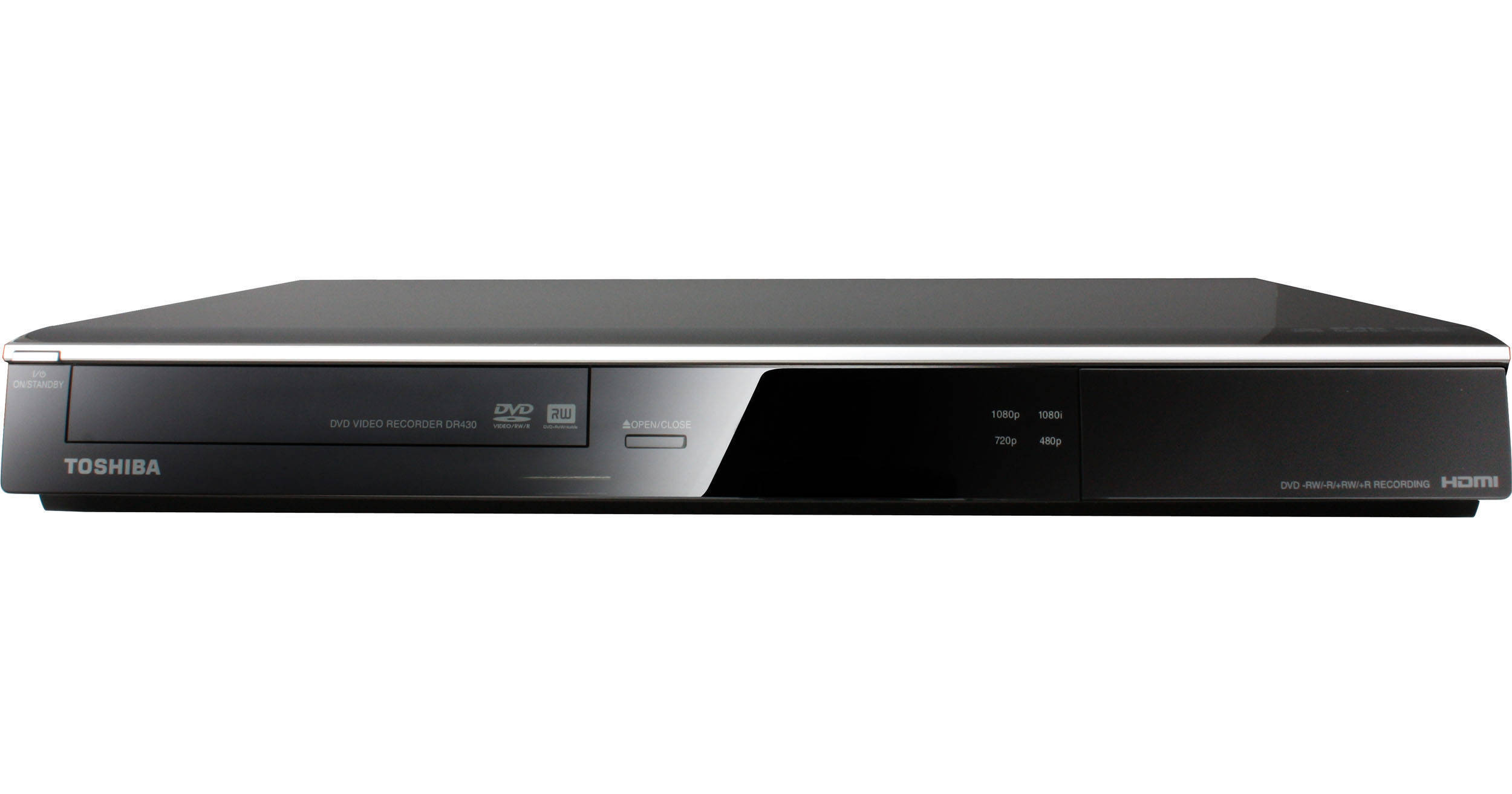
Record your favorite TV shows or home videos to DVD with the DR430 DVD Player / Recorder from Toshiba thanks to its DVD-recording drive and host of video inputs. For an enhanced DVD video experience optimized for your HDTV, the DR430 sports DVD video upconversion to 1080p. Simply hook your satellite box up to the DR430's component-video or S-video inputs, set the timer, and you're ready to record. If you're looking to preserve home videos, you can either use the same video inputs to connect your VHS player, or the front DV input to connect your video camera directly to the DR430. Finally, this Toshiba DVD recorder records to a variety of DVD formats for optimal versatility. Further, a front-panel USB port makes it easy to connect to digital cameras, camcorders, and portable music players whether for playback or for media transfer to DVD.
If you're a home video enthusiast who needs a multi-faceted DVD player but don't want to settle for anything less than superb performance, the DR430 delivers both versatility and dependability.
| Video | |
|---|---|
| System | NTSC |
| Region | DVD: 1 |
| Progressive Scan | Yes |
| HD Upconversion | Yes |
| Video D/A Converter | 54MHz/10-Bit |
| Audio | |
|---|---|
| Dolby Digital/DTS Compatibility | DTS, Dolby Digital |
| Built-in Decoder | Yes |
| HDCD Decoding | Not Specified By Manufacturer |
| Audio D/A Converter | 192kHz / 24Bit |
| LPCM | Yes |
| Virtual Surround | Yes |
| Bass Management | No |
| Frequency Response | Not Specified By Manufacturer |
| Signal to Noise Ratio | Not Specified By Manufacturer |
| Dynamic Range | Not Specified By Manufacturer |
| THD (Total Harmonic Distortion) | Not Specified By Manufacturer |
| THX Certified | No |
| A/V Playback Formats | |
|---|---|
| Video | DVD+R, DVD+RW, DVD-R, DVD-RW, DVD-Video, SVCD, VCD |
| Audio | CD-DA, CD-R, CD-RW |
| File Formats Supported | JPEG, MP3, WMA |
| DivX Certified | No |
| Convenience | |
|---|---|
| Digital Media Slot | No |
| Slow Motion Playback | Yes |
| Frame-by-Frame Playback | Yes |
| Bookmarking | No |
| Zoom | Yes |
| Input/Output Connectors | |
|---|---|
| Analog |
2x Audio Input 2x Composite Video 2x S-Video 1x Component Video |
| Digital |
1x HDMI 1x Digital Coaxial Audio 1x DV Input |
| Other | 1x USB |
| General | |
|---|---|
| Tray Type | Single Disc Horizontal |
| Remote | Yes |
| Power Requirements | 110 VAC, 60 Hz |
| Power Consumption | Not Specified By Manufacturer |
| Operating/Storage Temperature | Not Specified By Manufacturer |
| Energy Star Compliant | Not Specified By Manufacturer |
| Dimensions (WxHxD) | 16.5 x 2.3 x 10.2" / 419.10 x 58.42 x 259.08 mm |
| Weight | 7.92 lb / 3.59 kg |
REVIEW SNAPSHOT®
by PowerReviewsPros
Cons
Best Uses
Most Liked Positive Review
Works well
We use this unit in place of a VCR and have not had any problems with it. The picture is acceptable in extended play and gets six hours of recording time. It's also easy ...Read complete review
We use this unit in place of a VCR and have not had any problems with it. The picture is acceptable in extended play and gets six hours of recording time. It's also easy to set up and to use. We also have a four year old DR410 that works well, although, occasionally the picture fails to record but this happens rarely. Bottom line is this: for the price it's a good product.
VS
Most Liked Negative Review
Not Without its Flaws
Price is easily the number one reason to buy this unit. I wanted something new that was also a current model, meaning not refurbished, remanufactured, or even a new-in-box item from one or ...Read complete review
Price is easily the number one reason to buy this unit. I wanted something new that was also a current model, meaning not refurbished, remanufactured, or even a new-in-box item from one or more generations ago. This is because the lasers in these things do eventually degrade and I'm hoping for the longest possible life out of the unit.
This is my first DVD Recorder after owning VCRs by GoVideo (a DVD combo unit), Sony, Panasonic, and GE. I'm accustomed to using 6 or 8 hour tapes and recording TV in the EP low quality setting. Disappointingly, this Toshiba unit in the SLP (8 hour) setting has a lower quality image than a comparable tape. I'm currently using the EP (6 hour) setting, which is acceptable, with the exception of some pixilation when quick movement is present. The "Reducing Block Noise" settings do not help; in fact they make the image worse. Still, the degradation which occurs with tapes over time should not be an issue with DVDs, so long-term quality should be more consistent. To get truly crisp images, you must use the XP mode, which reduces capacity to a paltry 1 hour per DVD. After recording, editing (such as deleting scenes, naming titles, adding chapter marks, etc.), inserting a disc, turning on the unit, deleting titles, or exiting the "Top Menu" after editing, the unit takes between 10 seconds to 2 minutes to load or write to the disc. This is rather cumbersome, but may be similar to other DVD recorders.
The "Top Menu" button on the remote is one of the best features of the DR430. It allows you to preview the first frame of all the titles on your DVD while playing the highlighted title in a small window. This makes locating and identifying content on the DVD much easier than rewinding and fast forwarding a VCR tape or even scanning through a list of title names/times. You can also delete and edit titles through this screen.
The two worst features (after the somewhat disappointing recording quality) are the commercial skip and one-touch recording functions. "Commercial Skip" turned out to be a button on the remote which jumps 30 seconds ahead each time you push it, which seems like false advertising if you ask me. "One-Touch Recording" is supposed to be able to record whatever you set on your satellite/cable box without having to program both. Considering I have an official DirecTV box, it should work—except that it's contingent on the box turning on AND shutting itself off. The DirecTV box never shuts itself off after auto tuning, so it would simply record until the whole DVD was full.
Still, it is a lot easier to program than my old GoVideo VCR unit. You can use the number keys to set the time, or select hour, minute, and AM/PM individually with the arrow keys. If I wanted to set the timer to 9pm on the Go Video VCR and it was 9am, it required using the arrow keys to scroll through 12 hours of digits (as in 9:01am, 9:02am, 9:03am… which even at rapid fire speeds with the arrow held down took several minutes)! It also has S-Video in (satellite box) and out (TV) and a digital audio out for my receiver, the Go Video unit had those, but only on the DVD player side, and without an S-Video in. That means even just watching TV without recording, the image looks much better since it has to pass through the unit.
Be forewarned that many of the features of the Toshiba DR430 are confusingly restricted to different DVD types or modes/formats. To get the full gamut, the best is to use DVD-RW and format them in "VR Mode"—but even then, to divide titles, you must view in "playlist mode" which you must toggle back-and-forth from "original mode" to see everything on the DVD (you cannot see both at the same time). DVD-RW "VR Mode" is the only one which allows you to delete titles at any point on the DVD and then regain the capacity by recording over them. (Other modes include DVD-RW "Video Mode," DVD+RW "VR Mode," DVD-R "Video Mode," DVD+R "VR Mode"). Also, with DVD-R you can only edit title names and delete titles, so for one-time recordings, use DVD+R as they allow you to create chapters wherever you want them.
While I cannot definitively say that there is a competitive model out there which is any better than this one, I suspect a Windows media center or DVR would be a better solution, albeit without the compatibility and convenience of transportable and archivable DVD discs. I still find sorting through recordings cumbersome and slow, where a simple Windows interface would be so much easier. I also think that something with a 1TB drive would be much more capable than having to swap out 4.7GB discs so they don't get full and would allow a higher level of quality without fear of running out of capacity.
REVIEWS
Reviewed by 22 customers
Sort by
Displaying reviews 1-20
Previous | Next »
Pros
Cons
Best Uses
Comments about Toshiba DR430 DVD Player / Recorder:
Easy to setup up...easy to use...awesome price...its a cant miss
Pros
Cons
Best Uses
Comments about Toshiba DR430 DVD Player / Recorder:
This is the 2nd. unit we purchase with no issues at all...the front USB port is a great feature as it can be use as a media player for pictures and music.Unit is easy to operate, the HDMI port is another great plus for upconverting video. ...and last but not least the price and [...] at B&H made my decision even easier.
Pros
Cons
Best Uses
Comments about Toshiba DR430 DVD Player / Recorder:
This is a workhorse for depos and home recording alike.
I use it for depos and could get aloing without it.
Pros
Cons
Best Uses
Comments about Toshiba DR430 DVD Player / Recorder:
I use the recorder for a backup to my video camera. It works fine but be sure to read all the setup directions or your dvd's will not be finalize and won't play on other recorders. Works great but run some tests to make sure all the programs are in place.
Pros
Cons
Best Uses
Comments about Toshiba DR430 DVD Player / Recorder:
Purchased new DVD recorder that failed to record anything. I gave my previous recorder (that worked perfectly) to my son. Per the instructions I called Toshiba to report the problem. It took several calls (they never returned promised call backs) and over 2 hours of trouble shooting to finally get to a "second level specialist". It took him less than a minute to tell me that the problem was with my cable company and Toshiba wouldn't offer refund or replacement. My son brought my old recorder back, I hooked it up and it recorded fine. I've been a B&H customer for years and have nothing but good things to say about them. I will never buy a Toshiba product again!
Pros
Cons
Best Uses
Comments about Toshiba DR430 DVD Player / Recorder:
A nice surprise with this DVD recorder is that it takes the firewire straight from my camera to the unit. This is going to come in very handy for the live seminars that I record. The quality is fantastic and for the price I am very pleased.
Pros
Cons
Best Uses
Comments about Toshiba DR430 DVD Player / Recorder:
For what I am doing is just fine
1:1 conversion is what I am doing...
from source to dvd.... works just fine
Chapters you can choose 5 minute intervals, and that is just fine
ok, have fun
Pros
Cons
Best Uses
Comments about Toshiba DR430 DVD Player / Recorder:
I allready own a Toshiba D-VR 610 VCR/DVD recorder,so I was familiar with it,s quality and functions. This DR430-DVD player/recorder was actually a no brainer for me. It,s sleek black deseign with silver accents is verry nice. It records only in 480p,but plays back up to 1080p,what,s not to like. Easy to set up,with many bells and whistles. Regular video,S-video to HDMI.Great product, if DVD player/recorder is on your radar THIS one is for you.
Pros
Cons
Best Uses
Comments about Toshiba DR430 DVD Player / Recorder:
Yes, this is listed with a 1 year parts warranty and a 90 day labor warranty. I call it a 90 day warranty because when this thing breaks down after 90 days and you try to get warranty service it will be cheaper to buy a new unit than paying labor costs to get your broken unit fixed.
Piece of **** gear like this with a joke for a warranty is not a good deal in the long run. Don't nickel and dime yourself.
Pros
Cons
Best Uses
Comments about Toshiba DR430 DVD Player / Recorder:
This is a great DVD recorder and has recorder prefect every time. No bad burns yet. Will be testing DVD-RW in future to see how well it does with eraseable DVD's. Over all would highly recommend this for a great all purpose recorder for DVD recording.
Pros
Cons
Best Uses
Comments about Toshiba DR430 DVD Player / Recorder:
Easy to use but when I called Toshiba for instructions to install, I could not speak to a live person. I was referred to their website. I have a Sony TVand they helped me install the DR430 DVD Player/Recorder on the TV. I was disappointed with Toshiba. [...] Thanks, John Fitzgerald
Pros
Cons
Best Uses
Comments about Toshiba DR430 DVD Player / Recorder:
An easy inexpensive way to record.
Pros
Cons
Best Uses
Comments about Toshiba DR430 DVD Player / Recorder:
I use this particular unit to transfer images from 8MM to DVD for court puposes and it does a good job-very staisfied with the product. Thank you.
Chief Rick Davis
McLean Illinois Police Department
Pros
Cons
Best Uses
Comments about Toshiba DR430 DVD Player / Recorder:
love that this recorder records and plays dvd-r and dvd+r dvd's
Pros
Cons
Best Uses
Comments about Toshiba DR430 DVD Player / Recorder:
My Samsung DVD Recorder was a piece of junk from the start. It would record but it wouldn't finalize the DVD all the time. My new Toshiba DR430 is great. Hooked it up in 15 right out of the box and started recording. I like it so much that I will be purchasing another one very soon.
Pros
Cons
Best Uses
Comments about Toshiba DR430 DVD Player / Recorder:
Worked great with my old Sony PC9 miniDV camcoder
Pros
Cons
Best Uses
Comments about Toshiba DR430 DVD Player / Recorder:
I record TV shows for viewing at a later time.
It works well if you follow the instructions carefully.
Great little machine for the price.
Pros
Cons
Best Uses
Comments about Toshiba DR430 DVD Player / Recorder:
The DR430 is a nice dvd recorder for everyday recording if you don't need tuner. Good PQ on XP or SP modes. Auto-finalize is a nice feature. Short of a hard drive for editing, this is a full featured machine.
Pros
Cons
Best Uses
Comments about Toshiba DR430 DVD Player / Recorder:
I got this to burn DV tapes into DVDs for transfer to the PC. Good for this purpose.
Pros
Cons
Best Uses
Comments about Toshiba DR430 DVD Player / Recorder:
Price is easily the number one reason to buy this unit. I wanted something new that was also a current model, meaning not refurbished, remanufactured, or even a new-in-box item from one or more generations ago. This is because the lasers in these things do eventually degrade and I'm hoping for the longest possible life out of the unit.
This is my first DVD Recorder after owning VCRs by GoVideo (a DVD combo unit), Sony, Panasonic, and GE. I'm accustomed to using 6 or 8 hour tapes and recording TV in the EP low quality setting. Disappointingly, this Toshiba unit in the SLP (8 hour) setting has a lower quality image than a comparable tape. I'm currently using the EP (6 hour) setting, which is acceptable, with the exception of some pixilation when quick movement is present. The "Reducing Block Noise" settings do not help; in fact they make the image worse. Still, the degradation which occurs with tapes over time should not be an issue with DVDs, so long-term quality should be more consistent. To get truly crisp images, you must use the XP mode, which reduces capacity to a paltry 1 hour per DVD. After recording, editing (such as deleting scenes, naming titles, adding chapter marks, etc.), inserting a disc, turning on the unit, deleting titles, or exiting the "Top Menu" after editing, the unit takes between 10 seconds to 2 minutes to load or write to the disc. This is rather cumbersome, but may be similar to other DVD recorders.
The "Top Menu" button on the remote is one of the best features of the DR430. It allows you to preview the first frame of all the titles on your DVD while playing the highlighted title in a small window. This makes locating and identifying content on the DVD much easier than rewinding and fast forwarding a VCR tape or even scanning through a list of title names/times. You can also delete and edit titles through this screen.
The two worst features (after the somewhat disappointing recording quality) are the commercial skip and one-touch recording functions. "Commercial Skip" turned out to be a button on the remote which jumps 30 seconds ahead each time you push it, which seems like false advertising if you ask me. "One-Touch Recording" is supposed to be able to record whatever you set on your satellite/cable box without having to program both. Considering I have an official DirecTV box, it should work—except that it's contingent on the box turning on AND shutting itself off. The DirecTV box never shuts itself off after auto tuning, so it would simply record until the whole DVD was full.
Still, it is a lot easier to program than my old GoVideo VCR unit. You can use the number keys to set the time, or select hour, minute, and AM/PM individually with the arrow keys. If I wanted to set the timer to 9pm on the Go Video VCR and it was 9am, it required using the arrow keys to scroll through 12 hours of digits (as in 9:01am, 9:02am, 9:03am… which even at rapid fire speeds with the arrow held down took several minutes)! It also has S-Video in (satellite box) and out (TV) and a digital audio out for my receiver, the Go Video unit had those, but only on the DVD player side, and without an S-Video in. That means even just watching TV without recording, the image looks much better since it has to pass through the unit.
Be forewarned that many of the features of the Toshiba DR430 are confusingly restricted to different DVD types or modes/formats. To get the full gamut, the best is to use DVD-RW and format them in "VR Mode"—but even then, to divide titles, you must view in "playlist mode" which you must toggle back-and-forth from "original mode" to see everything on the DVD (you cannot see both at the same time). DVD-RW "VR Mode" is the only one which allows you to delete titles at any point on the DVD and then regain the capacity by recording over them. (Other modes include DVD-RW "Video Mode," DVD+RW "VR Mode," DVD-R "Video Mode," DVD+R "VR Mode"). Also, with DVD-R you can only edit title names and delete titles, so for one-time recordings, use DVD+R as they allow you to create chapters wherever you want them.
While I cannot definitively say that there is a competitive model out there which is any better than this one, I suspect a Windows media center or DVR would be a better solution, albeit without the compatibility and convenience of transportable and archivable DVD discs. I still find sorting through recordings cumbersome and slow, where a simple Windows interface would be so much easier. I also think that something with a 1TB drive would be much more capable than having to swap out 4.7GB discs so they don't get full and would allow a higher level of quality without fear of running out of capacity.
Displaying reviews 1-20
Previous | Next »