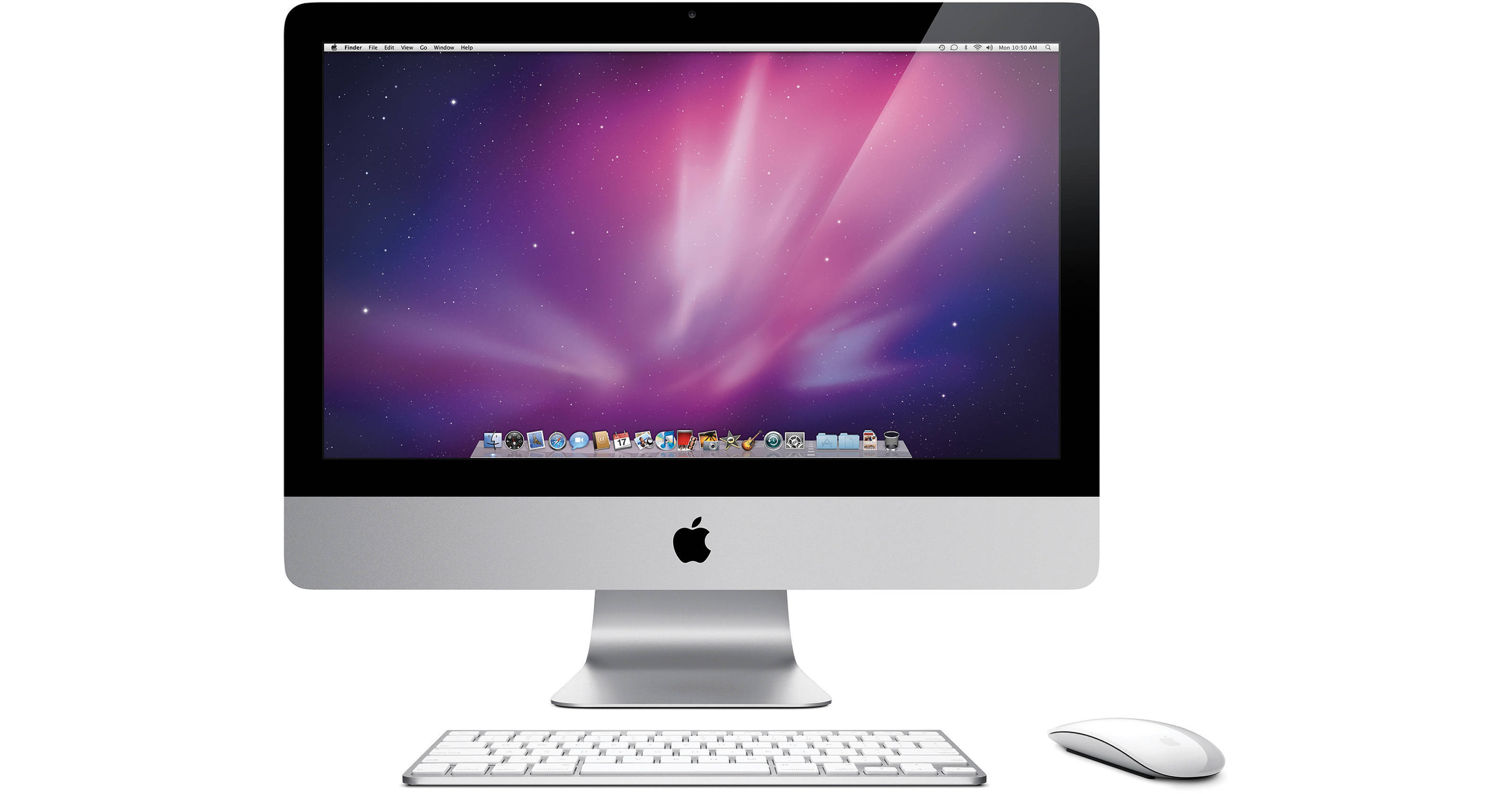
The 21.5" iMac Desktop Computer from Apple is a sleek all-in-one computer with a stunning 16:9 HD display. Capable of displaying 1080p HD video at full resolution, the display features a LED backlight and IPS panel technology for superior image quality. The iMac sports a sleek aluminum and glass industrial design, with a matching wireless slimline aluminum keyboard. Apple's innovative wireless Magic Mouse is included for cursor control, giving desktop users the powerful multi-touch input capabilities that have in a desktop mouse form factor.
The built-in iSight camera hides discreetly above the LCD screen, giving you ready access to a webcam for Internet chat and conferencing. The included iChat and Photo Booth applications allow you to chat online and take fun self-portraits with the camera. You'll be able to download pictures from your digital camera directly into iPhoto thanks to the built-in SDXC card slot, and you can connect peripherals to the system via USB 2.0 and FireWire-800.
iLife '11, a complete suite of digital creativity applications, is installed on the system. Easy enough for anyone to use, iLife will help you edit your home movies, organize digital photos, and compose original music. The system is also powerful enough to run Apple's professional-level applications, perfect for those who are ready to move up to the next level of creative software.
The computer is powered by a dual-core 3.2GHz Core i3 processor for superior performance. It boasts 4GB of RAM, a 1TB hard drive, Bluetooth 2.1+EDR, dual-band 802.11n Airport Extreme Wi-Fi, integrated speakers, and the SuperDrive DVD burner. The glossy 21.5" widescreen display is powered by a ATI Radeon HD 5670 GPU with 512MB of GDDR3 memory.
All this hardware runs on Apple's Mac OS X 10.6 Snow Leopard operating system. The 64-bit OS features Time Machine backup, which automatically backs up system data to an external hard drive. It also features intuitive Cover Flow navigation, the powerful Spotlight search tool, and Quick Look document preview. You'll be able to use Boot Camp to run Windows on your Mac, or Front Row to turn your Mac into an impressive media player.
The iMac is a strikingly elegant computer that will feel at home on virtually any desk.
| Performance | |
|---|---|
| Processor | 3.2GHz Core i3 |
| Cache | L3: 4MB |
| Bus Speed | None |
| Memory |
Slots: 4x SO-DIMM Type: PC3-10600 1333MHz DDR3 SDRAM SO-DIMM Installed: 4GB (2x2GB) Capacity: 16GB |
| Display |
Type: LED Backlit Glossy Widescreen TFT Active-Matrix LCD with IPS Technology Size: 21.5" Native Resolution: 1920 x 1080 Aspect Ratio: 16:9 Colors: Millions of colors at all resolutions Viewing Angle: 178° horizontal, 178° vertical Brightness: 330cd/m² Contrast Ratio: 1000:1 |
| Graphics Display Card | ATI Radeon HD 5670 with 512MB GDDR3 RAM |
| Storage and Expansion | |
|---|---|
| Hard Drive |
Bays: 1x Installed: 1TB, 7200rpm Type: Serial ATA |
| Optical Drive |
1x Slot-loading 8x-speed SuperDrive Reads CD: 24x DVD: 8x Writes CD-R: 24x CD-RW: 16x DVD-R: 8x DVD-RW: 6x DVD-R DL: 4x DVD+R: 8x DVD+RW: 8x DVD+R DL: 4x |
| Input/Output Connectors | |
|---|---|
| Ports |
1x 9-Pin FireWire-800 (7W) 4x USB 2.0 |
| Display Output | 1x Mini DisplayPort output port with support for DVI, VGA, and dual-link DVI (adapters sold separately). |
| Audio |
2x Integrated Stereo Speakers with two internal 17W high-efficiency amplifiers 1x Integrated Microphone 1x Headphone/Optical Digital Audio Output (Minijack) 1x Audio Line-In/Optical Digital Audio Input (Minijack) Support for Apple iPhone headset with microphone |
| Video | None |
| Communications | |
|---|---|
| Wired |
Network: 10/100/1000 Gigabit BASE-T Ethernet connector (RJ-45) Modem: None |
| Wireless |
Wi-Fi: AirPort Extreme 802.11a/b/g/n Bluetooth: Bluetooth 2.1+EDR |
| Webcam | 1x Integrated iSight Camera |
| General | |
|---|---|
| Operating System | Mac OS X 10.6 Snow Leopard |
| Security | None |
| Power Requirements |
Meets ENERGY STAR 5.0 requirements AC: 100-240VAC, 50-60Hz, Single Phase Maximum Continuous Power: 241W |
| Environmental Requirements |
Operating Temperature: 50-95°F (10-35°C) Storage Temperature: -40-116°F (-40-47°C) Relative Humidity: 5-95%, noncondensing Maximum Altitude: 10,000' (3048 m) Typical Acoustical Performance: 18dBa sound pressure level at idle |
| Dimensions (WxHxD) | 20.8 x 17.75 x 7.42" (52.8 x 45.1 x 18.85cm) |
| Weight | 20.5 lb (9.3kg) |
REVIEW SNAPSHOT®
by PowerReviewsPros
Cons
Best Uses
Most Liked Positive Review
New Mac user
We have been windows users our whole lives. Made the switch as we were tired of our slow running, control alt delete demanding, just didn't work right Dell computer. We love our Mac....Read complete review
We have been windows users our whole lives. Made the switch as we were tired of our slow running, control alt delete demanding, just didn't work right Dell computer. We love our Mac. My wife is an avid amatuer photographer and the speed she is now able to edit her photos is astonishing, it's so easy to use. Best purchase we've made period in quite some time.
VS
Most Liked Negative Review
Support not Apple's long suit
Ive had my iMac for a week and have been through the same quest for hidden support help that many manufacturers insist on. Toshiba is the most notable exception - their phone number is right...Read complete review
Ive had my iMac for a week and have been through the same quest for hidden support help that many manufacturers insist on. Toshiba is the most notable exception - their phone number is right on the front of the manual - and they answer it promptly. I've been using PC's for 30 years and am not a rookie. I've spent HOURS trying to get past several simple problems that I'm sure somene could have helped me around quickly. One of the issues was simply a need to reboot the machine after makine a network setting. That fact was nowhere in the often sketchy instructions. Plan on struggling with the earning curve for hours or paying extra for simple startup help.
REVIEWS
Reviewed by 20 customers
Sort by
Displaying reviews 1-20
Pros
Cons
Best Uses
Comments about Apple 21.5" iMac Desktop Computer:
Was looking for an iMac at an affordable price (right around 1k) and found just that here at B&H. I wanted something that also had power to run FCP. After editing on my late 2009 macbook pro for 2 years, this new machine is a dream! It made cutting fun again.
Pros
Cons
Best Uses
Comments about Apple 21.5" iMac Desktop Computer:
I converted to Mac after security problems with PC. iMac is a delight to use. Fast, plenty of memory, stable. Very satisfied.
Pros
Cons
Best Uses
Comments about Apple 21.5" iMac Desktop Computer:
This product is very good in digital work. such as photo and video.
Pros
Cons
Best Uses
Comments about Apple 21.5" iMac Desktop Computer:
I agonized over buying this computer - my first Mac - and now I wish I hadn't wasted all that time. This is a beautiful machine, fast, smooth, easy to operate and wonderfully intuitive. Even as a lifelong PC user, this mac has posed few challenges and I am simply delighted. [...]
Pros
Cons
Best Uses
Comments about Apple 21.5" iMac Desktop Computer:
Great all in one computer.
Comments about Apple 21.5" iMac Desktop Computer:
I use mac since 1995 and love it.
Pros
Cons
Best Uses
Comments about Apple 21.5" iMac Desktop Computer:
Everything is great [...] I will never go back to PC!!!
Pros
Cons
Best Uses
Comments about Apple 21.5" iMac Desktop Computer:
I use this computer for photo editing primarily, but when the need arises, I also do multi-track recording and mixing. It has not let me down in any way.
Pros
Cons
Best Uses
Comments about Apple 21.5" iMac Desktop Computer:
Personal use.
Pros
Cons
Best Uses
Comments about Apple 21.5" iMac Desktop Computer:
This is my second Mac, and I love it just as much as my first. My first Mac was a 15inch MacBook Pro, which still runs great just a little outdated. The iMac is incredible. The monitor is outstanding. I d some video and graphic work and the monitor has great resolution and color. Its fst, and has a lot of storage space.
Pros
Cons
Best Uses
Comments about Apple 21.5" iMac Desktop Computer:
i work with photoshop and indesign. it works perfect for my needs.
What i los about it, is that the price is low compare to the time i'm saving
Pros
Cons
Best Uses
Comments about Apple 21.5" iMac Desktop Computer:
Got this imac as part of an FCP turnkey editing suite. Brilliant display and speed; better than my PC and my older Mac in every way feasible. Meets or exceeds all my current editing needs.
Pros
Cons
Best Uses
Comments about Apple 21.5" iMac Desktop Computer:
Perfect hardware! Bought for my daughter, she is in love for it.
Pros
Cons
Best Uses
Comments about Apple 21.5" iMac Desktop Computer:
This is my first Mac and I've been learning how to use it since I purchased it. I do like that it is compact and sleek. I purchased it to process pictures on because the view of photos on my PC laptop depends on the angle of screen. With the Mac desktop, no matter how I angle the monitor, I get the same view of the photo (e.g. brightness is the same).
Pros
Cons
Best Uses
Comments about Apple 21.5" iMac Desktop Computer:
Ive had my iMac for a week and have been through the same quest for hidden support help that many manufacturers insist on. Toshiba is the most notable exception - their phone number is right on the front of the manual - and they answer it promptly. I've been using PC's for 30 years and am not a rookie. I've spent HOURS trying to get past several simple problems that I'm sure somene could have helped me around quickly. One of the issues was simply a need to reboot the machine after makine a network setting. That fact was nowhere in the often sketchy instructions. Plan on struggling with the earning curve for hours or paying extra for simple startup help.
Pros
Cons
Best Uses
Comments about Apple 21.5" iMac Desktop Computer:
Brilliant machine; just got it for my girlfriend and setting it up was a pleasure as always. Versatile, easy to use, no cables and the exceptional OS X makes this a great product.
Mine is coming soon, but a bit wider for me :)
Pros
Cons
Best Uses
Comments about Apple 21.5" iMac Desktop Computer:
Absolutely on par with the best Apple offers. Great upgrade to my 20" iMac. Runs all of my software fast and smoothly. Does everything well so far. Windows 7 with VMWare Fusion runs great, too, giving me the best of both worlds.
Pros
Cons
Best Uses
Comments about Apple 21.5" iMac Desktop Computer:
As a Packaging Graphic Designer, I have worked with Macs all my life, from the tiny Macintosh Classic to this iMac.
With only ONE cable to plug, this a true "Plug and Play" desktop computer. This iMac is just awesome. Really fast, nice large screen and the wireless keyboard and mouse are so cool, my wife would like them for her Windows laptop! The LED screen is super sharp, making the graphics look crisp.
Pros
Cons
Best Uses
Comments about Apple 21.5" iMac Desktop Computer:
Used Mostly for Photography.
Pros
Cons
Best Uses
Comments about Apple 21.5" iMac Desktop Computer:
We have been windows users our whole lives. Made the switch as we were tired of our slow running, control alt delete demanding, just didn't work right Dell computer. We love our Mac. My wife is an avid amatuer photographer and the speed she is now able to edit her photos is astonishing, it's so easy to use. Best purchase we've made period in quite some time.
Displaying reviews 1-20