Please update your browser to take advantage of the latest technology security enhancements to ensure your B&H Shopping experience is as safe as it is enjoyable:
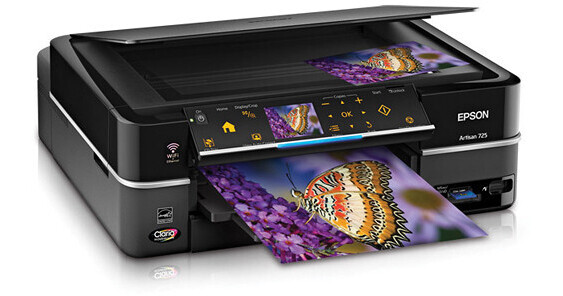
When you want professional quality prints and photos you can be proud of - whether they are simple snapshots or your photo masterpieces - you can rely on Epson's Artisan 725 Wireless All-In-One Printer.
The Artisan 725 delivers 4.0 x 6.0"/A6 photos at blazing speeds - as fast as 10 seconds! It equally fast for everyday projects with ISO print speeds down to 9.0 ISO ppm in color and 9.5 ISO ppm in B&W. It incorporates six individual ink cartridges with Clara Hi-Definition dye-based inks that yield superior color and B&W images and text with a maximum resolution of 5760 x 1400 dpi.
This performer is equipped with a Wi-Fi 802.11n connection so you can use it from anywhere in the house. Share it with multiple computers to print, scan and access memory cards. You can also go "hi-tech" and print from iPhones and other mobile devices.
The Artisan 725 means freedom - you can print without being connected to you computer. Just pop in a memory card or USB thumb drive -and you are good to go. It also has USB 2.0 interface with PictBridge so you can print directly from your digital camera - no waiting - no PC! The built-in Auto Photo Correction mode for cropping, rotating, enlarging, red-eye removal, and color correction helps you get the photos you want. It also provides a means of restoring life to faded photos.
For easy handling the unit comes with two paper trays - one for plain paper and another for photo papers. It also features automatic two-sided printing for added creative possibilities and paper saving. The Artisan 725 will allow you to let your creative rivers flow - on all types of media. As an added bonus - it has a built-in retractable CD/DVD tray so you can even print your images and text directly onto inkjet-printable media without messy labels.
When you want professional quality prints and photos you can be proud of - whether they are simple snapshots or your photo masterpieces - you can rely on Epson's Artisan 725 Wireless All-In-One Printer.
The Artisan 725 delivers 4.0 x 6.0"/A6 photos at blazing speeds - as fast as 10 seconds! It equally fast for everyday projects with ISO print speeds down to 9.0 ISO ppm in color and 9.5 ISO ppm in B&W. It incorporates six individual ink cartridges with Clara Hi-Definition dye-based inks that yield superior color and B&W images and text with a maximum resolution of 5760 x 1400 dpi.
This performer is equipped with a Wi-Fi 802.11n connection so you can use it from anywhere in the house. Share it with multiple computers to print, scan and access memory cards. You can also go "hi-tech" and print from iPhones and other mobile devices.
The Artisan 725 means freedom - you can print without being connected to you computer. Just pop in a memory card or USB thumb drive -and you are good to go. It also has USB 2.0 interface with PictBridge so you can print directly from your digital camera - no waiting - no PC! The built-in Auto Photo Correction mode for cropping, rotating, enlarging, red-eye removal, and color correction helps you get the photos you want. It also provides a means of restoring life to faded photos.
For easy handling the unit comes with two paper trays - one for plain paper and another for photo papers. It also features automatic two-sided printing for added creative possibilities and paper saving. The Artisan 725 will allow you to let your creative rivers flow - on all types of media. As an added bonus - it has a built-in retractable CD/DVD tray so you can even print your images and text directly onto inkjet-printable media without messy labels.
Note:
USB and Ethernet Cables are NOT Included
Fast Print Speeds
This powerful performer prints brilliant 4.0" x 6.0"/A6 photos in as fast as 10 seconds, without sacrificing quality. And, it's fast for everyday projects as well with ISO print speeds of 9.5 ISO ppm in black and 9.0 ISO ppm in color. Actual print times will vary based on system configuration, software and page complexity.
Built-In Wireless & Ethernet Networking
The Artisan 725 is equipped with the wide-range 802.11n Wi-Fi and wired Ethernet interfaces so it can be shared with multiple PC's. Print, scan and access memory card slots from any room in the house.
Print Directly from Memory Cards and Cameras
With built-in memory card slots and PictBridge compatibility, you can print photos PC-free from most digital cameras, multimedia players, camcorders and other devices. The Artisan 725 will also print from iPhones, iPods and other compatible mobile devices. You can visit www.epson.com/mobileprinting for details.
PC-Free Features
With the Artisan 725 you can let your creative juices flow without a computer. PC-free printing features supports: auto photo correction, cropping, rotating and enlarging photos, viewing photos and printing by date. You can also print your own picture packages, passport and ID photos, index sheets, greeting cards, coloring book pages, notepaper using your photos, ruled and graph papers.
Advanced Technology
Advanced MicroPiezo print head technology ensures sharp, accurate ink placement, while optimizing print speeds. Utilizing "smart" nozzles this powerful technology delivers ink droplets in as many as five sizes, some as small as 1.5 picoliters, ensuring remarkable precision, sharper detail and outstanding image quality.
Professional Looking CDs & DVDs
The Artisan 725 features a built-in retractable CD/DVD tray to enable direct printing onto inkjet-printable media without messy labels.
Long Lasting Prints
With Claria Hi-Definition dye ink and Epson's DX5 MicroPiezo print technology you can produce images with richness, depth and clarity. Prints made with Claria inks and Epson photo papers are smudge, scratch & water resistant, and can last up to 200 years in album storage, up to 98 years under glass.
Versatile Paper Handling
The Artisan 725 comes with two paper trays: a main which holds up to 120 sheets of plain paper, and a photo tray which holds up to 20 sheets of photo paper. It is also equipped for paper-saving automatic two-sided duplex printing.
Easily Charge Portable Devices
You can free up a power outlet and charge cell phones and MP3 players via the built-in USB port. A user-supplied cable is required.
Auto Photo Correction
Artisan 725 users will benefit from built-in Auto Photo Correction which provides red-eye removal and color balance to produce professional photo-lab quality photos.
Scan and Restore Faded Photos
Use the Artisan 725 to bring old, faded photos back to life. Simply scan in photos and use the automated restoration functions to easily restore the color to faded images.
Smart Ink System
By using six individual ink cartridges, you can replace only the color that you need to, and save both money and the environment. Standard and high-capacity ink replacement cartridges are both compatible with the Artisan.
Copier Features
Copier features include: automatic background removal for text, fit original to selected paper size, photo reprints and enlargements, color restoration of old faded photos, and copying onto CDs and DVDs.
Scanner Features
With the Artisan 725 you can scan photos to a memory card or USB flash drive, to a searchable PDF file and to your PC via the USB and network interfaces.
Software Bundle
The included software bundle includes: Epson printer driver, Epson Print CD, Web to Page, Epson Scan, ArcSoft Print Creations, and Epson scanner drivers. ArcSoft Print Creations includes templates to create borders, photo IDs, CD/DVD jewel cases and a selection of one-of-a-kind projects.
Epson 725 Specs
Printer
Printing Technology
Advanced MicroPiezo and DX5 technologies
Maximum Resolution
5760 x 1440 dpi
Print Speed
Black: 9.5 ISO ppm
Color: 9.0 ISO ppm
4.0 x 6.0"/A6 color photo: as fast as 10 sec
Minimum Ink Droplet Size
1.5 pl
Ink Type
Claria Hi-Definition Ink - dye-based
Ink Palette
Black, Cyan, Light Cyan, Magenta, Light Magenta and Yellow
Up to 200 years album storage, up to 98 years under glass
Scanner
Scanner Type
Color flatbed
Image Sensor
CIS line sensor
Optical Resolution
2400 dpi
Interpolated Resolution
9600 x 9600 dpi
Color Depth
Input: 48-bit color
Output: 24-bit
Dynamic Range
Not Specified by Manufacturer
Light Source
White LED
Reflective Scan Area
8.5 x 11.0" (216 x 279mm)
Copier
Copy Speed
Black: up to 39 cpm
Color: up to 40 cpm
Copy Resolution
Not Specified by Manufacturer
Reduction/Enlargement
25-400%
Number of Copies
1-99
Paper Handling
Maximum Paper Width
8.5"
PC-Free Paper Support
Plain: 8.5 x 11.0" (letter, 216 x 279mm), 8.5 x 14.0" (legal, 216 x 356mm) Photo: 4 x 6" (A6,102 x 152mm), 5 x 7" (127 x 178mm), 8 x 10" (216 x 254mm), 8.5 x 11"(letter, 216 x 279mm), 8.5 x 14" (legal, 216 x 356mm), 16:9 wide
Inkjet printable CDs / DVDs
Paper Sizes
3.5 x 5.0", 4.0 x 6.0" (A6,102 x 152mm), 5 x 7" (127 x 178mm), 8.0 x 10.0" (127 x 178mm), 8.5 x 11.0" (letter, 216 x 279mm) , 8.5 x 14.0" (legal, 216 x 356mm)
A4, B5, A5, A6
Half letter and Executive
Borderless Photo Sizes
3.5 x 5.0" (89 x 127mm), 4.0 x 6.0"(A6,102 x 152mm), 5 x 7" (127 x 178mm), 8.0 x 10.0" (127 x 178mm), 8.5 x 11.0" (letter, 216 x 279mm), 16:9 wide
Input Paper Tray Capacity:
Main paper tray: 120 sheets plain paper, 10 envelopes, adjustable up to 8.5 x 14.0" (legal, 216 x 356mm)
Photo Tray: 20 sheets glossy photo paper, 4.0 x 6.0" (A6,102 x 152mm) and 5.0 x 7.0" (127 x 178mm) Output Paper Tray Capacity:
30 sheets Secondary Paper Tray Capacity:
20 sheets photo paper
Maximum Paper Thickness
10.4 mil
Basis Weight
252 gsm
Special Media Support
Inkjet printable CD/DVDs
Duplex Printing
Automatic
Connectivity
Computer Interface
Wi-Fi 802.11b/g/n
Ethernet - 10/100
Hi-Speed USB 2.0
PictBridge
Compatible Memory Cards
SD, SDHC, xD-Picture Card Type-M, xD-Picture Card Type-M+, xD-Picture Card Type-H, Memory Stick, Memory Stick PRO, Memory Stick MagicGate, Compact Flash Type I, II, Microdrive V, MMCplus, and MMCmobile With Adapter (sold separately):
MiniSD, MicroSD, Mini SDHC, Micro SDHC, Memory Stick Duo, Memory Stick PRO Duo, Memory Stick PRO-HG Duo, Memory Stick Micro (M2), MMCmicro
Direct Print Capable
PictBridge port (cameras/phones), DPOF
Network Capable
Yes (Wi-Fi & Ethernet)
Printer Language
Epson ESC/P-R
Operating Systems
Windows 7, Windows Vista, Windows XP, Windows XP x64
Mac OS X 10.3.9, 10.4.11, 10.5.x and 10.6.x
Supported Technologies
Exif Print
Software
Epson printer driver, Epson scanner driver, Epson Print CD, Web to Page, Epson Scan and ArcSoft Print Creations
Physical
Image Preview Display
2.5"/64mm color LCD
Front Panel Controls
Tilting touch control panel
Power Requirements
120VAC, 50-60Hz, 0.8Amp
Power Consumption
Approx. 25W ISO 10561
Approx. 5.0W (Sleep Mode)
Approx. 0.3W (Power Off Mode)
ENERGY STAR compliant
Dimensions
Printing: 17.6 x 25.8 x 5.9" (447 x 665 x 150mm)
Storage: 17.6" x 18.0" x 5.9" (447 x 457 x 150mm)