A memory card is required but not included with this item. Please be sure to purchase a memory card that suits your needs.
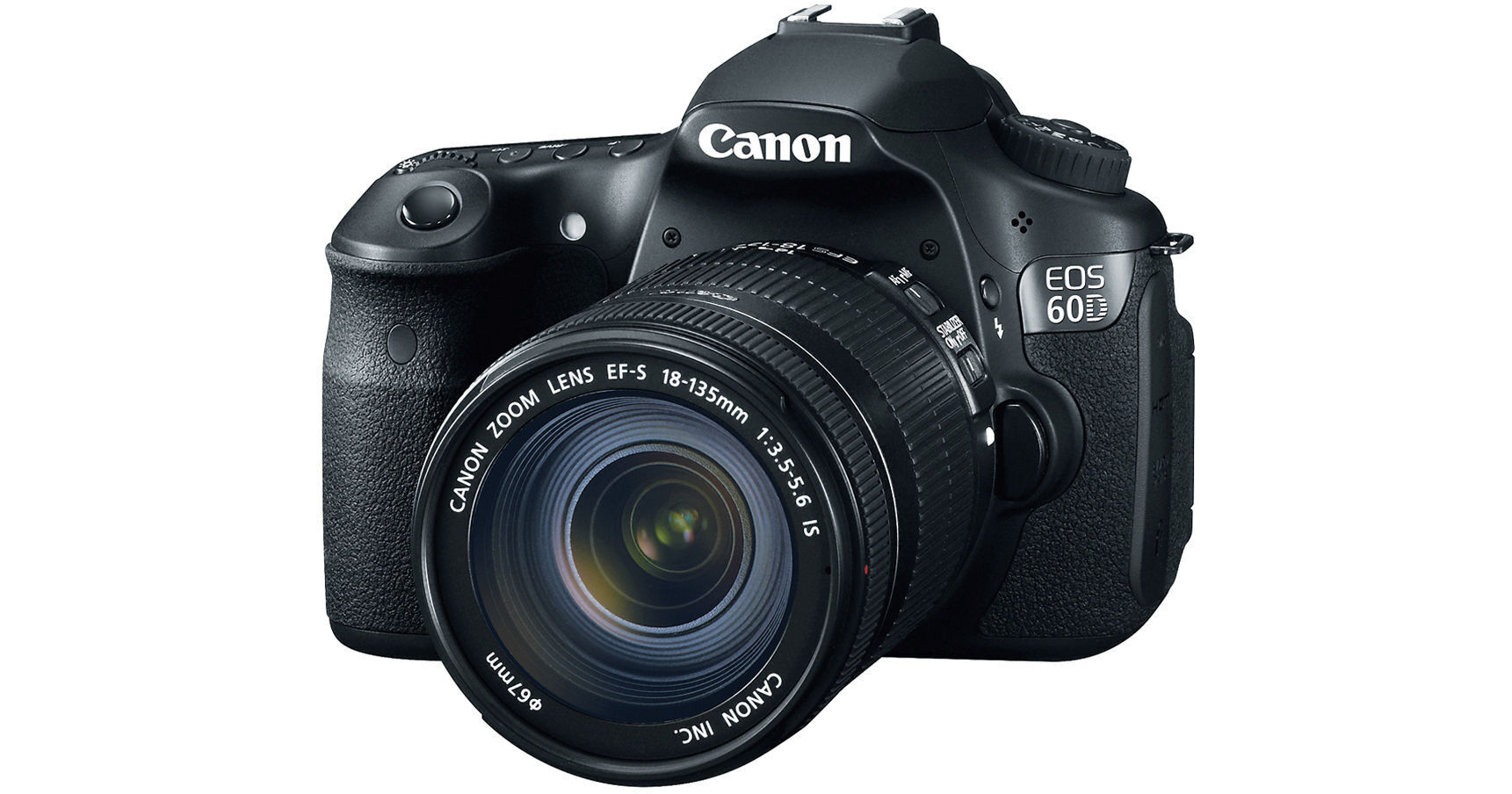
Digital Inspiration. That's how the good folks at Canon define their EOS 60D DSLR Camera Kit with Canon EF-S 18-135mm Lens. With a camera body that features an 18MP APS-C CMOS sensor, a 3" Clear View LCD, HD video capture, and an 18-135mm lens, among other mouth-watering features, perhaps you will agree. Let's take a tantalizing tour of this highly-anticipated DSLR camera kit.
Chief among the aforementioned "mouth-watering features" is the included Canon EF-S 18-135mm lens. Yes! It's true! But perhaps you've already divined this fact from the first paragraph and you're waiting for me to get on with it. The 60D is compatible with all Canon EF and EF-S lenses; Canon has paired this 18-135mm model up with the 60D camera body, making for a value-packed kit that'll have you shooting from day one (everybody say yay!). The 18-135mm is a great starter lens that gives you a wide zoom range with which to shoot - capture those close, close-ups all the way out to breath-taking, far-reaching vistas - all with this single lens.
What was that? Did I say video? Yes, I did. Let's take a moment to delve into the feature that has all those techies out there jumping out of their desk chairs. The 60D is more than your run-of-the-mill DSLR camera, as we know; it doubles as a 1920 x 1080 HD video camera. With the built-in video camera you'll be able to capture MOV video clips up to 4GB in size (time depends on resolution).
With features like manual exposure control, the option to attach on any of the Canon EF or EF-S lenses, and various audio adjustments - including an external stereo mic connection, and both manual and auto gain control - the 60D puts DSLR film-making at your fingertips. Other noteworthy features of the video function include in-camera editing, a number of recording resolutions to choose from, and an HDMI output for one-cable connection to your HDTV.
Perhaps you should take a moment and catch your breath. Ok, here we go - back to the DSLR proper.
Let's ease back into things here. No matter if you're shooting video or digital stills the 60D captures everything to convenient flash memory cards - Record to SD/SDHC/SDXC memory cards. Canon also gives you the option to use wireless USB 2.0 drives, or Eye-Fi cards for computer-free wireless transfer of your images.
Now, back to the show... The 18MP APS-C CMOS sensor packs in enough pixel-power to make those mural prints you've only been dreaming of, a reality. But even if you don't plan on making a wall-sized mural of your dog romping through the surf, 18MP have other advantages. Sharpness, clear details, a lack of image-destroying noise, and true-to-life colors are all examples of how more pixels will make your images pop!
The 60D also features Canon's DIGIC 4 Image Processor. With DIGIC 4 you'll enjoy the benefits of fast shooting speeds, in-camera RAW image processing, creative filters, image resizing, and other exciting in-camera features. Enhanced Face Detection Live Mode, Full HD video recording, Auto Lighting Optimizer, and Lens Peripheral Optimization are additional features also enabled by DIGIC 4.
Another high-point of the 60D is the fully articulated (in layman's terms: flip out and/or swivel) 3" LCD screen. That's right boys and girls, the LCD opens away from the camera and articulates for viewing from multiple angles. You can also choose to leave the LCD in the traditional back of the camera position. When you're done shooting, turn the LCD in, and its back cover protects the display from damage.
When it comes to low light you want the option to shoot without a flash. Canon gave the 60D ISO settings from 100-6400 - and the option to go up to 12800 using the custom function. You have more options to choose from - and more opportunity to capture stunningly clear images, even in low light.
What else could Canon fit into this divinely, oh wait, I mean digitally inspired camera? A short overview; includes 5.3 frames per second continuous shooting, a 96% coverage viewfinder, a multi-control dial, a 63-zone dual-layer metering system, and a 9-point AF system.
In addition to these user-friendly features, the camera also boasts in-camera photo editing technologies. You'll be able to process RAW files entirely in the camera to produce a separate JPEG file - without a computer. Filters like "Grainy Black-and-White" and "Soft Focus Effect" also allow you to add an artistic touch to your images, sans post-production. Throw in compatibility with Mac and PC, along with a myriad of bundled software options, and the 60D is one camera that packs a powerful punch.
The improved DIGIC 4 Image Processor ensures that images are captured, processed and saved with remarkable speed. The EOS 60D DSLR's new 3:2 multiple aspect ratio, in-camera RAW image processing, creative filters, image resizing and provided S2 and S3 image-recording quality are all possible thanks to the DIGIC 4 Image Processor. With dazzling results, the new DIGIC 4 Image Processor also works to capture and process data of images shot at 18MP at 5.3 fps, as well as 14-bit signal processing for excellent image gradation, enhanced Face Detection Live mode, Full HD video recording, Auto Lighting Optimizer and Lens Peripheral Optimization
With 1,040,000 (dots/VGA) pixels for spectacular detail, the advanced, smudge-resistant monitor includes high transparency materials plus anti-reflective and water-repellent coatings to provide clear and bright viewing. Superb for reviewing, editing and deleting photos or composing new images in Live View function, the Vari-angle Clear View LCD monitor also allows access to camera settings like ISO, metering modes, AF Point selection, the horizontal Electronic Level and flash options
The audio input level feature offers both manual and auto gain control, up to 64 levels, and a wind filter minimizes unwanted background noise. By pressing the Quick Control button, a simple graphic user interface for adjusting image quality, white balance, image creation and other settings appears on the LCD. The EOS 60D even lets users edit video in-camera: On-site or off, unnecessary scenes can be deleted and the start/end points of video footage can be designated via in-camera editing functions without the need of a separate computer
Video can be captured at a number of resolutions and frame rates for numerous applications. It can capture 1920 x 1080 Full HD video at frame rates of 30 (29.97 fps), 24 (23.976 fps) and 25 frames per second, for up to 4GB per clip. Video footage is saved as MOV files and can be viewed in Full HD through the EOS 60D DSLR's HDMI output. Other recording sizes include HD at 1280 x 720 (50/60 fps) or SD/VGA at 640 x 480 (50/60 fps) -24/30 fps delivers cinema-like motion, while 60 fps is perfect for footage being uploaded to video-sharing websites. The EOS 60D also has a built-in microphone for simple mono recording and stereo sound can be recorded through a self-powered external microphone
The EOS 60D also features a horizontal Electronic Level, that, when activated, is superimposed on the LCD monitor to aid in achieving evenly leveled shots by indicating the horizontal tilt up to approximately 9° in 1° increments
Additionally, once you capture an image with the EOS 60D, you can digitally manipulate it in-camera with a number of creative filters for artistic and dramatic effect. Options include Soft Focus Effect to convey dreamy tableaus; Grainy Black-and-White Effect for a gritty, hard-bitten look; Toy Camera Effect - the deliberate vignetting and color shift technique popular in art photography - and Miniature Effect, which blurs the top and bottom edges of the image to emphasize perspective and conveys a miniaturized look of the scene
The 60D can also gives you the option to store recordings to external media sources like USB 2.0 or Wireless LAN/Eye-Fi card (Canon cameras are not guaranteed to support Eye-Fi card functions, including wireless transfer)
The optional Canon Speedlite 430EX II is a step-up accessory for powerful flash shooting with the EOS 60D. It has excellent flash power (maximum guide number of 141'/43m at ISO 100), and is the perfect way to get great flash pictures when you can't get right up to the subject. The 430EX II is also great for bounce flash, with its tilting and swiveling flash head. It automatically zooms the flash head to cover lenses ranging from 16mm up to 105mm or longer with the EOS 60D. Of course, it works with the camera to provide full E-TTL II automatic flash exposure. And the 430EX II has a powerful AF-assist beam, which allows the camera to autofocus even in total darkness on subjects as far as 32 ft. from the camera
| Imaging | |
|---|---|
| Camera Type | Digital SLR with Interchangeable lenses |
| Lens Mount | Canon EF |
| Camera Format | APS-C / (1.5x Crop Factor) |
| Resolution |
Effective Pixels: 18 Megapixels Max Resolution: 17.9 MP: 5184 x 3456 |
| Sensor Type / Size | CMOS, 22.3 x 14.9 mm |
| File Formats |
Still Images: JPEG, RAW Movies: MPEG-4 AVC/H.264, MOV |
| Bit Depth | 14-bit |
| Memory Card Type |
SD SDHC SDXC |
| AV Recording | |
|---|---|
| Video Recording | Yes, NTSC/PAL |
| Aspect Ratio | 4:3, 16:9 |
| Video Clip Length | Up to 22 Minutes Limited by Memory Card Capacity |
| Audio Recording | With Video, Mono |
| Focus Control | |
|---|---|
| Focus Type | Auto & Manual |
| Viewfinder/Display | |
|---|---|
| Viewfinder Type | Pentaprism |
| Viewfinder Coverage | 96% |
| Live View | Yes |
| Exposure Control | |
|---|---|
| ISO Sensitivity | 100-6400 (Extended Mode: 100-12800) |
| Shutter | 30 - 1/8000 sec |
| Mirror Lock-Up | Yes |
| Metering Method | Spot metering, Center-weighted average metering, null |
| Exposure Modes | Modes: Aperture Priority, Auto, Manual, Shutter Priority |
| White Balance Modes | Auto, Cloudy, Daylight, Flash, Fluorescent (White), Shade, Tungsten, Preset Manual |
| Flash | |
|---|---|
| Built-in Flash | Yes: Auto |
| Max Sync Speed | 1 / 250 sec |
| Continuous Shooting | Up to 5.3 fps |
| External Flash Connection | Hot Shoe |
| Performance | |
|---|---|
| Connectivity | AV Output, HDMI C (Mini), USB 2.0 |
| Wi-Fi Capable (With Optional Transmitter) | Yes |
| Software Requirements |
Windows: 98, ME, 2000, XP, Vista, 7 Mac: OS X 10.1 or later |
| Power | |
|---|---|
| Battery | 1x LP-E6 Rechargeable Lithium-Ion Battery Pack |
| AC Power Adapter | AC Adapter Kit ACK-E6 (Optional) |
| Operating/Storage Temperature |
Storage 32 to 104 °F (0 to 40 °C) |
| Physical | |
|---|---|
| Dimensions (WxHxD) | 5.69 x 4.17 x 3.09" / 14.45 x 10.59 x 7.85 cm |
| Weight | 23.8 oz / 675 g Body only |
| Kit Lens | |
|---|---|
| Focal Length |
18 - 135 mm Comparable APS-C Focal Length: 29 - 216 mm |
| Aperture |
Maximum: f/3.5 - 5.6 Minimum: f/22 - 36 |
| Angle of View | 74° - 11° |
| Minimum Focus Distance | 1.5' (45.72 cm) |
| Magnification | 0.21x |
| Maximum Reproduction Ratio | 1:4.7 |
| Groups/Elements | 12/16 |
| Diaphragm Blades | 6 |
| Autofocus | Yes |
| Image Stabilization | Yes |
| Filter Thread | Front: 67 mm |
| Dimensions (DxL) | Approx. 3.0 x 4.0" (7.62 x 10.16 cm) |
| Weight | 1.0 lb (454 g) |
REVIEW SNAPSHOT®
by PowerReviewsPros
Cons
Best Uses
Most Liked Positive Review
Great DSLR for video production
I bought this camera with the purpose of shooting short video projects produced for the web. The capabilities of this camera far outweigh the needs of the project. The camera is not that much ...Read complete review
I bought this camera with the purpose of shooting short video projects produced for the web. The capabilities of this camera far outweigh the needs of the project. The camera is not that much different from the T2i or the 7D when it comes to sensor size and shooting capabilities, however, the ability to adjust audio right on the camera while shooting, and the swivel LCD screen are huge advantages for my shooting style and project work flow. I was looking at getting a 5D because that is the camera I use at work, but the 5D does not have the ability to attach an external mic, so I would have to use a Zume, or some other audio capturing device. For these small projects that just seemed to cumbersome. The 7D and T2i allow for external audio, however, you cannot adjust the audio on the fly. Again, that just creates more post work that I can eliminate on the smaller projects by using the 60D.
The sensor is not as big as the 5D, but is the exact same as the 7D and T2i. So if you already have a 7D, it makes no sense to buy a 60D, unless you are shooting a lot of video, If that is the case, I think the 60 D is a better camera for that purpose. If you are not shooting a lot of video, stick with the 7D. If you already own a T2i I'm not sure it is worth the upgrade, though I REALLY like the 60D. If, however, you do not have any of these cameras, I would start here and not even look at the T2i. It is only a matter of a few hundred dollars, and the swivel screen/audio control alone is worth that extra money-not to mention the stronger body. The T2i is just plastic, the 60D is not as heavy as the 7D but it is sturdy and feels like a professional camera.
I would and already have suggested this camera to many many people. I'm very happy with it!
VS
Most Liked Negative Review
nice camera but ...
So many cinematographers love these DSLRs so I must be one of the very few that are not happy...I used to have SD prosumer video cam (SONY DSR200) and it was great ...Read complete review
So many cinematographers love these DSLRs so I must be one of the very few that are not happy...I used to have SD prosumer video cam (SONY DSR200) and it was great in low light, but not so with this unless I am missing something. The pics are ok but not as good as I hoped. So you need lights (INDOORS). Even fast lenses prob wont help much. Also prob need stabilizer for better shots. Not really setup for video(or audio) features. If you do stills, it perfecto. Sorry dont mean to bash but its good to get started with unless you want low end 1/3"chip video cam or save up for better video cam. CANON quality is excellent. [...]
REVIEWS
Reviewed by 495 customers
Sort by
Displaying reviews 1-20
Previous | Next »
Comments about EOS 60D DSLR Camera Kit with Canon EF-S 18-135mm Lens:
The 60D is a wonderful camera. I use it only for video but the photos look great as well. I've shot with it only briefly so far but the footage looks incredibly high quality and professional.
The lens, at least for video, isn't great. You'd be better off getting the body cheap and buying a nice cheap fixed lens like the 50mm 1.8 (which I ended up doing and its footage looks great).
For those looking at a better camera than the t2i but a cheaper camera than the 5d or 7d, this is definitely worth getting.
Pros
Cons
Best Uses
Comments about EOS 60D DSLR Camera Kit with Canon EF-S 18-135mm Lens:
My problem with this kit primarily has to do with the kit lens and with all non-professional(L) Canon lenses, which is that they do not allow manual override of autofocus. Nikon offers this feature on their kit and mid-range lenses. But what's really crazy is that even though you can't override autofocus, the focus ring is still engaged when AF is on, meaning that if you attempt to focus with AF on, you can easily strip the gears involved in AF. It's almost like they wanted to ensure that the lens would break. This is beyond my comprehension. They really should try to match the features of similar Nikon lenses, but given that they didn't in this instance the least they should have done was disengage the freakin' ring. The 35mm/2.0 focus ring disengages with AF. What, did they fire their QA dept. to save some money? Inexplicable.
My only issue with the body itself is that it's not weather-sealed, a feature that, again, Nikon includes in this price range.
Finally, I should say that I did stay with the 60D, though I switched up to the 18-200. The feature set is quite impressive, and after about 2 weeks I must say I'm having a great time with it. Just be very careful with it. Make sure that whoever you hand it to knows to leave the focus ring alone. Finally, in my actuarial opinion and based on both of my gripes, get the warranty!
Pros
Cons
Best Uses
Comments about EOS 60D DSLR Camera Kit with Canon EF-S 18-135mm Lens:
It will take time to become familiar with all of the camera's attributes, but I'm looking forward to the challenge
Pros
Cons
Best Uses
Comments about EOS 60D DSLR Camera Kit with Canon EF-S 18-135mm Lens:
I bought this camera as an upgrade from the EOS 450D (Rebel XSi) and I am extremely pleased with its performance so far. The 60D is a great alternative to the 7D if you don't need the extra speed or MFA. Great IQ and very easy to use for someone upgrading to the next level DSLR. The 18-135 kit lens is a good quality lens for its price, and if you are used to the 18-55 kit lens, it's definitely a noticeable upgrade. However, it does have some limitations when fully zoomed in and out. All in all, I would still recommend this camera as one of the better ones built by Canon. The tilt/swivel LCD is extremely useful, especially when shooting weird angles or video.
Pros
Cons
Best Uses
Comments about EOS 60D DSLR Camera Kit with Canon EF-S 18-135mm Lens:
I recently made the switch from my full manual point & shoot Canon S90 to the Canon D60. The switch was smooth and the interface is friednly. A big advantage to the Canon D60 is the many "How To" Videos and resources that can be found online because it is a very popular camera amongst different levels of photographers.
At first I was a little afraid that I would be overwhelmed by the many options the camera has to offer but with all the inforamtion online I quickly was able to feel comfortable with the camera and take great photos.
The one thing I still haven't found is how to crop the images in camera. My Canon S90 has the option to crop (not resize) any photo, which I found very useful, so far I haven't found the option in the D60.
Overall I love the camera and love the photos I am able to shoot with it.
Pros
Cons
Best Uses
Comments about EOS 60D DSLR Camera Kit with Canon EF-S 18-135mm Lens:
This is an amazing camera for the money. I mainly bought this to step into the world of DSLR video and step away from cameras like the panasonic hvx200. With the right equipment to go along with this camera, the video capabilities are near endless. The still shooting is amazing itself of course. I really can't complain about much with this camera. If you plan on buying this or really any DSLR to take advantage of the video capabilities, you'd need a powerful external microphone with a 3.5 mini-jack connector. Also, a fast 50MM lens is a must to take advantage of the depth of field capabilities.
Pros
Cons
Best Uses
Comments about EOS 60D DSLR Camera Kit with Canon EF-S 18-135mm Lens:
Great.
Pros
Cons
Best Uses
Comments about EOS 60D DSLR Camera Kit with Canon EF-S 18-135mm Lens:
I bought this as an upgrade from my XTI...
I absolutely love it. Study little guy.
Tilt screen is a great plus...love shooting without looking like I am...good for those secret shots!
Pros
Cons
Best Uses
Comments about EOS 60D DSLR Camera Kit with Canon EF-S 18-135mm Lens:
I use this every weekend, amature photography. It's more camera than I need but nice to have the options. And the HD video is great for the grand kids. Easy to change settings
Pros
Cons
Best Uses
Comments about EOS 60D DSLR Camera Kit with Canon EF-S 18-135mm Lens:
Bought this camera to replace a stolen T3i. All I can say is WOW. There is so much more to the 60D.
Pros
Cons
Best Uses
Comments about EOS 60D DSLR Camera Kit with Canon EF-S 18-135mm Lens:
This product is used for taking pictures of my kids playing sports and it works great!
Pros
Cons
Best Uses
Comments about EOS 60D DSLR Camera Kit with Canon EF-S 18-135mm Lens:
With the right lenses (take into account crop form), this DSLR takes wonderful video and is an improvement over the 7D. With its articulating LCD screen, audio monitoring, Picture Style modes, crisp DOF, manual controls, and lightweight body I couldn't ask for more.
Pros
Cons
Best Uses
Comments about EOS 60D DSLR Camera Kit with Canon EF-S 18-135mm Lens:
We are using this camera to take pictures of our trips, parties and to have fun. It is very easy to use, but a litle heavy to carry. But when we see the qualities of our photos it worth!
Pros
Cons
Best Uses
Comments about EOS 60D DSLR Camera Kit with Canon EF-S 18-135mm Lens:
This is a great kit for beginners or more advanced shooters. The 18-135 lense is super smooth and great for wide or close shots. I personally use this camera more for the video function but the quality of the pictures are great as well. The flip screen is what I like about it the most because your not limited as much on what angle your at from the camera. This camera is super fast and has all the features you need for video use. The only thing I wish it had was a headphone jack for audio but you can get a mixer if you really need to.
Pros
Cons
Best Uses
Comments about EOS 60D DSLR Camera Kit with Canon EF-S 18-135mm Lens:
I have swapped all my nikon for canon and so glad I did. Great camera.
Pros
Cons
Best Uses
Comments about EOS 60D DSLR Camera Kit with Canon EF-S 18-135mm Lens:
This is a great camera. I produce a local T.V. show and use the camera. Quality is amazing at an affordable price. I definitely recommend it.
Pros
Cons
Best Uses
Comments about EOS 60D DSLR Camera Kit with Canon EF-S 18-135mm Lens:
After doing countless hours of research on what DSLR to purchase after being a SLR person for the past 20 years, I'm glad I went with the Canon 60D camera! Its well made and feels great in my hands. The instruction book can be intiminating at first so I recommend that you download the manual and review it on your computer.It's alot easier that way. Im pleased with the results I've gotten and the sharpness is excellent! The 18mm-135mm lens with Image stabilization works very well. For those of you that previously owned a different SLR system,I highly recommend that you purchase an adapter so that you can use those other system lenses with the Canon 60D! My Minolta lenses work great once again with the adapter and now I have full a full range of lenses again to use! My only negative comment for this camera is that Canon has made the neckstrap attachment area so small that you can't use your old clip on neckstraps.
Pros
Cons
Best Uses
Comments about EOS 60D DSLR Camera Kit with Canon EF-S 18-135mm Lens:
Great product. I use this mostly for video production. Amazing picture quality. Kit lens is a great one to start with especially for video. I paired this with an iDC follow focus, an IKAN shoulder stock and a RODE video mic for an affordable DSLR rig.
Pros
Cons
Best Uses
Comments about EOS 60D DSLR Camera Kit with Canon EF-S 18-135mm Lens:
As a videographer and aspiring cinematographer, I bought the 60D for its versatility and interchangeable lens system. The camera is affordable and gives me the ability to control depth of field, frame speed, ISO, and much more.
Still pictures can be captured beautifully on the camera. Video is also phenomenal, as mentioned before one can change the frame rate, from cinematic (24fps) to 60 fps. Video can be captured in an array of quality formats, including 1080 HD and 720 HD.
The onboard mic is not the best and picks up the sound of the lens focusing. It does not have a stereo microphone, so in order to get stereo sound and avoid the excess sound, one must attach a larger shotgun mic or use a lapel mic.
All in all, I'm satisfied with what I bought. As a film student, I can now make digital videos that don't look digital (unless I want them to!).
Pros
Cons
Best Uses
Comments about EOS 60D DSLR Camera Kit with Canon EF-S 18-135mm Lens:
I use it everyday. It is great in capturing videos, Especially with the right lens. With the 18-135 lens is perfect.
Displaying reviews 1-20
Previous | Next »