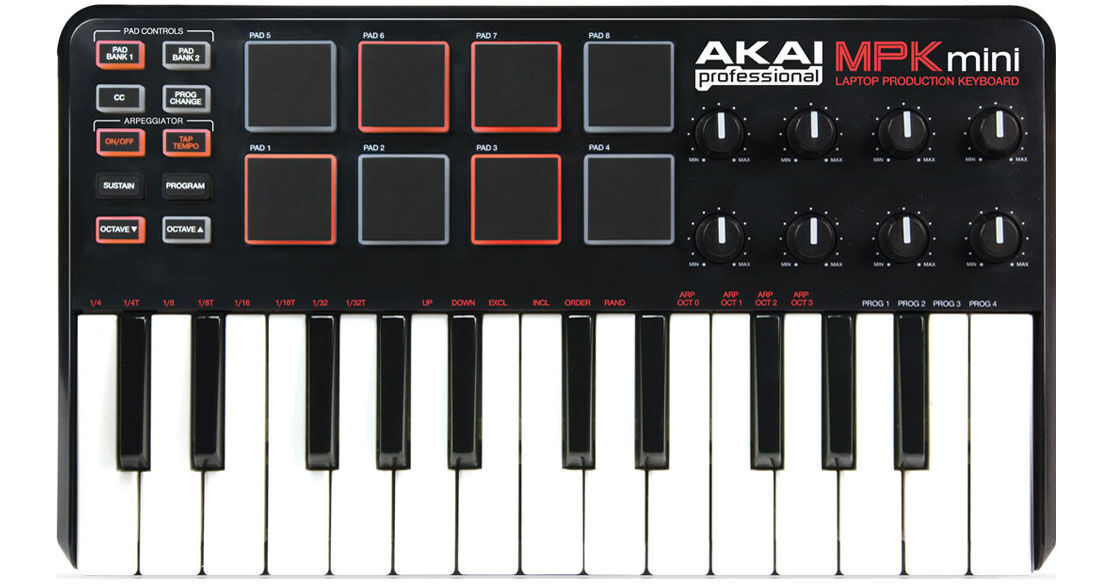
The MPK mini from Akai is an ultra-compact mini-keyboard that features 25 velocity and pressure sensitive keys, eight MPC-style trigger pads and eight Q-Link rotary controllers. The keyboard is ideal for quickly entering notes and phrases into the software of choice. The velocity-sensitive keys allow you to accurately express dynamics, while accessing different pitch ranges is achieved through dedicated octave up and down buttons.
A built-in arpeggiator functions in a variety of time denominations and patterns, while a tap-tempo button provides the ability to quickly adjust the arpeggiator clock, essential if you're looking to stay in sync with a band. A Sustain button holds notes after releasing your hand from the keyboard allowing you to easily utilize the pads and knobs.
The MPK mini's back-lit, velocity-sensitive pads are based on Akai Professional's MPC line of music production stations and are perfect for firing one-shot samples and sequencing drum patterns. They will also send note information, MIDI CCs, or even program changes. Pressing the Bank button will quickly toggle between 2 banks of pads giving you access to 16 pads in total.
The keyboard works plug-and-play with Mac and PC computers and requires no software driver installation or wall power for operation. It has four memory banks for programming and recalling settings and the included software editor lets you quickly map the controller's controls as well. The MPK mini strikes the perfect balance between portability and comprehensive software control.
| Keyboard Zones | 25 semi-weighted keys, velocity sensitive |
| Presets | No |
| User Memory | 4 |
| Controllers |
8 x Drum Pads (velocity sensitive) 8 x Rotary Controls (infinitely variable) 10 x Switches |
| Output | USB |
| Display | No |
| Power Requirements | USB |
| System Compatibility |
Mac OS X Windows XP, Vista, Windows 7 |
| Dimensions (WxDxH) | 13.6 x 6 x 1.2" (345 x 152 x 30mm) |
| Weight | 2 lb (0.9kg) |
| Specialties |
Internal arpeggiator Sustain, Tap-Tempo, and CC controls |
REVIEW SNAPSHOT®
by PowerReviewsPros
Cons
Best Uses
Most Liked Positive Review
Great Usb Controller
The MPK Mini Professional Laptop Production Keyboard made by Akai has turned the mobile production world around. The MPK mini has 8 velocity trigger pads with GREAT operation. The keyboard, also velocity sensitive.....Read complete review
The MPK Mini Professional Laptop Production Keyboard made by Akai has turned the mobile production world around. The MPK mini has 8 velocity trigger pads with GREAT operation. The keyboard, also velocity sensitive.. on all 25 keys. To accommodate both the pads and keys, 8 universal knobs. The MPK Mini also includes an onboard arpeggiator, sustain, both octave up and down, and memory bank buttons on it. Not forgetting the program key and program change key
Being a USB controller and not an actual MIDI controller, it can be a bit confusing to setup for some. I recommend trying some intense google or forum searching to find what you need. But once you get it working, ooh man look out!
Overall it's what you would want and expect when looking at the picture of it. 8 pads that you can make awesome beats with while you give other tracks at the same time on the keyboard, or whatever you want to do with it. It fits on your lap or even laptop.
VS
Most Liked Negative Review
MPK mini - Keyboard Software Controller
the hardware itself is well built for the price,however the software(mpk mini editor) included is pretty sketch.all&all i like the product and realize that if a person buys something like this...Read complete review
the hardware itself is well built for the price,however the software(mpk mini editor) included is pretty sketch.all&all i like the product and realize that if a person buys something like this for under 100$,"it is what it is".i'm waiting on some software to see exactly how the machine reacts.
Reviewed by 35 customers
Sort by
Displaying reviews 1-20
Previous | Next »
Pros
Cons
Best Uses
Comments about Akai MPK mini - Keyboard Software Controller:
Perfect beginner keyboard for use with my son's laptop. Quick shipment too!
Pros
Cons
Best Uses
Comments about Akai MPK mini - Keyboard Software Controller:
This MIDI controller is easy to use, didn't even need a manual or anything everything is pretty much straight-forward. I'd reccomened.
Pros
Cons
Best Uses
Comments about Akai MPK mini - Keyboard Software Controller:
It's great when a company makes EXACTLY what i need.
The price can't be beat. I've built two patches in reaktor that mesh so well with this interface and it's incredibly fun.
Can't say enough good things about this.
Pros
Cons
Best Uses
Comments about Akai MPK mini - Keyboard Software Controller:
I bought this keyboard for a computer music class I am taking. It is perfect for the class as well as music composition and works very well with Ableton Live. However it is not necessarily "plug and play" as it says.
I had trouble at first making it connect, and even had to call Akai customer service. However they were very informative and got my controller working.
B&H shipped it in less that 24 hours, free shipping, and it has served me perfectly.
Pros
Cons
Best Uses
Comments about Akai MPK mini - Keyboard Software Controller:
It's got a great feel to the pads and keys for something this small. Sits nicely in front of a laptop without too much overhang. With a little configuration, Ableton Live worked great with it.
Pros
Cons
Best Uses
Comments about Akai MPK mini - Keyboard Software Controller:
I use this product for my audio production. It is small and convenient. The size makes production easy for almost anywhere. I travel a lot so this more the adequate. I found this product cheaper at B&H than anywhere else, which makes the product that much more worth it. The only downfall to the product is that the keys are not real size, like ones you would find on a real piano, but I bought this knowing that. Overall, great product.
Pros
Cons
Best Uses
Comments about Akai MPK mini - Keyboard Software Controller:
I love it because its very light weight easy to travel with and I use the product to make my beats with but I thought that it would have its own sounds installed in side of the keyboard only dislike
Pros
Cons
Best Uses
Comments about Akai MPK mini - Keyboard Software Controller:
I bought this product recently [...]. Basic plug and play midi keyboard with some good features, I would recommend this product if you're not doing anything complicated.
Pros
Cons
Best Uses
Comments about Akai MPK mini - Keyboard Software Controller:
This little guy can take you to higher levels, works well with FL studio.
Pros
Cons
Best Uses
Comments about Akai MPK mini - Keyboard Software Controller:
I'm a beginner when it comes to these things but setting this up with Ableton Live 8 was exceptionally difficult. I did quite a bit of searching online before I found the correct settings to use for the program. After it was set up, it is a breeze to use. I would recommend this for someone that needs a keyboard and pads on-the-go or someone just getting started.
Pros
Cons
Best Uses
Comments about Akai MPK mini - Keyboard Software Controller:
For some reason I thought this would make me the best producer in the world. Well it didn't work a miracle but it did help me become a better one.become . Easy to use, very portable, good product.
Pros
Cons
Best Uses
Comments about Akai MPK mini - Keyboard Software Controller:
Easy to program for what I was using it for - Serato and producing in Logic and in Ableton. Super portable and easy to travel with - this mpk is just the best. Buy It
Pros
Cons
Best Uses
Comments about Akai MPK mini - Keyboard Software Controller:
graet product but should come loaded with better software
Pros
Cons
Best Uses
Comments about Akai MPK mini - Keyboard Software Controller:
The akai mini keyboard is a great tool for upcoming producers and musicians. It's easy to use software and compact size makes it simple for home or travel.
Pros
Cons
Best Uses
Comments about Akai MPK mini - Keyboard Software Controller:
I bought this keyboard to start producing for fun on my computer and it's been great. I use it with Logic on a macbook pro and it required no setup, and works well with the software. The only downside I've experienced so far that my hands are a little cramped on the keyboard since it's a small controller. Other than that I am loving this product!
Pros
Cons
Best Uses
Comments about Akai MPK mini - Keyboard Software Controller:
The MPK Mini is exactly what you need if you're going to do small scale music production or performance on a computer. At first I was surprised at the small size, but I realized it's a laptop midi controller. With pads, knobs, and a keyboard it's got you covered for anything you need to do. Be sure to use the software to set up the CC controls on all the knobs to make sure they're different. Initially my pads and knobs had the same midi signal (by default) and I had different controllers doing the same thing. Overall, I'd recommend it for any level of production, especially if you travel a lot.
Pros
Cons
Best Uses
Comments about Akai MPK mini - Keyboard Software Controller:
It is exactly what I thought that it would be... The keys are pretty small, but I wanted something portable. This is as portable as it gets. Buy it. You'll love it.
Pros
Cons
Best Uses
Comments about Akai MPK mini - Keyboard Software Controller:
I used it as an external keyboard for my abelton software. Which is so compatible with the software. Easy to use and fun to play with.
Pros
Cons
Best Uses
Comments about Akai MPK mini - Keyboard Software Controller:
I'm using this to simplify note entry on Fruity Loops. Much better than using computer keyboard. Great having pads and knobs, but I really wish it had a pitch and mod wheel. But for [$] it does the job.
Pros
Cons
Best Uses
Comments about Akai MPK mini - Keyboard Software Controller:
I use this as part of my mobile studio. It does everything I need it to do when I'm on the go. I love its size and form factor, it fits wonderfully into my backpack and is extremely lightweight. Its lack of a pitch bend or modulation wheel did not deter me from pruchasing it, as you can always map these functions on one of the 8 pads or knobs. All remapping is done using the MPK Mini Editor Software that comes with the MPK Mini. Took me several days to get going with the Editor Software, Akai Tech Support is terrible.. I actually figured it out by myself. However, I have all the controllers mapped out the way I like, couldn't be happier!
Displaying reviews 1-20
Previous | Next »