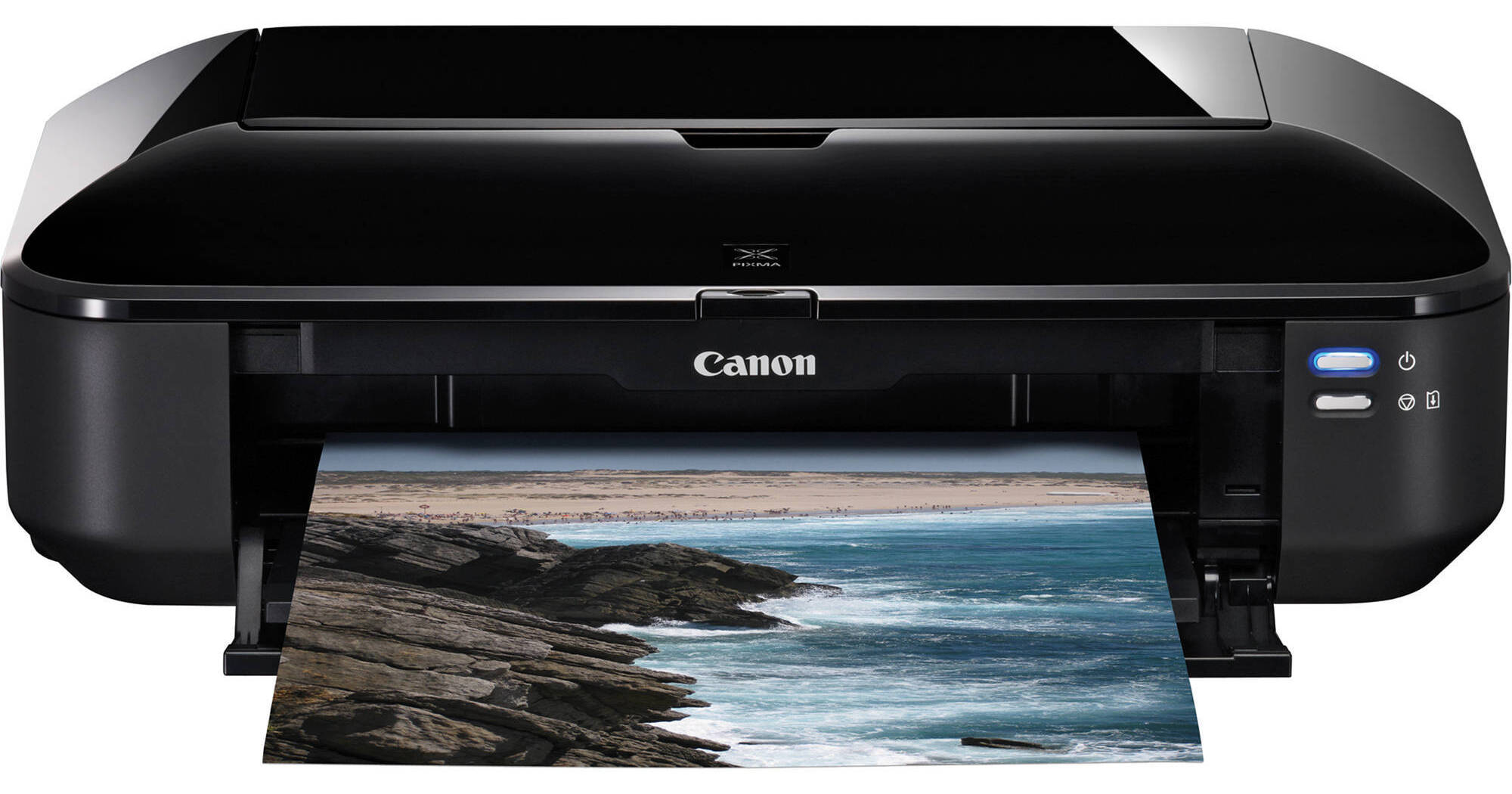
The PIXMA iX6520 Inkjet Business Printer from Canon is a wide format photo printer, capable of creating borderless prints up to 13 x 19" in size! It is compatible with Windows and Mac systems alike, connecting to either type of computer via a standard USB 2.0 interface. It is capable of print resolutions of up to 9600 x 2400dpi.
Purchasing the printer gives you access to a number of exclusive templates -- including those for brochures, posters, and ads -- that can be downloaded from Canon. The printer can even print still frames from videos recorded with Canon EOS DSLR and Canon PowerShot digital cameras.
The included Easy-WebPrint EX software makes it easier to print pages from the web. You'll be able to select which part of the pages print, so you won't waste paper and ink printing navigation bars and the like.
| Printing Method | |
|---|---|
| Printing Technology | Inkjet |
| Maximum Resolution |
Color: 9600 x 2400dpi Black: 600 x 600dpi |
| Minimum Ink Droplet Size | 1, 2, or 5 picoliter |
| Ink Type | Dye |
| Ink Palette | Not Specified by Manufacturer |
| Ink Cartridge Configuration |
Pigment Black (PGI-225) Cyan/Magenta/Yellow/Black (CLI-226) |
| Number of Nozzles | 4608 (4096 color, 512 black) |
| Nozzle Pitch | 1/9600" |
| Performance | |
|---|---|
| Print Speed |
Borderless 4 x 6" Color Photo: Approximately 36 seconds per photo Black: ESAT: Approximately 11.3ipm Color: ESAT: Approximately 8.8ipm |
| Input Buffer | Not Specified by Manufacturer |
| Printer Duty Cycle | Not Specified by Manufacturer |
| Print Archival Life | 300 years |
| Paper Handling | |
| Maximum Paper Width | 13" |
| Maximum Printable Area | 13 x 19" |
| Paper Sizes | 4 x 6", 5 x 7", 8 x 10", Letter, Legal, 11 x 17", 13 x 19", U.S. #10 Envelopes |
| Borderless Photo Sizes | 4 x 6", 13 x 19" |
| Paper Types |
Plain: Plain Paper, High Resolution Paper Super High Gloss: Photo Paper Pro Platinum Glossy: Photo Paper Plus Glossy II, Photo Paper Glossy Semi-Gloss: Photo paper Plus Semi-Gloss Matte: Matte Photo Paper Envelope: U.S. #10 Envelope |
| Paper Capacity | 150 sheets |
| Special Media Support | Not Specified by Manufacturer |
| Media Thickness | Not Specified by Manufacturer |
| Maximum Media Roll Diameter | Not Specified by Manufacturer |
| Maximum Roll Print Length | Not Specified by Manufacturer |
| Paper-Feed Method | Auto Sheet Feeder |
| Connectivity | |
|---|---|
| Computer Interface | USB 2.0 |
| Compatible Memory Cards | None |
| Direct Print Capable | No |
| Network Capable | No |
| PostScript Support | Not Specified by Manufacturer |
| System & Software Requirements |
Operating System: Windows XP, Vista, 7; Mac OS X 10.4.11, 10.5, 10.6 Hardware: USB 2.0 port |
| Physical | |
|---|---|
| Status Display | None |
| Buffer/Ram | Not Specified by Manufacturer |
| Image Preview Display | None |
| Front Panel Controls | None |
| Power Requirements | AC: 100-240VAC |
| Dimensions | 21.7 x 6.3 x 11.8" (55.1 x 16 x 30cm) |
| Weight | 16.7 lb (7.6kg) |
REVIEW SNAPSHOT®
by PowerReviewsPros
Cons
Best Uses
Most Liked Positive Review
Economic Efficient Quality Large Format
I've had the $900 Epson Stylus R2400 Wide Format Printer before and used it for demanding large-format drawings, graphics. The giant Epson never made its moneys worth with the slow speeds, constant expensive 8...Read complete review
I've had the $900 Epson Stylus R2400 Wide Format Printer before and used it for demanding large-format drawings, graphics. The giant Epson never made its moneys worth with the slow speeds, constant expensive 8 cartridge replacements, maintenance issues. One of the worst purchases I ever made... PIXMA iX6520 cheaper, prints better effortlessly and economically. Photo quality is excellent. I also have the PIXMA MG5220 Wireless Photo All-in-One Inkjet Printer, which is great for office work. I can buy the same cartridges and share spares along the printers as I go along. PIXMA iX6520 also powers itself off when it is not used, and powers on in seconds which is amazing...
VS
Most Liked Negative Review
Make sure it does what you need
The quality of print is excellent as long as you are using their predefined paper sizes. But if you need custom paper sizes and borderless printing beware. I got this printer primarily for printing ...Read complete review
The quality of print is excellent as long as you are using their predefined paper sizes. But if you need custom paper sizes and borderless printing beware. I got this printer primarily for printing 12"x12" digital scrapbook pages and papers. While I can set a custom page size (12"x12") for "plain paper," I cannot set it for photo paper. Also it will not do true borderless printing on the 12"x12" plain paper. I'm actually using 12x12 white card stock. So I can get fairly good reproductions with only 1/8 to 1/4 inch borders, it's still not quite what I was hoping for. But it's much better than being limited to just letter or legal sizes.
Reviewed by 34 customers
Sort by
Displaying reviews 1-20
Previous | Next »
Pros
Cons
Best Uses
Comments about Canon PIXMA iX6520 Inkjet Business Printer:
Used item to print photo images up to 13"x19", fast printer. Printer replace the Canon I4000 & Canon MP640.Dislikr: Is no a W/F printer.
Pros
Cons
Best Uses
Comments about Canon PIXMA iX6520 Inkjet Business Printer:
I've only used the printer a few times, but I am really impressed with the photos that I have printed. The printer prints a lot faster than my previous Canon printer, and is reasonably quiet as well. It was easy to set up and to install. I couldn't believe that I received my printer two days after ordering it online, and it was free shipping to boot. Very good deal.
Pros
Cons
Best Uses
Comments about Canon PIXMA iX6520 Inkjet Business Printer:
I bought this printer mostly for printing 13"x19" positives for screen printing.
I also do a few full-color prints here & there and all I can say is WOW!!
Full-color prints are insane..9600x2400DPI makes images razor sharp & lifelike.
The 13"x19" prints are done in less than a minute (black ink, highest quality setting) and look better than the ones I was getting at Kinko's.
I can't see any reason to spend $800+ for a similar printer...this one is as close to perfect as I've ever used....if only it had WiFi.
You can't beat it for the price.
Pros
Cons
Best Uses
Comments about Canon PIXMA iX6520 Inkjet Business Printer:
Fast setup and printing. Sleek look and it works well
Pros
Cons
Best Uses
Comments about Canon PIXMA iX6520 Inkjet Business Printer:
Canon makes a great photo printer. My old iP6700D letter-size printer is still going strong after many years of trouble-free performance. But when I saw the sale price on the iX6520, I had to buy it. The printer cost less than I had been paying for professional prints of the watercolors I have done, including the cost of paper and ink. The print quality is excellent. I have read third party reviews that say Canon is making fade-resistant color inks that work best on Canon paper. I have to take their word on that. Canon doesn't seem to advertise that aspect of their ink very much.
It takes it a minute or so for the printer to clear its throat when it's first turned on, but once that's done it is reasonably fast - much faster than the 6700D. There is no paper cassette, so the paper has to be loaded standing up on top of the printer. I remove it to keep the top door shut to keep the insides clean. The ink is priced about the same other printers - and there are five cartidges, but you only replace what needs replacing. I'm hoping the extra-large black means it will print documents a long time before it needs replacing. Large format paper can be expensive, especially heavy grades for professional artwork.
Installation was quick and simple on a Win 7 PC. You will need to buy a UBS 2 cable unless you have one available. Everything else is provided. One thing on installation - don't plug in the UBS cable until the instructions tell you to. Otherwise you'll get a generic driver - not the one you want.
It's ideal for its intended function - large format artwork - but it does letters, envelope, small 4x6 prints, etc. just fine. Reserve some desktop space for it. It's 11 1/2 x 21 inches in size and the top needs a lot of clearance to accept the paper standing up.
Pros
Cons
Best Uses
Comments about Canon PIXMA iX6520 Inkjet Business Printer:
I take a lot of scenics, most requiring 'stitching' and print very large photos.
Ordering was easy, set-up was easy, printing great pictures was easy. That's hard to beat.
Pros
Cons
Best Uses
Comments about Canon PIXMA iX6520 Inkjet Business Printer:
I use this printer to make prints of my work to sell, it prints in amazing quality for the price, I have absolutely no complaints at all. The only downside to me is if you print mainly in 13"x19" with large pictures then the ink may be used up a little quickly.
Pros
Cons
Best Uses
Comments about Canon PIXMA iX6520 Inkjet Business Printer:
I bought this printer to use for printing my wedding invitations. The main appeal for me in using this printer was that it could take heavier paper (since I'm printing on cardstock) and that it could print on larger paper sizes. Add onto this the fact that it could print borderless and I was sold.
When I first used it, I printed directly from Illustrator and found that the colors were a bit too light for my taste, especially since I was printing on matte cardstock. I went into Illustrator and modified the printer profile. I made the colors darker -- and what I found was that the prints that were coming out of the printer had a pleasing aesthetic to it.
Once my invites are done, I plan on using this for my graphic design jobs on the side, and even designing invites for my close friends. It's a good printer and really easy to use. I like that it's customizable from Illustrator and it prints like no other!
Pros
Cons
Best Uses
Comments about Canon PIXMA iX6520 Inkjet Business Printer:
Canon has lots of tools on line to make this printer fun. After a lot of research I picked the this large format printer because of price and the other reviews. The fact that most users had no print head issues was the decider in the price range I was shopping in. The only down side is ink is expensive!
Pros
Cons
Best Uses
Comments about Canon PIXMA iX6520 Inkjet Business Printer:
Easy to install, but took a long time.
Everything seems to work fine.
When closed up completely, looks like a casket with buttons; it's black. But who cares.
Instructions did not require use of a USB 1.0 cable, which I all ready owned. I seems to be sufficient.
Pros
Cons
Best Uses
Comments about Canon PIXMA iX6520 Inkjet Business Printer:
Very easy to set up and use , buttons are well lit. Quiet while printing.
beautiful full color prints.
Con: Ihave to continue adjusting color with portraits.
Pros
Cons
Best Uses
Comments about Canon PIXMA iX6520 Inkjet Business Printer:
This is a great cost effective machine. I have used Epson, Olympus, HP and now Canon in this 13 x 19 format and at this low price the Canon is the best! The colors are true and are so close to a Pro costing some much more, I will vote you will love to use this machine!!!!
Pros
Cons
Best Uses
Comments about Canon PIXMA iX6520 Inkjet Business Printer:
I bought it because I need to print 13 by 19 photos. So far I am very happy with it. I only gave it a 4 because it's not wireless.
Pros
Cons
Best Uses
Comments about Canon PIXMA iX6520 Inkjet Business Printer:
Some what slow and color management isn't perfect.
But for my use it is acceptable.
Pros
Cons
Best Uses
Comments about Canon PIXMA iX6520 Inkjet Business Printer:
Two weeks into this printer and lots of photos, But I'm having a hard time with my pictures being on the dark side. Not happy ,but I figure about 4 ink tanks and I'll have it just right. I'm getting very good prints,they just seem to be always on the darkside vs my old printer.
Pros
Cons
Best Uses
Comments about Canon PIXMA iX6520 Inkjet Business Printer:
This is pretty much my ideal workhorse printer for my home/home office. It can fit reasonably large media, print borderless, plus it's fast and has a smaller footprint than I expected. Colors may not be print production perfect, but it's fine for comping, and anything important would get a printer's proof anyway.
Pros
Cons
Best Uses
Comments about Canon PIXMA iX6520 Inkjet Business Printer:
Nice alternative to higher-priced 13x19 printers. Easy set-up and operation, quite pleased with results. Used in my photo business. Like most of these printers, ink is used up quickly if you have heavy coverage (esp. cyan, magenta, yellow) although the 2 black cartridges seem to be fine. Save money by getting your ink and paper supplies from B & H!
Pros
Cons
Best Uses
Comments about Canon PIXMA iX6520 Inkjet Business Printer:
I couldn't be happier with this purchase. I wanted a large format (a3+) borderless printer that would work for both photo prints from my 7d and for large diagrams. This thing works like a dream.
Pros
Cons
Best Uses
Comments about Canon PIXMA iX6520 Inkjet Business Printer:
Amazing print quality. just wish it was wireless capable. Love that it doesnt take up too much space and I can print up to 13x19
Pros
Cons
Best Uses
Comments about Canon PIXMA iX6520 Inkjet Business Printer:
Just printed a red and yellow poster size 13 x 16 and the quality of the color was excellent.
I used the "Fine Printing on plain paper" option which greatly improved the quality of the color over previous attempts.
Displaying reviews 1-20
Previous | Next »