This item has been discontinued by the manufacturer and is no longer available.
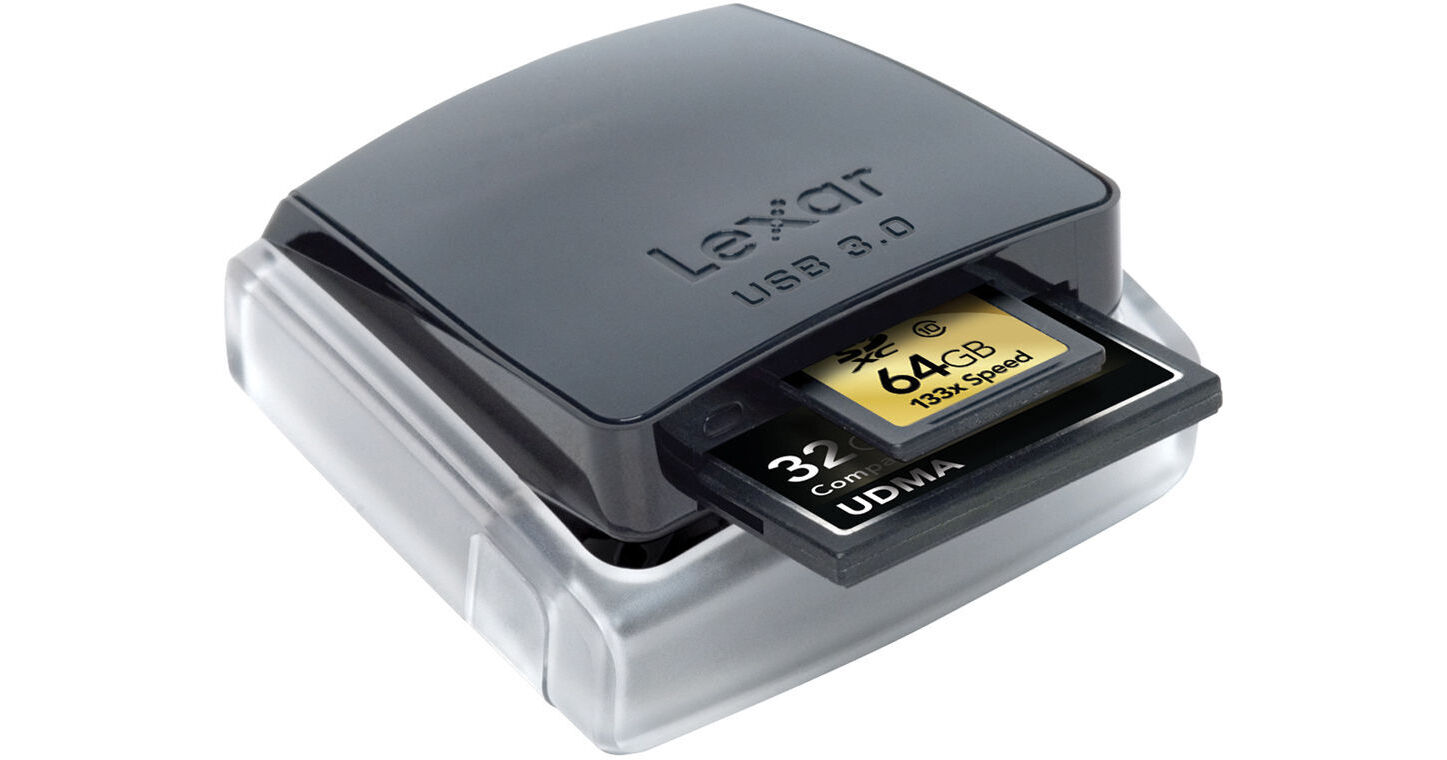
The Lexar Professional USB 3.0 Dual-Slot Reader promises to improve the efficiency of your digital workflow. Utilizing the USB 3.0 interface, this reader can transfer files at up to 500MB/s, which is approximately 5 times faster than USB 2.0. An activity LED will let you know when the transfer is complete. Compatible cards include UDMA CompactFlash, SDXC, and SD UHS-I.
In addition to transferring files to your computer's hard drive, the reader also allows for concurrent and card-to-card file transfers. It's also backwards compatible with USB 2.0 interfaces and standard CF, SD, and SDHC cards, making this device quite practical for today's digital needs. When not in use, the USB 3.0 Dual-Slot Reader collapses to keep the card slots safe. When you're ready to transfer again, just pop the reader back into place using the side buttons.
| Compatible Memory Cards | UDMA CompactFlash, CF, SDXC, SD UHS-I Backwards compatible: Standard CF, SD, SDHC, USB 2.0 devices |
| Computer Interface | USB 3.0 USB 2.0 |
| Data Transfer Rate | 500MB/s max |
| Operating System | Windows 7, Vista, XP Mac OS 10 and later |
REVIEW SNAPSHOT®
by PowerReviewsPros
Cons
Best Uses
Most Liked Positive Review
Fast and compact
I use it with Sandisk extreme pro 90MB cards. While I haven't seen quite that performance, its pretty close. The fold down, clam shell design keeps it reasonably safe. While USB3.0 is the...Read complete review
I use it with Sandisk extreme pro 90MB cards. While I haven't seen quite that performance, its pretty close. The fold down, clam shell design keeps it reasonably safe. While USB3.0 is the desirable interface, it generally outperforms any USB2.0 reader in a USB2.0 port, but not significantly.
Even if you have only USB2.0, go ahead and get a 3.0 reader. Its backward compatible, not much more money, and will provide that extra performance once you get a computer with USB 3.0 ports.
Note: it uses a standard USB3.0 cable which has a different connector on the adapter end than the mini/micro USB2.0 connectors. Your existing USB2.0 cables won't work with this device so be prepared to carry around a USB3.0 cable to use this.
VS
Most Liked Negative Review
stops working quickly
A pin bent in the compact flash slot of this USB reader after perhaps 50 insertions. Also, this reader was rather flaky on USB 3.0 connections before the bent pin, loacking up my Asus...Read complete review
A pin bent in the compact flash slot of this USB reader after perhaps 50 insertions. Also, this reader was rather flaky on USB 3.0 connections before the bent pin, loacking up my Asus Rampage II motherboard in the USB 3.0.
I bought this reader after exactly the same thing happened to the USB 2.0 version of this reader.
One could say that I'm the culprit with my technique or cards. Perhaps so. However, I had a Belkin reader that was slow and worked for many years. Likewise, an Omniflash USB 2.0 reader has survived probably 10x the number of insertions and continues to do so.
Reviewed by 140 customers
Sort by
Displaying reviews 1-20
Previous | Next »
Pros
Cons
Best Uses
Comments about Lexar Professional USB 3.0 Dual-Slot Reader:
I've been using this reader for a 16gb 60mbs CF card, as well as a 8gb 60mbs CF card and a 4gb 30mbs CF card. The speed at which this transfers is mind blowing, I'm using it through a USB 3.0 (powered) port, my system is running W7 Professional, dual 750gb 7200 rpm hard drives 3.0ghz I7 gen2 hyper-threaded quad-core, 3gb gddr5 video card and 16gb gddr3 ram.
You can actually use this reader to access large files and edit them from your device.
Pros
Cons
Best Uses
Comments about Lexar Professional USB 3.0 Dual-Slot Reader:
This card reader worked great right out of the box. USB 3 makes it very fast compared with my old 2.0 reader.
Pros
Cons
Best Uses
Comments about Lexar Professional USB 3.0 Dual-Slot Reader:
I bought this to allow downloading the images and movies from my Nikon D5100. I use the camera for work as well as home and my work computer does not have SD card reader. With this unit, you don't need to worry about the internal reader in a laptop being able to handle the large capacity cards. The unit latches closed so it fits nicely in the gear bag. Haven't had it long, so far I am happy. Installation was easy with Win7 Pro. Just works.
Pros
Cons
Best Uses
Comments about Lexar Professional USB 3.0 Dual-Slot Reader:
It reads SD and CF cards at a high speed. Very useful when I need to dump data fast on set. It's not an all-in-one card reader, but frankly those never had any longevity. This CF card reader is well constructed, sturdy, and can take a beating.
Pros
Cons
Best Uses
Comments about Lexar Professional USB 3.0 Dual-Slot Reader:
Use it for downloading photo files from SD card.
Speed is the key benefit with the USB 3.0 interface.
Did not get 5 stars because of pop up design. It's a personal preference - I took mine out of the base.
Pros
Cons
Best Uses
Comments about Lexar Professional USB 3.0 Dual-Slot Reader:
This is great time saver, several of my recent projects have been hours and hours of footage, or more accurately gigs upon gigs of data. It is very nice to have a 16 gig SDHC card transferred in 3-4 minutes instead of 30 minutes.
The unit is sturdy, and fits nicely on my desk. However I would of liked a longer cable, but that is just how my workstation is set up.
Pros
Cons
Best Uses
Comments about Lexar Professional USB 3.0 Dual-Slot Reader:
Fast and reliable
Pros
Cons
Best Uses
Comments about Lexar Professional USB 3.0 Dual-Slot Reader:
I am a professional photographer and I use this product to download large numbers of raw images. It is quick and easily portable. The snap down feature makes me feel more comfortable throwing it in my bag, and not having to worry about getting things in the slots.
It is not the most compact card reader but I love it and it's speed.
Pros
Cons
Best Uses
Comments about Lexar Professional USB 3.0 Dual-Slot Reader:
Thought the retractable mechanism was gimmicky at first but works smoothly and it stops any inverted misuse when closed.
Pros
Cons
Best Uses
Comments about Lexar Professional USB 3.0 Dual-Slot Reader:
I used it last weekend to upload 3000 images without a hitch. It's fast & I love the long cable. The CF card slot is precise. Folds down too take with you also.
Pros
Cons
Best Uses
Comments about Lexar Professional USB 3.0 Dual-Slot Reader:
reads fast, a must have CF card reader!
Pros
Cons
Best Uses
Comments about Lexar Professional USB 3.0 Dual-Slot Reader:
When time is of essence - This card reader is a must and makes such a huge difference! I shoot at professional events all day and have to get my pictures out in batches every 15-20 min. This is so helpful when 10-15GB of data has to be siphoned off in 2-3 min. It kinda pays for itself almost immediately in time saved! GET IT.
Pros
Cons
Best Uses
Comments about Lexar Professional USB 3.0 Dual-Slot Reader:
I use this card reader to transfer media from my Canon DSLR to my Mac for video editing, and I love it. Transfer times are nearly twice as fast as transferring directly from the camera via USB cable. Slightly slower than the Firewire800 CF card reader I used to use, but still a reliable tool that is a must have for any DSLR shooter.
Pros
Cons
Best Uses
Comments about Lexar Professional USB 3.0 Dual-Slot Reader:
This card reader is another excellent product by Lexar, just like the cf and sd cards I use. Worked perfectly with Windows 7 on both a system using usb 3.0 and a laptop using usb 2.0. This reader is very fast with the 3.0 connection, moving large batches of raw files in a fraction of the time used by my older reader. Very compact so having it in your bag when you need it is a breeze. Wish I had bought this sooner!
Pros
Cons
Best Uses
Comments about Lexar Professional USB 3.0 Dual-Slot Reader:
Works very hard at my studio
Pros
Cons
Best Uses
Comments about Lexar Professional USB 3.0 Dual-Slot Reader:
This device is rendered USELESS by its shallow USB 3.0 socket! The USB 3.0 socket is so shallow that slightly moving the device (while loading the CF card for example) repeatedly disconnects and reconnects the device! This results in destruction/corruption of data being downloaded, even if the device is bumped by mistake! Also, trying to get the device to connect correctly in the first place is a disaster, as one has to wiggle the USB 3.0 cable in the shallow socket and find a "good" position for connection!?
Pros
Cons
Best Uses
Comments about Lexar Professional USB 3.0 Dual-Slot Reader:
I was in new york shooting a music video for a well known celeb. While unpacking i noticed that my assistant did not pack a card reader. stopped by B&H and picked this one up. was pleasantly surprised how fast and accurately it handled large video files. much faster than any of my old readers. I highly recommend this product. love the compactness of it and the way it clicks into itself to conserve space and protect the contacts inside.
Pros
Cons
Best Uses
Comments about Lexar Professional USB 3.0 Dual-Slot Reader:
Transfer rates are fast.
Pros
Cons
Best Uses
Comments about Lexar Professional USB 3.0 Dual-Slot Reader:
Works great, fast and is convenient.
Pros
Cons
Best Uses
Comments about Lexar Professional USB 3.0 Dual-Slot Reader:
Extremely fast on USB 3.0 port and fast (26MB/s) on USB 2.0 port. Love it since it cut down my download time of 16GB data from 40min to 12min.
Displaying reviews 1-20
Previous | Next »