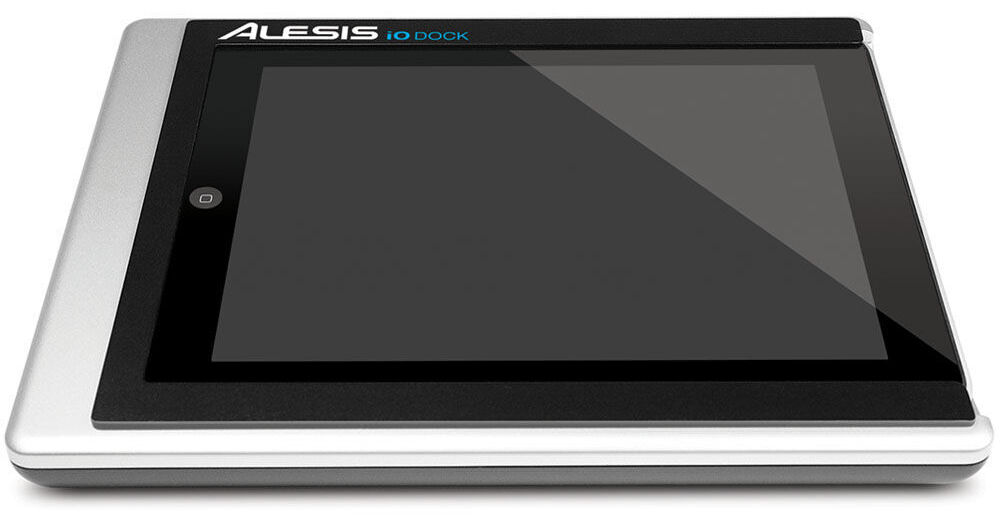
The Alesis iO Dock Pro Audio Dock for iPad is a universal docking station specifically designed for iPad. It gives musicians, recording engineers and music producers the interface they need to create and perform with iPad. The iO Dock facilitates recording, performing and creating music at home, in mobile situations and virtually anywhere in between. Built to accommodate all current app-development standards including Core MIDI, the iO Dock is a universal device that supports music-creation apps, instruments, mics and devices. It even has phantom power, a high-impedance guitar switch and a 1/4" footswitch input.
| Compatibility | iPad |
| Control I/O | MIDI in (DIN) MIDI out (DIN) USB MIDI (Host) 1/4" Footswitch (function assigned by apps) |
| Phantom Power | Yes (switchable) |
| Audio Inputs | Combo XLR-1/4" x 2 |
| Audio Outputs | 1/4" Main x 2 1/4" TRS Headphone x 1 |
| Video Outputs | RCA Composite x 1 |
| Dimensions (WxHxD) | Not specified by manufacturer |
| Weight | Not specified by manufacturer |
REVIEW SNAPSHOT®
by PowerReviewsPros
Cons
Best Uses
Most Liked Positive Review
Flexible iPad front end
The iO Dock has high quality inputs and outputs. I would compare it to standalone audio interfaces (available from numerous manufacturers). The specifications are available online. Where it really differs is the way...Read complete review
The iO Dock has high quality inputs and outputs. I would compare it to standalone audio interfaces (available from numerous manufacturers). The specifications are available online. Where it really differs is the way the iPad becomes an audio/midi workstation. As more and more applications take advantage of the iPad Core-Midi and high quality audio connectors, this docking station will provide incredible flexibility. Plugging into Garage Band on the iPad and using this as a front end to an audio system is a given, but using the iO Dock as a front end to applications on the PC or Mac is where it really shines. Its ability to send and receive midi commands through the standard midi ports and a USB-midi port opens up the possibilities.
The iO Dock is sturdy and very well constructed. It is made of plastic, but is well re-enforced and feels like it would protect the iPad from pretty much anything.
Some have complained that the iO Dock has to be plugged in (with the included 6 volts power transformer) that makes it less portable, but the iO Dock/iPad combination wasn't made to be standalone: it is much more more usefull whith instruments plugged in and when it is plugged into other components. This is a non-issue.
VS
Most Liked Negative Review
AMAZING, but false advertizing.
First of all, it's great, simply great to have so many connections in one place. It's wonderful, and NO OTHER product in the market will give you so much as of NOVEMBER OF ...Read complete review
First of all, it's great, simply great to have so many connections in one place. It's wonderful, and NO OTHER product in the market will give you so much as of NOVEMBER OF 2011. It's all you would expect it to be like you can read in other reviews, but none of the reviews will tell you some flukes, which I am going to. So again, it's AMAZING, and I will only alert you of the not so great things... Many people complain that they only have the RCA video output for video, and yes, they could do an HDMI since the IPAD supports it, or even VGA, but this is for music, not video, so honestly, the RCA is a plus... BUT WHAT KILLS ME is the fact that the USB port cannot be used in a USB MIDI keyboard. AGAIN, IT WILL NOT WORK WITH A USB KEYBOARD. You need to have a keyboard that has the old school MIDI port, or else it WILL NOT WORK. MIDI port is a MUST. I truly hope they can change the firmware. It's a shame, since even the USB camera adapter of the IPAD supports USB MIDI, and this thing will not. That's why it got a 3 star only. This is basicly my main complaint with it. I also wished that you could use the keyboard while on a different application, like for example, reading a text of PDF with the chords/notes of a song (which I use my ipad for as well), but unfortunately I did not find a way to do this, and I don't think that is possible due to IOs... Lastly, I truly wish they woulg make the bottom of this thing bezeled or something, so you can use an ipap klip, or something that would hold this in a Mic stand or something. What I mean is, if you are playing a keyboard on a keyboard stand for example, where are you going to place this? You can even try a sheet stand, but I would not trust on top of it without being secure... so yeah... nothing is perfect, but NOT BEING ABEL TO USE A USB KEYBOARD!!!! Give me a break, that is just nonsense! What is that USB for then??? The problem is, they advertise that (go look in Alesis website) 'The USB connection on the iO Dock provides MIDI connectivity between the computer and anything connected to the iO Dock.' NOT TRUE. Don't try it, I have tried 6 different keyboards, including ALESIS QX49 and Q49, M-AUDIOS, KORGS, it just will not work. Other than that, which to me is NEW TECHNOLOGY only working with OLD OLD OLD stuff, this thing is amazing! Have fun!
Reviewed by 16 customers
Sort by
Displaying reviews 1-16
Pros
Cons
Best Uses
Comments about Alesis iO Dock Pro Audio Dock for iPad:
I use the iO Dock with my iPad as a controller for music soft synths.
The in/out audio/midi ports are very useful, as well as USB out port. But what about USB in jack? I felt this held this product from being exceptional.
Pros
Cons
Best Uses
Comments about Alesis iO Dock Pro Audio Dock for iPad:
I really like this IO Dock. It let's me interface with all of my recording apps easily and reliably.
Sound quality is quite good and overall it seems to be a quality piece of audio gear that is bulit to last.
Pros
Cons
Best Uses
Comments about Alesis iO Dock Pro Audio Dock for iPad:
Apple fixed hiss and distortion symptoms with iOS 5.1. Alesis also put together a video (see below) covering performance tips and gain settings that can resolve the other (more normal) possible causes of hiss that apply to all digital recording setups:• Improper input gain settings (too high or too low).• Improper output (Main and/or Headphone) volume settings (too high or too low).• Hiss or distortion intentionally introduced by the virtual amplifiers inside recording apps (i.e. GarageBand).• Audio skips or distortion caused by processor-intensive activity happening in the background on the iPad (resolved by quitting all other apps and turning ON Airplane Mode)Alesis fixed MIDI hanging notes with their firmware update 1.0.7: http://www.alesis.com/iodock?tt=5For me, the iO Dock is working great with the iPad 2 and iOS 5.1. Check out their tips video here:http://noterepeat.com/articles/how-to/37-alesis-io-dock-getting-the-best-performance-and-signal-possible
Pros
Cons
Best Uses
Comments about Alesis iO Dock Pro Audio Dock for iPad:
Everyone should know, as it's never really stated clearly, you CANNOT plug in a keyboard through USB on this. Only old school midi.
Why ? I don't know as the apple camera connection kit does it just fine.
Other than that, the product is well built and has great connectivity. Except for the one that was the most useful for me.
Biggest disappointment ever. I was lucky enough to get a refund from the store.
DON'T BE FOOLED !
Pros
Cons
Best Uses
Comments about Alesis iO Dock Pro Audio Dock for iPad:
The iPad dock is amazing. It does everything they say. It recognized my Korg Kontrol 49 MIDI keyboard as a plug and play. Seems to work smoothly with my apps that accept MIDI in, and the XLRs are recognized as audio ins without hassles.
The only big disappointment is that the USB port does not allow USB MIDI in; it's just a way to connect with a computer.
The gain controls for the XLR ins feel a little cheap, and they're not linear; you need to turn them up about 75% to get any volume. The 1/4" guitar in is too tight; I'm concerned I'll damage it removing the cable plug.
But overall the unit does more than I'd expect, even if it cost quite a bit more.
Pros
Cons
Best Uses
Comments about Alesis iO Dock Pro Audio Dock for iPad:
Cant make things any easier to start recording on your Ipad. Replaced 3 other products i was using. And charging your ipad while you use it is a bonus as well.
Pros
Cons
Best Uses
Comments about Alesis iO Dock Pro Audio Dock for iPad:
First let me say this.B & H service is tops. I got a great price and the item arrived two days later. Kutos B & H. However none of the reviews on the Alesis mentioned that it did not work with the new Apple I Pad 2 running OS 5. After searching online Alesis has known about this problem since Nov 2011. Yet they keep selling the unit for I Pad 2. After contacting Alesis I was told I had to wait for the Apple OS 5.1 update to be released soon. Online sources have been waiting for quite some time now. Some beta testers state it doesn't resolve all the issues. I guess I'll have to wait and see. Anyway Alesis has lost a long time customer. NEVER AGAIN,
Pros
Cons
Best Uses
Comments about Alesis iO Dock Pro Audio Dock for iPad:
What they don't tell you is that this will not yet work with Ipad 2 with OS 5. People have been waiting for the update since Nov. Had I known I would have not upgraded my OS to 5. Alesis advertising does not mention the problem. Tec support says to just wait till the Apple update comes out. I'm sorry don't act like your product integrates seamlessly with the Ipad 2, it doesn't. Most new Ipad 2 come with OS 5 on them which makes the IO dock useless. Alesis has lost a fan. Oh and I had to wait ten days for the stupid Ipad 2 plastic adapter.
Pros
Cons
Best Uses
Comments about Alesis iO Dock Pro Audio Dock for iPad:
I've really enjoyed the dock so far. I'm doing some simple recording and using the ipad and dock as an extra synthesizer(animoog etc.), running it through my keyboard amp and it works great. A usb midi import would be nice.
Pros
Cons
Best Uses
Comments about Alesis iO Dock Pro Audio Dock for iPad:
First of all, it's great, simply great to have so many connections in one place. It's wonderful, and NO OTHER product in the market will give you so much as of NOVEMBER OF 2011. It's all you would expect it to be like you can read in other reviews, but none of the reviews will tell you some flukes, which I am going to. So again, it's AMAZING, and I will only alert you of the not so great things... Many people complain that they only have the RCA video output for video, and yes, they could do an HDMI since the IPAD supports it, or even VGA, but this is for music, not video, so honestly, the RCA is a plus... BUT WHAT KILLS ME is the fact that the USB port cannot be used in a USB MIDI keyboard. AGAIN, IT WILL NOT WORK WITH A USB KEYBOARD. You need to have a keyboard that has the old school MIDI port, or else it WILL NOT WORK. MIDI port is a MUST. I truly hope they can change the firmware. It's a shame, since even the USB camera adapter of the IPAD supports USB MIDI, and this thing will not. That's why it got a 3 star only. This is basicly my main complaint with it. I also wished that you could use the keyboard while on a different application, like for example, reading a text of PDF with the chords/notes of a song (which I use my ipad for as well), but unfortunately I did not find a way to do this, and I don't think that is possible due to IOs... Lastly, I truly wish they woulg make the bottom of this thing bezeled or something, so you can use an ipap klip, or something that would hold this in a Mic stand or something. What I mean is, if you are playing a keyboard on a keyboard stand for example, where are you going to place this? You can even try a sheet stand, but I would not trust on top of it without being secure... so yeah... nothing is perfect, but NOT BEING ABEL TO USE A USB KEYBOARD!!!! Give me a break, that is just nonsense! What is that USB for then??? The problem is, they advertise that (go look in Alesis website) 'The USB connection on the iO Dock provides MIDI connectivity between the computer and anything connected to the iO Dock.' NOT TRUE. Don't try it, I have tried 6 different keyboards, including ALESIS QX49 and Q49, M-AUDIOS, KORGS, it just will not work. Other than that, which to me is NEW TECHNOLOGY only working with OLD OLD OLD stuff, this thing is amazing! Have fun!
Pros
Cons
Best Uses
Comments about Alesis iO Dock Pro Audio Dock for iPad:
use it with my ipad 1
use it at home for fun
Pros
Cons
Best Uses
Comments about Alesis iO Dock Pro Audio Dock for iPad:
The IO Dock covers every possible base for iPad IO: MIDI in/out, microphone/line/guitar inputs with phantom power and/or adjustable gain, headphone and monitor outputs with independent volume controls, direct monitoring, and more. Everything works perfectly and with zero hassle -- you just slide the iPad into the cradle and it works. Build quality is great.
There are individual gadgets that cover subsets of this functionality, but it would cost a fortune to get them all and you can't use them all at the same time. This is really the one product to get.
However, having proper IO on the device has underscored it's limitations for me. For instance, I discovered that the amp models in Garage Band are terrible, yet I can't substitute a different modeler because iPad apps are isolated (outside of heroic measures like copying and pasting rendered tracks between apps). There's no MIDI editing in Garage Band, yet apps that have MIDI editing like Meteor have no built-in MIDI instruments. The Korg iMS-20 is a wonderful synth, but I can't use it in any iPad DAW. So on and so forth. By purchasing the IO Dock I've learned that what I *really* want is a nice lap top with a similar IO interface. :)
Of course, none of this is the IO Dock's fault. It's a testament to the IO Dock that by addressing every possible IO limitation, it returns focus the platform/software limitations.
Pros
Cons
Best Uses
Comments about Alesis iO Dock Pro Audio Dock for iPad:
Great item to interface your instruments straight to the iPad & iPad 2.
Pros
Cons
Best Uses
Comments about Alesis iO Dock Pro Audio Dock for iPad:
The iO Dock has high quality inputs and outputs. I would compare it to standalone audio interfaces (available from numerous manufacturers). The specifications are available online. Where it really differs is the way the iPad becomes an audio/midi workstation. As more and more applications take advantage of the iPad Core-Midi and high quality audio connectors, this docking station will provide incredible flexibility. Plugging into Garage Band on the iPad and using this as a front end to an audio system is a given, but using the iO Dock as a front end to applications on the PC or Mac is where it really shines. Its ability to send and receive midi commands through the standard midi ports and a USB-midi port opens up the possibilities.
The iO Dock is sturdy and very well constructed. It is made of plastic, but is well re-enforced and feels like it would protect the iPad from pretty much anything.
Some have complained that the iO Dock has to be plugged in (with the included 6 volts power transformer) that makes it less portable, but the iO Dock/iPad combination wasn't made to be standalone: it is much more more usefull whith instruments plugged in and when it is plugged into other components. This is a non-issue.
Pros
Cons
Best Uses
Comments about Alesis iO Dock Pro Audio Dock for iPad:
I got mine to work with my ipad2 using a 30 pin extension cord as the product didn't ship with the so-called adaptor. Without the adaptor, I just could get the connections to line up. However, once working, it was great. [...]
Pros
Cons
Best Uses
Comments about Alesis iO Dock Pro Audio Dock for iPad:
Plenty of inputs, phantom power, well built with a secure connection. All of my peripherals attach easily and WORK! All that is needed now is a new interface that works with multiple inputs at once. I use garageband now, and it is great when i am alone. When i want to use drums mic and guitar together with friends i still need to use a mixer.
Displaying reviews 1-16