This item has been discontinued by the manufacturer and is no longer available.
Due to Apple's OS upgrade, the preinstalled OS may be Mac OS X 10.6 Snow Leopard or OS X 10.7 Lion.
All Apple computers purchased on or after July 21, 2011 can be upgraded to Lion via free download from the Mac App Store within 30 days of purchase.
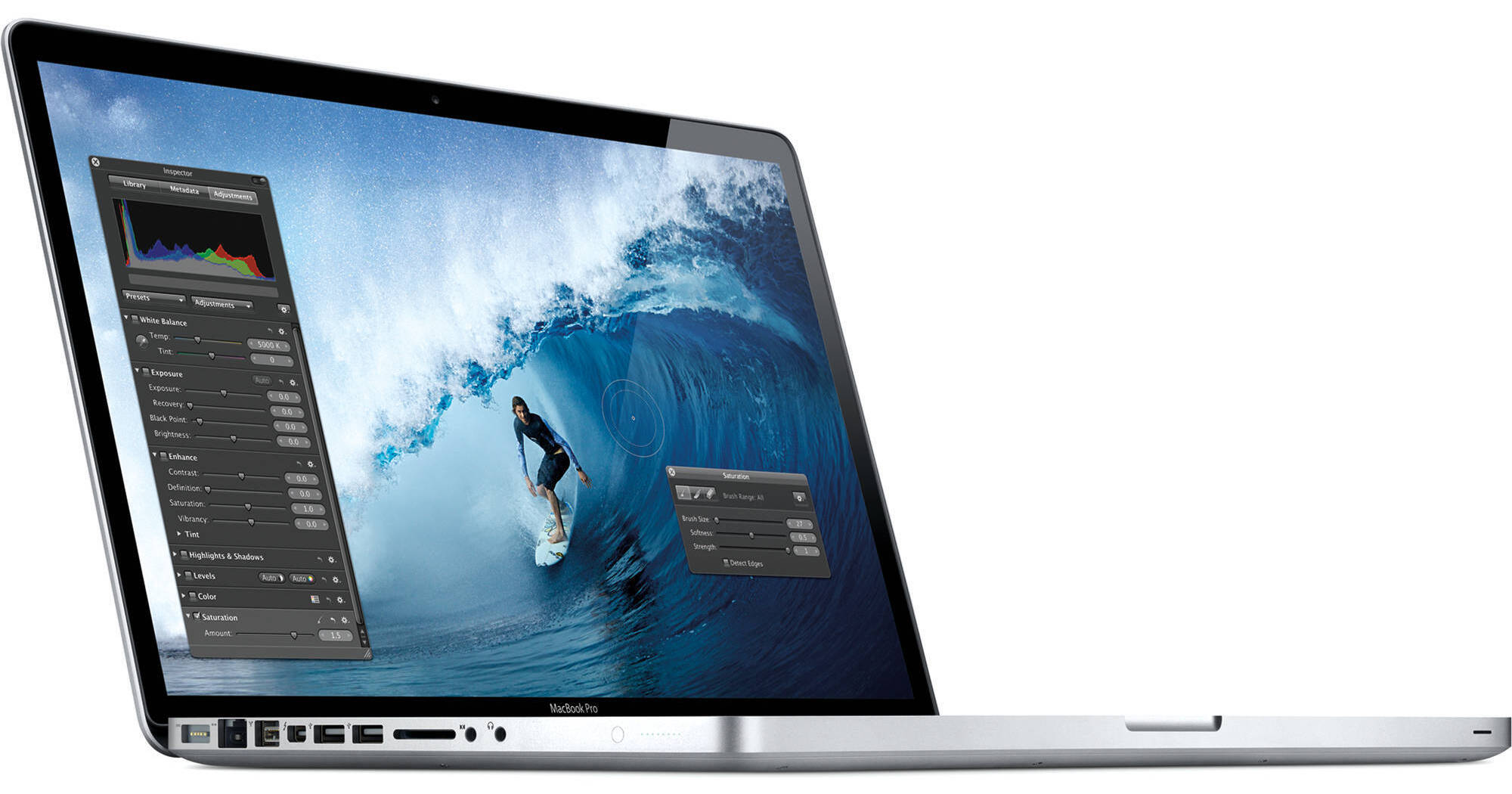
The 15.4" MacBook Pro Notebook Computer from Apple is a powerful notebook computer with an innovative aluminum unibody design. It is loaded with advanced power management features and an integrated battery -- they work together to provide up to 7 hours of wireless web browsing.
You may notice an unfamiliar logo next to one of the ports on the left side of the system. This is Thunderbolt, a high-speed interface that can move data at an amazing 10Gbps -- double that of USB 3.0. The Thunderbolt port doubles as a display output -- it shares the same physical form factor as a Mini DisplayPort. You can daisy-chain up to six devices, so you'll be able to connect high-speed external storage and an external LCD display via the same port!
The computer's 15.4" display features a LED backlight and a glossy finish. Its 1440 x 900 native resolution gives you ample screen real estate with which to work. You'll be able to output to an external display at up to 2560 x 1600 via Thunderbolt. Any Mini DisplayPort LCD will plug-in without the need for an adapter. If you have a display with DVI, VGA, or HDMI input, you'll only need to purchase an adapter cable for connection.
You'll be able to communicate with friends and family thanks to built-in support for FaceTime chat. The computer's FaceTime HD camera supports 720p HD video chat via the included app. You can make video calls to other Mac users with FaceTime, as well as to anyone with an iPhone 4 or an iPod touch model with a built-in camera.
The system is powered by a quad-core 2GHz Intel Core i7 CPU with 2.9GHz Intel Turbo Boost 2.0 support. The computer is loaded with 4GB of memory, a 500GB 5400rpm hard drive, and a SuperDrive DVD burner. You'll be able to connect to the Internet with ease via 802.11n Wi-Fi or wired Gigabit Ethernet. The MacBook Pro also features built-in Bluetooth 2.1+EDR, making it easy to use the system with wireless headphones, keyboard, mice, and other compatible peripherals. An SDXC slot is present, making it easy to download photos and videos from memory cards.
Graphics are handled by a hybrid system that gives you the best of both worlds in regards to battery life and performance. The MacBook Pro will use an integrated Intel HD Graphics 3000 GPU for light tasks -- such as web browsing and word processing. When more performance is needed -- for video games, HD video playback, or the like -- the system will switch over to the dedicated AMD Radeon HD 6490M. The Radeon features 256MB of staggeringly fast GDDR5 memory, which translates into pretty awesome performance.
The computer features a comfortable backlit chiclet-style keyboard, which features space between each key for improved accuracy and comfort when typing. It also sports a glass Multi-Touch trackpad with a clickable design. Rather than having a separate button for mouse clicks, the entire surface of the pad is clickable. This increases the active surface area, and allows you to quickly click, even if your finger is near the top of the trackpad.
What's more, the smooth surface fully supports Multi-Touch gestures -- you can tap the trackpad with one finger to click, with two fingers to right click, scroll through documents using two fingers, pinch to zoom, navigate through Safari or iPhoto with three-finger left and right swipes, or use two fingers to rotate a photo or PDF.
iLife '11 has a complete suite of digital creativity applications. Easy enough for anyone to use, iLife will help you edit your home movies, organize digital photos, and compose original music. iLife includes iPhoto, iMovie and GarageBand.
The 64-bit OS features Time Machine backup, which automatically backs up system data to an external hard drive. It also features intuitive Cover Flow navigation, the powerful Spotlight search tool, and Quick Look document preview. You'll be able to use Boot Camp to run Windows on your Mac.
Note!
Due to Apple's OS upgrade, the preinstalled OS may be Mac OS X 10.6 Snow Leopard or OS X 10.7 Lion.
All Apple computers purchased on or after July 21, 2011 can be upgraded to Lion via free download from the Mac App Store within 30 days of purchase.
| Performance | |
|---|---|
| Processor | 2GHz Intel Core i7-2630QM |
| Cache | L3: 6MB |
| System Bus | None |
| Memory |
Slots: 2x SO-DIMM 204-Pin Type: PC3-10600 1333MHz DDR3 SDRAM Installed: 4GB (2x2GB) Capacity: 8GB |
| Graphics Card |
Type: Hybrid Graphics System Installed: AMD Radeon HD 6490M with 256MB GDDR5 SDRAM Dedicated; Intel GMA HD Graphics 3000 with up to 384MB DDR3 SDRAM Shared |
| Display | |
|---|---|
| Type | Widescreen |
| Size | 15.4" |
| Backlight | LED |
| Aspect Ratio | 16:10 |
| Finish | Glossy |
| Native Resolution | 1440 x 900 |
| Supported Resolutions |
1440 x 900 at 16:10 Aspect Ratio 1280 x 800 at 16:10 Aspect Ratio 1152 x 720 at 16:10 Aspect Ratio 1024 x 640 at 16:10 Aspect Ratio 800 x 500 at 16:10 Aspect Ratio 1024 x 768 at 4:3 Aspect Ratio 800 x 600 at 4:3 Aspect Ratio 640 x 480 at 4:3 Aspect Ratio 1024 x 768 at 4:3 Aspect Ratio Stretched 800 x 600 at 4:3 Aspect Ratio Stretched 800 x 600 at 4:3 Aspect Ratio Stretched 640 x 480 at 4:3 Aspect Ratio Stretched 720 x 480 at 3:2 Aspect Ratio 720 x 480 at 3:2 Aspect Ratio Stretched |
| External Resolution | Up to 2560 x 1600 |
| Dual Display | Yes |
| Video Mirroring | Yes |
| Storage | |
|---|---|
| Hard Drive |
Bays: 1x 2.5" (9.5mm) Installed: 500GB 5400rpm Type: SATA |
| Optical Drive |
8x-Speed Slot-Load SuperDrive Reads DVD: 8x CD: 24x Writes DVD-R: 8x DVD-RW: 4x DVD-R DL: 4x DVD+R: 8x DVD+RW: 4x DVD+R DL: 4x CD-R: 24x CD-RW: 10x |
| Input/Output Connectors | |
|---|---|
| Ports |
2x USB 2.0 (A) 1x FireWire-800 (9-Pin) 1x Thunderbolt |
| Display Output |
1x Mini DisplayPort via Thunderbolt port 1x DVI via Thunderbolt port using optional cable 1x VGA via Thunderbolt port using optional cable 1x Dual-Link DVI via Thunderbolt port using optional cable 1x HDMI via Thunderbolt port using optional cable |
| Audio |
Integrated Stereo Speakers with subwoofer Integrated Omnidirectional Microphone 1x 1/8" (3.5mm) Headphone Output with shared S/PDIF 1x 1/8" (3.5mm) Microphone Input with shared S/PDIF |
| Expansion Slots | None |
| Flash Media Slot | 1x SDXC |
| Communications | |
|---|---|
| Network | 10/100/1000Mbps Gigabit Ethernet (RJ-45) |
| Modem | None |
| Wi-Fi | 802.11a/b/g/n |
| Bluetooth | Bluetooth 2.1+EDR |
| Webcam | Yes |
| General | |
|---|---|
| Operating System |
Not Specified By Manufacturer
1
Please Note:Due to Apple's OS upgrade, the preinstalled OS may be Mac OS X 10.6 Snow Leopard or OS X 10.7 Lion. close |
| Security | Kensington Lock Slot |
| Keyboard |
Keys: 78 Type: Standard Notebook Keyboard Features: Backlight, Chiclet Style |
| Pointing Device | TouchPad with Double-Tap, Drag, Four-Finger Swipe, Inertial Scrolling, Multi-Touch Control, Pinch, Precise Cursor Control, Rotate, Tap, Three-Finger Swipe, Two-Finger Scrolling |
| Battery | Built-In Lithium-Polymer Providing up to 7 Hours per Charge (77Wh) |
| Power Requirements |
AC: 100-240 V AC, 50-60Hz Consumption: 85W |
| Dimensions (WxHxD) | 14.35 x 0.95 x 9.82" / 36.45 x 2.41 x 24.94 cm |
| Weight | 5.6 lb / 2.54 kg |
REVIEW SNAPSHOT®
by PowerReviewsPros
Cons
Best Uses
Most Liked Positive Review
My First MAC
I waited for a long time to cross over to the Mac. I've been a PC guy since Windows 3.1 and just couldn't take the leap. Finally I did and I haven't been sorry....Read complete review
I waited for a long time to cross over to the Mac. I've been a PC guy since Windows 3.1 and just couldn't take the leap. Finally I did and I haven't been sorry. Everything just works so well and is so fluid. I push the power button and 30 seconds later I'm surfing the net. No hang ups, no processes that slow down other applications. I'm impressed. It found my wireless printer with no effort on my part and set up flawlessly. The quad core processor is #1 in my book. Best computer I've ever owned by far. Don't hesitate, make the switch. Within a week you will have adapted; PC and Windows will be history.
VS
Most Liked Negative Review
Great configuration but...!!!
Apple is one of the leaders of computer industry. Great for designers, great for daily use. High performance. But... Unfortunately programmers are not supporting it enough. It is not supporting all ...Read complete review
Apple is one of the leaders of computer industry. Great for designers, great for daily use. High performance. But... Unfortunately programmers are not supporting it enough. It is not supporting all features of Microsoft Outlook, any salesforce tools and bunch of other business programs.
Reviewed by 126 customers
Sort by
Displaying reviews 1-20
Previous | Next »
Pros
Cons
Best Uses
Comments about Apple 15.4" MacBook Pro Notebook Computer:
This machine is solidly built. I love the one piece aluminum body (chassis?) and all the of the small touches that make this machine a pleasure to use. And of course there's the software that comes with every Mac...iLife, the Mac OS, everything is a pleasure to use.
I bought this mainly for my wife who is an educator. It's getting used mostly for entering grades and some research. But I do use it for FaceTime chats with our iPad. Great for out of town communications!
Pros
Cons
Best Uses
Comments about Apple 15.4" MacBook Pro Notebook Computer:
I use my Macbook Pro, for everything! great for work and graphics. I love how easy it is to use.
Pros
Cons
Best Uses
Comments about Apple 15.4" MacBook Pro Notebook Computer:
We bought this computer to replace an aging windows vista (!) notebook. The windows notebook was mainly used for home accounting tasks, web surfing, and occasional media viewing. With the new macbook, I also would like to use it access my MacPro using remote desk top. So far I've really like the Lion interface, the full screen app is especially nice for my wife as she enjoys the ipad. The battery life is pretty awesome. Two minor complaints: (1) the screen color is a little muted than I expect. I am assuming that a little calibration will take care of it, but being Apple I expected it to look great out of the box. (2) It takes a long time too boot up. Having had the mac pro desktop for a while, I really liked how fast it starts. But the macbook takes longer to start, which is pretty odd. It does shut down very fast, which is nice.
Pros
Cons
Best Uses
Comments about Apple 15.4" MacBook Pro Notebook Computer:
I my self use my laptop every day and it is a really great product and the best part is that B and H has it for a really cheap price.
Pros
Cons
Best Uses
Comments about Apple 15.4" MacBook Pro Notebook Computer:
The MacBook Pro was a Christmas present for my son who will be entering college this fall. After loading his "stuff" from his PC, he cannot stop praising the Apple for its speed, efficiency, and intuitive applications! He is now a complete Apple convert.
Thank you B&H for offering such a wonderful product at such a competitive price.
Pros
Cons
Best Uses
Comments about Apple 15.4" MacBook Pro Notebook Computer:
I purchased this product for my daughter and she cant stop raving about it. the speed, the ease, and just the overall way it operates is amazing. Apple is awesome!!!
Pros
Cons
Best Uses
Comments about Apple 15.4" MacBook Pro Notebook Computer:
I love it!!!!
Pros
Cons
Best Uses
Comments about Apple 15.4" MacBook Pro Notebook Computer:
It just works! Not being a computer geek, this computer just makes things easy for me, and the larger screen really helps too.
Pros
Cons
Best Uses
Comments about Apple 15.4" MacBook Pro Notebook Computer:
I have used hand-me-down computers my whole life. I wanted to invest in a good computer to last me a while. It has taken some getting used to but so far this computer has been great. Itunes is just terrible for transfering information from one computer to the next but that is a separate issue. for everyday use this product will do everything you want and much more. great buy!
Pros
Cons
Best Uses
Comments about Apple 15.4" MacBook Pro Notebook Computer:
Simply awesome!! Extremely well built computer; very smooth running and intuitive functionality once you get oriented to it.
Pros
Cons
Best Uses
Comments about Apple 15.4" MacBook Pro Notebook Computer:
Still learning Apple's way of organization. Not that much different than a PC. I bought my MBP to be worry free of viruses. I am surprised what a powerhouse it is. I am completely satisfied.
Pros
Cons
Best Uses
Comments about Apple 15.4" MacBook Pro Notebook Computer:
An excellent computer! I just upgraded from my ancient iMac with OS 9 to a 15.4" MacBook Pro Notebook and couldn't be happier! So easy to use, even for someone used to an OLD model of Apple. Now I just need to figure out how to transfer all my old applework files! A Mac costs more than a pc but they are definitely worth every cent!
Pros
Cons
Best Uses
Comments about Apple 15.4" MacBook Pro Notebook Computer:
I can't believe that I haven't used mac since the beginning. It really is a great product, would recommend it to everyone who needs a great piece of equipment!
Pros
Cons
Best Uses
Comments about Apple 15.4" MacBook Pro Notebook Computer:
my first switch from PC to MAC and so far so good. Not as magical as I some people tend to believe but its a huge improvement. The build and design is obviously unmatched ....cmon its apple!.. great experience with multitouch trackpad and gestures.. worth the money - Sure!.. would I worship Apple.. probably not!..Good product.. and it WORKS.. to say the least :)
Pros
Cons
Best Uses
Comments about Apple 15.4" MacBook Pro Notebook Computer:
I use the product to work and entertainment. The system is very good and I`m so glad.
Pros
Cons
Best Uses
Comments about Apple 15.4" MacBook Pro Notebook Computer:
Going from PC to mac hasn't been to difficult. I really like the way they set up the touch pad. I also like the clean look and hi def screen. I could probably get a PC with the same secs for half the price, but it wouldn't be a mac.
Pros
Cons
Best Uses
Comments about Apple 15.4" MacBook Pro Notebook Computer:
It goes without saying that the MacBook Pro is an awesome system and B&H offered it at an incredible price.
It was a breeze to order from B&H, was delivered fast and as promised.
Thanks!
Pros
Cons
Best Uses
Comments about Apple 15.4" MacBook Pro Notebook Computer:
I own this product for home use. I love the applications that are across the bottom. The colors are really strong and vibrant. The small weight is another plus. It was very time consuming, tho, to transfer my files from my pc to the Mac. The instructions were not completely clear and needed several calls to the support center. The MacBook Pro also had difficulty holding on to my password. I had to call the support center several times with this problem.
Pros
Cons
Best Uses
Comments about Apple 15.4" MacBook Pro Notebook Computer:
I am majoring in audio/video production so I use my macbook pro every day. It is a great purchase for me and I would recommend it to anyone.
Pros
Cons
Best Uses
Comments about Apple 15.4" MacBook Pro Notebook Computer:
Outstanding laptop. It has everything I needed right out of the box. I will however be upgrading the RAM as soon as I can get some in. I use this for personal use as well as video editing.
Displaying reviews 1-20
Previous | Next »