The Professional's Source 866.276.1435 / 212.502.6357

Apple 15.4" MacBook Pro Notebook Computer

  • No Longer Available
  • B&H # APMBP475015
  • Mfr# MC723LL/A

Product Highlights

  • 2.2GHz Intel Core i7 Quad-Core
  • 4GB (2x2GB) RAM
  • 750GB 5400rpm Hard Drive
  • SuperDrive & Secure Digital Card Slot
  • AMD Radeon HD 6750M 1GB GPU
  • 15.4" Glossy Widescreen Display
  • FaceTime HD Camera
  • Bluetooth 2.1+EDR, 802.11n Wi-Fi

Due to Apple's OS upgrade, the preinstalled OS may be Mac OS X 10.6 Snow Leopard or OS X 10.7 Lion.

All Apple computers purchased on or after July 21, 2011 can be upgraded to Lion via free download from the Mac App Store within 30 days of purchase.

Protect Your Purchase


What item is right for you?

Ask our Experts!

866.276.1435
Live Chat

The 15.4" MacBook Pro Notebook Computer from Apple is a powerful notebook computer with an innovative aluminum unibody design. It is loaded with advanced power management features and an integrated battery -- they work together to provide up to 7 hours of wireless web browsing.

You may notice an unfamiliar logo next to one of the ports on the left side of the system. This is Thunderbolt, a high-speed interface that can move data at an amazing 10Gbps -- double that of USB 3.0. The Thunderbolt port doubles as a display output -- it shares the same physical form factor as a Mini DisplayPort. You can daisy-chain up to six devices, so you'll be able to connect high-speed external storage and an external LCD display via the same port!

The computer's 15.4" display features a LED backlight and a glossy finish. Its 1440 x 900 native resolution gives you ample screen real estate with which to work. You'll be able to output to an external display at up to 2560 x 1600 via Thunderbolt. Any Mini DisplayPort LCD will plug-in without the need for an adapter. If you have a display with DVI, VGA, or HDMI input, you'll only need to purchase an adapter cable for connection.

You'll be able to communicate with friends and family thanks to built-in support for FaceTime chat. The computer's FaceTime HD camera supports 720p HD video chat via the included app. You can make video calls to other Mac users with FaceTime, as well as to anyone with an iPhone 4 or an iPod touch model with a built-in camera.

The system is powered by a quad-core 2.2GHz Intel Core i7 CPU with 3.2GHz Intel Turbo Boost 2.0 support. The computer is loaded with 4GB of memory, a 750GB 5400rpm hard drive, and a SuperDrive DVD burner. You'll be able to connect to the Internet with ease via 802.11n Wi-Fi or wired Gigabit Ethernet. The MacBook Pro also features built-in Bluetooth 2.1+EDR, making it easy to use the system with wireless headphones, keyboard, mice, and other compatible peripherals. An SDXC slot is present, making it easy to download photos and videos from memory cards.

Graphics are handled by a hybrid system that gives you the best of both worlds in regards to battery life and performance. The MacBook Pro will use an integrated Intel HD Graphics 3000 GPU for light tasks -- such as web browsing and word processing. When more performance is needed -- for video games, HD video playback, or the like -- the system will switch over to the dedicated AMD Radeon HD 6750M. The Radeon features 1GB of staggeringly fast GDDR5 memory, which translates into pretty awesome performance.

The computer features a comfortable backlit chiclet-style keyboard, which features space between each key for improved accuracy and comfort when typing. It also sports a glass Multi-Touch trackpad with a clickable design. Rather than having a separate button for mouse clicks, the entire surface of the pad is clickable. This increases the active surface area, and allows you to quickly click, even if your finger is near the top of the trackpad.

What's more, the smooth surface fully supports Multi-Touch gestures -- you can tap the trackpad with one finger to click, with two fingers to right click, scroll through documents using two fingers, pinch to zoom, navigate through Safari or iPhoto with three-finger left and right swipes, or use two fingers to rotate a photo or PDF.

iLife '11 has a complete suite of digital creativity applications. Easy enough for anyone to use, iLife will help you edit your home movies, organize digital photos, and compose original music. iLife includes iPhoto, iMovie and GarageBand.

The 64-bit OS features Time Machine backup, which automatically backs up system data to an external hard drive. It also features intuitive Cover Flow navigation, the powerful Spotlight search tool, and Quick Look document preview. You'll be able to use Boot Camp to run Windows on your Mac.

Note!
Due to Apple's OS upgrade, the preinstalled OS may be Mac OS X 10.6 Snow Leopard or OS X 10.7 Lion.
All Apple computers purchased on or after July 21, 2011 can be upgraded to Lion via free download from the Mac App Store within 30 days of purchase.

Design

Strength. Lightness. Beauty. Seamlessly Integrated
The MacBook Pro is machined from a single piece of aluminum, an engineering breakthrough that replaced many parts with just one. It's called the unibody. And the first time you pick up a MacBook Pro you'll notice the difference it makes. The entire enclosure is thinner and lighter than other notebooks. It looks polished and refined. And it feels strong and durable - perfect for life inside (and outside) your briefcase or backpack.
A Display Full of Bright Ideas
Everything Apple designers and engineers do, they do for a reason. They chose LED backlight technology for the MacBook Pro because it makes the display instantly bright and allows it to be incredibly thin. They used edge-to-edge glass not just because it looks beautiful, but because it lends structure to the display. And at the top of the screen they hid the built-in FaceTime HD camera. So you see your friends and family in big, beautiful widescreen -- and as little of the camera as possible. The camera is even thinner than the one found in the iPhone 4!
Multi-Touch Trackpad -- It Just Feels Right
The Multi-Touch trackpad has no button because it is the button. That means there's more room to track and more room to click -- left, right, center, and everywhere in between. Apple designers and engineers spent countless hours considering things like sensitivity (how much pressure triggers a click?), audio feedback (what does the click sound like?), and friction over the smooth glass surface (what does it feel like?). The result is a trackpad that just makes sense to you -- and your fingers.
Magnetic Latch
Because the magnetic latch has no moving parts to snag, jam, or break, even opening and closing your MacBook Pro is a pleasure.
Easy Access to Connections and Ports
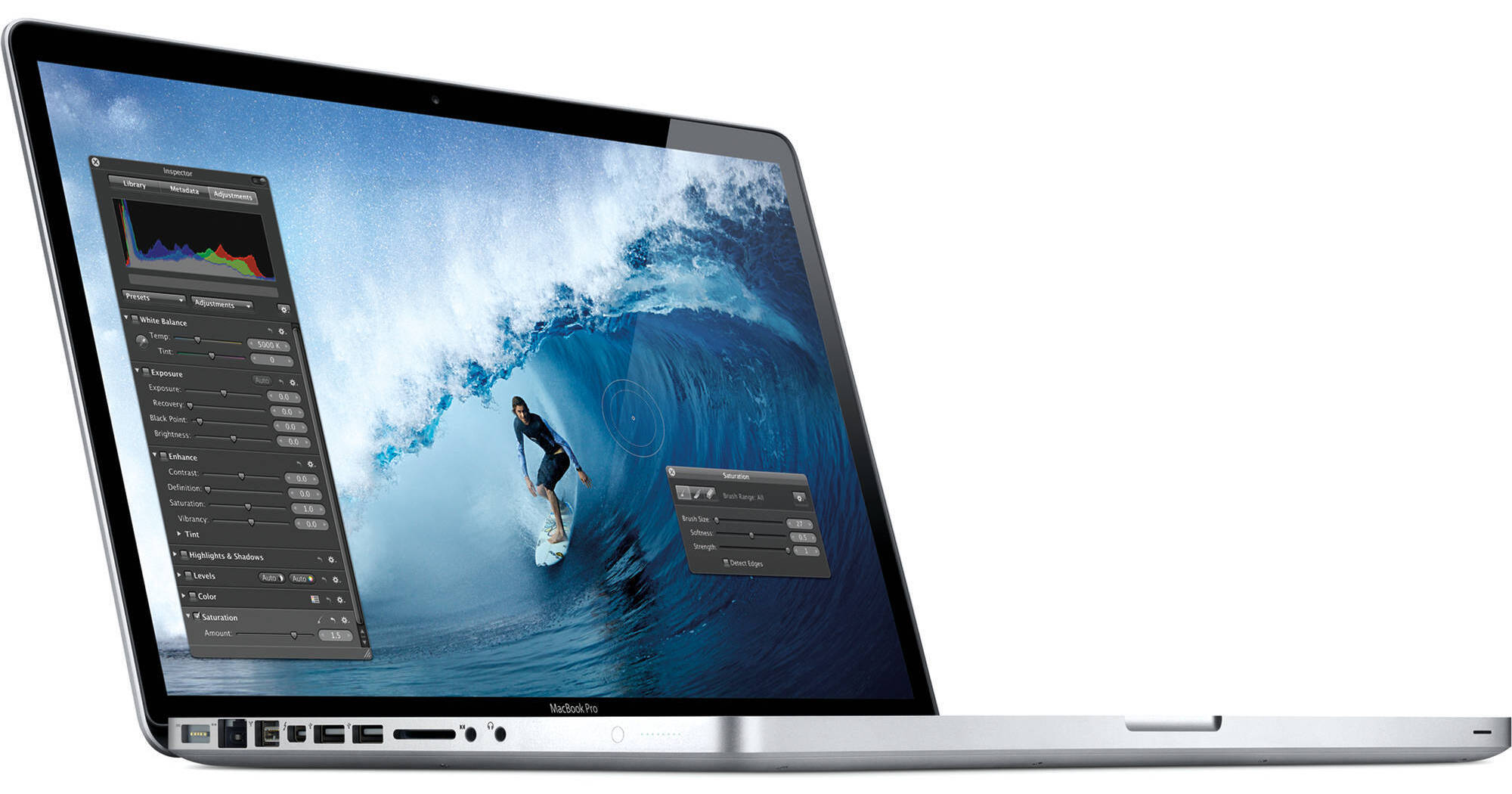
The connections and ports on MacBook Pro -- MagSafe power, Gigabit Ethernet, Thunderbolt, USB, SDXC, and audio in/out -- are all smartly integrated on the same side of the notebook. So your cables stay neatly organized, and connecting and disconnecting your devices is easy and convenient.
MagSafe Power Adapter
The power cord is held in place magnetically, so if someone should trip over it, the cord disconnects harmlessly and your MacBook Pro stays put safely.
Thunderbolt Port
Thunderbolt lets you connect high-performance devices and high-resolution displays to a single, compact port. It even supports Mini DisplayPort devices -- such as your Apple LED Cinema Display or an HDMI adapter for your television.
Designed to Make an Impact -- Just Not on the Environment
Complete control over how the MacBook Pro is designed, how it's manufactured, and how it's packaged gives Apple an environmental edge. LED backlight technology preserves energy. Glass and aluminum are highly recyclable. The MacBook Pro is free of most harmful toxins. And the computer ships in packaging that's smaller than that of the original MacBook Pro. That means fewer trees used for boxes and fewer planes, trains, and trucks used for transport.

Features

Next-Generation Quad-Core Intel CPU
The 15" MacBook Pro features a 2.2GHz i7 processor. With 3.2GHz Turbo Boost support and 6MB of cache, this CPU allows the computer to perform up to twice as fast as the previous generation.
The Graphics Performance You Need, When You Need It
The integrated Intel HD Graphics 3000 processor -- now included across the MacBook Pro lineup -- handles the things you do every day. It encodes video quickly, making HD video calls with FaceTime possible. And it decodes efficiently, so you get long playback time for DVDs and iTunes movies.

For graphics-intensive applications, the MacBook Pro automatically switches to a high-performance AMD Radeon GPU. With up to three times the performance of the previous models, they let you see more frames per second in 3D games, or work on HD video projects with more speed and responsiveness than before.
Introducing Thunderbolt
Imagine accessing multiple streams of uncompressed HD video -- from your notebook -- at speeds that let you edit an HD feature film in real time. That's how Thunderbolt technology will connect the next generation of high-performance peripherals to the next generation of computers -- starting with MacBook Pro. Ultrafast and ultraflexible, the Thunderbolt pipeline is more than 12 times faster than FireWire-800 and up to 20 times faster than USB 2.0, and it offers unprecedented expansion capabilities. It changes what you can do on a notebook.

The Thunderbolt port will give you plug-and-play performance with a whole new world of Thunderbolt peripherals, as well as with the Apple LED Cinema Display and other Mini DisplayPort peripherals. You can daisy-chain as many as six devices, including your display. And with support for video and eight-channel audio, it's easy to connect HDMI-compatible devices -- like your TV and home stereo -- using the HDMI adapter that you may already have. Current VGA, DVI, and DisplayPort adapters are also supported.
FaceTime HD Camera
Get more of your friends in the picture with crisp, widescreen HD video. The FaceTime HD camera gives you three times the resolution of the previous camera -- perfect for the brilliant LED backlit display -- along with improved low-light performance. You and your friends can make 720p HD calls from one MacBook Pro to another. You can also make video calls to other Intel-based Mac computers, iPhone 4, or a camera-equipped iPod touch.
Multi-Touch Trackpad -- Be More Hands-On
The Multi-Touch trackpad is the most natural way to interact with what's on your screen, and the smooth glass surface gives you plenty of room for gestures. Pinch to zoom in and out, swipe to flip through photos, rotate to adjust an image, and much more. The buttonless design lets you click anywhere. And if you're coming from a right-click world, you can right-click with two fingers or configure a right-click area on the trackpad. The more you use the Multi-Touch trackpad, the more you'll wonder how you ever did without it.
A Long-Lasting Battery -- Charge Less, Do More
The MacBook Pro delivers amazing battery life. And that's with a more powerful CPU and faster graphics than ever before. An energy-efficient processor architecture with an integrated video encoder, along with automatic graphics switching, all help improve battery life. So you can expect to browse the web wirelessly for up to 7 hours on a single charge. Or take your entire creative studio on the road for live performances or a location shoot. Advanced chemistry and Adaptive Charging give you up to 1000 full charge and discharge cycles -- nearly three times the lifespan of typical notebook batteries. And because the MacBook Pro battery lasts up to five years, the computer uses just one battery in the same time a typical notebook uses three. That's better for you and for the environment.

Apple is now using more rigorous battery test than ever before. It measures the results you can expect in the real world -- like browsing your favorite websites in a coffee shop or catching up on the latest web videos. Even using this more stringent test, the MacBook Pro delivers amazing battery life. For your real life.
It's Very Well Connected
When you're out and about, the 802.11n wireless technology in MacBook Pro makes it easy to get connected just about anywhere. The MacBook Pro automatically finds available networks and allows you to join them with a click. Bluetooth wireless technology is also built in, so you can use your favorite wireless accessories right out of the box.
Ports with Possibility
With the Thunderbolt port, you can daisy-chain as many as six devices, including your display, to create a full-fledged workstation. Two USB 2.0 ports and a FireWire-800 port let you connect your iPad, iPod, iPhone, digital cameras, and external hard drives.

The SDXC card slot on the supports up to 64GB cards and makes it a snap to transfer all those photos to and from your MacBook Pro, so you can edit and share them on the spot.
Burn DVDs Superfast
After using iMovie and iDVD to edit and apply the finishing touches to your home movie, use the 8x SuperDrive on MacBook Pro to burn it to DVD in no time. Since the SuperDrive writes to double-layer discs (DVDs with nearly 9GB of space), it's great for backing up data, too.

Performance

Quad-Core Intel Core i7 CPU
The computer features a quad-core Intel Core i7 processor and a recently-refined Intel chipset. So what does all that mean for the system? Bottom line: It performs up to twice as fast as the previous generation, breezing through demanding tasks like editing HD video, compiling audio, or rendering a multilayered image file. And since the MacBook Pro is designed to take advantage of every processor core, it captures every last bit of performance from the processor.
Faster Single-Chip Microarchitecture
Whether you're watching a movie, updating your blog, or editing photos, data has to travel from place to place to be processed. The latest Intel Core architecture puts the processor, cache, memory controller, and graphics engine on a single chip. Since data doesn't have as far to travel, you get faster performance and greater efficiency.
Turbo Boost 2.0
Say you're using a processor-intensive application like Aperture 3 or Final Cut Pro that benefits from extra power. Turbo Boost is a dynamic performance technology that automatically increases the speed of the active cores -- up to 3.2GHz. Turbo Boost 2.0 is even more dynamic and efficient. By shifting core frequency in smaller increments than before, it allows the processor to manage performance without sacrificing efficiency. All this takes place behind the scenes, so your work just goes smoother and faster.
Hyper-Threading
Hyper-Threading is standard on every MacBook Pro. This technology allows two threads to run simultaneously on each core, so Mac OS X recognizes four on a dual-core processor. When you're running multiple applications at once, the processor spreads tasks more evenly across a greater number of cores.
Integrated Memory Controller
With faster access to memory, each core can get right to work on your data, rather than waiting for it to arrive. That's why the Intel Core architecture uses an integrated memory controller to connect fast 1333MHz memory directly to the processor. Together with 6MB of shared L3 cache, the integrated memory controller helps your applications run at peak performance.
Energy-Efficient Graphics
Thanks to the computer's microarchitecture, the graphics processor is on the same chip as the central processor and has direct access to L3 cache. That proximity translates into performance. The graphics processor also automatically increases clock speeds for higher workloads. An integrated video encoder enables HD video calls with FaceTime, while an efficient decoder gives you long battery life when you're watching DVDs or iTunes movies.
AMD Radeon HD 6750M GPU
When you need more performance for things like playing 3D games, editing HD video, or even running CAD software, the MacBook Pro automatically switches to discrete AMD Radeon graphics that let you see more frames per second and experience better responsiveness. With 1GB of dedicated GDDR5 video memory, this GPU provides up to three times faster performance than the previous generation.
Thunderbolt - Lightning Fast Data Transfer
Thunderbolt technology has arrived -- and the MacBook Pro is the first notebook to have it. Now one connection carries both DisplayPort and PCI Express. With two 10Gbps data channels, you can transfer data more than 12 times faster than with FireWire-800. And don't worry about a single drive or peripheral tying up the Thunderbolt port: You can daisy-chain as many as six devices, including your display. So with one tiny, streamlined port, you get lightning-fast transfer speeds and huge expansion capabilities.

Thunderbolt -- In Depth

Powerful Technology from a Powerful Collaboration.
Thunderbolt began at Intel Labs with a simple concept: create an incredibly fast input/output technology that just about anything can plug into. After close technical collaboration between Intel and Apple, Thunderbolt emerged from the lab to make its first appearance in MacBook Pro.

Intel co-invented USB and PCI Express, which have become widely adopted technologies for data transfer. Apple invented FireWire and was instrumental in popularizing USB. Their collective experience has made Thunderbolt the most powerful, most flexible I/O technology ever in a personal computer.
One Small Port -- One Giant Leap in Possibilities
The MacBook Pro gives you access to a world of high-resolution displays and high-speed peripherals with one compact port. That's because Thunderbolt is based on two fundamental technologies: PCI Express and DisplayPort.

PCI Express is the technology that links all the high-performance components in a Mac. And it's built into Thunderbolt. Which means you can connect external devices like RAID arrays and video capture solutions directly to MacBook Pro -- and get PCI Express performance. That's a first for notebooks. Thunderbolt also provides 10 watts of power to peripherals, so you can tackle workstation-class projects on the go. With PCI Express technology, you can use existing USB and FireWire peripherals -- even connect to Gigabit Ethernet and Fibre Channel networks -- using simple adapters.

And because Thunderbolt is based on DisplayPort technology, the video standard for high-resolution displays, any Mini DisplayPort display plugs right into the Thunderbolt port. To connect a DisplayPort, DVI, HDMI, or VGA display, just use an existing adapter.
Performance and Expansion Never Before Seen on a Notebook
With 10Gbps of throughput in both directions, Thunderbolt I/O technology lets you move data to and from peripherals up to 20 times faster than with USB 2.0 and more than 12 times faster than with FireWire-800. Two 10Gbps channels on the same connector mean you can daisy-chain multiple high-speed devices and a display, without using a hub -- and without reducing performance.
High Performance on Display
Thunderbolt I/O technology provides native support for Mini DisplayPort displays. It also supports DisplayPort, DVI, HDMI, and VGA displays through the use of existing adapters. So you can connect your Apple LED Cinema Display or other existing display, along with multiple high-speed devices, all from a single port.
No Project Is Too Massive
Now you can create a professional video setup for your MacBook Pro, just as you would for your Mac Pro. If you're a video editor, imagine connecting high-performance storage, a high-resolution display, and high-bit-rate video capture devices to handle all the post-production for a feature film -- right on your notebook. Thunderbolt I/O technology allows you to daisy-chain up to six peripherals, such as the Promise Pegasus RAID or LaCie Little Big Disk, or five peripherals and an Apple LED Cinema Display.

And that's just the beginning. With Thunderbolt technology, peripheral manufacturers finally have what they need to take high-performance devices from workstations and top-of-the-line desktops to portable computers.

Software

Mac OS X
At the heart of every MacBook Pro -- and every Mac -- is Mac OS X, an operating system custom made for the Intel multicore processors and advanced graphics inside. The version of Mac OS X installed on this computer is based on an entirely 64-bit architecture, and so are virtually all of the applications that come with a Mac. Translation: Everything you do on your MacBook Pro happens with dramatic speed and incredible overall performance.
Powerful Applications That Are Easy to Use
Because Apple makes MacBook Pro and the software that comes on it, everything works together perfectly. Becoming familiar with Apple applications takes almost no time because they all work in similar ways. So once you get the hang of one application, it takes little or no effort to master the others.

And Apple understands portable productivity. Which is why they include features -- like Exposé and Spaces -- to help you access everything on your MacBook Pro. With one keystroke or gesture, Exposé instantly tiles all your open windows, scales them down, and neatly arranges them in a grid, so you can see what's in every single one. And Spaces lets you group windows together within their own desktop, or space, that you can move between quickly. Create a space for work, a space for play, a space for whatever you like. Together, Exposé and Spaces give you a big advantage when you're multitasking on a notebook screen.
Wireless Networking -- Without the Work
See a network, join a network. With a Mac, getting online via Wi-Fi is just that easy. One click of the AirPort icon in the menu bar gives you a list of available networks. Select the one you want to join, enter the password, if necessary, and you're up and running.
One Thing a Mac Doesn't Do -- Get PC Viruses
Trojan horses, worms, e-mail viruses. The digital world can be a scary place. Thankfully, a Mac isn't susceptible to the thousands of viruses plaguing Windows-based computers. Mac OS X comes with built-in defenses that keep you safe, without any work on your part. And when a potential security threat arises, Apple responds quickly by providing software updates and security enhancements you can download automatically and install with a click.
Automatic Backup with Time Machine
Backing up is essential. Yet you probably don't do it as often as you should. That's why your MacBook Pro bears the burden of backing up for you. Time Machine, an application that comes on every Mac, automatically backs up your entire system to your external hard drive or Time Capsule. Time Machine keeps a spare copy of every file, and it also remembers how your system looked on a given day. So you can revisit your Mac as it appeared in the past.
Even the Everyday Stuff Is Amazing
Unlike a lot of PC notebooks, the MacBook Pro comes with everything you need to send e-mail, manage your calendar, organize your contacts, and more. And it's ready to do all these things minutes after you take it out of the box. That's because every Mac comes with Mail for sending and receiving e-mail, iCal for managing appointments and important events, Address Book for organizing your contacts, iTunes for all things entertainment, and other fun and useful applications you'll find yourself using every day.
The Mac App Store -- A Thousand More Reasons to Love a Mac
More than a thousand Mac apps are a click away at the Mac App Store. Find the ones you want and simply click to download and install. No more boxes. No more disks. No more hassle. You can browse apps by category or search for something specific. And you can easily keep your apps up to date, because your Mac will let you know when updates are available.
FaceTime. Now Making HD Video Calls
The MacBook Pro comes with the FaceTime HD camera and easy-to-use FaceTime for Mac software. Just click to make HD video calls from MacBook Pro to MacBook Pro. You can also make video calls to other Intel-based Mac computers, iPhone 4, or a camera-equipped iPod touch. Your calls will start in portrait view, but you can easily rotate to the new widescreen format. FaceTime automatically displays your contacts from Address Book, so you don't have to build a buddy list. And calls ring through to your Mac even when you don't have the FaceTime app open.
iPhoto -- The Best Way to Organize, Edit, and Share Your Photos
iPhoto is an easy-to-use photo application that makes it fast and fun to organize and find your pictures, as well as make them look their absolute best. With features like Faces, Places, and Events, iPhoto helps you keep track of your photos by who's in them and when and where you took them -- all in an immersive full-screen view. Use quick and simple editing tools to make so-so shots picture perfect with just a few clicks. iPhoto even lets you share your photos with the world with beautiful photo books and letterpress cards or online via Facebook, MobileMe, and Flickr.
iMovie -- Turn Your Home Movies into Home Blockbusters
Don't settle for boring home movies. With iMovie, you can transform the videos you shoot into your very own indie flicks. Create a Hollywood-style trailer that'll make your audience laugh, cry, and cheer for more. If you know how to drag and drop, you can make a movie in iMovie. It comes with Apple-designed themes that look fun and professional. Just choose one and iMovie does the rest, adding animated titles and sophisticated transitions automatically. Customize your screen gem further with your own words and audio.
GarageBand -- Creating Great-Sounding Songs Is Easy
Whether you're musically gifted or mostly curious, GarageBand is the application for you. Plug in your electric guitar or USB music keyboard and get ready to rock with virtual replicas of the most revered amps and stompboxes in the world, as well as over 100 software instruments. Just because you didn't grow up learning your A, B, and C sharp doesn't mean you can't. Basic Lessons teach you just that: the basics. Choose from 40 lessons that cover blues guitar, rock guitar, classical piano, pop piano, and more. Or get a private lesson from one of your musical heroes, like Sting or Death Cab for Cutie, with Artist Lessons. GarageBand even tells you how well you're playing in real time with a feature called "How Did I Play?"

The Environment

Efficient Power Supply
The MacBook Pro includes a highly efficient power supply that reduces the amount of power wasted when bringing electricity from the wall to your computer. Lower power consumption reduces energy bills and lessens the environmental impact of greenhouse gas emissions from power plants.
Advanced Power Management
Unlike a lot of Windows-based PC systems, the MacBook Pro uses energy-efficient hardware components that work hand in hand with the operating system to conserve power. Mac OS X activates sleep mode on already energy-efficient LED backlit displays. And it balances tasks across both central processors and graphics processors. Mac OS X never misses a power-saving opportunity, no matter how small. It even regulates the processor between keystrokes, reducing power between the letters you type. That's just one of many ways Apple manages small amounts of power that add up to big savings.
ENERGY STAR Qualification
The MacBook Pro meets the stringent low power requirements set by the EPA in their ENERGY STAR 5.0 qualification. ENERGY STAR 5.0 sets significantly higher efficiency limits for power supplies and aggressive limits for the computer's typical annual power consumption.
Fewer Toxins
The greatest environmental challenge facing the computer industry today is the presence of arsenic, brominated flame retardants (BFRs), mercury, phthalates, and polyvinyl chloride (PVC) in products. Apple engineers have worked hard to eliminate BFRs and PVC from MacBook Pro circuit boards, internal and external cables, connectors, insulators, adhesives, and more. And they've eliminated many other toxins that are a common part of notebook computer manufacturing -- choosing, for example, mercury-free backlighting and arsenic-free glass for the MacBook Pro display.
Smaller Boxes, Fewer Planes
The MacBook Pro ships in a package that is smaller than before. Smaller boxes are much better for the planet. Because smaller boxes mean that more boxes can fit on each shipping pallet. Which means more products will fit on each boat and plane. Which means fewer boats and planes are used, resulting in fewer carbon dioxide emissions. It's one seemingly minor change. But it has a major positive impact on our environment.
Recyclable Materials
Apple has minimized the waste when MacBook Pro reaches end of life through its ultraefficient design and the use of aluminum, which recyclers can reuse for other products.
EPEAT Gold Rating
The Electronic Product Environmental Assessment Tool, or EPEAT, evaluates the environmental impact of a product based on how recyclable it is, how much energy it uses, and how it's designed and manufactured. Through its innovative and environmentally friendly design, the MacBook Pro has earned the highest rating of EPEAT Gold.
Life Cycle Impact
Apple's life cycle analysis accounts for all emissions associated with their products. That includes raw material extraction, manufacturing, packaging, transportation, a three- or four-year period of use, and recycling. In the course of this analysis, Apple determined that more than 95 percent of their total greenhouse gas emissions come from the products they make.

Support

Tech Support
Have a problem with your Mac? Get support and advice at the Genius Bar, located at every Apple Retail Store. Apple also provides online tutorials, troubleshooting forums, and 90 days of phone support for users who aren't able to make it to an Apple store.
Optional AppleCare
Apple provides 90 days of free phone support and a 1-year limited hardware warranty on the computer. You can opt to add an AppleCare Protection Plan, at additional cost, which covers support and repairs for 3 years from the date of purchase. AppleCare can be purchased at any time within the first year of ownership of the computer.
Performance
Processor 2.2GHz Intel Core i7-2720QM
Cache L3: 6MB
System Bus None
Memory Slots: 2x SO-DIMM 204-Pin
Type: PC3-10600 1333MHz DDR3 SDRAM
Installed: 4GB (2x2GB)
Capacity: 8GB
Graphics Card Type: Hybrid Graphics System
Installed: AMD Radeon HD 6750M with 1GB GDDR5 SDRAM Dedicated; Intel GMA HD Graphics 3000 with up to 384MB DDR3 SDRAM Shared
Display
Type Widescreen
Size 15.4"
Backlight LED
Aspect Ratio 16:10
Finish Glossy
Native Resolution 1440 x 900
Supported Resolutions 1440 x 900 at 16:10 Aspect Ratio 
1280 x 800 at 16:10 Aspect Ratio 
1152 x 720 at 16:10 Aspect Ratio 
1024 x 640 at 16:10 Aspect Ratio 
800 x 500 at 16:10 Aspect Ratio 
1024 x 768 at 4:3 Aspect Ratio 
800 x 600 at 4:3 Aspect Ratio 
640 x 480 at 4:3 Aspect Ratio 
1024 x 768 at 4:3 Aspect Ratio Stretched
800 x 600 at 4:3 Aspect Ratio Stretched
640 x 480 at 4:3 Aspect Ratio Stretched
720 x 480 at 3:2 Aspect Ratio 
720 x 480 at 3:2 Aspect Ratio Stretched
External Resolution Up to 2560 x 1600
Dual Display Yes
Video Mirroring Yes
Storage
Hard Drive Bays: 1x 2.5" (9.5mm)
Installed: 750GB 5400rpm
Type: SATA
Optical Drive 8x-Speed Slot-Load SuperDrive

Reads
DVD: 8x
CD: 24x

Writes
DVD-R: 8x
DVD-RW: 4x
DVD-R DL: 4x
DVD+R: 8x
DVD+RW: 4x
DVD+R DL: 4x
CD-R: 24x
CD-RW: 10x
Input/Output Connectors
Ports 2x USB 2.0 (A)
1x FireWire-800 (9-Pin)
1x Thunderbolt
Display 1x Mini DisplayPort via Thunderbolt port
1x DVI via Thunderbolt port using optional cable
1x VGA via Thunderbolt port using optional cable
1x Dual-Link DVI via Thunderbolt port using optional cable
1x HDMI via Thunderbolt port using optional cable
Audio Integrated Stereo Speakers with subwoofer
Integrated Omnidirectional Microphone
1x 1/8" (3.5mm) Headphone Output with shared S/PDIF
1x 1/8" (3.5mm) Microphone Input with shared S/PDIF
Expansion Slots None
Flash Media Slot 1x SDXC
Communications
Network 10/100/1000Mbps Gigabit Ethernet (RJ-45)
Modem None
Wi-Fi 802.11a/b/g/n
Bluetooth Bluetooth 2.1+EDR
Webcam Yes
General
Operating System Not Specified By Manufacturer 1
Please Note:

Due to Apple's OS upgrade, the preinstalled OS may be Mac OS X 10.6 Snow Leopard or OS X 10.7 Lion.

close
Security Kensington Lock Slot
Keyboard Keys: 78
Type: Standard Notebook Keyboard
Features: Backlight, Chiclet Style
Pointing Device TouchPad with Double-Tap, Drag, Four-Finger Swipe, Inertial Scrolling, Multi-Touch Control, Pinch, Precise Cursor Control, Rotate, Tap, Three-Finger Swipe, Two-Finger Scrolling
Battery Built-In Lithium-Polymer Providing up to 7 Hours per Charge (77Wh)
Power Requirements AC: 100-240 V AC, 50-60Hz
Consumption: 85W
Dimensions (WxHxD) 14.35 x 0.95 x 9.82" / 36.45 x 2.41 x 24.94 cm
Weight 5.6 lb / 2.54 kg

REVIEW SNAPSHOT®

by PowerReviews
Apple15.4" MacBook Pro Notebook Computer
 
4.8

(based on 42 reviews)

Ratings Distribution

  • 5 Stars


    (37)

  • 4 Stars


    (4)

  • 3 Stars


    (0)

  • 2 Stars


    (0)

  • 1 Stars


    (1)

97%

of respondents would recommend this to a friend.

Pros

  • Good power output (32)
  • Fast (31)
  • Quality display (29)
  • Comfortable keyboard (22)
  • Long battery life (21)

Cons

  • Heavy (4)
  • Too hot (3)

Best Uses

  • Graphics (27)
  • Video (24)
  • Music (20)
  • Web browsing (20)
  • Business use (13)
    • Reviewer Profile:
    • Multimedia professional (15), Tech savvy (12)
    • Primary use:
    • Personal (18), Business (17)

Most Liked Positive Review


MacBook Pro - My Server Lab On The Go

Here are some of my impressions of the new MacbookPro15 2011.

DECISION: I have been contemplating on buying last year's high-end model of MBP-15 (2.66 Ghz Intel i7) for $325...Read complete review

Here are some of my impressions of the new MacbookPro15 2011.

DECISION: I have been contemplating on buying last year's high-end model of MBP-15 (2.66 Ghz Intel i7) for $325 less than the price of the 2011 version. I came into conclusion that it is justifiable to go for the latest one by gaining 1gb GDDR5 graphics (vs. 512mb GDDR3 of MBP-15 2010), Intel i7 Quad Core (vs. Intel i7 Dual Core), and Thunderbolt I/O port (vs. mini-Display port). Just by looking at the average price of 1gb GDDR5 ATI Radeon at $180 plus the Quad Core i7, the $325 difference is good.

UPGRADE: To meet my need, I upgraded the RAM to 8gb (Crucial DDR3 1333MHz SODIMM) by myself for just $97 compared to Apple's markup at $300. My next project for upgrade would be to replace the 750gb 5400 rpm Hard Drive with 512gb SSD; but today's SSD price of $2.25/gb sounds absurd, I'm sticking for the mechanical storage for awhile until the price drops to $1.50/gb.

PERFORMANCE: The new 2011 MacbookPro 15 with 2.2 Ghz Intel i7 Quad Core has exceeded my expectations in performance. I'm using this as my portable server lab. I use VMWare Fusion to run multiple operating systems - Windows (as my work environment + SQL Server database), UNIX Solaris 10 (Oracle database), and Linux (Weblogic App Server and Apache Web server). All these environments are running simultaneously in MacOS X. The 2nd Gen Intel i7 Quad Core truely delivers a better multi-threading process even at a lower clock speed of 2.2 Ghz. I get only 45% CPU utilization compared to my 2-yr old MacBook Pro Intel Core 2 Duo that hits at 100% during transaction simulations. What is surprising to me is the 750gb 5400 rpm hard drive has the same i/o read performance of a higher speed 500gb 7200 rpm in my previous MBP. Could it be of the new 4,096 bytes/sector size vs the traditional 512 bytes/sector is the factor of such performance?

CONS: 1) When the CPU starts to hit 40% utilization, this thing can get hot in the upper left corner of its base. You might as well consider buying a hardshell (I use Speck See-Thru Satin shell) to somehow suppress the heat from the aluminum frame when working on your lap.
2) At 45% CPU, the dual fans can be loud for someone who has sensitive ears.
3) The integrated graphics Intel HD 3000 consumes 384mb of your RAM vs. the 2010 MBP nVidia 320M using only 256mb. And, the performance of the Intel HD 3000 is only as good as the 2009 MBP nVidia 9400M. If you need to maximize the usage of your RAM for your apps, ditch the integrated graphics and use the discrete ATI Radeon graphics by unchecking the "Automatic Graphics Switching" at the Energy System Preference (but this comes with battery life penalty of -30 minutes which I don't mind at all).

CONCLUSION: I am very much satisfied with purchase as it meets all the performance I needed plus the elegant look it brings to a professional IT guy.
I give this 5 stars.

VS

Most Liked Negative Review


Piece of junk

After only 3 months of occasional use (& mostly sitting on a desk, not being carted about as a portable device), my screen has started flickering & is now unusable. This...Read complete review

After only 3 months of occasional use (& mostly sitting on a desk, not being carted about as a portable device), my screen has started flickering & is now unusable. This will be the first & last Apple PC that I will ever buy.

Reviewed by 42 customers

Sort by

Displaying reviews 1-20

Back to top

Previous | Next »

 
5.0

Good for those obsessed with details

By Taras

from Seattle, WA

About Me Proficient with computers, Student

Verified Buyer

Pros

  • Easy To Collaborate Across Programs
  • Easy to Customize
  • Easy to Navigate
  • Versatile

Cons

    Best Uses

    • Educational Purposes
    • Multimedia

    Comments about Apple 15.4" MacBook Pro Notebook Computer:

    Hello.

    Right away I can say that this laptop meets and exceeds the needs of most users out there. It is a good laptop that you use every day, and it fits every need you will have. You can customize almost every bit of it when you make the effort to do so, and the trade off is such that you don't run in to the problems and inconvenience that Windows laptops have.

    You will like this laptop if you need the computer power, portability and are picky about the details. For example, when you type and accidentally touch the trackpad on a PC, it moves your mouse. When you do that on this macbook pro, it doesn't. So, this is an example of the nitty-gritty details that add to your everyday comfort and do not give you any frustrations, which makes your day even better. Apple has obviously done a great job, and the laptop is worth the money.

    When you look at this laptop, think twice. If you are able to invest in this laptop, it will be more than worth it! The money will be worth it in the long run.

    However, each laptop has its own downsides. For this Macbook pro there are very few of them. For example, if you are an expert with computers, you won't find such customization abilities with Apple's Mac OS X, because this laptop is made for everyday comfortable use and also those who are not experienced with computers. There may be glare from the glossy display, but you can just turn the monitor away, and the colors on the glossy display are much more vibrant than on the more expensive anti-glare display.

    So, summing it up, this laptop has many abilities. You can also install Windows on it to run separately when you want, so that you can run any Windows programs if you want them. Take good care of this laptop like I do, and it will serve you reliably for a good four to five years and will always look beautiful and amazing.

    P.S. The battery on it is good - takes me through most of the day, and you'll like the backlit keyboard because it helps so much when you need it!

    • Primary use:
    • Personal
    • Computer Platform:
    • Mac
    • Similar:
    • iMac 21.5" desktop Computer

    Share this review

     
    5.0

    Price better than Apple Store

    By Sergio

    from Chestnut Hill, MA

    Verified Buyer

    Pros

      Cons

        Best Uses

          Comments about Apple 15.4" MacBook Pro Notebook Computer:

          Great graphics for working with publicity and marketing. Reliable and efficient. The simplicity of its hardware does not shadow the outstanding performance of this laptop. Few features made it better than my previous Macbook.

          • Primary use:
          • Business

          Share this review

           
          5.0

          Lots of power in a small package

          By Rich from Rifton

          from Rifton, NY

          About Me Multimedia Professional, Technically Challenged

          Verified Buyer

          Pros

          • Fast
          • Powerful
          • Quality Display

          Cons

          • Short Battery Life
          • Too Hot

          Best Uses

          • Video
          • Web Browsing

          Comments about Apple 15.4" MacBook Pro Notebook Computer:

          I purchased this laptop for live video streaming. It has the guts for that and more. Just wish the battery lasted a little longer.

          • Primary use:
          • Business

          Share this review

          (0 of 2 customers found this review helpful)

           
          1.0

          Piece of junk

          By TazD

          from San Diego, CA

          About Me Tech Savvy

          Pros

          • Fast
          • Lightweight
          • Powerful

          Cons

          • Poor Quality
          • Unreliable

          Best Uses

            Comments about Apple 15.4" MacBook Pro Notebook Computer:

            After only 3 months of occasional use (& mostly sitting on a desk, not being carted about as a portable device), my screen has started flickering & is now unusable. This will be the first & last Apple PC that I will ever buy.

            • Primary use:
            • Personal

            Share this review

             
            4.0

            The best

            By N in LA

            from Los Angles, CA

            About Me Multimedia Professional, Tech Savvy

            Verified Buyer

            Pros

            • Fast
            • Long Battery Life
            • Powerful
            • Quality Display
            • Quiet

            Cons

            • Heavy

            Best Uses

            • Business Use
            • Graphics
            • Music
            • Video
            • Web Browsing
            • Word Processing

            Comments about Apple 15.4" MacBook Pro Notebook Computer:

            This laptop is changing my life. It's quick, it can read my mind and I can have as many apps open as I need to. My only issue is that it is still heavy.

            • Primary use:
            • Business

            Share this review

             
            5.0

            Love the MBP

            By drips

            from nyc

            About Me Tech Savvy

            Verified Buyer

            Pros

            • Powerful
            • Quality Display

            Cons

            • Heavy

            Best Uses

            • Graphics
            • Video

            Comments about Apple 15.4" MacBook Pro Notebook Computer:

            I am generally a casual user (internet, email, etc) but occasionally do some graphics, including 3D stuff. I just upgraded from a 13" MacBook and I like the added performance of the Pro and the dedicated graphics card. Best price from B&H too.

            • Primary use:
            • Personal

            Share this review

             
            5.0

            This device has Simplified my life

            By elunico

            from Washington, DC

            About Me Tech Savvy

            Verified Buyer

            Pros

            • Comfortable Keyboard
            • Fast
            • Long Battery Life
            • Powerful
            • Quality Display
            • Quiet

            Cons

            • Heavy

            Best Uses

            • Business Use
            • Music
            • Video
            • Web Browsing
            • Word Processing

            Comments about Apple 15.4" MacBook Pro Notebook Computer:

            My Mac has replaced my other (3) laptops. I have given away two as gifts to family and friend. I see no reason to ever stop using my Mac. I got so excited about having my Mac that I went and purchased an iPad and an iPhone to compliment my iPod and my Mac Book Pro.

            • Primary use:
            • Personal

            Share this review

            (1 of 1 customers found this review helpful)

             
            5.0

            The mac book pro

            By sha

            from CA

            Verified Buyer

            Pros

            • Quality Display

            Cons

              Best Uses

                Comments about Apple 15.4" MacBook Pro Notebook Computer:

                i love this mac book pro computer by apple it give me room to move around
                on the go. the screen is sharp was going to get the mac air at first but when
                i saw the mac book pro had to have it a must have

                • Primary use:
                • Personal

                Share this review

                 
                5.0

                Excellent! this is very nice macBook

                By Cyberguy

                from Denver, CO

                Verified Buyer

                Pros

                • Comfortable Keyboard
                • Fast
                • Quality Display

                Cons

                  Best Uses

                  • Graphics
                  • Web Browsing

                  Comments about Apple 15.4" MacBook Pro Notebook Computer:

                  This is my first time to buy macbook. It is an excellent macbook.

                  • Primary use:
                  • Personal

                  Share this review

                   
                  5.0

                  Love it

                  By LT

                  from Eagle, CO

                  About Me Multimedia Professional, Tech Savvy

                  Verified Buyer

                  Pros

                  • Comfortable Keyboard
                  • Fast
                  • Long Battery Life
                  • Powerful
                  • Quality Display

                  Cons

                    Best Uses

                    • Business Use
                    • Graphics
                    • Music
                    • Web Browsing

                    Comments about Apple 15.4" MacBook Pro Notebook Computer:

                    Fast and clean - awesome

                    • Primary use:
                    • Business

                    Share this review

                    (0 of 1 customers found this review helpful)

                     
                    5.0

                    Great computer

                    By Vtek

                    from chicago, il

                    About Me Multimedia Professional

                    Verified Buyer

                    Pros

                    • Comfortable Keyboard
                    • Fast
                    • Lightweight
                    • Powerful
                    • Quality Display

                    Cons

                      Best Uses

                      • Business Use
                      • Graphics
                      • Web Browsing

                      Comments about Apple 15.4" MacBook Pro Notebook Computer:

                      I use this product both at the office and at home for work related tasks. I down sized from a 17" version because the 15" is easier to transport. I solved the screen size issue by getting larger monitors at each location that I can plug into.

                      So far so good.

                      • Primary use:
                      • Business

                      Share this review

                       
                      5.0

                      Love It!

                      By christo

                      from new orleans, la

                      About Me Tech Savvy

                      Verified Buyer

                      Pros

                      • Comfortable Keyboard
                      • Fast
                      • Lightweight
                      • Long Battery Life
                      • Powerful
                      • Quality Display
                      • Quiet

                      Cons

                        Best Uses

                        • Graphics
                        • Music
                        • Video

                        Comments about Apple 15.4" MacBook Pro Notebook Computer:

                        -music, movies, art
                        -fast, light, reliable
                        -expensive

                        • Primary use:
                        • Personal

                        Share this review

                         
                        5.0

                        Fast, cheapest on the web or off!

                        By PK

                        from Shrewsbury, MA

                        About Me Tech Savvy

                        Verified Buyer

                        Pros

                        • Fast
                        • Powerful
                        • Quality Display
                        • Quiet

                        Cons

                          Best Uses

                          • Business Use
                          • Graphics
                          • Music
                          • Web Browsing
                          • Word Processing

                          Comments about Apple 15.4" MacBook Pro Notebook Computer:

                          IT'S GREAT, AS PROMISED.

                          • Primary use:
                          • Business

                          Share this review

                           
                          5.0

                          Great Laptop's Ever

                          By Do3L

                          from Caguas, PR

                          About Me Multimedia Professional

                          Verified Buyer

                          Pros

                          • Comfortable Keyboard
                          • Fast
                          • Lightweight
                          • Long Battery Life
                          • Powerful
                          • Quality Display
                          • Quiet

                          Cons

                            Best Uses

                            • Graphics
                            • Video
                            • Web Browsing

                            Comments about Apple 15.4" MacBook Pro Notebook Computer:

                            I am Used with final cut pro is so great speed in render.

                            • Primary use:
                            • Personal

                            Share this review

                             
                            5.0

                            Love Mac's and love MacBook Pro!

                            By A photographer

                            from Massachusetts

                            About Me Photographer

                            Verified Buyer

                            Pros

                            • Fast
                            • Long Battery Life
                            • Powerful
                            • Quality Display
                            • Quiet

                            Cons

                            • Heavy

                            Best Uses

                            • Business Use
                            • photo editing
                            • Video Editing

                            Comments about Apple 15.4" MacBook Pro Notebook Computer:

                            Lots of power in a small enough package to carry around, although I have been spoiled by my MacBook Air. I have an older MacBook Air, which is fantastic for those who don't want a heavy computer to lug around. However, the Air has its limitations; I couldn't install Photoshop and Lightroom together because of the lack of hard drive space and the slower processor would have made it unbearable (for me anyway) to run Photoshop. I also plan to do more video and need the power the Pro offers.

                            I'm loving the larger screen than the Air, the track pad is a little different and took some getting used to but overall it's a fabulous laptop! I would buy another.

                            • Primary use:
                            • Business

                            Share this review

                             
                            5.0

                            More of what I expected

                            By imd23

                            from Miami, FL

                            About Me Multimedia Professional

                            Verified Buyer

                            Pros

                            • Comfortable Keyboard
                            • Fast
                            • Powerful
                            • Quality Display
                            • Quiet

                            Cons

                              Best Uses

                              • Graphics
                              • Music
                              • Video

                              Comments about Apple 15.4" MacBook Pro Notebook Computer:

                              This MacBook Pro is for the first time in my computer-story (10 years), beginning when I was 6, that is faster than my-self.

                              Everything is just as is supposed to be, and it's important to note that it has one of the most GeekBench scores of all Apple MBP and even more than most MacPro , it's about 10,990! Isn't this just lovely?

                              Buy this, you won't get disappointed.

                              • Primary use:
                              • Business

                              Share this review

                               
                              5.0

                              Fantastic Product

                              By Jasty

                              from Amarillo, TX

                              Verified Buyer

                              Pros

                              • Comfortable Keyboard
                              • Fast
                              • Lightweight
                              • Long Battery Life
                              • Powerful
                              • Quality Display
                              • Quiet

                              Cons

                                Best Uses

                                  Comments about Apple 15.4" MacBook Pro Notebook Computer:

                                  First Mac ever owned and loving it. Easy to learn and use, tremendously fast, and great to look at.

                                  • Primary use:
                                  • Personal

                                  Share this review

                                   
                                  5.0

                                  Great and reliable product!

                                  By Pedro1460

                                  from Rockville MD

                                  About Me Multimedia Professional

                                  Verified Buyer

                                  Pros

                                  • Comfortable Keyboard
                                  • Fast
                                  • Lightweight
                                  • Powerful

                                  Cons

                                  • none

                                  Best Uses

                                  • Graphics
                                  • Video

                                  Comments about Apple 15.4" MacBook Pro Notebook Computer:

                                  This a very good product, specially to work on graphic design.

                                  • Primary use:
                                  • Business

                                  Share this review

                                   
                                  4.0

                                  A workhorse

                                  By KG

                                  from Bozeman, MT

                                  About Me Multimedia Professional

                                  Verified Buyer

                                  Pros

                                  • Fast
                                  • Lightweight
                                  • Powerful
                                  • Quality Display

                                  Cons

                                  • Expensive

                                  Best Uses

                                  • Business Use
                                  • Graphics
                                  • Music
                                  • Video
                                  • Web Browsing

                                  Comments about Apple 15.4" MacBook Pro Notebook Computer:

                                  I use this computer primarily for photo and video edting. I'm running the Adobe Creative Suite and Final Cut Studio. With a RAM upgrade to 8gb this computer works wonderfully. The display seems accurate but I suggest using a calibration tool for accuracy.

                                  • Primary use:
                                  • Business

                                  Share this review

                                   
                                  5.0

                                  Solid Upgrade

                                  By pjfrank

                                  from Washington, DC

                                  About Me Multimedia Professional

                                  Verified Buyer

                                  Pros

                                  • Comfortable Keyboard
                                  • Fast
                                  • Powerful
                                  • Quality Display
                                  • Quiet

                                  Cons

                                    Best Uses

                                    • Graphics
                                    • Music
                                    • Video

                                    Comments about Apple 15.4" MacBook Pro Notebook Computer:

                                    I replaced my late 2007 Macbook Pro with this model. The unibody has a fantastic construction and the guts are a lot quieter than my older model. I did like the easy battery removal of the old though. The built-in battery is basically another new Apple power grab.

                                    I opted for the 2.2gHz over the 2.0 and I'm glad I did. Final Cut 7 runs like a champ and the upgrade from 2 GB to 4GB RAM is processing FCP exports faster. An upgrade to 8 GB is probably a smart investment though.

                                    Battery life advertised as 7 hours? Meh.. I probably get closer to 5 with a lot of apps open jumping between Spaces. I could see having the screen awake and not much else processing getting 7 but that's not realistic for basic use.

                                    Really looking forward to Thunderbolt peripherals! Overall this is a great machine.

                                    • Primary use:
                                    • Personal

                                    Share this review

                                    Displaying reviews 1-20

                                    Back to top

                                    Previous | Next »

                                    Cases

                                    be.ez -  La robe B&W Laptop Sleeve (Black and White)
                                    • Price: $22.99
                                     

                                    Memory

                                    Transcend -  8GB (2x4GB) SO-DIMM Memory Upgrade Kit for Notebook
                                    • Price: $49.95
                                     
                                    Add installation service for an additional $39.99 ">More information

                                    Drives & Storage

                                    Western Digital -  500GB My Passport Studio Portable Hard Drive
                                    • Price: $109.00
                                     

                                    Software

                                    Microsoft -  Office for Mac Home and Student Edition 2011
                                    • Price: $104.99
                                    • Limited supply at this price
                                     
                                    Add installation service for an additional $29.99 ">More information

                                    Editing Software

                                    Adobe -  Photoshop CS5 Software for Mac
                                    • Price: $589.00
                                     
                                    Add installation service for an additional $50.00 ">More information

                                    Networking

                                    Apple -  AirPort Extreme Base Station (Current Model)
                                    • Price: $163.17
                                     
                                    View all Accessories

                                    What's in the Box

                                    Apple 15.4" MacBook Pro Notebook Computer
                                    • 85W MagSafe Power Adapter
                                    • AC Wall Plug
                                    • Power Cord
                                    • Display Cleaning Cloth
                                    • Software
                                      • iTunes, Time Machine, Quick Look, Spaces, Spotlight, Dashboard, Mail, iChat, Safari, Address Book, QuickTime, iCal, DVD Player, Photo Booth, Xcode Developer Tools
                                    • iLife '11 [Preinstalled or Via Download]
                                      • iPhoto, iMovie and GarageBand
                                    • Printed and Electronic Documentation
                                    • 1-Year Limited Warranty with 90-Days Phone Support
                                     
                                     
                                    See any errors on this page? Let us know.

                                    Close

                                    Close