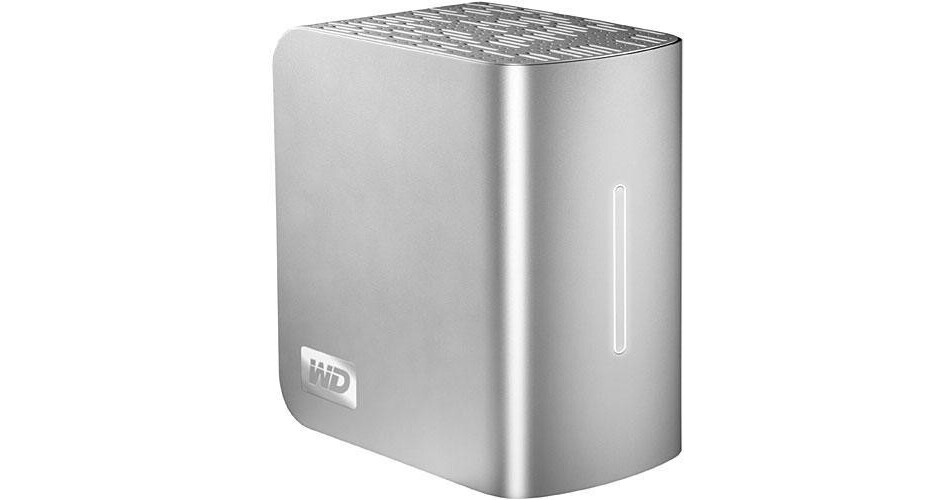
The 6TB My Book Studio Edition II Quad Interface External Hard Drive from Western Digital is a high-capacity external hard drive with an interface that allows it to be connected via FireWire-800, FireWire-400, USB 2.0, or eSATA.
The drive is housed in an elegant design that can at first glance be mistaken for that of a hardbound book. This makes the drive an excellent choice for anyone who would like to have a unique and classy drive to use for external data storage. The drive features built-in power-saving, has no environmental contaminants, and ships in recyclable packaging, making it as friendly to the environment as it is to your data.
The drive comes preformatted with the Mac OS X HFS+ Journaled file system, making it an excellent choice for creative professionals who work on the Mac platform. WD Anywhere Backup software for OS X is included. The drive can also be reformatted for use in Windows. This drive is an excellent choice for anyone who would like to add storage to their computer without sacrificing aesthetics.
| Performance | |
|---|---|
| Capacity | 6TB |
| Interface |
1x USB 2.0 1x eSATA 2x 9-Pin FireWire-800 |
| Drive Speed | 7200rpm |
| Buffer | Not Specified by Manufacturer |
| Average Seek Time | Not Specified by Manufacturer |
| Sustained Data Transfer Rate | Not Specified by Manufacturer |
| Drivers | |
|---|---|
| Supported | Not Required |
| Included | Not Required |
| System Requirements | |
|---|---|
| Operating System |
Mac Windows |
| Hardware | FireWire-400, FireWire-800, USB 2.0, or eSATA port |
| General | |
|---|---|
| Mounting | Desktop |
| Power Requirements | AC: 100-240VAC, 47-63Hz |
| Environmental Requirements |
Operating Temperature: 41-95°F (5-35°C) Storage Temperature: -4-149°F (-20-65°C) |
| Dimensions (WxHxD) | 3.9 x 6.5 x 6.1" (9.8 x 16.6 x 15.4cm) |
| Weight | 5.2 lb (2.6kg) |
REVIEW SNAPSHOT®
by PowerReviewsPros
Cons
Best Uses
Most Liked Positive Review
Good product, good value
I use the 6TB external hard drive disk primarily as a drag-and-drop disk for photo storage. I've used several WD external hard drives over the years and have always found them easy to use (...Read complete review
I use the 6TB external hard drive disk primarily as a drag-and-drop disk for photo storage. I've used several WD external hard drives over the years and have always found them easy to use (once the occasional installment problem is overcome) and extremely reliable. The 6TB disk is no exception.
The only problem I encountered in installation was owing to misinformation in the WD manual (if I had looked closer, I would have found the correct information in the B&H description): the printed WD manual that came with the product says that this product can be operated from a Mac running OS 10.4.10+ (Tiger), but it does in fact require OS 10.5 or 10.6. After initially trying to run it from an older Mac with the Tiger operating system, I hooked it up to a newer machine running 10.6 and the disk mounted immediately after installation of the software and it was immediately accessible for transfer of files thereunto. I anticipate years of reliable service from the disk.
VS
Most Liked Negative Review
Doesn't work for me
I bought one of these 6TB Western Digital external hard drives. I have had nothing but problems. First, the quick-start instructions are very incomplete, if you are using Windows. They don't tell you...Read complete review
I bought one of these 6TB Western Digital external hard drives. I have had nothing but problems. First, the quick-start instructions are very incomplete, if you are using Windows. They don't tell you that the drive has to be formatted for Windows (nor do they tell you how to do it). That is covered in the PDF of the user's manual on the CD, but you would think that the quick-start instructions would get you going. If you are using the eSATA cable interface, the instructions are even more incomplete.
But that aside, the main problem is that I can't get more than 2.2TB of files onto the 6TB drive! No matter what I do, it will only take somewhere between 2.15 and 2.19TB. I spent six days trying to get a 2.6TB file from an external 3TB Seagate drive on there, but it would never take it. I tried breaking it into 500GB pieces. I tried breaking it into 50GB pieces. I tried Windows copy and my own program - nothing could get even 2.2TB on there.
I ran the extended diagnostics, and it locked up at about 77%. I called WD support, and they were good and I got an RMA. I got the replacement drive, but it had basically the same problem - could never get 2.2TB on it, even after trying for 2+ days. I ran the extended diagnostics on it, and it locked up at 74%. I got another RMA from WD, but at present they are out of stock.
Finally, the speed and interface. It uses Firewire, USB 2.0, or eSATA. I don't know why they don't use USB 3.0 - you certainly need it for a drive this size. At best, it will take more than 41 hours to read or write the whole drive under USB 2.0. USB 3.0 should be at least 3 times faster. But I'm using the eSATA cable (not included) for better performance (than USB 2). But the performance is poor. I mentioned the 3TB Seagate drive, which is on USB 3.0. It gives 25% better performance than the WD, and the Seagate is not a RAID drive, whereas the WD is set for RAID0, which should make it faster. I expected the performance of the RAID0 WD to be more than twice as fast as it actually is.
Reviewed by 37 customers
Sort by
Displaying reviews 1-20
Previous | Next »
Pros
Cons
Best Uses
Comments about Western Digital 6TB My Book Studio Edition II Quad Interface External Hard Drive:
I already have another Hard Drives from the series "My Book Studio" and this 6TB is great!
Pros
Cons
Best Uses
Comments about Western Digital 6TB My Book Studio Edition II Quad Interface External Hard Drive:
I have nothing to complain about so far.
I am backing up my Mac pro with carbon copy cloner and they work perfectly to gather.
Pros
Cons
Best Uses
Comments about Western Digital 6TB My Book Studio Edition II Quad Interface External Hard Drive:
Yes it's is great! I'm having a good experience with Western Digital and their drives.
Pros
Cons
Best Uses
Comments about Western Digital 6TB My Book Studio Edition II Quad Interface External Hard Drive:
Using this as "TIme Machine" for my mac. Works way fast, and is super quiet. Great Price. Go for it.
Pros
Cons
Best Uses
Comments about Western Digital 6TB My Book Studio Edition II Quad Interface External Hard Drive:
-use to backup all of our old video
-can edit with it as well
Pros
Cons
Best Uses
Comments about Western Digital 6TB My Book Studio Edition II Quad Interface External Hard Drive:
I use this as the data drive on a Mac system and it's fast enough to use as the scratch disk for Photoshop.
Pros
Cons
Best Uses
Comments about Western Digital 6TB My Book Studio Edition II Quad Interface External Hard Drive:
I bought one of these 6TB Western Digital external hard drives. I have had nothing but problems. First, the quick-start instructions are very incomplete, if you are using Windows. They don't tell you that the drive has to be formatted for Windows (nor do they tell you how to do it). That is covered in the PDF of the user's manual on the CD, but you would think that the quick-start instructions would get you going. If you are using the eSATA cable interface, the instructions are even more incomplete.
But that aside, the main problem is that I can't get more than 2.2TB of files onto the 6TB drive! No matter what I do, it will only take somewhere between 2.15 and 2.19TB. I spent six days trying to get a 2.6TB file from an external 3TB Seagate drive on there, but it would never take it. I tried breaking it into 500GB pieces. I tried breaking it into 50GB pieces. I tried Windows copy and my own program - nothing could get even 2.2TB on there.
I ran the extended diagnostics, and it locked up at about 77%. I called WD support, and they were good and I got an RMA. I got the replacement drive, but it had basically the same problem - could never get 2.2TB on it, even after trying for 2+ days. I ran the extended diagnostics on it, and it locked up at 74%. I got another RMA from WD, but at present they are out of stock.
Finally, the speed and interface. It uses Firewire, USB 2.0, or eSATA. I don't know why they don't use USB 3.0 - you certainly need it for a drive this size. At best, it will take more than 41 hours to read or write the whole drive under USB 2.0. USB 3.0 should be at least 3 times faster. But I'm using the eSATA cable (not included) for better performance (than USB 2). But the performance is poor. I mentioned the 3TB Seagate drive, which is on USB 3.0. It gives 25% better performance than the WD, and the Seagate is not a RAID drive, whereas the WD is set for RAID0, which should make it faster. I expected the performance of the RAID0 WD to be more than twice as fast as it actually is.
Pros
Cons
Best Uses
Comments about Western Digital 6TB My Book Studio Edition II Quad Interface External Hard Drive:
Perfect product have three already and will get more. Perfect for mass storage with mirror protection and many ways to access the drive with esata, firewire both 400 and 800 and USB.
Love it and best price with B&H.
Pros
Cons
Best Uses
Comments about Western Digital 6TB My Book Studio Edition II Quad Interface External Hard Drive:
I'm an art director with over 16 years expeirence. Throughout these years I've used MANY different brands of external hard drives; inevitably all have failed. The stellar performance of this external hard drive after a few weeks gives me high hopes!
Pros
Cons
Best Uses
Comments about Western Digital 6TB My Book Studio Edition II Quad Interface External Hard Drive:
I configured the HD as a RAID 1 to back up a MAC G5 using Firewire 800. The drive responds nicely, albeit a little slower than I thought it would, The esata connection would be much faster. I now have lots of storage for keeping my data "safe."
Pros
Cons
Best Uses
Comments about Western Digital 6TB My Book Studio Edition II Quad Interface External Hard Drive:
As a editor of file based video that must be revised from time to time I am developing an enormous archive of HD video. While there are other devices and other mfrs. I find WD makes the best product FOR THE PRICE and as it's best feature, has a very good warrantee.
Pros
Cons
Best Uses
Comments about Western Digital 6TB My Book Studio Edition II Quad Interface External Hard Drive:
I used to buy seagate or maxtor.... they always burned out after 2 years. I have over 15 of these drives from Western Digital and have had all for almost 4 years with no problems. Love them.
Pros
Cons
Best Uses
Comments about Western Digital 6TB My Book Studio Edition II Quad Interface External Hard Drive:
Purchased two of these drives. The four drives in these 2 units are less expensive wehn purchased in the enclosure and are now serving in my Drobo drive.
Pros
Cons
Best Uses
Comments about Western Digital 6TB My Book Studio Edition II Quad Interface External Hard Drive:
This thing is hot! With my Apple hardware, it works great and looks even better!
So far, it has performed well, and it definitely puts that firewire 800 to work! I'm very happy with this piece compared to my other WD!
Not quiet, but not as loud as my other 4TB drives.
Pros
Cons
Best Uses
Comments about Western Digital 6TB My Book Studio Edition II Quad Interface External Hard Drive:
I have been using My Book 2TB and 4TB for many years, and now I bought 2 6TB, which I hope they are as good as the previous ones.
Pros
Cons
Best Uses
Comments about Western Digital 6TB My Book Studio Edition II Quad Interface External Hard Drive:
Even though this drive is formatted for Mac, with a little bit of patience, it can be formatted for a PC. The drive is extremely quiet, but the biggest issue the drive has, is that it goes to sleep at some specific "time", that only Western Digital knows. You cannot eliminate "sleep time" from the drive, a major flaw on the part of Western Digital. The drive would "not stay awake" during the transfer of 200gb, which may possibly be avoided with an eSata connection, but I did not want to go down that road. For me, this drive should have been plug and play, but that's not what happened. I ended up returning the drive.
Pros
Cons
Best Uses
Comments about Western Digital 6TB My Book Studio Edition II Quad Interface External Hard Drive:
I have had good luck with all the WD products I have used to date. I use two of these drives in RAID 1 to allow me to rotate my off premises back ups. The high capacity of this drive keeps the bulk down by not needing multiple drives.
Pros
Cons
Best Uses
Comments about Western Digital 6TB My Book Studio Edition II Quad Interface External Hard Drive:
Works great!
Pros
Cons
Best Uses
Comments about Western Digital 6TB My Book Studio Edition II Quad Interface External Hard Drive:
Using this device in RAID 1 (Mirrored) as a long-term archive storage device. I guess only time will tell if it holds up to the challenge.
Pros
Cons
Best Uses
Comments about Western Digital 6TB My Book Studio Edition II Quad Interface External Hard Drive:
For a long time picking up reliable and fast temporary storage for your photos. Better yet found
Displaying reviews 1-20
Previous | Next »