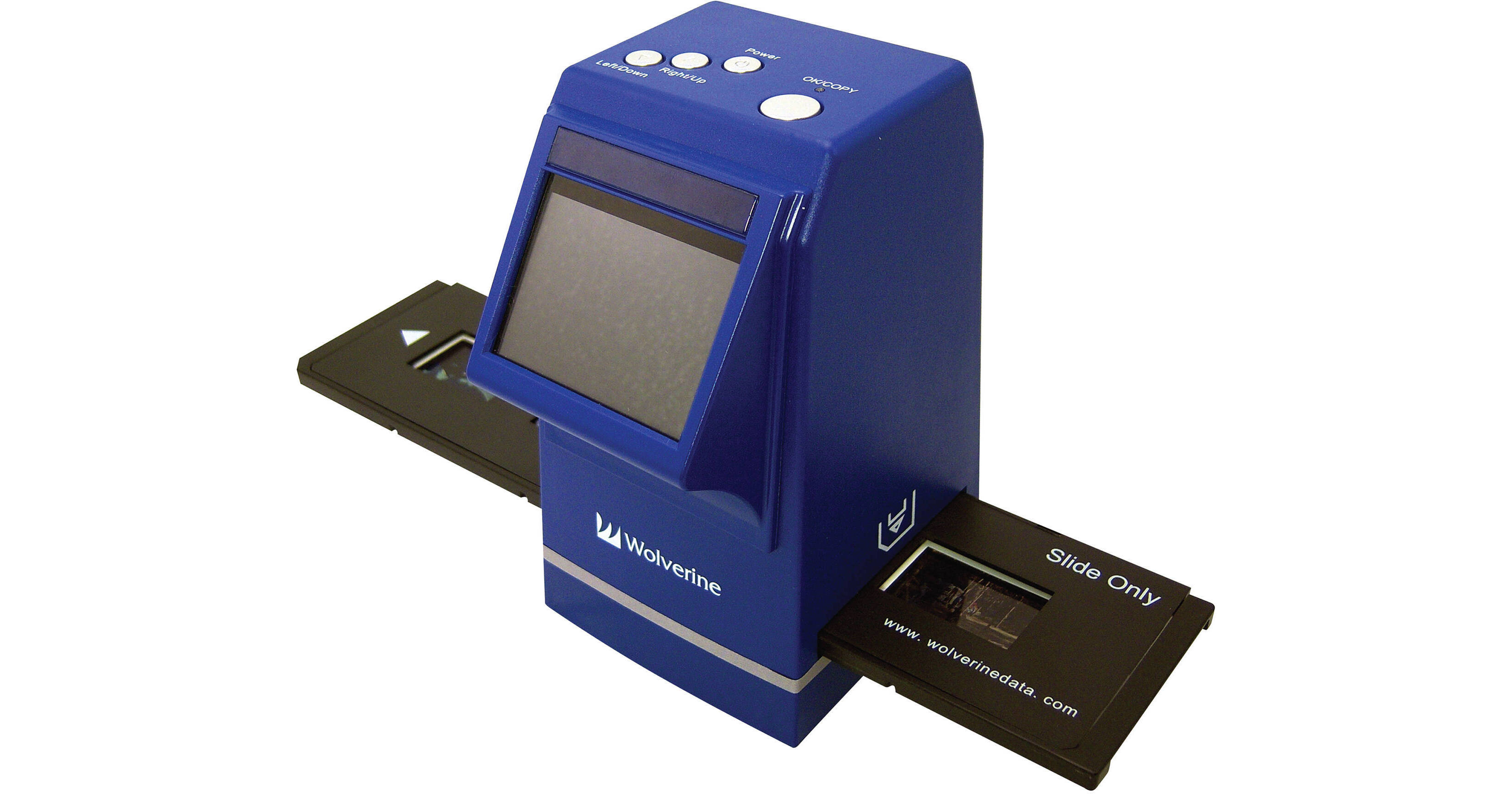
The Wolverine F2D300 35mm to Digital Converter is a stand-alone scanner, capable of transforming your 35mm negatives and slides into 7.3Mp JPEGs in 5 seconds. Powered by either an AC outlet or USB connection, the F2D300 requires no computer or software to work. Controls are embedded right on the scanner and a 2.4" LCD lets you see what you're working with. Your files will save either to the internal memory or to optional SD/SDHC memory cards, which make it easy to transfer files. Of course, if you want to transfer right from the scanner, you can do so - to your Mac or PC with drag-and-drop transfer - using the USB connection.
| Film Types | 35mm |
| Resolution | 7.3Mp - 3312 x 2208 |
| Scan Speed | 5 seconds |
| Output File Format | JPEG |
| Hardware Platforms | Internal SD/SDHC |
| Connection | USB TV out |
| LCD | 2.4" color LCD |
| System & Software Requirements | N/A for use Mac or PC for drag-and-drop file transfer |
| Power Requirements | AC outlet or USB |
| Dimensions (WxHxD) | Not specified by manufacturer |
| Weight | Not specified by manufacturer |
REVIEW SNAPSHOT®
by PowerReviewsPros
Cons
Best Uses
Most Liked Positive Review
Just Amazing
I'm a pro with a 50,000 plus old slides archives. No prosumer technology was able to deliver both velocity, color fidelity, crispness, easy operation and portability. This one does. The scanned (photographed...Read complete review
I'm a pro with a 50,000 plus old slides archives. No prosumer technology was able to deliver both velocity, color fidelity, crispness, easy operation and portability. This one does. The scanned (photographed) images are 3300 by 2200 pixels, bigger then necessary to use in a full page magazine. You'll get good and usefull pics from slides, without fringes (chromatic aberration) and without distortion at the corners.
VS
Most Liked Negative Review
There Is No Free Lunch
This little gem does everything it claims and does it rapidly and well considering its price. I got it intending to scan about 2,000 35-mm color negatives that I had preserved in albums along...Read complete review
This little gem does everything it claims and does it rapidly and well considering its price. I got it intending to scan about 2,000 35-mm color negatives that I had preserved in albums along with their color prints. This was on the theory that I would get a better result by going to the original source of the images.
After scanning a few slides with it, I was satisfied that it was providing images of acceptable snapshot quality. As a cross-check, I scanned prints of the same photos at 200 dpi on my hp Officejet Pro 8500. The sharpness and color of the print scans were very noticeably better than the film scans, so much so that I have retired the converter and gone back to scanning the prints.
I'm no pro, so the following may not be worth much. I conjecture that the relative lack of sharpness may result from the fact that the film is slightly curved in its carrier; and that the relatively poorer color rendition may be related to the color temperature of the light source. If your aim is to have a slide show on the family TV, you may find this converter to be quite satisfactory.
Reviewed by 46 customers
Sort by
Displaying reviews 1-20
Previous | Next »
Pros
Cons
Best Uses
Comments about Wolverine F2D300 35mm to Digital Converter:
In the beginning I got a bit confused with the controls on top, but nothing serious at all. The good thing is that you can use it off-line without turning-on your computer by saving all images on a SD card. Later on you can choose to load all images at once on LR or any other image mngt software. The JPEG output is pretty acceptable, but scanning negatives is time-consuming process as you have to scan only up to 5 pics per batch with manual film traction. Furthermore, there's a lot of work to do afterwards in PS. I don't regret buying the converter, but I underestimated the required effort to effectively "convert" my pics on film to digital.
Pros
Cons
Best Uses
Comments about Wolverine F2D300 35mm to Digital Converter:
It does a very good job of converting 35mm slides to digital. My father shot lots of slides. Now I can easily convert those to digital and share them with siblings. Machine is not real fast so not for commercial use but for a winter project while watching a ball game, it works great.
Pros
Cons
Best Uses
Comments about Wolverine F2D300 35mm to Digital Converter:
Very easy to use. Easily change from Slides to negative film.
Pros
Cons
Best Uses
Comments about Wolverine F2D300 35mm to Digital Converter:
It is very easy to use. With the extra slide trays, it is much faster. I have over 30 years of family, visits, and travels to preserve. I am therefore very pleased with the product.
Pros
Cons
Best Uses
Comments about Wolverine F2D300 35mm to Digital Converter:
I got this on sale so the price was very affordable. The instructions were easy to follow. Images produced have good resolution. Plus, you don't even need a computer to accomplish the task at hands.
Pros
Cons
Best Uses
Comments about Wolverine F2D300 35mm to Digital Converter:
Very easy to use and also convenient, sometimes a little cranky to be recognized by a PC (at least with Windows 7)but I manage to use it as I want, and it works well. The image quality is good to work with Photoshop, and the sizes of the images is also acceptable
Pros
Cons
Best Uses
Comments about Wolverine F2D300 35mm to Digital Converter:
The scan quality of my black and whites is very good. After a little tweaking in post, the exposure and contrast look great. The color is less than perfect, but I'm more interested in the old Plus-X shots.
Mine is faulty in that the preview does not always work until after I expose the image—seems like a switch problem. I'll have to decide if it's worth my time and not having the scanner for a bit to return it.
Pros
Cons
Best Uses
Comments about Wolverine F2D300 35mm to Digital Converter:
I had my doubts about this scanner as the price is ridiculously low, but it seems to work as advertised. I began converting my 15 boxes of Kodachrome slides from Vietnam within minutes of taking it out of the box, and with pretty good results. I suspect that a higher resolution scanner would make the Kodachromes look more like the original image, but at a much higher price. It's very fast, so you can do a box of 24 exposure slides in less than 10 minutes if you clean them well first. Remember, the original slide is still available for a higher quality scan if you feel the need.
Pros
Cons
Best Uses
Comments about Wolverine F2D300 35mm to Digital Converter:
overall pretty good, considering the price. Good to catalog the thousands of slides I have, but I will probably bring a few select to get professionally done.
Pros
Cons
Best Uses
Comments about Wolverine F2D300 35mm to Digital Converter:
Had a large number of old slides to convert to a CD for permanent storage. The F2D300 does it easily and with surprising quality. Problem is if you have a lot, the tray provided means you will have to do 4 at a time! Removing from the carousel, putting it in the supplied tray, removing and repeating the procedure is tedious. Wish there was a way to feed a carousel of slides into the F2D300
Pros
Cons
Best Uses
Comments about Wolverine F2D300 35mm to Digital Converter:
[...] I was left a couple reals of 35mm shot by friends who spent a couple of summers in the 80's with us cruising British Columbia in our boat. I've tried all the functions on converter and found none wanting. My big concern when receiving the sldes was how to view, not having a projector. Hey, this Wolverine hooked up to the TV I think probably far exceeds any projector view. If you have a lot of slides, this feature alone is more than worth the price.
Pros
Cons
Best Uses
Comments about Wolverine F2D300 35mm to Digital Converter:
Was given two shoe boxes of old family slides, after looking at them through a projector and pricing getting them digitized the Wolverine was way more cost effective. You can set it up and digitize slides while almost anywhere with power. The screen is just a little small to see if you are using the right light balance on each picture, so i just bracket my favorites with different brightness and chose the best once on the computer.
Pros
Cons
Best Uses
Comments about Wolverine F2D300 35mm to Digital Converter:
We have thousands of slide and negatives to archive from 30+ years on the mission field ... which my wife is happily doing on the Wolverine F2D300 digital converter because it is so simple and slick to use. Each frame takes only seconds to convert and store on a SD memory card which leaves my computer free to use while she archives.
Pros
Cons
Best Uses
Comments about Wolverine F2D300 35mm to Digital Converter:
I bought this for my wife's birthday (romantic huh?)because her father has 25+ trays of slides dating back to 1954. She has wanted to find a way to save these for some time. She has spent hours over the last couple of weeks laughing & remin1scing about family & friends while saving the images. It has been easy for her to load to the 8gig card I bought & she has then been loading to a separate hard drive. I went with this one because it seemed to have the most positive reviews & so far she thinks it's the best birthday present she has ever gotten!
Pros
Cons
Best Uses
Comments about Wolverine F2D300 35mm to Digital Converter:
This is an excellent scanner for its price. It creates 7.1MP JPEGs from standard 36x24mm negatives (I don't have any slides to run through it), and comes with an easy to load tray. One may find it's a little bit hard to scan 135 film on more exotic formats like half-frame or panoramas.
Build quality seems a little bit cheap, and the user interface, tough simple, is not as intuitive as one would expect. The trays need some practice to be used efficiently, because loading and unloading and aligning one negative strip at a time is a tedious job.
Image quality is good. 100% crops may show some exaggerated grain, depending on the negative. Also, it's always good to brush the dust from the scanner glass and use a mild vacuum cleaner on the negatives before loading them.
All in all, it does a wonderful job, and I still have my own enormous pile of negatives to dig through and I'm sure it will do a wonderful job.
Pros
Cons
Best Uses
Comments about Wolverine F2D300 35mm to Digital Converter:
Easy to use and setup. Up and scanning in about 10 minutes. No need for a computer, just an SD card for storage. Scanned about 300 slides in one afternoon. It is not very high resolution, but enough for decent 4x6 prints.
Pros
Cons
Best Uses
Comments about Wolverine F2D300 35mm to Digital Converter:
I purchased this because my high quality scanner was on the fritz and I only had a few more negatives to convert. It definitely isn't a high quality scanner, but for [$] it isn't a bad deal either. I do appreciate the simple design of the manual feed instead of relying on the traditional automated feeds which are slow, noisy and likely to break. Futhermore, it is incredibly fast and can digitize an image in seconds. Finally, it can power itself from a USB port which is nice given that I am short on outlets and have too many chords. On the other hand, the resolution is noticably less than my more powerful scanner and I have found the glass panel more difficult to clean than I would have expected (I found using a Q-tip with lens cleaner to be more effective than the brush they provide - just be careful not to jam the dust door.) So, overall, a great way to view pics at low to moderate resolution, but don't expect professional-level prints from this.
Pros
Cons
Best Uses
Comments about Wolverine F2D300 35mm to Digital Converter:
I have many old pictures on 35mm negitaves, now I can add them to my digital albums.
Pros
Cons
Best Uses
Comments about Wolverine F2D300 35mm to Digital Converter:
This is a very good device, simple to use.
Pros
Cons
Best Uses
Comments about Wolverine F2D300 35mm to Digital Converter:
It's not fair to blame the scanner, but it could make it a bit better. Scanning film (negatives) is something that demands time - and sometimes extra-work. Unless your films are not too old with mold and/or faded colors, you can achieve pretty good results very quickly. But prepare yourself for long restoration sessions in PS/LR if otherwise..
Displaying reviews 1-20
Previous | Next »