
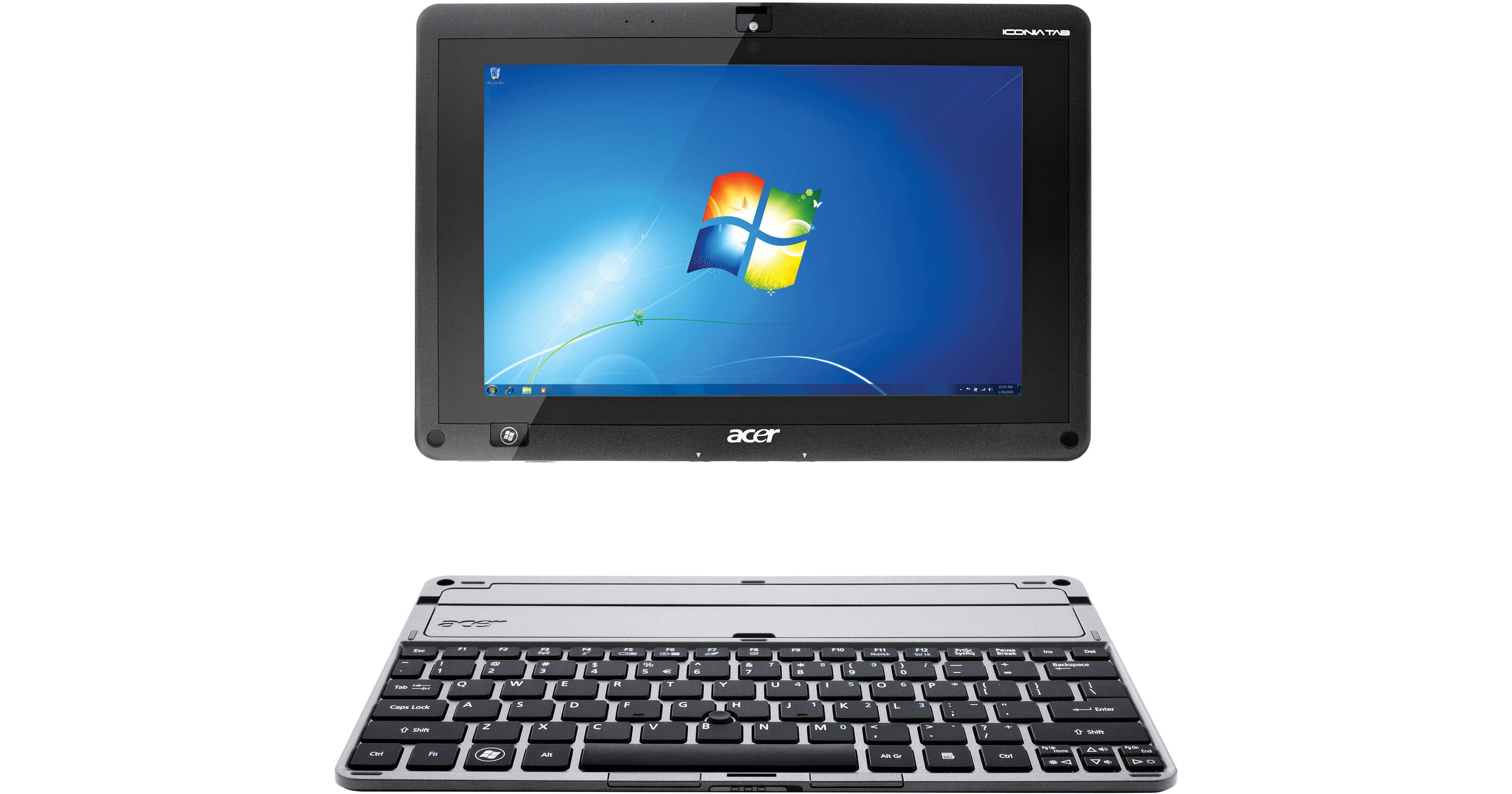
The Acer W500 10.1" Multi-Touch Screen Tablet is an ultra-portable tablet featuring a 10.1" HD CrystalBrite LED-backlit TFT LCD display with 1280 x 800 resolution and a brightness of 350 cd/m². It runs a Genuine Windows 7 Home Premium (32-bit) operating system with an AMD C-Series processor C-50 and AM50M Fusion Controller Hub chipset. The W500 has 2GB DDR3 onboard memory and a 32GB mini-SATA solid-state storage drive.
With Acer InviLink Nplify 802.11 b/g/n Wi-Fi CERTIFIED connectivity, you'll be able to access the Internet anywhere where there is Wi-Fi availability. The W500 also has 10/100 Mbps fast Ethernet connectivity, as well as Bluetooth compatibility. It offers dual USB 2.0 ports for quick data transfers between your computer and tablet, a 3.5 mm mini-jack line out for headphone/speaker connection, a 3.5 mm mini-jack line in for mic connection, and an HDMI port with High-bandwidth Digital Content Protection (HDCP). The availability of an HDMI port affords quick and easy output of saved media or Internet content on your W500 to an HDTV for viewing files and Web pages on a large HDTV screen.
Acer has also endowed the W500 Tablet with a 2-in-1 multimedia card reader and dual integrated WebCams. The WebCams are Acer Crystal Eyes with 1280 x 1024 resolution. Used in combination with the mic input, the W500 is perfect for video-conference calling or even just video-chatting with friends and family online. The three-cell lithium-ion battery lasts up to 6 hrs depending on configuration and usage, which ensures you'll encounter minimal interruptions when using your W500 Tablet. As an added convenience, Acer has even added a US keyboard dock on the bottom of the W500 Tablet, which facilitates attachment of a tactile US keyboard for using your tablet like a notebook.
| Performance | |
|---|---|
| Operating System | Windows 7 Home Premium (32-bit) |
| Cache | L2: 1MB |
| Graphics Card |
Type: Dedicated Installed: AMD Radeon HD 6250 with 256MB |
| Memory |
Type: DDR3 SDRAM Installed: 2GB |
| Processor | 1.0GHz AMD C-50 Dual Core Processor |
| Storage |
SSD 32GB
1
Please Note:(mSATA Interface) close |
| Display | |
|---|---|
| Type |
Capacitive
2
Please Note:HD CrystalBright Technology (Active Matrix TFT Color LCD) close |
| Size |
10.1"
3
Please Note:(25.7cm) close |
| Backlight | LED |
| Aspect Ratio | 16:10 |
| Native Resolution |
1280 x 800
4
Please Note:WXGA Resolution close |
| Brightness | 350cd/m2 |
| Input/Output Connectors | |
|---|---|
| Ports |
2x USB 2.0 1x HDMI 1x Docking |
| Audio |
1x 1/8" (3.5 mm) Headphone 1x 1/8" (3.5 mm) Microphone |
| Flash Media Slot |
1x SD 1x MMC 5 Please Note:2-in-1 Card Reader close |
| Communications | |
|---|---|
| Network | 10/100Mbps Ethernet (RJ-45) |
| Wi-Fi | 802.11b/g/n |
| Bluetooth | Bluetooth 2.1 + EDR |
| Camera |
Front: 1.3 MP Back: 1.3 MP 6 Please Note:Dual Acer Crystal Eye Webcams close |
| General | |
|---|---|
| Keyboard | Virtual, Tactile |
| Battery | 3-Cell Built-In Lithium-Ion Providing up to 6.0 Hours per Charge |
| Dimensions (WxHxD) | 10.8 x 0.6 x 7.6" / 27.43 x 1.52 x 19.30 cm |
| Weight | 2.14 lb / 971 g |
REVIEW SNAPSHOT®
by PowerReviewsPros
Cons
Best Uses
Most Liked Positive Review
Solid Win7 tablet at a decent price.
What I was looking for was a tablet that I could use with Win7, so I could use more "native" programs instead of "apps". So when Acer decide...Read complete review
What I was looking for was a tablet that I could use with Win7, so I could use more "native" programs instead of "apps". So when Acer decided to release this I of course jumped on it to see if Win7 on a tablet was as good or bad as people were saying. So far this is what I have found.
First off the Pros:
+The Screen is bright and has very good viewing angles. 1280x800 resolution.
+The Sound from the unit is definitely more than fine for this unit. I'd say above average especially for a device of this size. The sounds playing a movie were not distored and got very load. Also using stereo headphones through bluetooth also worksed well without lag.
+Win7 full OS (32bit) and Storage Space is not bad at all. I have really had no problems what so ever getting around the menus or "holding" a finger down for the right click menu. Scrolling is also pretty fluid. Pinching to zoom and other "flick" controls via Win7 work as advertised. The ability to install programs that were designed for the OS was (and would be the main focus for someone looking at this tablet) is great ventrilo works, skype, joining flash based chatrooms with video also works as expected. with intergrated mic and dual cams, makes that a no brainer. Also a great point to mention here is that using Windows 7 HomeGroup, I was able to stream all my music and movies from my home PC with flawless playback. Now you get a 32GB SSD with this tablet so after running most updates from microsoft and installing most of my used programs I had about 13GB free space. (not too bad, but with HomeGroup I don't really need to put any music or movies on my tablet while I am at home so thats a bonus and very simple to setup.)
+Great array of connection options, including usb (one on the tab itself), hdmi (on the tab), 2-1 card reader (on the tab). Adding the dock adds 2 usb ports and an ethernet port. (more about the dock in a bit).
Now for some cons...
-Keyboard Dock (that comes with the unit) While the keyboard dock is comfortable, its not that practical. The tablet, as stated in many reviews is a little too heavy for the docking station itself. so on a desk its fine, now so much on your lap or a bed. The docking station adds a wired ethernet connection and 2 usb ports as well as a nice "feeling" keyboard. But the top heavy issue while anywhere other than on your desk or a table is still annoying.
-Battery life No way are you going to get 10 hours of battery life out of this guy, but you will get about 4-5 depending on use. I put this a a con because most will be looking for a longer battery life (but honestly for me that isn't a huge concern.)
Neutral points that should be mentioned.
-System speed and ram. This is not that much of a con but needs to be mentioned. System speed out of the box was not that great but got alot (and I mean alot better) after windows update was run and files patched (as to be expected from windows) and not that much of a drawback other than the time spent updating your system. There is definetly enough ram to support the system.
Conclusions - This is a good Win7 tablet in my opinion, of course this all boils down to what you going to use this thing for. Video editing or really high intensive processor stuff, not so much on this tablet. PC gaming.... (maybe some older games but I haven't tested that). But flash based chat, web surfing, x86 based applications, HD multimedia content and most everything else is there. Also updating my website from this tablet through Internet Explorer 9 is a breeze. The use of Home Group in Win7 takes some of the pressure off only having 32GB SSD. Connections are great with device and all seem to work as advertised. The keyboard dock is great for a desk or table but not too much else, but still nice to have. Again with most windows 7/PC devices I would say make sure to do windows updates on this tablet and you soon be zipping along with good Win7 tablet experience. All in all, I would reccomend this tablet to anyone thats looking to get a tablet that will support Win7. It has a great screen, viewing angles and sound. I also don't mind the Win7 touch experience at all and find it to be just fine for me. For a price point of 550USD this is a great tablet overall and I think its worth people checking out if your a windows fan and really want the customization of a full OS. I have no regrets.
VS
Most Liked Negative Review
Nice But Think I Have Lemon
The tablet is nice if I could get it to work. Upon turning on my tablet, the tablet stated it was setting up and then had to restart. After Restarting the tablet froze on...Read complete review
The tablet is nice if I could get it to work. Upon turning on my tablet, the tablet stated it was setting up and then had to restart. After Restarting the tablet froze on the Acer logo. I let it sit for 3 hours thinking it was just still loading. Nothing happened. I then pushed the on/off switch (which I think the manual calls a quick start) and Windows loaded. I was able to setup Windows and was able to use Windows. However everytime the computer needed to restart, it would freeze on the Acer logo. I would just then have to do the qucik start method each time and Windows would load. Also, my wireless adapter could not be located by the tablet or Windows7. In the Acer Ring where you are suppose to be able to turn on Wifi, I only had the Bluetooth option to turn on. Also, in my device manager in Windows, under network adapters, my wireless adapter did not show up either. I was recommended by Acer to download the latest drivers from there site to see if that would fix it. But the files would not install due to the fact that the tablet can't find the wireless adapter.
My main reason for leaving a post is to let people know (and may be dumb on my part for not knowing) is if you want to do a recovery with the cds they send you, you will need a external DVD drive to do the recovery. So just have a heads up if you get this and I guess any tablet, to do a recovery, you will need extra hardware.
Reviewed by 49 customers
Sort by
Displaying reviews 1-20
Previous | Next »
Pros
Cons
Best Uses
Comments about Acer W500 10.1" Multi-Touch Screen Tablet:
I operate a small EMS company and needed something light and portable to document run with, but that would also be compatible with the standard software used in the region. These tablets have proven to exceed my expectations in every way. They run smooth, the interface and features are well designed, and battery life is better than I thought it would be. Each will typically run for 6 hours of steady use, and I have yet to have any issues after several weeks.
Pros
Cons
Best Uses
Comments about Acer W500 10.1" Multi-Touch Screen Tablet:
I travel for my business and need to bring something light for computer as I should keep doing my work during the trip
This Tablet what I need as I can use as tablet as well as notebook. Window operation system as my priority as I need to make report, spreadsheets. I can use it as tablet or connect with the keyboard as a notebook. But the tablet is a little bit heavy.
When use the keyboard need a table - as the tablet or screen is heavy compare with the keyboard. It isn't easy to use it on the lap with the keyboard.
I like the way they put the keyboard - as I can carry separately or lock it up as a notebook.
Pros
Cons
Best Uses
Comments about Acer W500 10.1" Multi-Touch Screen Tablet:
The Acer Iconia Tab W500 has a clever design that allows you to detach its Netbook-like screen for use as a standalone tablet. Dual core processor with built in graphics GPU is wonderful. The touchscreen is responsive and accurate and it is surprisingly easy to use the touchscreen keyboard included in Win 7. A good thing is that there are some USB ports so you can plug in some external drives. Or if you have an SD card, you go ahead and plug that in. Try getting that on most of the tablets out there. For easier handwritten notes, I would prefer a thinner stylus tip. The battery life, which is one of the main concerns of a Windows tablet, seems to hold up reasonably well. It seems that I can get between 5-6 hours of moderate use on a charge with no problems.
I have been completely satisfied with this tablet pc.
Pros
Cons
Best Uses
Comments about Acer W500 10.1" Multi-Touch Screen Tablet:
The product is easy to use and good accessories. It would be interestingif the screen could change from horizontal to vertical, automatically, that is just turning the tablet.
Pros
Cons
Best Uses
Comments about Acer W500 10.1" Multi-Touch Screen Tablet:
Only problem I have us that it doesn't have enough memory. This was easily fixed with an external hard drive. I really wanted a tablet, but wanted it to be able to use my iPhone with it. I refused to get a iPad because it isn't useful with anything except Apple product. For the same price as the iPad with the most amount of memory I have gotten twice plus amount of memory and I got a keyboard as well (also has to be purchased separate from iPad). I am also very pleased with the service of this company; good price & arrived a day before it was due to arrive!!:)
Pros
Cons
Best Uses
Comments about Acer W500 10.1" Multi-Touch Screen Tablet:
Tablet works well but needs longer battery life.
Pros
Cons
Best Uses
Comments about Acer W500 10.1" Multi-Touch Screen Tablet:
Works just like a laptop but a little slow to respond to touch commands.
Pros
Cons
Best Uses
Comments about Acer W500 10.1" Multi-Touch Screen Tablet:
The tablet is nice if I could get it to work. Upon turning on my tablet, the tablet stated it was setting up and then had to restart. After Restarting the tablet froze on the Acer logo. I let it sit for 3 hours thinking it was just still loading. Nothing happened. I then pushed the on/off switch (which I think the manual calls a quick start) and Windows loaded. I was able to setup Windows and was able to use Windows. However everytime the computer needed to restart, it would freeze on the Acer logo. I would just then have to do the qucik start method each time and Windows would load. Also, my wireless adapter could not be located by the tablet or Windows7. In the Acer Ring where you are suppose to be able to turn on Wifi, I only had the Bluetooth option to turn on. Also, in my device manager in Windows, under network adapters, my wireless adapter did not show up either. I was recommended by Acer to download the latest drivers from there site to see if that would fix it. But the files would not install due to the fact that the tablet can't find the wireless adapter.
My main reason for leaving a post is to let people know (and may be dumb on my part for not knowing) is if you want to do a recovery with the cds they send you, you will need a external DVD drive to do the recovery. So just have a heads up if you get this and I guess any tablet, to do a recovery, you will need extra hardware.
Pros
Cons
Best Uses
Comments about Acer W500 10.1" Multi-Touch Screen Tablet:
as i was going on the web my acer tab would not connect with my wifi. there are other problems for example the screen is hope less the keybord is no good the speed is painfully slow the space just is not good the ipadbis better. when i set it up it took over six hours to up date, then there was putting mircosoft word on 2010. i had a choice between a hp i7 2nd genration laptop i should of taken you will get a lot more for your money ( the keybord is an extra ) it only has a single core 1ghz cpu. the display has a lot of problems with 720p it will crash if you try and play in 1080p hd.and the price of over £500 is a total rip off. I use my tab for student work and it is not that good . i hope this reveiw helped fell free to ask questions . Alex-other[@]
Pros
Cons
Best Uses
Comments about Acer W500 10.1" Multi-Touch Screen Tablet:
-
Daily usage with a familiar Operating System really makes life easier and this is one of its Powers.
Being a tablet makes it easy to pass it around so everyone on a table can see what you want to show them.
*Quick as a solid state can promise,
*Screen perfect as it should,
*Energy enough for a days work,(5-6 hours)
-
A bad thing is that it didn't came with a stylus it would really save me time from cleaning the screen.
*A bit heavy compare to other tablets but it's needed for the hardware that is carrying.
Pros
Cons
Best Uses
Comments about Acer W500 10.1" Multi-Touch Screen Tablet:
First at all you MUST to know that you have to UPDATE many things in this tablet! Video is one of the most important things! The tablet is very nice and powerfull, but very slow when you move the tablet and try to use in vertical, Windows 7 is not the best in this case, but you have a complete OS and it is much powerfull that other tablets!
Pros
Cons
Best Uses
Comments about Acer W500 10.1" Multi-Touch Screen Tablet:
I use this product when I'm out of my house. I have to get used to not having the keyboard ....!
Pros
Cons
Best Uses
Comments about Acer W500 10.1" Multi-Touch Screen Tablet:
I have been waiting for a windows tablet with at least 2g of ram and a dedicated video for a long time. Even with only a 1ghz processor the tablet is very fast because the solid-state harddrive and the 256mb Dedicated video. I had no idea till I bought I that it had that much video memory, I don't know why no websites advertise that, the graphics deserve bragging rights. I usually get 5 hours of work out of the battery which is impressive. Great touchscreen. It's way nice to have 2 USB ports and a full size hdmi. I am very pleased especially for only [$]. I've done a lot of research and there is nothing out or coming out under $1000 that would be better. I think the windows 8 tablets will be nice but I really like windows 7 and may install it later but either way it's a way nice tablet. Oh yeah and the keyboard docking station is really easy to type on.
Pros
Cons
Best Uses
Comments about Acer W500 10.1" Multi-Touch Screen Tablet:
Does everything i need it to do, i suppose it could have had more memory and a better processor, but it gets the job done, surfing the web and playing online video works well. i do get choppyness on my netflix on there, but that is not the main reason i bought it. i would recommend this item for web browsing and running windows applications, i would not recommend it for media hungry users or heavy gamers.
Pros
Cons
Best Uses
Comments about Acer W500 10.1" Multi-Touch Screen Tablet:
the acer tablet was easily setup for use in our home; bill paying, skyping, net news etc.
The Windows based system really appreciated. we have friends with Ipad and Android systems who both complain about getting used to the change, and lack of functionality with their old programs.
All in all, this little tablet will prove to be perfect for taking with us throughout our travels, cruises, etc...
Pros
Cons
Best Uses
Comments about Acer W500 10.1" Multi-Touch Screen Tablet:
Works good as a portable netbook. Installed Open Office and have no problems with it. Touch screen works very good. Most reviews I saw online complained about keyboard. The point of this was to not have a keyboard, so as the rest of the reviews state, it works very good as a multi point touch screen device with full PC functions. Played Angry Birds on it and worked as well as an itouch in terms of response. I do use the keyboard and it works fine. Using windows in touch screen mode takes a bit of getting used to. But once I did, I was more than happy. : ). Battery life is about what is stated on product details
Pros
Cons
Best Uses
Comments about Acer W500 10.1" Multi-Touch Screen Tablet:
acer w500 is a great tablet touch screen is great led screen is vary bright much better then lcd good battery life windows 7 is great this tablet has vary good speed i am vary happy with this tablet
Pros
Cons
Best Uses
Comments about Acer W500 10.1" Multi-Touch Screen Tablet:
This is ok for the price I paid. But the keyboard dock is annoying to use, it would have been better if the dock was similar to the Asus transformer with the ability to open and close it like a laptop.
Also it would have been good if this tablet was 50 dollars more but included a wacom digitizer and a stylus.
As it stands right now Windows 7 is pretty annoying to use without the dock but this may change when windows 8 comes out in 2013.
The previously mentioned concerns are all the cons with this device. here are the pros
The hardware is great, the cpu fan does blow sometimes but the upside is that it is nearly silent, it is not audible at all from 1.5 feet away.
Also the tablet does not get burning hot on the bottom like some laptops I have used. This AMD C-50 must be super efficient. The Performance of the tablet is better than the Netbook I owned previously(Asus eee pc with an N280, 2 gigs ram, and Windows 7).
I also absolutely love the high resolution on the screen (1280 x 800).
Hardware wise this thing gets a 5 out of 5 but the software ability of Windows 7 drags it down a star. But this may not be the case once windows 8 comes out next year, or whenever bluestacks decides to release their android virtualization software (android x86 doesn't work well on the w500 because the necessary drivers are not loaded).
The lack of a wacom digitizer does not enter into my star rating because I bought it knowing that there was no wacom digitizer.
So overall this was a good purchase but buyers should know that windows 7, although a great OS is not the OS to use on a tablet.
Pros
Cons
Best Uses
Comments about Acer W500 10.1" Multi-Touch Screen Tablet:
This isn't as sleek or as fast as the A500 Android version but if you need a Windows device it's great. Basically a hybrid netbook/tablet. I've been using it as a reader (works great) and have now hooked it up to an external HDMI monitor (and even my 55" TV) along with a Bluetooth keyboard and mouse and it has replaced my laptop completely. Works great with Citrix. Definitely recommend a stylus. Only cons are that the keyboard cant fold back or swivel out of the way and that you have to manually change the orientation of the screen rather than having gyros like other tablet devices.
Pros
Cons
Best Uses
Comments about Acer W500 10.1" Multi-Touch Screen Tablet:
I use this product for Business & Private. Very easy to handle as well as it is a windows operating system. The speed of it is much better than a lot of simular products.Nothing negative say about it. But I need to mention the service from B&H staff was the best.
Displaying reviews 1-20
Previous | Next »