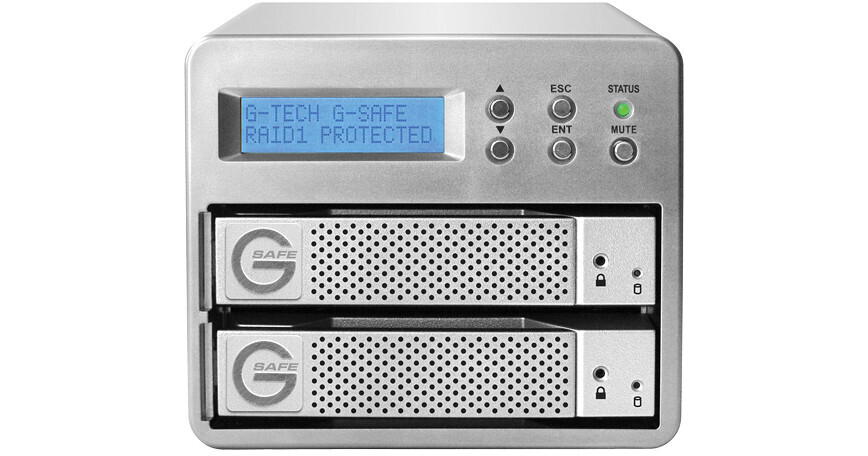
The 3TB G-SAFE External Hard Drive Array from G-Technology is an external hard drive array that provides real-time mirrored backup of all data. The array features two 3TB hard drive modules in a RAID 1 configuration for real-time backup of data. Data is mirrored to both physical drives, so if a single drive fails your data will remain secure.
The array connects to a computer via eSATA. The array features a front-panel LCD for monitoring, as well as an audible alarm that sounds in the event of drive failure. Each drive can be swapped with ease, allowing you to easily replace a failed disk, or to swap to a different RAID set. The drive ships formatted with the HFS+ file system for Mac OS X, but can be reformatted for use in Windows.
| Performance | |
|---|---|
| Capacity | 3TB |
| Interface |
1x eSATA 1x USB 2.0 2x 9-Pin FireWire-800 |
| Drive Speed | 7200rpm |
| Buffer | ≤ 32MB |
| Average Seek Time | Not Specified by Manufacturer |
| Sustained Data Transfer Rate | Not Specified by Manufacturer |
| System Requirements |
Operating System: Windows 2000, XP, Vista; Mac OS X 10.3.x Hardware: FireWire-800, eSATA, or USB 2.0 port |
| General | |
|---|---|
| Mounting | Desktop |
| Power Requirements |
AC: 120VAC Consumption: 200W |
| Environmental Requirements | None |
| Dimensions (WxHxD) | 4.9 x 7.6 x 4" (12.7 x 19.3 x 10.2cm) |
| Weight | 10 lb (4.5kg) |
REVIEW SNAPSHOT®
by PowerReviewsPros
Cons
Best Uses
Reviewed by 17 customers
Sort by
Displaying reviews 1-17
Pros
Cons
Best Uses
Comments about G-Technology 3TB G-SAFE External Hard Drive Array:
Well, I have been researching for a backup solution for a few months now. I narrowed it down to 3 manufacturers(G-Tech, Hive, & Glyph) that in the end that fit what I felt were key features for the overall solution I wanted. I was looking for simplicity, redundancy and quality. Firstly I contacted each manufacturer and awaited a response. G-Tech was the ONLY out of the 3 to actually respond within a reasonable timeframe(a few days)and continue to answer any questions I had regarding the G-Safe and a few other products they make without having purchased a thing from them. They always had an answer. The only thing they did not have was an answer to was WHY they discontinued the G-Safe. With it being the mid-point unit, and at a reasonable price, I thought maybe they were going to revamp the item, but they specifically said it was just discontinued. Despite the unit being discontinued, I STILL went with what I felt was the most solid product(G-tech's G-Safe). The reviews were everywhere about G-Tech and there were not any negative's about the product. So, I went along and ordered one for myself with the spare drive and another G-Safe and Spare for a friend of mine who has been researching with me as well. Upon receiving the delivery, I unpacked the G-Safe and the Spare drive. The G-Safe is one solid unit! I was completely impressed with the build quality of this thing. it was solid, heavy and even looked good. Hard to find this build quality in any of the NAS units that are being sold, but, this IS a local device and NOT a NAS unit. But again, very hard to find this build quality in local external hard drive solutions as well! So, I powered it up, connected it to my PC(not a MAC), formatted the device with an NTFS file system and I was ready to go! Simple setup! I tested copy speeds using USB and eSATA. I tested the hot-swappable spare by pulling out the second(lower) drive in the unit and sliding in the spare - which by the way, was another solid, well designed module that the drive is fastened to. The drives have a release key that comes with the unit that gets inserted into a small pinhole, which unlocks the front of the drive's lever allowing you to slid the drive out. I was again impressed with the front lever even being made of aluminum as the rest of the unit! I thought they would have cheaped out and went with some kind of plastic here, but nope, build quality was consistent throughout! Very Nice!! Well, after making the swap, it then began to rebuild the newly inserted drive, which took quite some time to finish. When I say quite some time, I mean for my 3TB drive it took about 10 hours! I haven't found anything to complain about with my G-Safe after all my tests. Time will only show how durable this little item really is. But as far as I can tell, it was definitely thought out and built to last.
Pros
Cons
Best Uses
Comments about G-Technology 3TB G-SAFE External Hard Drive Array:
*Main use is a photo and video storage unit (cause those 1080p files tend to get heavy when making movies)
*The design is great, looks sleek, and the hot swap drives are a must. the menu is simple and gives you the info you need from it.
*I wish there was a way to turn off the led screens backlight without turning off the unit. blue color cast everywhere, Gaff tape will have to do.
Pros
Cons
Best Uses
Comments about G-Technology 3TB G-SAFE External Hard Drive Array:
G-Technology has a great reputation so when I went looking for a solution to my photo storage needs, it's the first place I looked.
The Raid couldn't have been easier to use - just plugged it into my iMac and I was ready to go. I was impressed with the build quality and compact size. It looks great on my desktop and could be easily transported if needed.
The unit is quiet with only the sound of the fan humming in the background.
The only thing missing in my opinion is support for Thunderbolt. I'm sure that will come on the next update to the product line, but I couldn't risk data loss waiting for that feature.
I didn't purchase an extra 3TB drive, but I like that I have the ability to do so in the future if I decide to rotate a 3rd backup offsite.
Bottom line - this is one of the best purchases I've made. You can't put a price on the peace of mind knowing that all your photos, videos and documents are safe and secure. Speaking from experience as someone who suffered substantial loss due to a HD failure, the G-Safe was the best money ever spent.
Pros
Cons
Best Uses
Comments about G-Technology 3TB G-SAFE External Hard Drive Array:
I shoot and edit video, so I need reliable storage and backup. This drive is small and relatively quiet. Yes, it's pricey...but it gives me peace of mind knowing all my elements are backed up.
I unpacked the drive and hooked it up to my Mac. End of story. It works great!
Pros
Cons
Best Uses
Comments about G-Technology 3TB G-SAFE External Hard Drive Array:
If fan noise that is more than just noticeable (in a quiet home office) is a problem for you, then give this four stars. I love the way the unit is designed and built, love how easy it is to set up and love the peace of mind I get from knowing that I have two copies of everything. I haven't yet removed a drive to take with me when I'm traveling--but that too is a nice feature. My new workflow is to download all picture files directly to this drive (thus keeping my computer hard drive space open)using View NX. I then edit pictures right on the drive using Capture NX2. Seems just as fast as if the files were on the computer hard drive. This thing just works great.
Pros
Cons
Best Uses
Comments about G-Technology 3TB G-SAFE External Hard Drive Array:
We needed a hard drive for professional video... this drive delivered.
Pros
Cons
Best Uses
Comments about G-Technology 3TB G-SAFE External Hard Drive Array:
Plugged it in, turned it on, icon popped up on the screen, done!. If you have a mac, that's all you need to know.
Pros
Cons
Best Uses
Comments about G-Technology 3TB G-SAFE External Hard Drive Array:
I use the 3TB G-Safe as backup for the multitude of files involved in my photo and video editing. It works flawlessly as a Time Machine backup drive with my Mac. But I also use it for my primary drive for storing video files, render files for Final Cut projects. It is fast enough for any job. I am very satisfied with my purchase and feel much more secure about dataloss protection by having this reliable product!
Pros
Cons
Best Uses
Comments about G-Technology 3TB G-SAFE External Hard Drive Array:
I intended to use this external drive as a drive attached to a Time Capsule (generation 1). However, there were some minor issues here. The drive goes into stand by mode to save power (a good thing) however, the time capsule seems to have trouble waking it up. As a result, time machine backups don't work reliably with this configuration. I think this is probably more of a problem with the Time Capsule so I am still giving this product 5 stars.
When plugged in via firewire, the drive is fast and reliable but a little noisy.
The enclosure is solid and the internal software seems to work well.
I would definitely recommend this product.
Pros
Cons
Best Uses
Comments about G-Technology 3TB G-SAFE External Hard Drive Array:
I have over 20,000 images to store and its growing. I have been looking at storage solutions for a long time that was affordable and had raid. This fit that perfectly. I now have room to grow for at least a while. Being able to store the drives or get an extra to store is wonderful. Its fairly quiet and built to last. Multiple ways to hook it up is a bonus too. I use firewire on the desktop and usb on the laptop. Its somewhat portable and could be carried on assignment if necessary.
I do wish you could turn down the display lighting or that it would fade while in sleep mode. Other than that I find the unit is perfect.
Pros
Cons
Best Uses
Comments about G-Technology 3TB G-SAFE External Hard Drive Array:
This mirrored array is perfect for my work as a photographer. Since I have about 20,000 NEF and PSD files stored in 1TB this should give me room to grow for some time. In my Mac Pro I had a 1TB raid mirror that was getting full. If I needed to move to my laptop to work my files were in my desktop, now I can move my library with ease. This g-safe is portable to some degree. Its in a nice tidy package. The cooling fan is pretty quiet. I use the Firewire 800 connection which is fast and does not slow me down. Only con for me would be that its a bit heavy.
Pros
Cons
Best Uses
Comments about G-Technology 3TB G-SAFE External Hard Drive Array:
I haven't had an opportunity to use the true RAID feature on this drive yet--hopefully that's a long time from now. I have, however, had an opportunity to work with the Hitachi/G-Tech support staff. Since this was the first time I'd used a device like this I called support for assistance installing and using it on my iMac via firewire 800. My contact with their support was fantastic. The tech understood each of my questions, patiently answered all of them, and helped me install the drive from beginning to end. In a nutshell, they were fantastic--G-Tech support is first class. One last item refers to comments about the loud fan. My G-Safe is sitting on my desktop, and I have not found the fan even a little noisy--it's just a quiet hum.
Pros
Cons
Best Uses
Comments about G-Technology 3TB G-SAFE External Hard Drive Array:
As an active amateur photographer, I use this to safe-guard my photos while still having them accessible. Just a few weeks in operation but is working well. Came right up with no system problems on my MACbook Pro. On-board cooling a plus. A bit expensive. Bought it because of its reputation.
Pros
Cons
Best Uses
Comments about G-Technology 3TB G-SAFE External Hard Drive Array:
This is the perfect drive to use with Final Cut Pro. I was using two separate external hard drives and it was a pita to have to back up one drive to the other each night. Now everything is saved to two drives automatically and constantly, while I work.
Pros
Cons
Best Uses
Comments about G-Technology 3TB G-SAFE External Hard Drive Array:
I use it to travel with it... I shot all day long.. after I give a Hard Drive to my sound person to take to his room.. I keep one in my room in case anything happens.. it great having two copies of all your work, specially in international shooting..
Pros
Cons
Best Uses
Comments about G-Technology 3TB G-SAFE External Hard Drive Array:
Edit video with a mac pro. Have the G-drive hooked up with eSATA. It's fast and quiet. Saw some reviews about a noisy fan, but not here. So far so good. Mac Pro saw the drive right away. Happy with the drive.
Pros
Cons
Best Uses
Comments about G-Technology 3TB G-SAFE External Hard Drive Array:
I'm a professional photographer with massive amounts of digital RAW files and scanned negatives - and the 3TB G-Safe External Hard Drives are an excellent way of storing files in a Raid 1 device giving you the ultimate in peace of mind by simultaneously writing to two independent hard disk drives providing instant back up of the images as you save them. They are especially easy to use for Mac users - just plug in a FireWire 800 cable and go! I now have 2 of these 3TB G-Safe External Hard Drives and plan to order several more.
Displaying reviews 1-17