The Professional's Source 866.276.1435 / 212.502.6357

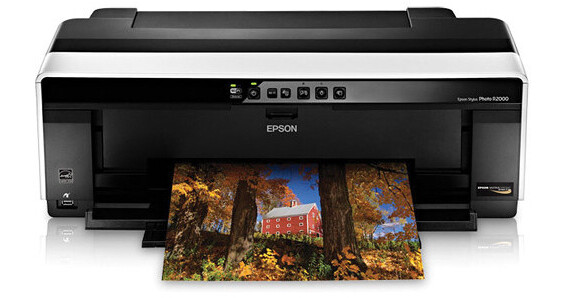
Epson Stylus Photo R2000 Ink Jet Printer

  • Price: $499.00
  • Mail In Rebate -$100.00 (see details)
    offer ends MAY 31 '12
  • Price after Rebate: $399.00
  • B&H # EPSPR2000
  • Mfr# C11CB35201

Product Highlights

  • Print An 8 x 10 In 1:08 Minutes
  • Print 13 x 19" Photos & 13" Rolls
  • Print Directly On CDs & DVDs
  • Auto-Selecting Black Cartridges
  • USB, Ethernet, Wi-Fi Connectivity

Protect Your Purchase


What item is right for you?

Ask our Experts!

866.276.1435
Live Chat

Remember the Essentials

A USB cable is required but not included with this item. Please be sure to purchase a USB cable that suits your needs.

The Stylus Photo R2000 Ink Jet Printer from Epson uses 8 ink colors with 180 nozzles each to produce professional-quality results right in your own home or office. The printer can output an 8 x 10 photo in just over 1 minute. With the auto-selecting black cartridge system you never have to remove the photo and matte black cartridges or remember to choose the appropriate one, the printer does it for you.

The R2000 features multiple connection options. In addition to a USB port the printer has a PictBridge port conveniently located on the front. Additionally, you can share the printer with others on your network either wirelessly or with the printer's Ethernet port.

Industry-Leading Pigment Ink Technology
Epson UltraChrome Hi-Gloss 2 pigment ink for colorful, vibrant prints, beautiful skin tones that are highly water, smudge and fade-resistant
Large Ink Cartridges
Change cartridges less often and get up to 50% more prints
Professional Media Versatility
Accommodates cut-sheet and roll paper in sizes up to 13" wide; supports photographic and fine art paper, canvas, 1.3 mm thick board and ink jet printable CDs & DVDs
Auto-Selecting Black Inks
Achieve optimal black density and superior contrast on glossy, matte or fine art papers from either Matte or Photo Black ink
Leading-Edge Image-Quality Architecture
Smoother color transitions and outstanding highlight and shadow detail with AccuPhoto HG imaging technology
Precision 8-Channel Print Head Technology
Innovative MicroPiezo AMC, one-inch wide print head with ink-repelling coating for more accurate dot placement and reduced maintenance
Printing Method
Printing Technology Advanced Micro Piezo AMC print head with ink-repelling coating technology
8-channel, drop-on-demand, ink jet print head
Maximum Resolution 5760 x 1440 dpi
Minimum Ink Droplet Size 1.5 picoliters
Ink Type Epson UltraChrome Hi-Gloss 2 pigment ink
Ink Palette Photo black, matte black, cyan, magenta, yellow, red, orange, gloss optimizer
Ink Cartridge Configuration 8 individual ink cartridges
Number of Nozzles 1440 (180 nozzles per color)
Performance
Print Speed 8.0 x 10.0": Approx. 1:08 min
11.0 x 14.0": Approx. 1:43 min
Paper Handling
Maximum Paper Width 13.0" (330.2 mm)
Maximum Printable Area Sheet: 13.0 x 19.0" (330.2 x 482.6 mm)
Roll: 13.0" x 32.8' (330.2 x 10 m)
Paper Sizes A4 (8.3 x 11.7"), A6 (4.1 x 5.8"), letter (8.5 x 11.0"), legal (8.5 x 14.0"), 4.0 x 6.0", 5.0 x 7.0" 8.0 x 10.0", 11.0 x 14.0", 12.0 x 12.0", half letter (5.5 x 8.5"), B (11.0 x 17.0") A3 (11.7 x 16.5") super B (13.0 x 19.0")
Borderless Photo Sizes 4.0 x 6.0", 5.0 x 7.0", 8.0 x 10.0", letter (8.5 x 11.0", 11.0 x 14.0", A3 (11.7 x 16.5"), 12.0 x 12.0", super B (13.0 x 19.0")
Paper Types Photo Paper: Premium Glossy, Ultra Premium Glossy, Glossy, Semi-Gloss, Ultra Premium Luster
Presentation Paper: Ultra Premium Matte, Premium Matte, Premium Matte Double-sided, Matte
Fine Art Paper: Velvet, Ultrasmooth
Watercolor: Radiant White
Matte Scrapbook Photo Paper
Exhibition: Canvas Satin, Canvas Matte
Bright White Paper
Photo Quality Self-Adhesive Sheets
Hot Press: Bright, Natural
Cold Press: Bright, Natural
Paper Capacity 120 sheets 24 lb (90 g/m²)
Special Media Support Roll paper, fine art paper, ink jet printable CD / DVD
Maximum Roll Print Length 32.8' (10 m)
Paper-Feed Method Sheet feeder, roll paper feeder, manual feed tray
Connectivity
Computer Interface USB 2.0, 100Base-T Ethernet, Wi-Fi (802.11n only), PictBridge
Network Capable Wired: Ethernet 100Base-TX/10Base-T
Wireless: 802.11n only (a/b/g not supported)
Windows System Requirements Windows 7, Windows Vista, Windows XP Pro x64 Edition, Windows XP
Mac OS System Requirements OS X 10.5.8 to 10.6.x
Printer Language Epson ESC/P 2 raster photographic drivers standard
Environmental
Temperature Operation: 50 to 95 °F (10 to 35 °C)
Storage: -4 to 140 °F (-20 to 60 °C)
Humidity Operation: 20 to 80% RH
Storage: 5 to 85% RH
Physical
Status Display Network status, paper status, roll paper status, ink status,
Front Panel Controls Power, Wi-Fi on/off, Paper, Ink, Roll Paper
User-Replaceable Items Ink cartridges, printheads,
Power Requirements 100 to 120 V, 50 to 60 Hz
Power Consumption Printing: ~ 21 W
Ready: ~ 7.7 W
Sleep: ~ 3.5 W
Power Off: ~ 0.2 W
Dimensions Printing: 24.5 x 31.4 x 16.5"(622 x 797 x 418 mm)
Stored: 24.5 x 12.8 x 8.6" (622 x 324 x 219 mm)
Weight 27.1 lb (12.3 kg) without cartridges

REVIEW SNAPSHOT®

by PowerReviews
EpsonStylus Photo R2000 Ink Jet Printer
 
4.6

(based on 60 reviews)

Ratings Distribution

  • 5 Stars


    (37)

  • 4 Stars


    (19)

  • 3 Stars


    (4)

  • 2 Stars


    (0)

  • 1 Stars


    (0)

96%

of respondents would recommend this to a friend.

Pros

  • Easy to use (52)
  • Easy to set up (46)
  • Fast print time (29)
  • Reliable (24)
  • Durable construction (19)

Cons

  • Large footprint (15)
  • Too much ink used (11)
  • Slow print time (5)

Best Uses

  • Photos (55)
  • Graphics & charts (13)
  • Black & white documents (10)
  • Professional documents (10)
    • Reviewer Profile:
    • Frequent user (43), Infrequent user (8), Heavy duty user (7)
    • Primary use:
    • Personal (39), Business (17)

Most Liked Positive Review


At first disappointed, then quite happy

When I first received the R2000 and ran a few test prints I was so disappointed in the quality that I came very close to sending it back. HOWEVER, all is well now and ...Read complete review

When I first received the R2000 and ran a few test prints I was so disappointed in the quality that I came very close to sending it back. HOWEVER, all is well now and the printer is producing beautiful results. I send along my experience in the hopes that it will help someone else who might run across the same problems.Some background. I've used an Epson 1280 wide format printer for many years with stunning results, but had to finally retire it after the head became so clogged that no cleaning/repair would salvage it. So, decided on the R2000 - primarily because of the pigment-based inks, the UltraChrome ink system, and the wireless capabilities... oh, and the nice rebate right now. My computer is a MacBook Pro with Snow Leopard... so if you have a Windows box, your mileage with this review may vary.[...] Setup was a breeze - the drivers and print utility installed on my Mac quickly and it was up and running on the wireless network without a hitch... just follow the Quick Setup Guide. I set up the utility for my paper type (Epson Photo Glossy) and chose the default Epson color calibration.The problems came when I sent my first test photos to the printer... they were terrible... washed out, flat, no depth at all. They were not even as good as plain paper prints from my cheapo office multi-function inkjet printer. Yikes! Ok, so maybe I had some bad settings. So I fiddled around with the color calibration and media choices on the print utility... still terrible. Tried printing from different programs... same thing.I won't use valuable space here describing all the gyrations I went through to diagnose the issue, nor the amount of photo paper and ink used... I'll just pass along the final results that cured the problems and produced absolutely beautiful prints.First, the paper is surprisingly important for these new pigment inks... perhaps much more so than dye-based inks (although I don't have confirmation of that). My paper was good quality Epson photo paper, but it was a few years old. I switched to fresh premium Red River paper... huge difference.Second, and very important. The printer ships with an old driver, so a driver update is essential. BUT... if you go directly to the Epson web site for the latest driver (as I did), you won't find it. The R2000 driver on the Epson support site is v8.43... THIS IS NOT THE LATEST DRIVER. On the Mac you need to let the built-in Apple software update app run - it will find the v8.60 driver. This is the driver you need. Switching to the 8.60 driver made all the difference in the world in the quality of my prints... they went from flat and uninteresting to absolutely stunning.Finally, download the ColorSync color profiles that match your paper. Then choose that colorsync profile under "Color Matching" and turn off all in-printer calibration under "Print Settings" in the print dialog page. I ordered some premium paper from [...] and downloaded the matching profiles from their web site. I then checked the R2000 output using the Gretag Macbeth ColorChecker calibration chart... the output of the R2000 was absolutely spot on. I have never seen such perfect color matching from a home inkjet.Keep in mind that the color vibrancy from pigment inks is not as "punchy" as with dye-based inks... so if you want a super vibrant "digital" look, this may not be the printer for you. However, the colors from the R2000 are more natural and "film like" than my previous dye ink printers, and based on my Gretag tests, more accurate, if that's what you are looking for.Another hint. If you are like me and make small test prints (like 3x5) on 8x10 paper to save $$, and reuse the paper by positioning each print in a new quadrant of the page, there is something to know. If the "Gloss Optimizer" is turned ON (it's a check box in the print driver utility), it will coat THE ENTIRE PAGE with the gloss optimizer coating, even if your photo is just a small portion of the page. So the next time you use the paper, it will be coated with gloss and that will change the print characteristics... it also uses up the gloss supply really, really quickly. I kept the gloss optimizer turned off for all of my testing and calibration.So, now my prints are stunning. I hope this review helps some of you in both your choice of printer and in perhaps avoiding the head banging I endured.

VS

Most Liked Negative Review


Got 2 Lemons, Now Have Lemonade

I built my computer and I am my own technical support. I am no slouch in the technical and geek departments. For reasons I explain below, however, I had to call Epson tech ...Read complete review

I built my computer and I am my own technical support. I am no slouch in the technical and geek departments. For reasons I explain below, however, I had to call Epson tech support on this printer. I'm also a videographer and I was attracted to the R2000 for printing high quality artwork for DVD and Blu-ray cases and for direct printing on DVD and Blu-ray discs. Other reviews are far more comprehensive about photo printing, so I'll not bother commenting on photos.

Printer #1 worked great out of the box after a short setup for use over WiFi. A test 8.5 x 11" borderless print on glossy looked astounding. I also printed on specialized templates for DVD cases directly from Adobe Illustrator with no problem. Direct printing from AI to DVD's, however, resulted in grossly offset images -- several inches in both directions. What the heck? Even Epson's own "Print CD" utility resulted in horribly offset images. A call to Epson technical support in less than 24h of my ownership resulted in a quick warranty replacement. Epson's service was top notch. Unfortunately, the warranty replacement wasn't.

Printer #2 could not even print more than 1/3 of ANY page, test page or otherwise, without generating a high pitched whine and seizing of the print head. Seriously? You gotta be kidding. In three decades of purchasing, installing, and using printers on Apple/Macs and PC's, these two state-of-the-art printers are the ONLY two that have ever given me problems. This is really disturbing. I gently asked Epson if they have received other complaints -- no, they haven't -- and Epson suggested that rough handling by the carrier might have damaged the print heads. Still, two lemons in a row? Another call to incredibly polite Epson tech support resulted in a rush shipment of another printer. Today, for reasons I'll never fathom, I received two of them. OK, so now I get to ship more printers back to Epson.

Printer #3 (obviously, the one I kept) did not set up smoothly using Epson's combo software/driver package, the same that I used before, despite clean uninstalls of everything Epson. A fresh download worked a treat, however. Printer #3 is working flawlessly. OK, so Epson came through.

In conclusion, this was BY FAR the clunkiest and most error-ridden experience I have EVER had with a printer. I ding Epson 2 stars for the crummy experience. What I have now, however, is what the other reviewers have posted, I am happy to say.

Reviewed by 60 customers

Sort by

Displaying reviews 1-20

Back to top

Previous | Next »

 
5.0

Very Nice Printer

By Mom the photographer

from New Hampshire

About Me Infrequent User

Verified Buyer

Pros

  • Also takes paper roll
  • Durable construction
  • Easy To Use
  • Pretty easy to set up
  • Quality photo printing
  • Seems to be reliable

Cons

  • May use a lot of ink
  • Pretty big
  • Slow Print Time

Best Uses

  • Photos

Comments about Epson Stylus Photo R2000 Ink Jet Printer:

I just got this printer but so far am very happy with it. It was recommended by B&H as a great printer for good quality photos. I think the print quality looks as good as glossy photos I have had printed by photo stores. Thanks B&H!

  • Primary use:
  • Personal

Share this review

 
4.0

Using as an onsite event photo printer

By Gameday Photography LLC.

from Kenner, Louisiana

About Me Frequent User

Verified Buyer

Pros

  • Easy To Set Up
  • Easy To Use
  • Fast Print Time

Cons

  • Large Footprint

Best Uses

  • Photos

Comments about Epson Stylus Photo R2000 Ink Jet Printer:

Tried it with the 10" x 100' roll of luster paper and blues came out black. Was told by Epson rep that it was from the photo editing software. Used 8x10 glossy paper to test and images were perfect. Still waiting to use it at an event(in 2 weeks) for printing 11x14 prints onsite.Although I was really looking forward to printing 10"x20" panoramic team photos onsite.

  • Primary use:
  • Business

Share this review

 
4.0

Big printer but well worth the space

By JYU

from Temple City, CA

About Me Frequent User

Verified Buyer

Pros

  • Easy To Use
  • Good quality for price
  • Great Print Quality

Cons

  • Hard Setup
  • Large Footprint
  • Slow Print Time

Best Uses

  • Photos

Comments about Epson Stylus Photo R2000 Ink Jet Printer:

Great quality at a great price, but as many reviews also comment, output speed is pretty slow.

Share this review

 
5.0

Working very well

By biopku

from Saint Louis, MO

Verified Buyer

Comments about Epson Stylus Photo R2000 Ink Jet Printer:

very good, will buy again

Share this review

(2 of 2 customers found this review helpful)

 
3.0

Got 2 Lemons, Now Have Lemonade

By Steve

from Northern Virginia

About Me Heavy Duty User

Verified Reviewer

Pros

    Cons

    • Hard Setup
    • Horrible quality control

    Best Uses

    • Direct DVD printing
    • Photos

    Comments about Epson Stylus Photo R2000 Ink Jet Printer:

    I built my computer and I am my own technical support. I am no slouch in the technical and geek departments. For reasons I explain below, however, I had to call Epson tech support on this printer. I'm also a videographer and I was attracted to the R2000 for printing high quality artwork for DVD and Blu-ray cases and for direct printing on DVD and Blu-ray discs. Other reviews are far more comprehensive about photo printing, so I'll not bother commenting on photos.

    Printer #1 worked great out of the box after a short setup for use over WiFi. A test 8.5 x 11" borderless print on glossy looked astounding. I also printed on specialized templates for DVD cases directly from Adobe Illustrator with no problem. Direct printing from AI to DVD's, however, resulted in grossly offset images -- several inches in both directions. What the heck? Even Epson's own "Print CD" utility resulted in horribly offset images. A call to Epson technical support in less than 24h of my ownership resulted in a quick warranty replacement. Epson's service was top notch. Unfortunately, the warranty replacement wasn't.

    Printer #2 could not even print more than 1/3 of ANY page, test page or otherwise, without generating a high pitched whine and seizing of the print head. Seriously? You gotta be kidding. In three decades of purchasing, installing, and using printers on Apple/Macs and PC's, these two state-of-the-art printers are the ONLY two that have ever given me problems. This is really disturbing. I gently asked Epson if they have received other complaints -- no, they haven't -- and Epson suggested that rough handling by the carrier might have damaged the print heads. Still, two lemons in a row? Another call to incredibly polite Epson tech support resulted in a rush shipment of another printer. Today, for reasons I'll never fathom, I received two of them. OK, so now I get to ship more printers back to Epson.

    Printer #3 (obviously, the one I kept) did not set up smoothly using Epson's combo software/driver package, the same that I used before, despite clean uninstalls of everything Epson. A fresh download worked a treat, however. Printer #3 is working flawlessly. OK, so Epson came through.

    In conclusion, this was BY FAR the clunkiest and most error-ridden experience I have EVER had with a printer. I ding Epson 2 stars for the crummy experience. What I have now, however, is what the other reviewers have posted, I am happy to say.

    • Primary use:
    • Personal

    Share this review

    (1 of 1 customers found this review helpful)

     
    5.0

    "Picture Perfect"

    By "Whos Your Daddy Baby"

    from Las Cruces, New Mexico

    About Me Frequent User

    Verified Buyer

    Pros

    • Durable construction
    • Easy To Set Up
    • Easy To Use
    • Low Ink Consumption
    • Reliable

    Cons

    • Large Footprint

    Best Uses

    • Photos

    Comments about Epson Stylus Photo R2000 Ink Jet Printer:

    Use this product to accurately print my hobby photos as well as "NOW" printing Panoramic Mountain Range Photos.
    This Printer very accurately prints my "Monitor Calibrated" photos in extremely high resolution. Used in conjunction with Epson Glossy Photo Paper, both 13"x19" sheets and 13" x 35 foot rolls produce stunning pictures accurately reproduced from their digital files. Ink Cartridges are outlasting the predecessor Epson R1800. Very nice interface capabilities, USB, Wireless, and Network Capable. Easily installed. Nice Physical Design, leaning forward looks like it is ready to go at a moments notice.

    Wish is would have come with Samples of Available Media for the printer. The Roll feed works great. Took a little practice at getting it to take the paper the first time but now that I understand it is much easier to load.

    Really enjoyed the $100.00 Rebate too...

    • Primary use:
    • Personal

    Share this review

     
    4.0

    Good Investment

    By Sakinmakavy

    from Empire, Alabama

    About Me Heavy Duty User

    Verified Buyer

    Pros

    • Easy To Use
    • Fast Print Time
    • Reliable

    Cons

    • Large Footprint
    • Too much ink used

    Best Uses

    • Photos

    Comments about Epson Stylus Photo R2000 Ink Jet Printer:

    My R1800 finally failed after I made my first million with it:) I was forced to buy a new printer and this one doesnt disappoint. It seems faster. Getting used to the new settings. I would recommend it.

    • Primary use:
    • Business

    Share this review

     
    5.0

    Great Printer

    By Howard

    from Atlanta, GA

    Verified Buyer

    Comments about Epson Stylus Photo R2000 Ink Jet Printer:

    Easy to set up. First photo came out great!

    Share this review

     
    4.0

    Great Product

    By Norwalk Housing Authority

    from Norwalk, Connecticut

    About Me Heavy Duty User

    Verified Buyer

    Pros

    • Compact Design
    • Easy To Set Up
    • Easy To Use
    • Fast Print Time
    • Reliable

    Cons

      Best Uses

      • Photos

      Comments about Epson Stylus Photo R2000 Ink Jet Printer:

      The Stylus Photo R2000 Ink Jet Printer was purchased by the Norwalk Housing Authority in Norwalk, CT, to print out student photos taken during the after school photography program. The NHA runs several after school programs from 5 of its various housing projects. On Wednesdays, the Washington Village housing project participates in a photography program that allows students to capture their neighborhood through the eyes of a lens. Students take pictures of elements they like about their neighborhood and would like to see continue, and elements of their neighborhood they dislike and would like to see changed. Through photography, students are given a voice to speak about their community. The Stylus Photo R2000 Ink Jet Printer allows for the students work to be printed in a beautiful, professional manner, so they can see the fruit of their labor. This printer will also be used to print out student work for a community art show to congratulate children on all their hard work and let their opinion be heard. This printer works wonderfully for us at the NHA. It produces high quality professional prints while being user friendly. With approximately 30 students participating, there are a lot of photos to print out and this printer does it quickly and efficiently, helping the NHA expose children to an artistic outlet they would have otherwise probably never have had the chance to experience. We cherish this printer at the NHA, and the kids love to see their work big and beautiful!
      While loading the roll paper was a little difficult at first, it was nothing a quick phone call to the helpful staff at Epson couldn't fix within 5 minutes.

      • Primary use:
      • Business

      Share this review

       
      5.0

      I would buy this product again and again

      By Tum67

      from Mississippi

      About Me Frequent User

      Verified Buyer

      Pros

      • Easy To Set Up
      • Easy To Use
      • Fast Print Time
      • Reliable

      Cons

      • Large Footprint

      Best Uses

      • Graphics & Charts
      • Photos

      Comments about Epson Stylus Photo R2000 Ink Jet Printer:

      So far this machine is the best home printer I have ever used (glossy photos). I have not even tried matte prints because the gloss is so beatiful. Some trouble with color calibration, but I think thats more my Imac than the printer.

      • Primary use:
      • Business

      Share this review

       
      4.0

      Stylus Photo R2000

      By Burtonbh

      from Mountain Ranch CA

      About Me Infrequent User

      Verified Buyer

      Pros

      • Durable construction
      • Easy To Set Up
      • Easy To Use

      Cons

      • Large Footprint

      Best Uses

      • Photos

      Comments about Epson Stylus Photo R2000 Ink Jet Printer:

      Photo printer only. I have a color laser for everything else.

      • Primary use:
      • Personal

      Share this review

      (0 of 2 customers found this review helpful)

       
      3.0

      Look out for Ink set!

      By JimboKC

      from Kansas City. Mo.

      About Me Frequent User

      Verified Buyer

      Pros

      • Compact Design
      • Durable construction
      • Easy To Set Up
      • Easy To Use
      • Fast Print Time
      • Low Ink Consumption
      • Reliable

      Cons

        Best Uses

        • Photos

        Comments about Epson Stylus Photo R2000 Ink Jet Printer:

        The ink set is GLOSSY! Unlike the K3 inks.

        • Primary use:
        • Personal

        Share this review

         
        5.0

        High Quality Prints

        By tlang

        from South carolina

        About Me Frequent User

        Verified Buyer

        Pros

        • Easy To Set Up
        • Easy To Use
        • Reliable

        Cons

        • Too much ink used

        Best Uses

        • Photos

        Comments about Epson Stylus Photo R2000 Ink Jet Printer:

        Bought this printer to print out photos up to 13 x 19. Very nice color prints.
        It's uses quite a lot of ink though, so don't print anything you don't intend to use / hang on the wall.

        • Primary use:
        • Personal

        Share this review

         
        4.0

        better then expected

        By Al the printer guy

        from San Jose,Ca

        About Me Heavy Duty User

        Verified Buyer

        Pros

        • Compact Design
        • Easy To Set Up
        • Easy To Use
        • Fast Print Time

        Cons

          Best Uses

          • Photos

          Comments about Epson Stylus Photo R2000 Ink Jet Printer:

          We have a R1900 and ink is getting difficult to find, so we got the R2000 as a replacement thinking that it would be pretty much the same printer. The printer was easy to set up on a Mac computer and the prints are better then our R1900. Don't get me wrong the R1900 is a great printer but so far the R2000 prints just look a little better. We hope the larger ink cartridges will save us some money on ink as we print a lot of photos.

          • Primary use:
          • Personal

          Share this review

          (1 of 1 customers found this review helpful)

           
          4.0

          Love the R2000, But B&W Could be Better

          By Mike B.

          from Ormond Beach, FL

          About Me Frequent User

          Verified Buyer

          Pros

          • Easy To Set Up
          • Easy To Use
          • Fast Print Time

          Cons

            Best Uses

            • Color Printing

            Comments about Epson Stylus Photo R2000 Ink Jet Printer:

            Great color prints, but B&W requires a lot of adjustment and then it's still just not quite right (color cast). If B&W is critical, go to the R3000.

            • Primary use:
            • Business

            Share this review

             
            5.0

            Super printer

            By Flaco

            from Austin, TX

            About Me Frequent User

            Verified Reviewer

            Pros

            • Durable construction
            • Easy To Set Up
            • Easy To Use
            • Reliable

            Cons

            • Large Footprint

            Best Uses

            • Graphics & Charts
            • Photos
            • Professional Documents

            Comments about Epson Stylus Photo R2000 Ink Jet Printer:

            My Epson Stylus Photo 825 printed its last page after 10 solid years of use. I didn't need to look very far in deciding which brand to buy. For me, I find that Epson makes reliable, dependable and affordable products. Pros about the r2000: Installation is easy and relatively quick on both my Apple desktop and laptop computers. I had it printing in wireless mode in no time. The test photos came out fantastic in both glossy and matte. No complaints about text prints. Machine is quiet. I like the fact that I can purchase individual ink cartridges. I like the design, and the overall cost (thanks to mail in rebate). Cons: I still can't get over how large this machine is, but since I have the space for it it's not a problem. I know the cost of ink might be an issue, but I was aware of that prior to purchase.

            • Primary use:
            • Personal

            Share this review

             
            5.0

            First print was perfect.

            By Gil

            from Memphis, TN

            About Me Frequent User

            Verified Buyer

            Pros

            • Durable construction

            Cons

            • Too much ink used

            Best Uses

            • Photos

            Comments about Epson Stylus Photo R2000 Ink Jet Printer:

            Outstanding service, free shipping in two days(fantastic). Only used for one week and am very pleased so far. Price for ink is way too expensive.

            • Primary use:
            • Business

            Share this review

             
            4.0

            Epson R200 Photos Terrific

            By Zoomer

            from Fullerton, Ca

            About Me Frequent User

            Verified Buyer

            Pros

            • Easy To Use

            Cons

            • Slow Print Time
            • Too much ink used

            Best Uses

            • Photos

            Comments about Epson Stylus Photo R2000 Ink Jet Printer:

            I just started shooting photos as a hobby & bought the R2000 to print photos taken from a Canon 60D using Lightroom 3 software. The color photos produced look terrific. Setup was almost very easy (I din't see any intructions to push the drop button to get the ink started). At first the photos were coming out very dark. It took a lot of trial and error to understand the use of "Color Management by Printer" in Lightroom 3 to get the photos to print properly (but thats a software instruction issue not a printer issue). It also uses quite a bit of ink and the ink is expensive. Overall I'm very happy with the printer.

            • Primary use:
            • Personal

            Share this review

            (1 of 1 customers found this review helpful)

             
            5.0

            Epson r2000; A really good printer

            By G-POP1239

            from Newark, DE

            About Me Frequent User

            Verified Buyer

            Pros

            • Durable construction
            • Easy To Set Up
            • Easy To Use
            • Fast Print Time
            • Larger then you imagine
            • Reliable

            Cons

              Best Uses

              • Graphics & Charts
              • Photos

              Comments about Epson Stylus Photo R2000 Ink Jet Printer:

              I had a Epson 960 for years, and when it came time to purchase a new printer I knew it would be a Epson. After doing some research, I decided on the r2000. It was a great price with free shipping. I have been using it for a couple of weeks, and it is doing a great job. The colors are right on !! It was easy to set up, and just as easy to use. I have a iMac w/OS X Lion. Before you start to set it up with WI-FI, make sure you have the "Security Key" for your router, or you won't be able to complete the WI-FI set up. Also make sure you have a shelf at least 24" wide. It's quite larger than the 960 that I had. If you are looking to purchase a new printer I would highly recommend the r2000. I have had many Epson products over the years, and have never had a problem with any of them. And if you need assistance, Epson is always there to help you with your whatever problem you may have.

              • Primary use:
              • Personal

              Share this review

              (2 of 2 customers found this review helpful)

               
              5.0

              Produces professional quality prints

              By gricketts

              from Hoover, AL

              About Me Heavy Duty User

              Verified Buyer

              Pros

              • Easy To Set Up
              • Fast Print Time

              Cons

                Best Uses

                • Photos

                Comments about Epson Stylus Photo R2000 Ink Jet Printer:

                The printer is used for printing photographs, mostly at the 13"x19" size to produce a framable 12"x18" print.

                The color and quality of the prints are outstanding.

                The only downside so far is that it's difficult to get a single sheet of photo paper to feed the first try. The paper has to be set just right for the feed mechanism to pull the paper through.

                Overall, a great product.

                • Primary use:
                • Personal

                Share this review

                Displaying reviews 1-20

                Back to top

                Previous | Next »

                Cables & Adapters

                Required item:

                Pearstone -  USB 2.0 Type A Male to Type B Male Cable - 6' (1.8 m)
                  • Original: $5.49
                  • Save: $0.55
                • Price: $4.94
                 

                Ink Cartridges

                Epson -  Cyan Ink Cartridge For Stylus Photo R2000 Printer
                • Sugg Retail Price: $21.99
                • Add to cart for price
                 

                Copy Paper

                HammerMill -  Tidal MP Copy Paper (8.5x11") (500 Sheets)
                • Price: $4.99
                 

                Photo Paper

                Epson -  Glossy Photo Paper (4 x 6") / 100 Sheets
                • Price: $7.95
                 

                Printable Media

                Verbatim -  CD-R White Inkjet Printable Disc (50)
                • Price: $13.85
                 

                Surge Protectors

                APC -  Essential SurgeArrest 7-Outlet Surge Protector - 120VAC
                • Price: $9.99
                 

                Warranties

                Epson -  2-Year U.S. Extended Service Contract for Inkjet Printers $400-$1000
                • Price: $233.50
                 

                This is a special order item and is non-cancelable and non-returnable. Est. arrival at B&H is 7-14 days (subject to availability). Your order will be charged at time of shipment.

                View all Accessories

                What's in the Box

                Epson Stylus Photo R2000 Ink Jet Printer
                Note:USB and Ethernet cables not included
                 
                 
                See any errors on this page? Let us know.

                Close

                Close