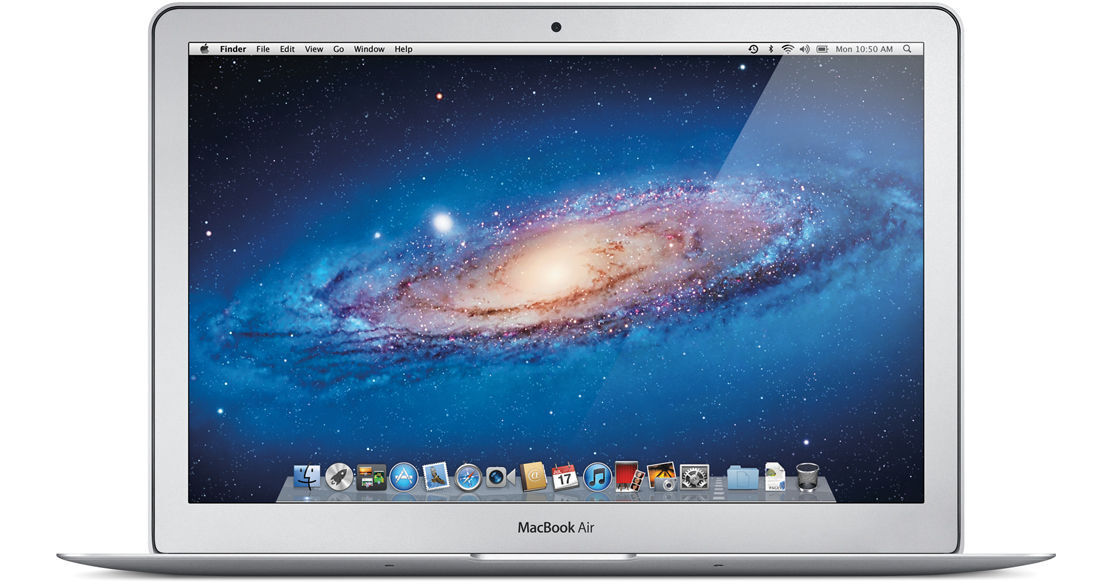
The 13.3" MacBook Air Notebook Computer from Apple is an extremely portable, stunningly designed laptop computer. Apple's engineers have leveraged the lessons they learned in designing the miniaturized iPad and applied them to the design of this 3-pound computer.
To say that the Air is svelte is all at once stating the obvious and understating the truth. The system is defined by its sleek lines and stunning aluminum enclosure. At its thickest point the computer is only 0.68" -- it tapers down to 0.11" at its thinnest.
The system is loaded with 128GB of SSD flash storage rather than an old-fashioned hard drive. Flash storage doesn't just give you a lighter, thinner computer. It also allows for impressive battery life -- up to 7 hours of web browsing and an amazing 30 days of standby time!
The MacBook Air is housed in an aluminum unibody enclosure, which is as strong as it is light. Because it is cut from a solid block of aluminum, the housing is stronger than those found on laptops built via traditional means.
The computer's high-resolution display makes working on the go a breeze. At 13.3" in size, the 16:10 display feature a native resolution of 1440 x 900 -- delivering the same amount of pixels as the standard 15.6" MacBook Pro! It features a glossy finish and LED backlight technology for enhanced image quality and energy efficiency.
Computers in the MacBook Air's weight class are most often classified in the "netbook" category. Netbooks typically feature less-than-full-size keyboards, cramped trackpads, and low-powered CPUs. Not so with the MacBook Air. This computer features a standard-size backlit chiclet keyboard, the same as on the larger computers in the MacBook line. It also boasts a large multi-touch glass trackpad, giving you full control over your computer -- without sacrificing ergonomics.
The computer is powered by a dual-core 1.7GHz Intel Core i5 processor and boasts 4GB of RAM. Graphics are provided by an integrated Intel GMA HD 3000 GPU. The computer features all the amenities you expect on a Mac -- a FaceTime webcam, dual-band 802.11n Wi-Fi, Bluetooth 4.0, and built-in stereo speakers.
iLife '11, a complete suite of digital creativity applications, is installed on the system. Easy enough for anyone to use, iLife will help you edit your home movies, organize digital photos, and compose original music.
The computer is loaded with Apple's Mac OS X 10.7 Lion operating system. The 64-bit OS features Time Machine backup, which automatically backs up system data to an external hard drive. It also features intuitive natural scrolling, the innovative Launchpad application launcher, and support for full screen applications. Mission Control combines the functionality of Dashboard, Exposé, and Spaces -- giving you a bird's eye view of everything that is happening on your computer.
Lion also adds Auto Save to your Mac, ensuring that you won't lose data if you forget to save a file. The OS tracks different versions of your documents, so you can go back to a previous draft of a document with ease. AirDrop makes it easy to transmit files wirelessly between computers, even if there is no central Wi-Fi network available. The revamped Mail application takes full advantage of modern widescreen displays.
And of course, you can expand the functionality of your computer system by browsing through the multitude of productivity applications, games, and other software that is available for purchase from the Mac App Store. Because the software in the store is curated by Apple, you can be sure that it is free of malware and safe to use. And, like the iOS App Store, you'll automatically be notified when updated versions of your favorite programs are available for download.
| Performance | |
|---|---|
| Processor | 1.7GHz Intel Core i5 |
| Cache | L3: 3MB |
| System Bus | Not Specified By Manufacturer |
| Memory |
Slots: Onboard Type: PC3-10600 1333MHz DDR3 SDRAM Installed: 4GB Capacity: 4GB |
| Graphics Card |
Type: Integrated Installed: Intel GMA HD Graphics 3000 with 384MB DDR3 SDRAM Shared |
| Display | |
|---|---|
| Type | Widescreen |
| Size | 13.3" |
| Backlight | LED |
| Aspect Ratio | 16:10 |
| Finish | Glossy |
| Native Resolution | 1440 x 900 |
| Supported Resolutions |
1440 x 900 at 16:10 Aspect Ratio 1280 x 800 at 16:10 Aspect Ratio 1152 x 720 at 16:10 Aspect Ratio 1024 x 640 at 16:10 Aspect Ratio 1024 x 768 at 4:3 Aspect Ratio 800 x 600 at 4:3 Aspect Ratio |
| External Resolution | Up to 2560 x 1600 |
| Dual Display | Yes |
| Video Mirroring | Yes |
| Storage | |
|---|---|
| Hard Drive | Installed: 128GB SSD |
| Optical Drive | None |
| Input/Output Connectors | |
|---|---|
| Ports |
2x USB 2.0 (A) 1x Thunderbolt |
| Audio |
Integrated Stereo Speakers Integrated Omnidirectional Microphone 1x 1/8" (3.5mm) Headphone/Microphone Combo Jack |
| Expansion Slots | None |
| Flash Media Slot | 1x SD |
| Communications | |
|---|---|
| Network | None |
| Modem | None |
| Wi-Fi | 802.11a/b/g/n |
| Bluetooth | Bluetooth 4.0 |
| Webcam | Yes |
| General | |
|---|---|
| Operating System | Mac OS X 10.7 Lion (64-bit) |
| Security | None |
| Keyboard |
Type: Standard Notebook Keyboard Features: Backlight, Chiclet Style |
| Pointing Device | TouchPad with Double-Tap, Drag, Four-Finger Swipe, Inertial Scrolling, Multi-Touch Control, Pinch, Rotate, Tap, Three-Finger Swipe |
| Battery | Built-In Lithium-Polymer Providing up to 7 Hours per Charge (50Wh) |
| Power Requirements |
AC: 100-240 V AC, 50-60Hz Consumption: 45W |
| Dimensions (WxHxD) | 12.8 x 0.68 x 8.94" / 32.51 x 1.73 x 22.71 cm |
| Weight | 2.96 lb / 1.34 kg |
REVIEW SNAPSHOT®
by PowerReviewsPros
Cons
Best Uses
Most Liked Positive Review
Amazing Machine!
I was a bit hesitant based on the price of this machine but I am glad that I made the decision to buy. This is by far the best Mac purchase that I have ever...Read complete review
I was a bit hesitant based on the price of this machine but I am glad that I made the decision to buy. This is by far the best Mac purchase that I have ever made. Actually, this is the best tech purchase that I have ever made. This machine is very fast, incredibly responsive and it feels solid- much more solid than you would expect for something of this size.
B&H was a pleasure to work with and that means a great deal to me. I rely on my machines for my living and it is nice to find a reliable product from a reliable source.
VS
Most Liked Negative Review
Screen Flickers & Flap Loose
I use for programming purposes. Great thing about it is that it is light weight.
Bad thing is that the screen flickers and the flap got loose.
I use for programming purposes. Great thing about it is that it is light weight.
Bad thing is that the screen flickers and the flap got loose.
Reviewed by 59 customers
Sort by
Displaying reviews 1-20
Previous | Next »
Pros
Cons
Best Uses
Comments about Apple 13.3" MacBook Air Notebook Computer:
it is everything you'd want from a laptop / notebook - fast, stylish, intuitive, highly portable and simply works! Granted its a bit more expensive than the regular Dell / HP / Lenovo but Apple products last! I have a friend who 2003 Mac desktop performs flawlessly for web browsing, try that with a PC!
Pros
Cons
Best Uses
Comments about Apple 13.3" MacBook Air Notebook Computer:
Its certainly a sleek and robust design, I was impressed with the screen clarity but I would prefer a keyboard like thinkpad
There is nothing to say "bad" about MacBook air but its certainly not a jawdropping product. I dont really appreciate Lion.
Its certainly a trendy machine, good for a traveler, Overpriced, and in my opinion an average buy
Pros
Cons
Best Uses
Comments about Apple 13.3" MacBook Air Notebook Computer:
I had this computer for three days now and so fare i have been impressed with MAC OS. Until now i have been a PC user (HP Envy 13)and this was my first apple product. Its a great laptop with great features, excellent back-lit keyboard for typing, great touch-pad and the viewing angles are perfect. It will take some time for me to get used to mac os but it is worth it every penny. I compare this to my previous pc Envy 13 and the MBA is much faster in every sense. So, for all those pc users who have doubts whether to switch to mac os, I tell you go for it, you won't regret it.
Pros
Cons
Best Uses
Comments about Apple 13.3" MacBook Air Notebook Computer:
MBA is great design, build quality and I love B&H
Pros
Cons
Best Uses
Comments about Apple 13.3" MacBook Air Notebook Computer:
Great design, outstanding product quality, service is outstanding. Saved the sales tax and shipping by purchasing the B&H. Yes, I also love B&H!
Pros
Cons
Best Uses
Comments about Apple 13.3" MacBook Air Notebook Computer:
Fast and Light.
Apple is also very good in software. The only problem we had was updating the operating system once as it was asked by system automatically, and the result was a crash so that we didn't know how to make it back. Finally it came back suddenly; don't know how.
Pros
Cons
Best Uses
Comments about Apple 13.3" MacBook Air Notebook Computer:
compact
easy to carry
and gorgeous shape *-*
Pros
Cons
Best Uses
Comments about Apple 13.3" MacBook Air Notebook Computer:
Comparing price & quality
Thats the most efficient macbook ever
Highly Recommended
Pros
Cons
Best Uses
Comments about Apple 13.3" MacBook Air Notebook Computer:
Extremely good value and BH service is superb. They have the best rates than [@].
Pros
Cons
Best Uses
Comments about Apple 13.3" MacBook Air Notebook Computer:
I've got 4gb ram 128 gb flash memory Macbook Air to use as my worktool as the project manager for the industrial company. I bought it as the replacement for my 12" ASUS netbook which got too slow for my simple everyday tasks - mail, MS Office, occasional photoediting and movies.
I'm satisified with my new MBA. However I only used it for several days still it has been very fast and super comfortable to use - MacOS X is much more user-friendly than Windows. The programs start very fast and run very smoothly. I like the screen size, the picture quality and the touchpad, keyboard is great too. There are two things which are not great - webcam quality is worse compared to current Macbook Pro models and the flash memory volume is limited on the starter 13" model. It will definitely require a portable HDD for my music & video library. Well, I did not want to spend extra $300 for a 256gb version so I'll try to stay reasonable with my disc space use. Aside of these 2 "disadvantages" MBA 128gb is a great tool for business travellers like me. The inredibly light and thin laptop with a decent screen size and amazing MacOS onboard. I highly recommend it for those thinking about replacing their netbooks. You'll notice the difference!
Pros
Cons
Best Uses
Comments about Apple 13.3" MacBook Air Notebook Computer:
Purchased a 13.3" Macbook Air 128GB for my family to use at home. Looked at an Ipad but decided we wanted an integrated keyboard and the ability to run conventional applications as well as ipad type apps. This laptop is perfect for our needs. The display is excellent. Keyboard feel is very good. Lightweight, easy to use. Very fast startup with the Solid State internal drive.
Web browsing is a breeze. Powered it up and we were ready to go right out of the box. Used the Migration assistant to move our user files over from our desktop imac. Everything transferred flawlessly. We were up and running almost immediately.
Very happy with the laptop and the on-line process through B&H Photo. Competitive pricing, on-time delivery. Excellent follow-up.
100 % happy with the laptop and the purchase process. Would recommend to anyone else looking.
Cheers
Pros
Cons
Best Uses
Comments about Apple 13.3" MacBook Air Notebook Computer:
Love this laptop debated for a month, on which laptop to go with; the Air or the Pro. Glad I went with the Air its perfect for what I use it for. Mainly web browsing and email, with occasional word processing. the Pro would of had a lot more memory and option to upgrade ram but during this time in my life (college student - always on the run between classes and work) I need light, fast and extremely portable.
I do plan to purchase a portable hard drive to save all my music, movie, and other documents on, so as to keep my SSD lean and fast, and only use that memory for my installed programs.
I love that I can carry this with books and I'm not breaking my back, also it turn on in seconds, which is convenient for in between class when I need to do something online quickly.
Pros
Cons
Best Uses
Comments about Apple 13.3" MacBook Air Notebook Computer:
Love the small size and weight, fast launch of Photoshop and convenience of SD card slot. Screen is very sharp, noticeably better than my previous Mac laptop. Battery life is good, although not quite as good as claimed.
Pros
Cons
Best Uses
Comments about Apple 13.3" MacBook Air Notebook Computer:
Useful for travel, photo storage, and cruising the internet. Also do some photo editing and review.
Pros
Cons
Best Uses
Comments about Apple 13.3" MacBook Air Notebook Computer:
The product will be for home using
Pros
Cons
Best Uses
Comments about Apple 13.3" MacBook Air Notebook Computer:
I upgraded from a 4 year old Macbook and this Macbook Air is so much better. It is very very light, very fast, and has a great screen. Also the sound quantity and quality is much better.
In short- I love it!
Pros
Cons
Best Uses
Comments about Apple 13.3" MacBook Air Notebook Computer:
My daughter is the recipient of the Air notebook, and it took some joy out of the gift when she realized that she has to go to some wizard-like steps to "borrow" from another computer the cd or dvd drive to read media. We shall see if over time the benefits of MAC over PC outweigh the cost differential. To think what I would have afforded in a PC for the same $! Oh, well.
Pros
Cons
Best Uses
Comments about Apple 13.3" MacBook Air Notebook Computer:
I had been wedded to my PC systems for years, both laptops and desktops. After much deliberation I decided to take the leap to Apple and purchased a 2012 macbook air and could not be happier. From the moment that I turned it on it performed beyond my expectations. The system started up and I was live within minutes. All the normal hassles with setting up a PC were missing. Recognized my network without a problem, detected and setup my printer, and walked through my mail setup seamlessly.
Cant say enough good things, would do it again in a heart beat.
Pros
Cons
Best Uses
Comments about Apple 13.3" MacBook Air Notebook Computer:
I'm a medical student and always travelling so having something so small and light such as the Mac Air is very handy and useful.
Pros
Cons
Best Uses
Comments about Apple 13.3" MacBook Air Notebook Computer:
best product on the market
Displaying reviews 1-20
Previous | Next »