The Professional's Source 866.276.1435 / 212.502.6357

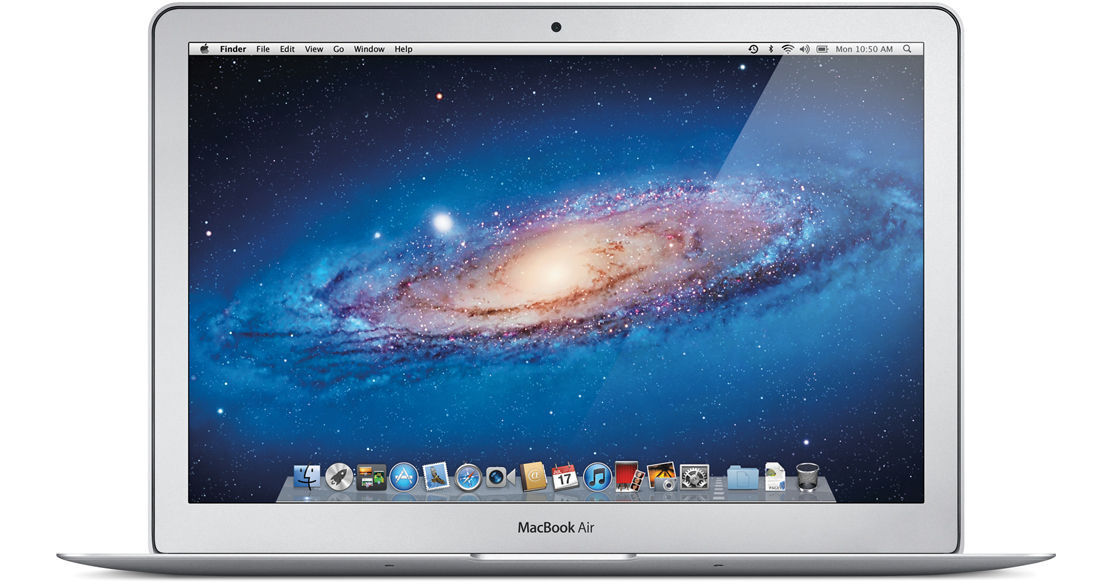
Apple 13.3" MacBook Air Notebook Computer

  • Price: $1,649.95
  • B&H # APMBAZ0ME1
  • Mfr# Z0ME-0001

Product Highlights

  • 1.8GHz Intel Core i7
  • 4GB RAM
  • 256GB Flash Storage
  • Intel GMA HD 3000 Graphics
  • 13.3" Glossy Widescreen LED Backlit Display
  • FaceTime Webcam
  • Bluetooth 4.0
  • 802.11a/b/g/n Wi-Fi
  • Mac OS X 10.7 Lion
  • 3 lb

AppleCare Protection Plan


What item is right for you?

Ask our Experts!

866.276.1435
Live Chat

The 13.3" MacBook Air Notebook Computer from Apple is an extremely portable, stunningly designed laptop computer. Apple's engineers have leveraged the lessons they learned in designing the miniaturized iPad and applied them to the design of this 3-pound computer.

To say that the Air is svelte is all at once stating the obvious and understating the truth. The system is defined by its sleek lines and stunning aluminum enclosure. At its thickest point the computer is only 0.68" -- it tapers down to 0.11" at its thinnest.

The system is loaded with 256GB of SSD flash storage rather than an old-fashioned hard drive. Flash storage doesn't just give you a lighter, thinner computer. It also allows for impressive battery life -- up to 7 hours of web browsing and an amazing 30 days of standby time!

The MacBook Air is housed in an aluminum unibody enclosure, which is as strong as it is light. Because it is cut from a solid block of aluminum, the housing is stronger than those found on laptops built via traditional means.

The computer's high-resolution display makes working on the go a breeze. At 13.3" in size, the 16:10 display feature a native resolution of 1440 x 900 -- delivering the same amount of pixels as the standard 15.6" MacBook Pro! It features a glossy finish and LED backlight technology for enhanced image quality and energy efficiency.

Computers in the MacBook Air's weight class are most often classified in the "netbook" category. Netbooks typically feature less-than-full-size keyboards, cramped trackpads, and low-powered CPUs. Not so with the MacBook Air. This computer features a standard-size backlit chiclet keyboard, the same as on the larger computers in the MacBook line. It also boasts a large multi-touch glass trackpad, giving you full control over your computer -- without sacrificing ergonomics.

The computer is powered by a dual-core 1.8GHz Intel Core i7 processor and boasts 4GB of RAM. Graphics are provided by an integrated Intel GMA HD 3000 GPU. The computer features all the amenities you expect on a Mac -- a FaceTime webcam, dual-band 802.11n Wi-Fi, Bluetooth 4.0, and built-in stereo speakers.

iLife '11, a complete suite of digital creativity applications, is installed on the system. Easy enough for anyone to use, iLife will help you edit your home movies, organize digital photos, and compose original music.

The computer is loaded with Apple's Mac OS X 10.7 Lion operating system. The 64-bit OS features Time Machine backup, which automatically backs up system data to an external hard drive. It also features intuitive natural scrolling, the innovative Launchpad application launcher, and support for full screen applications. Mission Control combines the functionality of Dashboard, Exposé, and Spaces -- giving you a bird's eye view of everything that is happening on your computer.

Lion also adds Auto Save to your Mac, ensuring that you won't lose data if you forget to save a file. The OS tracks different versions of your documents, so you can go back to a previous draft of a document with ease. AirDrop makes it easy to transmit files wirelessly between computers, even if there is no central Wi-Fi network available. The revamped Mail application takes full advantage of modern widescreen displays.

And of course, you can expand the functionality of your computer system by browsing through the multitude of productivity applications, games, and other software that is available for purchase from the Mac App Store. Because the software in the store is curated by Apple, you can be sure that it is free of malware and safe to use. And, like the iOS App Store, you'll automatically be notified when updated versions of your favorite programs are available for download.

Design

The Future of the Notebook. Available Now
Designing MacBook Air came with one goal: Create an incredibly thin and light notebook computer that's every bit as powerful and capable as one twice its size. With flash storage, durable unibody construction, Multi-Touch technology, and a long-lasting battery, MacBook Air not only achieves that goal, it sets a new standard for what every notebook should be. Perfected down to the millimeter.
Thin, Light, Durable. Thank You, Flash Storage
Even at less than an inch thin, MacBook Air sets a pretty high standard -- by making flash storage standard. Flash chips are very small, allowing MacBook Air to be incredibly thin and light. Flash is also solid state, meaning there are no moving parts. Which makes it reliable, durable, and quiet. And because Apple placed the flash chips directly on the logic board, they take up much less space -- about 90 percent less, in fact. That creates room for other important things, like a bigger battery. So you have a notebook that weighs almost nothing and runs for hours on a single charge. That's mobility mastered.
The Best Way to Multi Touch on a Notebook
Multi-Touch technology is part of practically every Apple product. It's the best and most personal way to interact with your devices. And the optimal way to experience Multi-Touch on a notebook is through a trackpad. That's precisely the case with MacBook Air. The trackpad's spacious, all-glass surface doesn't have a button because the whole thing is the button. And with Multi-Touch gestures that are new to OS X Lion, you can interact with MacBook Air in ways that feel more intuitive and realistic than ever before.
See Your QWERTY in Lights
Anyone can try to make a notebook that's thin and light. Success comes in doing it without cutting corners. That's why MacBook Air features a full-size keyboard, not a condensed version of what you're used to. When you type on the MacBook Air, it's just as comfortable as typing on a desktop keyboard. And now the keyboard is backlit, so you can type comfortably even in low-light conditions. A built-in sensor detects changes in the ambient lighting and adjusts the keyboard and display brightness automatically, giving you the perfect illumination in any environment.
A Battery That Can Get You Through the Day. And the Month
If you looked inside MacBook Air, you'd see something remarkable: how much space is devoted to the battery. That's thanks to smaller components such as flash storage. And when the goal is to design the perfect notebook for everyday use, giving priority to the battery just makes sense. With MacBook Air, you can get up to 7 hours of battery life. Put MacBook Air to sleep for more than an hour, and it enters what's called standby mode. That means you can come back to MacBook Air a day, a week -- even up to an entire month later -- and it wakes in an instant. Time is on your side, courtesy of MacBook Air.
A Thing of Beauty. And Durability
MacBook Air features a unibody design for both the main enclosure and the display. Unibody construction means a higher-precision, less complex design with fewer parts. And that translates to a notebook that's exceptionally thin and light, yet durable enough to handle the rigors of everyday use.
FaceTime Camera
Make video calls with a built-in FaceTime camera that's even smaller than the one inside iPhone 4.

Features

Intel Core i7 Processor
MacBook Air features the 1.8GHz Core i7 Intel processor. Along with fast DDR3 memory, the MacBook Air gains up to 1.9 times the processing performance over the previous generation. MacBook Air also features the Intel HD Graphics 3000 processor, which includes an on-chip engine for video encoding and decoding. That means you experience video playback and FaceTime calls that are smoother, more responsive, and more true to life.
Thunderbolt I/O
With one port, MacBook Air gives you access to a world of high-speed peripherals capable of transferring data up to 12 times faster than FireWire-800 and up to 20 times faster than USB 2.0. Or use the Thunderbolt port to connect the optional Apple Thunderbolt Display and transform your ultracompact MacBook Air into a complete desktop workstation. Power over 4 million eye-popping pixels while enjoying some major benefits: Gigabit Ethernet, FireWire-800, an additional Thunderbolt port, three USB ports, a FaceTime HD camera, 2.1 stereo sound, and a built-in microphone. The display even charges your MacBook Air, so there's no need to unpack and unravel your power adapter. With two quick connections -- the MagSafe power cord and the Thunderbolt cable -- you're up and running in seconds. Unplug them, and you're on your way just as fast.
All-Flash Storage
Devices like iPhone and iPad have already demonstrated the advantages of flash storage: reliability, speed, and efficiency. So the decision to use flash storage in an ultracompact notebook like MacBook Air made perfect sense. With flash, your computer starts up in almost no time and accesses data quickly. Flash also gives MacBook Air the astonishing ability to remain in standby mode for up to 30 days. Which means your MacBook Air snaps to in an instant, whether you open it tomorrow, next week, or next month.
Backlit Keyboard.
As incredibly compact as MacBook Air is, it still manages to fit a full-size keyboard that makes typing as natural as it is comfortable. And now the keyboard is backlit, so you can type with ease in even the dimmest light. A built-in ambient light sensor detects changes in lighting conditions and adjusts the display and keyboard brightness automatically. From a seat in a sunny café, to a seat on a cross-country red-eye, you'll always have the perfect lighting for any environment.
Multi-Touch Trackpad
The Multi-Touch gestures in OS X Lion make everything you do on MacBook Air more intuitive, direct, and fun. And the spacious Multi-Touch trackpad is perfectly designed for them, whether it's a three-finger swipe to activate Mission Control or a four-finger pinch to see all your apps in Launchpad. Gesture responses in Lion are smooth and realistic. So when you're scrolling up and down a web page or swiping from one full-screen app to another, it's almost like you're touching what you're seeing.
High-Resolution Display. Millions of Pixels. Millimeters Thin
Corner to corner and pixel by pixel, the MacBook Air display is both an engineering feat and a design breakthrough. The display measures a mere 0.19" (4.86mm) thin, yet the resolution is so high, you'll feel like you're looking at a much larger screen. And with good reason. The 13.3" MacBook Air features a resolution equal to that of your typical 15.6" notebook.
FaceTime Camera. Your Smile Goes for Miles
The wafer-thin MacBook Air display houses something pretty huge: the FaceTime camera. It's so thin -- even thinner than the camera on iPhone 4 -- you barely notice it, but it's incredibly capable. Using the FaceTime for Mac app, you can make video calls with anyone who has a Mac, iPad 2, iPhone 4, or a camera-equipped iPod touch.
Stereo Speakers. Heard but Not Seen
Despite its compact form, MacBook Air delivers full stereo sound. Space-efficient design inside the enclosure allows for the placement of left and right speakers that project sound through the keyboard. So you're able to enjoy a richer audio experience while chatting online, watching TV shows, listening to music, or playing games.
Long-Lasting Battery
Since space-saving flash storage leaves room for a bigger battery, you can devote more time to the things you enjoy most. Things like browsing the web, editing photos, and watching videos. You'll get up to 7 hours of battery life on a single charge. Put MacBook Air to sleep, and it enters standby mode to conserve battery life for up to 30 days. When you come back to your MacBook Air and open it up, it's on in an instant.
Connectivity
When you're wireless, you're truly mobile. That's why MacBook Air features 802.11n Wi-Fi and Bluetooth 4.0 technology. Wireless connectivity allows you to browse the web, send e-mail, and print documents no matter where you are. MacBook Air weighs almost nothing, so you can go from room to room, dorm to dorm, or cubicle to cubicle and stay connected. Being wireless also means you can download apps from the Mac App Store anytime you want. With thousands of Mac apps available for download with just a few clicks, you don't have to bother with going to the store to buy software on disc or worry about a growing pile of CDs and DVDs. Apps download instantly right on your Mac. If plugged in is what you want to be, MacBook Air has you covered there, too. Two USB 2.0 ports, an SD card slot, and a headphone port give you plenty of options. And the Thunderbolt port connects to the Apple Thunderbolt Display and high-speed Thunderbolt peripherals such as external hard drives.

Performance

Intel Core i7 Processor
Now with the an Intel Core i7 processor and speedy DDR3 memory, the MacBook Air is up to 1.9 times as fast as the previous generation, yet it weighs next to nothing. Applications run faster and more efficiently than before. So everything you normally do on a computer you can do even quicker. Send e-mail, write reports, create presentations, touch up photos, edit home movies, and all the little (and big) tasks in between. And since the Core i7 CPU features a graphics processor with an on-chip engine for video encoding and decoding, you'll notice longer battery life when watching iTunes movies or making FaceTime video calls.
All-Flash Storage
"Wow, that was fast." With MacBook Air, you'll find yourself saying that a lot. Because flash storage is up to two times faster than a conventional hard drive, everything you do is more responsive and immediate -- starting up, browsing a large photo library, launching applications, and opening files, for instance. When you combine the speed of flash storage with a fast dual-core processor and power-efficient graphics, your entire MacBook Air experience feels turbocharged. And flash storage doesn't have any moving parts, which means it's more reliable and quiet. Lightning fast, durable, silent -- qualities that make sense in a notebook tasked with keeping up with you.
High-Speed Thunderbolt I/O
The breakthrough I/O technology pioneered on MacBook Pro and iMac now comes to MacBook Air, letting you connect multiple high-performance devices -- such as external hard drives -- through a single port. With two 10Gbps data channels, Thunderbolt lets you transfer data at rates up to 12 times faster than FireWire-800 and up to 20 times faster than USB 2.0. Thunderbolt technology gives MacBook Air capabilities it's never had before. Like attaching FireWire peripherals or connecting to Ethernet networks at gigabit speeds -- two big gains from one tiny port. You can also use the Thunderbolt port to connect MacBook Air to the ultimate docking station: the Apple Thunderbolt Display. When you do, your MacBook Air transforms into so much more. That's because the Thunderbolt Display includes Gigabit Ethernet, FireWire-800, an additional Thunderbolt port, three USB ports, a FaceTime HD camera, 2.1 stereo sound, and a built-in microphone. Together MacBook Air and the Thunderbolt Display create a powerful setup for work or play.

OS X Lion

Hardware and Software Made for Each Other
Since the software on every Mac is created by the same company that makes the Mac, you get a fully integrated system in which everything works together perfectly. OS X works with the processor in your Mac to deliver the best possible performance. The Multi-Touch trackpad on every Mac notebook gives you more than enough space to pinch, swipe, and tap your way around most of the apps on your system. OS X gives you long battery life by dimming the screen in low-light conditions and even regulating processor activity between keystrokes.
Interact with Your Computer in a Whole New Way
Tap, scroll, pinch, and swipe using Multi-Touch gestures, directly controlling what's on your screen in a more fluid, natural, and intuitive way. When you scroll down on your trackpad or Magic Mouse, your document scrolls down. When you scroll up, your web page scrolls up. When you swipe left, your photos move left. And there are many more gestures that make all you do on your Mac the best experience you can have on a computer. Hands down.
Easy to Use and Incredibly Powerful
From the desktop you see when you start up your Mac to the applications you use every day, everything is designed to be simple and intuitive. Of course, making amazing things simple requires some seriously advanced technologies, and OS X is loaded with them. Not only is it built on a rock-solid, time-tested UNIX foundation that provides unparalleled stability, it also delivers incredible performance, stunning graphics, and industry-leading support for Internet standards.
Easy Access to All of Your Apps
Working and playing on a Mac is all about apps, so OS X makes it simple to find and open those apps fast. The Dock is a handy place on your desktop for storing and launching your favorite apps, and it makes switching between them a breeze. The Dock also includes Stacks, folders that give you quick access to documents, files, and downloads. Launchpad is a full-screen home for all the apps on your Mac. It lets you arrange them the way you want, group them in folders, and delete them with ease. And apps purchased from the Mac App Store automatically appear in Launchpad, so you can browse thousands of apps and start using the ones you buy right away.
Find, Organize, and Share Files Fast
The Finder gives you easy access to all the files on your system. It lets you find, organize, and access practically everything on your Mac -- including applications, files, folders, discs, and shared computers on your network. You can sort files by kind, application, date modified, date added, or size. But with so many files on your computer, finding a specific one can be a challenge. Not on a Mac. Features like Spotlight and Quick Look make locating the file you're looking for effortless -- even if you don't know the filename. Say you're searching for a document, and the only thing you recall about it is the phrase "surrealist painters." Open Spotlight, start typing "surrealist painters," and your Mac generates a list of files that contain those words. And with Quick Look, you don't need to open an application to verify that you've found the right file - view a full-screen preview by hitting the space bar. Want to share a file with someone nearby? Just drag and drop to send it to the person wirelessly with AirDrop.
See Everything Running on Your Mac. In an Instant
OS X offers systemwide support for gorgeous, full-screen apps that use every inch of your Mac display. You can have multiple full-screen apps open at once -- along with multiple apps in windows. And it's easy to switch between full-screen and desktop views. Mission Control gives you a bird's-eye view of all your windows and full-screen apps, and allows you to instantly navigate among them.
It Does the Saving for You
Say goodbye to the worry and the hassle of manually saving your work. Auto Save automatically saves your work, while you work, without you having to do a thing. Versions creates a new version of a document each time you open it and every hour while you're working. It saves only the differences between successive versions, so the impact on your disk drive is minimal. Just open Versions to see the current document next to a cascade of previous versions. You can copy and paste between versions or revert to an earlier version. And when you share a document, you share only the most recent copy.
Highly Secure by Design
OS X doesn't get PC viruses. And with virtually no effort on your part, the operating system protects itself from other malicious applications. Because every Mac ships with a secure configuration, you don't have to worry about changing complex settings in order to stay safe. Even better, OS X won't slow you down with constant security alerts and sweeps. Apple responds quickly to online threats and automatically delivers security updates. And with FileVault 2 in OS X Lion, all the data on your Mac is protected by powerful encryption.
Built for Compatibility
The versatility and power of OS X help a Mac fit in just about anywhere -- including Windows networks. Want to transfer your files, photos, and other data from a Windows PC? OS X lets you do that easily. If you want to run Windows on your Mac, you can do that, too. OS X has built-in support for the latest version of Microsoft Exchange Server, so you can use your Mac at home and at work and keep all your messages, meetings, and contacts in one place. OS X works with virtually all of today's digital cameras, printers, and other peripherals without the need to manually download separate drivers. And it opens popular file types such as JPG, MP3, and PDF, as well as Microsoft Word, Excel, and PowerPoint documents.
Accessible Innovation
OS X comes standard with a wide range of assistive technologies that help people with disabilities experience what the Mac has to offer, including many features you won't find in other operating systems -- at any price. For example, built-in VoiceOver screen-reading technology, available in over 20 languages, makes it possible for those who are blind or have low vision to control their computers using key commands or gestures on a Multi-Touch trackpad. OS X also offers out-of-the-box support for more than 40 Braille displays (including Bluetooth displays) and many other accessibility features, such as dynamic full-screen magnification, playback of closed captions, and a scalable screen.
Reliable from the Very Start
Just about everything you do on a Mac -- even upgrading to the latest version of the OS -- is safe and reliable. OS X checks your applications to make sure they're compatible and sets aside any programs known to be incompatible. If a power outage interrupts your installation, OS X can start again without losing any data. Best of all, upgrading doesn't require reformatting your drive -- you keep all your compatible applications, files, and settings. And if something goes wrong when you're using your Mac, Time Machine is there to restore your data if needed.

Built-In Apps

iPhoto
iPhoto is an easy-to-use photo application that makes it fast and fun to organize and find your pictures, as well as make them look their absolute best. With features like Faces, Places, and Events, iPhoto helps you keep track of your photos by who's in them and when and where you took them -- all in an immersive full-screen view. Use quick and simple editing tools to make so-so shots picture perfect with just a few clicks. iPhoto even lets you share your photos with the world with beautiful photo books and letterpress cards or online via Facebook and Flickr.
iMovie
Don't settle for boring home movies. With iMovie, you can transform the videos you shoot into your very own indie flicks. Create a Hollywood-style trailer that'll make your audience laugh, cry, and cheer for more. If you know how to drag and drop, you can make a movie in iMovie. It comes with Apple-designed themes that look fun and professional. Just choose one and iMovie does the rest, adding animated titles and sophisticated transitions automatically. Customize your screen gem further with your own words and audio.
GarageBand
Whether you're musically gifted or mostly curious, GarageBand is the application for you. Plug in your electric guitar or USB music keyboard and get ready to rock with virtual replicas of the most revered amps and stompboxes in the world, as well as over 100 software instruments. Just because you didn't grow up learning your A, B, and C sharp doesn't mean you can't. Basic Lessons teach you just that: the basics. Choose from 40 lessons that cover blues guitar, rock guitar, classical piano, pop piano, and more. Or get a private lesson from one of your musical heroes, like Sting or Death Cab for Cutie, with Artist Lessons.1 GarageBand even tells you how well you're playing in real time with a feature called "How Did I Play?"
Mac App Store
Just like shopping the App Store on iPad, the Mac App Store offers endless possibilities to browse and purchase apps. Apps install in one step right to Launchpad. And the Mac App Store lets you know when app updates are available, so you always have the latest versions.
Safari
Designed with the Mac in mind, Safari emphasizes browsing, not the browser. In full-screen view, the browser frame is only a pixel wide, and you can hide almost the entire interface if you choose. So there's nothing to distract you from an article, video, or photo album. Navigating web pages is easy with trackpad gestures -- flip through web pages with a swipe, and double tap or pinch the trackpad to zoom in on text or images. Safari also features Reader, which lets you peruse articles sans annoying ads. Or save articles for later with Reading List. And since pages render fast in Safari, you won't miss a minute of the web.
Mail
Mail makes it easy to manage all your e-mail from a single, ad-free inbox. It features powerful search capabilities, with search suggestions and tokens built in. It works with most e-mail standards -- including POP3 and IMAP -- and popular e-mail services such as Gmail, Comcast, Time Warner, Charter, Cox, Yahoo! Mail, and AOL Mail. Mail supports Microsoft Exchange 2010, too. If you have more than one e-mail account, no problem. Add your accounts to Mail and you'll be able to access all your e-mail from one place.

And Mail looks as great as it works. It makes full use of your display with a gorgeous widescreen view featuring a full-height message and a message list that includes snippets. With Conversations, messages from the same thread appear in an elegant timeline showing each communication as it was sent while hiding redundant text.
iCal
Keep track of your busy schedule and share it with others using iCal. Create separate calendars -- one for home, another for school, a third for work, and so on. See all your calendars in a single window or choose to see only the calendars you want. iCal lets you create invitations using contact information from your Address Book, update your guest list, keep track of responses, and receive the latest status information. When you or another Mac user receives an iCal invitation via Mail, it's automatically added. iCal works with Yahoo! and Google calendars too, and syncs to iPad, iPhone, and iPod touch, so you'll always be up to date on all your devices.
Address Book
With Address Book you have a flexible and convenient place to store contact information for everyone you know. You can import names, numbers, addresses, and photos from other applications, create smart groups for clubs, activities, and business purposes, print address labels and envelopes, and more. It syncs to iPad, iPhone, and iPod touch so there's no need for duplication. And since Address Book is built on vCard, an industry standard for storing contact information, your friends can send you cards that you can add simply by dropping them in -- no typing required.
Time Machine
Time Machine works with your Mac and an external hard drive or Time Capsule. Connect the drive, assign it to Time Machine, and start enjoying some peace of mind. Time Machine automatically backs up your entire Mac, including system files, applications, accounts, preferences, music, photos, movies, and documents. But what makes Time Machine different from other backup applications is that it not only keeps a spare copy of every file, it remembers how your system looked on any given day -- so you can revisit your Mac as it appeared in the past.
FaceTime
FaceTime for Mac makes it possible to talk, smile, and laugh with anyone on an iPad 2, iPhone 4, iPod touch, or another Mac from your Mac. So you can catch up, hang out, joke around, and stay in touch with just a click. And when someone tries to reach you, the call rings through on every Mac you own, even if FaceTime isn't running. So you never have to worry about making yourself available. If you don't want to receive calls, just turn FaceTime off in preferences. FaceTime is integrated with your Address Book so you can initiate chats easily.
Photo Booth
Take photo snapshots and video clips with your Mac using Photo Booth. Send them to your friends, use one as an iChat icon, add them to your Address Book, or organize and edit them in iPhoto. The real fun starts when you use the effects and backdrops in Photo Booth. Snap a photo of yourself at the Eiffel Tower or in outer space. Choose from nine effects that use facial tracking technology so effects look great whether you're front and center -- or left of center. Snap single photos or shoot multiples in a four-photo burst. You can even shoot video clips, complete with effects, then trim them right in Photo Booth and send them to friends and family. And since Photo Booth can be viewed full screen, you'll enjoy every detail down to the last pixel.

The Mac Experience

Every Day Use
Every Mac is designed to make your life easier, not more difficult. The system ships with Mac OS X "Lion," which gives you all the tools you need for e-mail, personal organization, Internet browsing, watching movies, and more. Its software and hardware are designed work to together seamlessly, eliminating the compatibility nightmares that often plague PC users. What's more, the MacBook Air can run Windows via Boot Camp, perfect for users who have a Windows-only application that they absolutely need to use.
iLife '11
The included iLife '11 suite is a suite of applications that help you organize your digital life. It includes iPhoto for photo management and editing, iMovie for HD video editing, iDVD to burn your movies to disc, GarageBand for music production, and iWeb for web publishing.
Secure and Reliable
Worried about viruses and malware? Don't be. The MacBook Air isn't plagued by constant attacks from the outside world. It is designed to be secure out of the box, eliminating the need for additional software to protect your system from danger. OS X will warn you if a downloaded file is potentially dangerous, ensuring that you don't accidentally open a malicious application. Apple responds quickly to any security threats, prompting you to download updates that keep your Mac up to date and safe.
Advanced Technology, Standard
Powered by an Intel dual-core CPU, the MacBook Air is fully loaded with flash storage, 3D graphics, a FaceTime camera, Bluetooth, and Wi-Fi. You'll find features on this system that are foreign to the PC world, including the MagSafe power adapter design. A powerful 64-bit operating system built on a UNIX foundation, Lion, is pre-installed on the system.
Environmentally Friendly Design
Apple understands that the Earth is our most precious resource. They've worked to create a computer that is energy efficient, free of many toxins, and highly recyclable. Because Apple designs both hardware and software, the MacBook Air is able to use a highly efficient power supply that reduces wasted power. The computer is free of mercury and arsenic, and its internal components are free of polyvinyl chloride (PVC) and brominated flame retardants (BFRs). When the computer reaches the end of its long life, you can rest assured that it can be recycled. It is constructed from materials that are highly desirable to recyclers. The MacBook Air has been awarded EPEAT Gold status for responsible manufacture, energy efficiency, and recyclability.
Tech Support
Have a problem with your Mac? Get support and advice at the Genius Bar, located at every Apple Retail Store. Apple also provides online tutorials, troubleshooting forums, and 90 days of phone support for users who aren't able to make it to an Apple store.
Optional AppleCare
Apple provides 90 days of free phone support and a 1-year limited hardware warranty on the computer. You can opt to add an AppleCare Protection Plan, at additional cost, which covers support and repairs for 3 years from the date of purchase. AppleCare can be purchased at any time within the first year of ownership of the computer.
Performance
Processor 1.8GHz Intel Core i7
Cache L3: 4MB
System Bus Not Specified By Manufacturer
Memory Slots: Onboard
Type: PC3-10600 1333MHz DDR3 SDRAM
Installed: 4GB
Capacity: 4GB
Graphics Card Type: Integrated
Installed: Intel GMA HD Graphics 3000 with 384MB DDR3 SDRAM Shared
Display
Type Widescreen
Size 13.3"
Backlight LED
Aspect Ratio 16:10
Finish Glossy
Native Resolution 1440 x 900
Supported Resolutions 1440 x 900 at 16:10 Aspect Ratio 
1280 x 800 at 16:10 Aspect Ratio 
1152 x 720 at 16:10 Aspect Ratio 
1024 x 640 at 16:10 Aspect Ratio 
1024 x 768 at 4:3 Aspect Ratio 
800 x 600 at 4:3 Aspect Ratio 
External Resolution Up to 2560 x 1600
Dual Display Yes
Video Mirroring Yes
Storage
Hard Drive Installed: 256GB SSD
Optical Drive None
Input/Output Connectors
Ports 2x USB 2.0 (A)
1x Thunderbolt
Audio Integrated Stereo Speakers
Integrated Omnidirectional Microphone
1x 1/8" (3.5mm) Headphone/Microphone Combo Jack
Expansion Slots None
Flash Media Slot 1x SD
Communications
Network None
Modem None
Wi-Fi 802.11a/b/g/n
Bluetooth Bluetooth 4.0
Webcam Yes
General
Operating System Mac OS X 10.7 Lion (64-bit)
Security None
Keyboard Type: Standard Notebook Keyboard
Features: Backlight, Chiclet Style
Pointing Device TouchPad with Double-Tap, Drag, Four-Finger Swipe, Inertial Scrolling, Multi-Touch Control, Pinch, Rotate, Tap, Three-Finger Swipe
Battery Built-In Lithium-Polymer Providing up to 7 Hours per Charge (50Wh)
Power Requirements AC: 100-240 V AC, 50-60Hz
Consumption: 45W
Dimensions (WxHxD) 12.8 x 0.68 x 8.94" / 32.51 x 1.73 x 22.71 cm
Weight 2.96 lb / 1.34 kg

REVIEW SNAPSHOT®

by PowerReviews
Apple13.3" MacBook Air Notebook Computer
 
5.0

(based on 29 reviews)

Ratings Distribution

  • 5 Stars


    (28)

  • 4 Stars


    (1)

  • 3 Stars


    (0)

  • 2 Stars


    (0)

  • 1 Stars


    (0)

100%

of respondents would recommend this to a friend.

Pros

  • Lightweight (14)
  • Fast (13)
  • Comfortable keyboard (11)
  • Easy to collaborate across programs (11)
  • Easy to customize (11)

Cons

    Best Uses

    • Business use (11)
    • Web browsing (11)
    • Multimedia (9)
    • Word processing (8)
    • Educational purposes (7)
      • Reviewer Profile:
      • Tech savvy (8), Multimedia professional (3)
      • Primary use:
      • Personal (18), Business (9)
      • Computer Platform:
      • Mac (13)

    Reviewed by 29 customers

    Sort by

    Displaying reviews 1-20

    Back to top

    Previous | Next »

     
    5.0

    "Best Notebook purchase ever"

    By Neelam

    from CT

    About Me Tech Savvy

    Verified Buyer

    Pros

    • Comfortable Keyboard
    • Fast
    • Lightweight
    • Quality Display
    • Quiet

    Cons

      Best Uses

      • Business Use

      Comments about Apple 13.3" MacBook Air Notebook Computer:

      I bought this notebook for my wife on mother's day since my kids wanted to surprise her. Indeed it was her best surprise gift and liked it very much. A bit expensive though. I am changing my SONY lap top to Macbook book air.

      • Primary use:
      • Personal

      Share this review

       
      5.0

      Excellent Computer

      By Jim Kidd Photos

      from Cambridge, MD

      About Me Sailboater, Semi-pro photographer, Tech Savvy

      Verified Buyer

      Pros

      • Comfortable Keyboard
      • Fast
      • Lightweight
      • Long Battery Life
      • Powerful
      • Quality Display
      • Quiet

      Cons

        Best Uses

        • Business Use
        • Chart display Nav
        • Graphics
        • Pactor II AirMail comm
        • Photography management

        Comments about Apple 13.3" MacBook Air Notebook Computer:

        This computer has the 256 GB flash drive, which more than satisfies my needs. I expected that routine operations with a flash drive would be faster than a standard disk-type hard drive; and they are significantly faster! After 7 weeks with the new MacBook Air I am thoroughly pleased with it; and it is quite clear to me that I made the right choice for what I do.

        I am retired but into digital photography in a sort of semi-pro fashion. I use Lightroom 4 quite extensively and Photoshop to a lesser degree. I am also a sailor with a little boat that I sail on the North American Atlantic coast from the Caribbean to Labrador. I use a Windows-based computer for the boat's navigation and communication. The navigation software I use is Nobeltec's Visual Navigation Suite, which interfaces with the boat's GPS and the AIS. For communication, the computer (using WinLink AirMail software) interfaces with an HF/MF SSB ICOM-710 radio through a Pactor II modem to exchange email and to receive regular onboard weather forecasts over the HAM net.

        Previously I have run my navigation and communication software on Windows laptops because the software I use will only run on a Windows operating system. So switching to the MacBook Air meant I would need to integrate Windows onto the MacBook Air. After considerable research and study, I decided to go with Parallels Desktop 7 and a virtual Windows 7 operating system. I followed the available guidance carefully. And the installation of both Parallels and Win-7 all went without a hitch. As with any new computer, loading lots of software programs on it and getting everything to work the way you want it to do, can be a time consuming process and there always seem to be a few bumps along the way. The experience was no different with my new MacBook Air... there were some new things to be learned and in a few cases the old software that I had been using on Windows XP didn't work on Win-7 and had to be replaced.

        My software programs are all installed now and everything is working well. Also at this point I have integrated my navigation and communication software successfully in the sailboat and confirmed that everything is working as it should. Frankly, I am astonished and thrilled that the whole integration process has gone as successfully as it did. And I am incredibly pleased with my new machine! I would just offer one note of caution to anyone is planning to replicate the process that I have just been through to integrate a MacBook Air into his/her boat for NAV/Comm purposes with Windows based software; it would be well to leave plenty of time to do the job. It took me about 6.5 weeks to complete the effort. I am sure there are plenty of folks out there who could complete the effort quicker... and I am nearly certain that very few folks... or perhaps no one would get the job done within just a few hours of the time he plans to sail.

        As always, my experience buying from B&H has been highly positive.

        • Primary use:
        • Personal

        Share this review

         
        5.0

        MacBook Air

        By Buggio

        from Carry, NC

        About Me Multimedia Professional

        Verified Buyer

        Pros

        • Lightweight
        • Powerful

        Cons

        • none
        • NOTHING

        Best Uses

        • Business Use

        Comments about Apple 13.3" MacBook Air Notebook Computer:

        Great! the best you can find!
        I'm Really Happy with this.
        I would buy this product again and again.
        More over on Bhphoto you can find the BEST price.
        Yes THE best price, no doubts !

        • Primary use:
        • Business

        Share this review

         
        5.0

        Great Product

        By Bobby lee

        from Los Angeles CA

        About Me Tech Savvy

        Verified Buyer

        Pros

        • Comfortable Keyboard
        • Fast
        • Lightweight
        • Powerful
        • Quality Display
        • Quiet

        Cons

        • Too Hot

        Best Uses

        • Music
        • Video
        • Web Browsing
        • Word Processing

        Comments about Apple 13.3" MacBook Air Notebook Computer:

        As a student, portability is a large priority so having such thin laptop is great.

        • Primary use:
        • Personal

        Share this review

         
        5.0

        mac air 13"

        By hacker

        from Las Vegas

        About Me Technically Challenged

        Verified Buyer

        Pros

        • Comfortable Keyboard
        • Fast
        • Lightweight
        • Long Battery Life
        • Powerful
        • Quality Display
        • Quiet

        Cons

          Best Uses

          • Business Use
          • Graphics
          • Web Browsing

          Comments about Apple 13.3" MacBook Air Notebook Computer:

          Just took it on first road trip. What a relief on hauling 6 lbs less than before. I love this thing. Fast very light and full featured. Would buy again

          • Primary use:
          • Business

          Share this review

           
          5.0

          EXCELLENT NOTEBOOK

          By NEW THING LOVER

          from GREATER NEW YORK AREA

          About Me ENJOY LIFE WITH COMPUTER

          Verified Buyer

          Pros

          • Comfortable Keyboard
          • Fast
          • Lightweight
          • Long Battery Life
          • Powerful
          • Quality Display
          • Quiet

          Cons

            Best Uses

            • Business Use
            • Web Browsing
            • Word Processing

            Comments about Apple 13.3" MacBook Air Notebook Computer:

            I BOUGTH RECENTLY A ASUS ULTRABOOK AND THEN A MACBOOK AIR NOTEBOOK. BOTH ARE THINK LIGHT WEIGHT AND BEAUTIFUL. AFTER USING MANY YEARS OF PC, I CAME TO LIKE MACBOOK AND APPLE PRODUCTS MORE AND MORE. THE MAJOR DIFFERENCE IS THE OPERATION SYSTEM. PC WITH MICROSOFT HAS SO MANY PROBLEMS AND ANNOYING EXPERIENCE WHILE APPLE'S MACBOOK WITH APPLE'S OWN OS MAKE YOU FEEL MORE SECURE, MORE CONVENIENT AND MORE CUSTOMER FRIENDLY. WILL RECOMMEND TO ALL FRIENDS MACBOOK. AT THE SAME TIME, FEEL COMFORTABLE WITH B&H'S SERVICE, PRICE AND ONLINE SHOPPING EXPERIENCE.

            • Primary use:
            • Business

            Share this review

             
            5.0

            Another fine Apple product!

            By seant

            from rhinecliff, ny

            About Me Multimedia Professional, Tech Savvy

            Verified Buyer

            Pros

            • Comfortable Keyboard
            • Fast
            • Lightweight
            • Long Battery Life
            • Powerful
            • Quality Display
            • Quiet

            Cons

              Best Uses

              • Business Use
              • Graphics
              • Music
              • Web Browsing
              • Word Processing

              Comments about Apple 13.3" MacBook Air Notebook Computer:

              i'll admit, i was one of the 'non-believers' of the first macbook air when it was announced. but now my needs have changed, and so has the macbook air.. with plenty of power & multiple ports, this light powerhouse has become one of my favorite mac's to date!

              • Primary use:
              • Business

              Share this review

               
              5.0

              MacBook Air

              By Norske

              from Denver, CO

              About Me Tech Savvy

              Verified Buyer

              Pros

              • Comfortable Keyboard
              • Fast
              • Lightweight
              • Long Battery Life
              • Powerful
              • Quality Display
              • Quiet

              Cons

                Best Uses

                • Business Use
                • Graphics
                • Music
                • Video
                • Web Browsing
                • Word Processing

                Comments about Apple 13.3" MacBook Air Notebook Computer:

                This lapton is so light, it has made traveling with a laptop, a pleasure.Along with the Mac Super drive, this is an unbeatable combo.

                • Primary use:
                • Personal

                Share this review

                 
                5.0

                PERFECT

                By ZIH

                from TRENTON,NJ

                About Me Tech Savvy

                Verified Buyer

                Pros

                • Comfortable Keyboard
                • Fast
                • Lightweight
                • Long Battery Life
                • Powerful
                • Quality Display
                • Quiet

                Cons

                  Best Uses

                  • Business Use
                  • Graphics
                  • Music
                  • Video
                  • Web Browsing
                  • Word Processing

                  Comments about Apple 13.3" MacBook Air Notebook Computer:

                  I use my MacAir for school and photography. I love how light it is and the fact that it can fit in my 14.5 inches purse. The design is very slick and very thin. I was hesitant on buying a Mac because I've always been a PC user but they're right "once with Mac, always with Mac". The computer is amazing and I don't need to say more about it.

                  • Primary use:
                  • Personal

                  Share this review

                   
                  5.0

                  Awesome Mac!!!

                  By mac user 09809890

                  from Atlantic Beach, FL

                  About Me Tech Savvy

                  Verified Buyer

                  Pros

                  • Comfortable Keyboard
                  • Fast
                  • Lightweight
                  • Long Battery Life
                  • Powerful
                  • Quality Display
                  • Quiet

                  Cons

                    Best Uses

                    • Business Use
                    • Graphics
                    • Music
                    • Web Browsing
                    • Word Processing

                    Comments about Apple 13.3" MacBook Air Notebook Computer:

                    Light weight, portable, fast!! This computer is very fast and stable. Runs Adobe software very nicely!! I love the solid state hard drive.

                    • Primary use:
                    • Business

                    Share this review

                     
                    5.0

                    EXCELLENT SERVICE, EXCELLENT PRODUCT

                    By asoto_segura

                    from Miramar, FL

                    About Me Technically Challenged

                    Verified Buyer

                    Pros

                    • Fast
                    • Lightweight

                    Cons

                      Best Uses

                      • Web Browsing

                      Comments about Apple 13.3" MacBook Air Notebook Computer:

                      EXCELLENT SERVICE, EXCELLENT PRODUCT

                      • Primary use:
                      • Personal

                      Share this review

                       
                      5.0

                      Fantastic Laptop

                      By Gary

                      from Chico, Ca

                      About Me Tech Savvy

                      Verified Buyer

                      Pros

                      • Comfortable Keyboard
                      • Fast
                      • Lightweight
                      • Long Battery Life
                      • Powerful
                      • Quality Display
                      • Quiet

                      Cons

                        Best Uses

                        • Business Use
                        • Music
                        • Web Browsing
                        • Word Processing

                        Comments about Apple 13.3" MacBook Air Notebook Computer:

                        I bought this for the wife as a gift. Her 2005 Mac Mini was getting real tired. This thing is fast, stable and light. We both have been impressed with how well it handles daily tasks with ease.

                        • Primary use:
                        • Personal

                        Share this review

                         
                        5.0

                        Awesome!

                        By Luiz

                        from Florianopolis, SC

                        About Me Multimedia Professional

                        Verified Buyer

                        Pros

                        • Comfortable Keyboard
                        • Fast
                        • Lightweight
                        • Long Battery Life
                        • Quality Display
                        • Quiet

                        Cons

                          Best Uses

                          • Business Use
                          • Graphics
                          • Music
                          • Video
                          • Web Browsing
                          • Word Processing

                          Comments about Apple 13.3" MacBook Air Notebook Computer:

                          Very fast! I'm impressed!

                          • Primary use:
                          • Personal

                          Share this review

                           
                          5.0

                          good for light dev

                          By mousator

                          from Princeton, NJ

                          About Me Software Engineer

                          See all my reviews

                          Verified Buyer

                          Pros

                          • Easy To Collaborate Across Programs
                          • Fast enough for my purp
                          • Lightweight

                          Cons

                          • Bit noisy fan over 50cpu

                          Best Uses

                          • Light dev
                          • Reading papers
                          • Web Browsing

                          Comments about Apple 13.3" MacBook Air Notebook Computer:

                          As almost everybody else mentioned, the boot up and application startup is very fast. I am using it for tiny projects in Java and web technologies, and the performance from the CPU is good enough.

                          Some flash and silverlight based apps like netflix makes the fan a little noiser, even if the cpu is not getting over 50%.

                          Lion OS is great.

                          • Primary use:
                          • Personal
                          • Computer Platform:
                          • Mac

                          Share this review

                           
                          5.0

                          13.3" MacBook Air

                          By avinoy

                          from MA

                          Verified Buyer

                          Pros

                          • Easy To Collaborate Across Programs
                          • Easy to Customize
                          • Easy to Navigate
                          • Versatile

                          Cons

                            Best Uses

                            • Educational Purposes
                            • Multimedia

                            Comments about Apple 13.3" MacBook Air Notebook Computer:

                            Really light and powerful laptop. I love it.

                            • Primary use:
                            • Personal
                            • Computer Platform:
                            • Mac

                            Share this review

                             
                            5.0

                            First Mac after wins and linux

                            By mousator

                            from Princeton, NJ

                            About Me Soft engineer

                            See all my reviews

                            Verified Reviewer

                            Pros

                            • Fast
                            • Portable

                            Cons

                            • Noisy fan when loaded

                            Best Uses

                            • Not heavy dev
                            • Office
                            • Web

                            Comments about Apple 13.3" MacBook Air Notebook Computer:

                            very fast HW with SW, mainly due ssd hard drive. If you do not need super duper cpu, then also good for dev (if laptop is fine). The fan is sometimes noisy like when watching netflix, but that's ok for me.

                            • Primary use:
                            • Personal

                            Share this review

                            (1 of 1 customers found this review helpful)

                             
                            5.0

                            Love It!

                            By Audog2

                            from St Louis, MO

                            Verified Buyer

                            Pros

                            • Easy to Navigate
                            • Portable

                            Cons

                              Best Uses

                              • Multimedia

                              Comments about Apple 13.3" MacBook Air Notebook Computer:

                              Got it to take with me on photo shoots. Perfect size for sticking in my camera bag! Runs all my editing software great.

                              • Primary use:
                              • Business
                              • Computer Platform:
                              • Mac

                              Share this review

                               
                              5.0

                              I would buy this over and over again

                              By Marius Paul

                              from Miami, fl

                              About Me Mac lover

                              Verified Buyer

                              Pros

                              • Easy To Collaborate Across Programs
                              • Easy to Customize
                              • Easy to Navigate
                              • Versatile

                              Cons

                                Best Uses

                                • Educational Purposes
                                • Multimedia

                                Comments about Apple 13.3" MacBook Air Notebook Computer:

                                I was extremly pleased with the speed of my macbook air..
                                It also looks great.

                                • Primary use:
                                • Personal
                                • Computer Platform:
                                • Mac

                                Share this review

                                 
                                5.0

                                I would buy this product again and again

                                By Udi

                                from Tel-Aviv, Israel

                                Verified Buyer

                                Pros

                                • Easy To Collaborate Across Programs
                                • Easy to Customize
                                • Easy to Navigate
                                • Versatile

                                Cons

                                  Best Uses

                                  • Educational Purposes
                                  • Multimedia

                                  Comments about Apple 13.3" MacBook Air Notebook Computer:

                                  After years using Lenovo and other laptops, finally decided to get my first MacBook. Definately a great decision - light, excellent performance, looks great.. In other words - another great product from Apple.

                                  • Primary use:
                                  • Personal
                                  • Computer Platform:
                                  • Mac

                                  Share this review

                                  (0 of 1 customers found this review helpful)

                                   
                                  5.0

                                  MacBookAir 13

                                  By Luke

                                  from NY

                                  Verified Buyer

                                  Pros

                                  • Easy To Collaborate Across Programs
                                  • Easy to Customize

                                  Cons

                                    Best Uses

                                    • Multimedia

                                    Comments about Apple 13.3" MacBook Air Notebook Computer:

                                    Best laptop as far i got in my life so light crazy fast booting with SSD. perfect Screen. Spend more money and enjoy your work. It's worth it.

                                    • Computer Platform:
                                    • Mac

                                    Share this review

                                    Displaying reviews 1-20

                                    Back to top

                                    Previous | Next »

                                    Cases

                                    Ruggard -  13" Ultra Thin Laptop Sleeve with Handles (Black/Orange)
                                      • Original: $12.95
                                      • Save: $1.29
                                    • Price: $11.66
                                     

                                    Optical Drives & Media

                                    Apple -  MacBook Air SuperDrive
                                    • Price: $70.47
                                     

                                    Drives & Storage

                                    LaCie -  500GB Rugged Triple Interface USB 3.0 Portable Hard Drive
                                    • Price: $135.00
                                     

                                    Software

                                    Microsoft -  Office for Mac Home and Student Edition 2011
                                    • Price: $104.99
                                    • Limited supply at this price
                                     
                                    Add installation service for an additional $29.99 ">More information

                                    Editing Software

                                    Adobe -  Photoshop Lightroom 4 Software For Mac And Windows (Boxed Full Version)
                                    • Price: $145.00
                                     
                                    Add installation service for an additional $50.00 ">More information

                                    Networking

                                    Apple -  AirPort Extreme Base Station (Current Model)
                                    • Price: $163.17
                                     
                                    View all Accessories

                                    What's in the Box

                                    Apple 13.3" MacBook Air Notebook Computer
                                    • 45W MagSafe Power Adapter
                                    • AC Wall Plug
                                    • Power Cord
                                    • Printed and Electronic Documentation
                                    • Software Bundle
                                      • Mac OS X 10.7 Lion (Mail, Address Book, iCal, The Mac App Store, iTunes, Safari, Time Machine, FaceTime, Photo Booth, Mission Control, Launchpad, AirDrop, Resume, Auto Save, Versions, Quick Look, Spotlight, QuickTime)
                                      • Lion Recovery
                                      • iLife '11 (iPhoto, iMovie, GarageBand, iWeb, iDVD)
                                    • 1-Year Limited Warranty
                                     
                                     
                                    See any errors on this page? Let us know.

                                    Close

                                    Close