
Reliable Wi-Fi is no longer a luxury—it’s essential. Most of our mobile devices require it; furthermore, scores of modern homes depend on it for basic (but smart) functionality, such as powering on lights, wirelessly controlling heating and cooling systems, A/V entertainment, security, and more. Add the pressure of working from home (as many people do) and it becomes even more vital that these systems work reliably and securely. Over the years, I’ve experimented with many different iterations of whole-home Wi-Fi (or “mesh systems” as they’re sometimes called) and few (if any) of those systems were as reliable, capable, and powerful as ASUS’s ZenWifi BQ16 Pro. Allow me to walk you through what makes this system so special.
Setup and Configuration
The BQ16 Pro is offered in single- and two-unit variations. But like a wide variety of ASUS routers, this system supports AiMesh, a proprietary technology that allows compatible ASUS routers to form a mesh network, even if they’re not in the same series. For this review I paired a two-unit BQ16 Pro system with ASUS’s ZenWiFi BD5 Outdoor Module for specifically covering problem areas around the perimeter of my home. Together, this three-node system is designed to cover up to 10,500 square feet. Even if you factor in some inherited interference that comes with the materials homes are constructed of, this is more than enough coverage for most users, and should you require more, ASUS allows you to add additional routers/nodes as needed.
If you think configuring a system like this is complicated, you may be surprised as ASUS’s app makes it as straightforward as possible as it walks you through every step of the installation process. For node-to-node communication, you have the option of choosing wireless or wired backhaul configurations, with the BQ16 Pro offering a dedicated channel for this purpose should you go the wireless backhaul route as I did. While the BD5 Outdoor is a two-band (2.4/5 GHz) module and the BQ16 Pro offers quad-band (2.4/5/2 x 6 GHz) connectivity, the three-node system was able to communicate with each other without incident. I also rest assured that the wired backhaul option was still there if I needed it.
Once the setup is complete, ASUS’s app provides you with a clear picture of what’s happening on your network. You can see which devices are connected to which nodes, assign priority access, control parental and guest settings, enable VPN and security controls, and much more. ASUS’s app is the most comprehensive I’ve encountered yet. Web browser-based control is also available for power users who want to configure and monitor their systems from a computer.

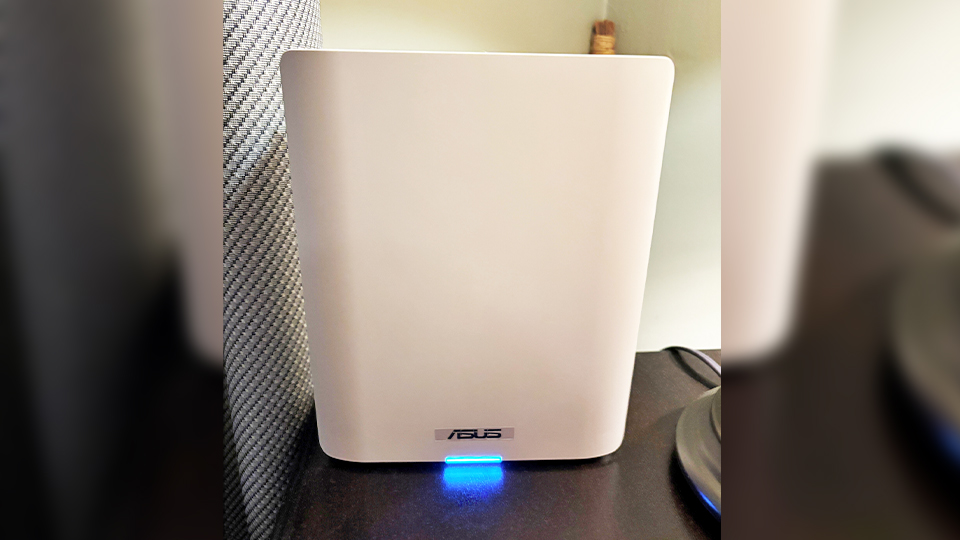
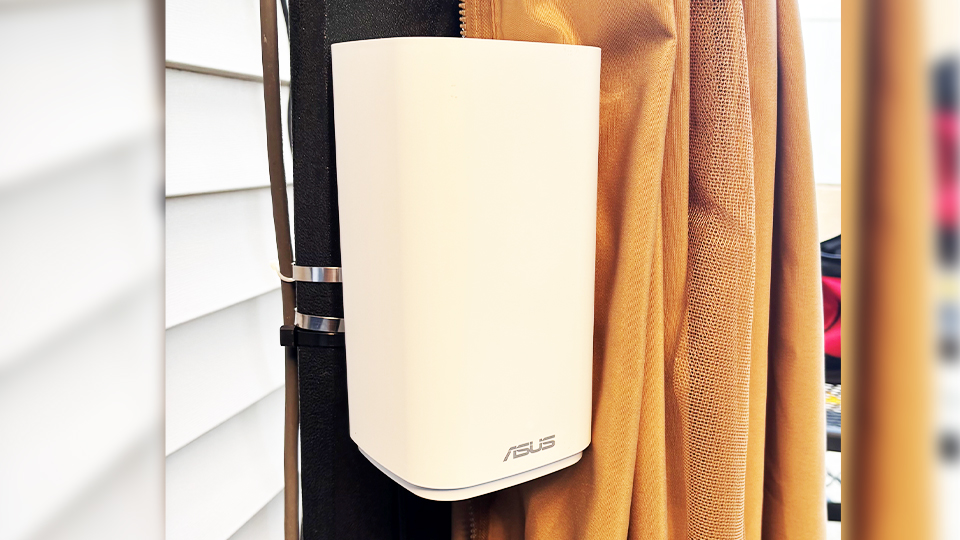
Each BQ16 Pro node stands approximately 8.4” high and 7” wide for desktop or shelf placement. Each node’s 12 antennas are internal, making it less visually intrusive in your home. The BD5 Outdoor, however, is intended for outdoor use and comes with a few accessories for placement. In addition to being IP65 weather-resistant, the included straps and hardware allow the module to be mounted to a pole or wall. Furthermore, the power connection on the BD5 Outdoor module is designed to keep that safe from the elements as well.
Connectivity and Features
On the wireless side, the BQ16 Pro is a Wi-Fi 7 (802.11be) system that supports up to 30 Gb/s. Do you have multiple 4K streams happening at once? Or maybe 100 devices connected to your network? This system’s throughput is more than capable of handling demanding high-resolution streams and data transfers across its 2, 4, 5, and dual 6 GHz bands. It intelligently manages the AiMesh backhaul to keep those high-speed traffic jams at bay. Tri-band multi-link operation (MLO) further enhances the seamless switching between these bands in an effort to keep your system optimized and reliable. It even supports 4G and 5G LTE tethering, allowing you to connect your high-speed smart devices directly to the system in the event of a service outage.

When it comes to wired connections, each BQ16 Pro node is equipped with two shared LAN/WAN ports and three dedicated LAN ports for connecting to high-speed devices such as NVRs and modems directly to the system. For internet connectivity, one of the device’s WAN connections support up to 10 Gb/s service, essentially future proofing the system for years to come. If you connect a Gigabit switch to your system, you’ll be pleased to find that one of its LAN ports also supports up to 10 Gb/s speeds. A USB 3.0 port is also onboard. Understandably, the BD5 Outdoor offers fewer connections, including dual 2.5 Gigabit WAN/LAN ports. If you chose to forego the aforementioned power cord, the BD5 Outdoor also supports power over Ethernet.
ASUS has an expansive feature set in its app and web-based controls. One of the most notable features comes from the security side, as this system includes several protections at no additional cost. This includes Trend-micro powered AiProtection Pro to guard against malware, phishing, and viruses. Instant Guard is also included, which offers easy VPN activation, protecting your browser from online threats. Parental controls are also available to help you filter-out unsafe content and even schedule your child’s online time, my kids dislike that feature the most—but homework comes first.
In Use
At the time of writing, we have 83 devices connected to our home network. Considering that I checked this status remotely via the ASUS app, and no one is currently home, that means we’re pushing closer to 100 connected devices when the house is full. We’re talking about multiple smart TVs, cameras, appliances, computers, light switches—the list continues to grow with each passing year and the evolution of the technology we interact with daily.

With that many devices, the best way to judge a Wi-Fi system’s performance is how easily it disappears. Mesh systems should be silent partners; there when you need them but quietly working in the background. What impressed me most about the BQ16 Pro and BD5 Outdoor combo is how little I thought about them. My home is mostly brick with plaster walls, which can make filling all three levels with reliable coverage a challenge. We also do quite a bit of entertaining outdoors, so our Wi-Fi needs to extend to our backyard as well. With one node in the basement, another on the main floor, and the BD5 Outdoor mounted to a gazebo pole in the backyard, this system performed without a hiccup.
While my Fios Internet service currently maxes out a 1 Gb/s, I routinely saw speeds approaching this number on wired devices and more than half of that on my wireless devices, which is still plenty fast when you consider the number of connected devices we have, and these speed tests were conducted in adjacent rooms.
Is the BQ16 Pro Too Much System for the Average User?
This is tough to answer in the same way that a Mustang may be too much car for city speed limits. I love the idea of future-proofing our system and having the horsepower on tap for the more challenging situations. It’s clear that my home and devices weren’t enough to make the BQ16 Pro break a sweat, but I’m not sure what type of residential environment would. The BQ16 Pro is an easy recommendation for me, and it’s not just for power users, it’s for anyone who considers their internet reliability to be a nonnegotiable matter.
