Wacom Movink

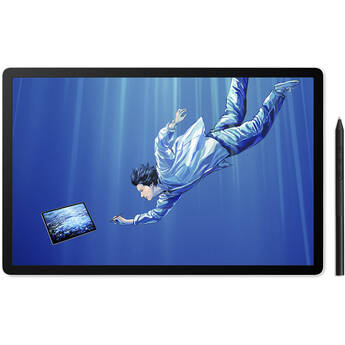
Wacom 14" MovinkPad Pro All-in-One Mobile Drawing Tablet
- Qualcomm 8s Gen 3 Mobile CPU (SM8635P)
- 12GB RAM | 256GB Storage
- 14" 2880 x 1800 OLED Touchscreen
- 11.9 x 7.4" Active Area
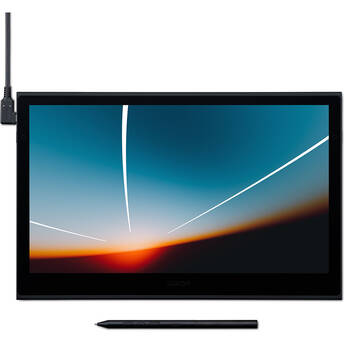
Wacom Movink 13 Creative Pen & Touch Display
- 13.3" Full HD 1920 x 1080 Touchscreen
- 11.6 x 6.5" Active Area
- 2 x USB-C Ports
- 8192 Levels of Pen Pressure Sensitivity
Wacom 11.45" MovinkPad All-in-One Mobile Drawing Tablet
- MediaTek G99 CPU
- 8GB RAM | 128GB Storage
- 11.45" 2200 x 1440 IPS Touchscreen
- 9.6 x 6.3" Active Area
Exploring the Wacom Cintiq and Cintiq Pro
If you love seeing your artwork come to life under your pen, it's time to explore Wacom Cintiq. With full HD, durable construction, and a choice of sizes, Wacom Cintiq tablets are the perfect tool for creative professionals.
Differences Between a Pen Tablet and Pen Display
When you draw on a pen tablet, you don't see your work on the tablet. The device transmits your pen strokes to your computer, and your work appears on the computer screen. When you use a pen display, your strokes are immediately visible on the tablet itself, as if you were drawing on paper. With Cintiq drawing tablets, you get next-level graphic abilities and a flow that feels natural.
Can You Use Cintiq Pen Displays Without Computers?
Some Wacom Cintiq Pro creative pen displays aren't stand-alone tablets. They're an extra monitor. You'll need to connect them to a PC or Apple Mac computer with the included cords.
Cintiq vs Cintiq Pro
Wacom designed the Cintiq line for students and entry-level professionals. Available in two sizes, the Cintiq line has non-glare screens, minor parallaxes, and excellent scratch resistance. The Pro line caters to design studios and creative professionals, and features glass screens, 4K resolution, enhanced color accuracy, and no parallaxes.
Cintiq Pens
Wacom has optimized both lines of Cintiq drawing tablets for use with the Wacom Pro Pen. Your tablet powers the pen, so there's no battery or power cord. With 8,192 levels of pressure sensitivity, this pen is precise. There is almost no lag, and the tilt feels natural while remaining accurate. If you prefer less sensitivity or more simplicity, Cintiq pen displays are compatible with the full range of Wacom accessory pens.
To take your tablet drawing to the next level, visit B&H Photo where you'll find the full range of Cintiq tablets and accessories from Wacom.