Hard Drive Enclosures & Docks

Sorry, B&H does not carry Drobo products at this time
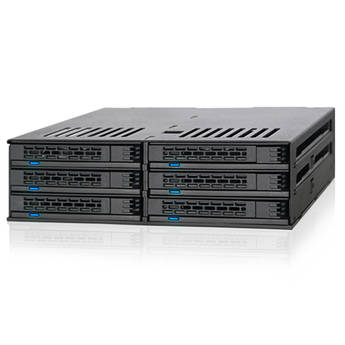
Icy Dock ExpressCage 6-Bay 2.5" SAS/SATA Drive Cage for 5.25" Bay
- Mounts Six 2.5" Drives into 5.25" Bay
- Supports 5 to 9.5mm Tall Drives
- SAS/SATA III 6 Gb/s Interface
- Two 40mm Cooling Fans
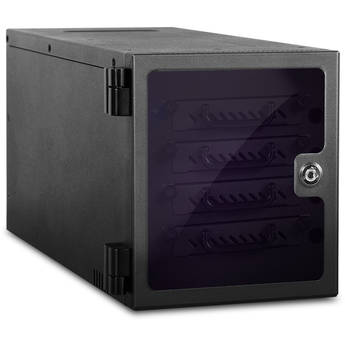
iStarUSA 4-Bay 2.5" SAS/SATA miniSAS Hot-Swap Tower (Black)
- 4 x 2.5" Hot-Swappable Bays
- Semi-Transparent Door with Key Lock
- 2.5" SAS I/II, SATA I/II/III HDD Support
- 1 x miniSAS SFF8088 Interface
CRU-DataPort RTX410-XJ 4-Bay SAS/SATA JBOD Drive Enclosure with TrayFree Bays
- SFF-8088 Multi-Lane SAS/SATA 6G Port
- TrayFree Bays
- Supports 6 Gb/s SATA Speed
- 4 x Bays
iStarUSA 8-Bay 2.5" SATA 6.0 Gb/s eSATA Hotswap Tower (Black)
- 8 x 2.5" Hot-Swap Bays
- Supports 2.5" SATA I/II/III HDDs
- HDD Tray with Thumb Screw Design
- Supports 6.0 Gb/s Hard Drives
iStarUSA 5-Bay SATA 6.0 Gb/s eSATA-Port Multiplier Hotswap Tower (Black)
- 5 x 3.5" Hotswap Bays
- Supports 3.5" SATA I/II/III HDDs
- 1 x 4.7" Cooling Fan
- 150W Open-Frame Power Supply
Areca ARC-4036 8-Bay 6 Gbps SAS Tower JBOD Enclosure
- Supports up to 8x 6 Gbps SAS/SATA Drives
- 2x SAS Host In Connectors
- 2x SAS Expansion Out Connectors
- 6-Pin UART RJ-11 Connector
iStarUSA DAGE212U40BK-3MS-R 12-Bay SAS/SATA Mini-SAS SFF8088 JBOD Enclosure (Black)
- 550W Redundant Power Supply
- Supports up to 12 x SAS/SATA I/II HDDs
- 3 x Mini-SAS (SFF8088) Connectors
- 4 x 3.15" (80mm) Cooling Fans
Learning About External Hard Drive Enclosures and Docks
Put your spare hard drives to good use by converting them into external storage drives, with hard drive enclosures and docks. Whether you're reclaiming internal hard drives from old PCs or buying new ones to use as external drives, you need enclosures and docks to connect them to your computer. The cases link the interfaces used by storage drives with the USB ports of computers. They also serve as protective shells for fragile hard disk drives (HDD).
What's the Difference Between Hard Drive Docks and Enclosures?
An enclosure encompasses a hard drive completely. Some enclosures hold single drives while others have multiple bays for two or more hard drives. A dock has slots rather than bays. Since a hard drive goes into a dock vertically, part of it remains exposed. This design makes hot-swapping drives easier. To remove the drive in an HDD enclosure, you have to first open the casing.
How to Choose the Right HDD Enclosure and Dock
Key factors to consider include material used, hard drive size and interface, and connection type. Most docks and enclosures are metal, rubber, or plastic. Metal units are very durable, while rubber ones offer excellent protection from shock and impact. Aluminum is a common choice that's both strong and lightweight. Some enclosures and docks can only accommodate the 2.5-inch drives commonly used by laptops, while others can fit desktop-class, 3.5-inch drives. To fit a 2.5-inch drive in a bay or slot made for 3.5-inch units, you'll need an internal hard drive cage. This converter bracket makes 2.5-inch hard disk and solid-state drives (SSDs) just as big as 3.5-inch HDDs.
You should also make sure the chosen enclosure or dock supports your drive's interface. SATA interfaces are the most common, but they have different subtypes (SATA I, II, and III). Choosing a SATA III casing is advisable, as it'll be backward-compatible with the older standards. Most docks and enclosures connect to computers via USB ports. Like SATA, there are multiple generations of USB (1.1, 2.0, 3.0, and 3.1). For fast transfer speeds, choose a casing with one or more USB 3.0 ports. Some have USB-C ports. These are smaller, reversible USB ports, increasingly found on computers and mobile devices. An Apple Thunderbolt enclosure can connect to the ultra-fast Thunderbolt ports found on high-end computers. While Thunderbolt 1 and 2 use the Apple Mini DisplayPort connector, Thunderbolt 3 employs the widely adopted USB-C connector.
What's in a Hard Drive Enclosure Kit?
This package contains everything you need to install an internal hard drive in an enclosure. In addition to the protective case, the kit includes a USB drive adapter cable and SATA adapter. Some manufacturers also provide mounting screws and screwdrivers.
Reuse old hard drives by placing them in hard drive enclosures and hard drive docking stations. Find a wide selection of RAID enclosures and SSD enclosures among B&H Photo and Video's extensive inventory of external and internal hard drive accessories.