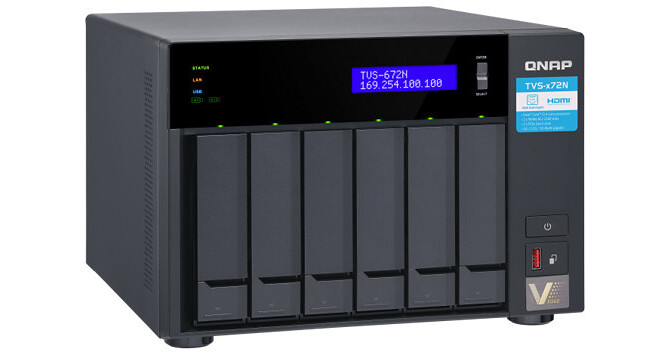
Powered by an Intel 8th Generation processor, the TVS-672N 6-Bay NAS Enclosure from QNAP features 5GBASE-T bandwidth, which delivers up to five times the speed of standard Gigabit Ethernet and allows for smoother 4K videos transfers, displays, and editing. With M.2 2280 SSD support and the ability to install a graphics card, the TVS-672XT provides the opportunity to boost performance and create a scalable working environment for collaboration and high-speed file sharing. It is driven by hardware that delivers performance, comprehensive multimedia features, expandable storage capacity, and numerous other NAS functionalities.
The TVS-672N is powered by a 3.1 GHz Intel Core i3-8100T Quad-Core processor and 84GB of DDR4 RAM, which can be upgraded to 32GB, using one 16GB module in each of the SO-DIMM slots. Network connectivity is achieved using the two Gigabit Ethernet ports and one 5 Gigabit Ethernet port. This NAS also supports JBOD, Single, and a variety of RAID modes, including RAID 0, 1, 5, 6, 10, and 50, each of which offer data redundancy, speed, or a combination of both.
This 6-bay enclosure has the ability to natively house both 3.5" and 2.5" SATA III and SATA II hard drives or SSD drives. The TVS-672N can reach a throughput of up to 590 MB/s using 5 Gigabit Ethernet, or up to 226 MB/s using both Gigabit Ethernet ports and an encrypted volume. Using the two 10 Gb/s USB 3.1 Gen 2 Type-C ports, two 10 Gb/s USB 3.1 Gen 2 Type-A ports, one 5 Gb/s USB 3.1 Gen 1 Type-A port, and one HDMI 2.0 port, this QNAP NAS can be connected to other QNAP devices, as well as other external drives and displays at resolutions up to 3840 x 2160 at 60 Hz. Internally, there are two M.2 2280 PCIe 3.0 x2 slots for tiered storage and cache acceleration using separately sold flash modules. Additionally, the TVS-672N is validated with AES-NI encryption, helping to prevent sensitive business data from unauthorized access and breaches.
Using QNAP's tiered storage functionality, known as Qtier, storage efficiency is optimized across M.2 SSDs, SATA SSDs, and SATA HDDs. Frequently-used "hot" data is stored on high-performance SSD tiers, while less-accessed "cold" data is kept on higher-capacity hard drives. Qtier 2.0 features IO awareness that empowers SSD-tiered storage with a cache-like reserved space to handle burst I/O in real time, greatly maximizing the advantages of SSDs.
The QNAP TVS-672N 6-Bay NAS Enclosure operates on 100-240 VAC using a 250W power supply. It includes three Gigabit Ethernet cables, a power cord, flat head screws for 2.5" drives, flat head screws for 3.5" drives, and two M.2 SSD heatsinks. Protection is provided by a limited 2-year warranty.
Improve Random Data Access Speeds with an SSD Cache
SSD caches accelerate IOPS performance and reduce latency for storage volumes. They are perfect for IOPS-demanding applications (including databases and virtualization) and can significantly improve overall workflow.
Maximize the Value of SSDs with Qtier Technology
Qtier technology empowers the TVS-672N with auto-tiering, which helps optimize storage efficiency by automatically moving data between M.2 SSDs, 2.5" SSDs, and high-capacity HDDs based on data access frequency. Qtier 2.0 features IO-awareness that empowers SSD-tiered storage with a cache-like reserved space to handle burst I/O in real time, greatly maximizing the advantages of SSDs.
Freely Remove Qtier's SSD RAID Tier
You can flexibly remove an SSD from an SSD RAID group to change or add SSDs, or change SSD RAID type or SSD type (SATA, M.2, or QM2) when needed to enhance storage auto-tiering efficiency.
HybridMount File-Based Cloud Gateway
Flexibly expand your storage capacity by connecting to cloud storage. You can leverage QTS apps to manage and edit your cloud files or monitor multimedia files. HybridMount is ideal for file server online collaboration and file-level data analysis.
VJBOD Cloud Block-Based Cloud Gateway
VJBOD Cloud supports mounting object cloud storage as a block-based volume or LUN on a NAS. Block-based data transmission uploads random data and large files to the cloud in blocks, and only block-based volume or LUN changes such as addition, modification, or deletion will be transmitted. This is ideal for enterprise-level applications with large file transfer requirements, such as databases, VM volumes, and videos.
Virtualization Station
Run multiple Windows, Linux, UNIX, and Android virtual machines and access them via web browser or Virtual Network Computing (VNC). Businesses can run virtualized server applications on a single NAS without the need for additional physical servers.
Container Station
Experience LXC and Docker lightweight virtualization technologies, download apps from the built-in Docker Hub Registry, import and export containers, and create abundant microservices.