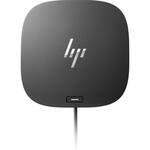
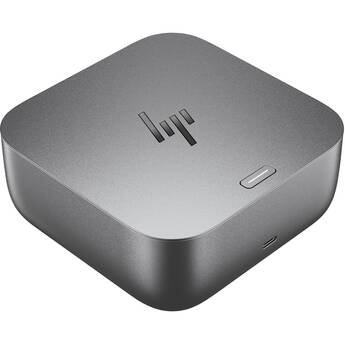
HP USB-C G5 Dock for Business

BH #HEUSBCAUDG5 • MFR #5TW10AA#ABA
Print
HP USB-C G5 Dock for Business
Key Features
  • 4 x USB 3.2 Gen 1 Type-A Ports
  • 1 x 15W USB Type-C Port with Data
  • 1 x RJ-45 Gigabit Ethernet Port
  • 1 x HDMI 2.0 Port
Connect plenty of peripherals and cut down on clutter with the USB-C G5 Dock for Business from HP. Interface with accessories via four USB 3.1 Gen 1 Type-A ports and a USB Type-C port with data and 15W of power delivery. Or, expand screen space with an HDMI 2.0 and two DisplayPort outputs supporting up to three 3840 x 2160 displays at once via a host with DisplayPort 1.4 and DP++ support. An RJ-45 Gigabit Ethernet port is also present, along with a 3.5mm audio combo port for headphones with a mic.
More Details
In Stock
No Store Display
Free 2-Day Shipping
Protect Your Gear
Add a protection plan from $29.99
Ask an Expert
800-606-6969

HP G5 Overview

Connect plenty of peripherals and cut down on clutter with the USB-C G5 Dock for Business from HP. Interface with accessories via four USB 3.1 Gen 1 Type-A ports and a USB Type-C port with data and 15W of power delivery. Or, expand screen space with an HDMI 2.0 and two DisplayPort outputs supporting up to three 3840 x 2160 displays at once via a host with DisplayPort 1.4 and DP++ support. An RJ-45 Gigabit Ethernet port is also present, along with a 3.5mm audio combo port for headphones with a mic.

The USB Type-C Dock G5 connects to your laptop by way of an integrated cable terminating in a USB Type-C connector. This host connection supports up to 100W of power delivery to HP laptops or up to 75W for non-HP laptops. Supported power profiles include 5, 9, 10, 12, 15, and 20V, all with a maximum output of 5A. A power button with an LED indicator can be used to power on or wake a compatible host laptop. The HP USB Type-C Dock G5 is compatible with Windows 7 and later, macOS, and Chrome OS.

USB 3.2 Gen 1
USB 3.2 Gen 1 features a maximum throughput of 5 Gb/s and is synonymous with USB 3.1 Gen 1 and USB 3.0.
Wide Compatibility
Designed with universal compatibility in mind, this dock works with both HP and non-HP laptops with an available USB Type-C and Thunderbolt 3 or 4 port.
Note:
Using the power button to wake or turn on your connected computer is only supported on HP laptops. Furthermore, HP does not provide Ethernet and audio drivers on Mac PCs.
Single-Cable Solution
Connect wired accessories via four USB 3.2 Gen 1 Type-A ports, plus one USB Type-C port with data and up to 15W of power delivery. Furthermore, add up to three 3840 x 2160 displays when using a laptop with a DisplayPort 1.4 output supporting DP++ protocols. The single-cable host connection also streamlines your setup for less clutter.
Easy Management
Help IT secure and remotely manage your deployed commercial HP laptop and dock with advanced network manageability features that include PXE Boot, LAN and WLAN switching, Wake-on-LAN (WoL), and MAC Address Pass-through in all power states.
Small Footprint
Reclaim your desk with a compact dock that measures just 5" on its longest side.
Electronic Asset Management
Empower your IT to manage and track your docks by product name, serial number, and MAC Address from anywhere with the time-saving, easy-to-use Electronic Tag (eTag) asset management tool.
Efficient Firmware Updates
Updating your dock fleet has never been easier. IT can save time by pushing dock firmware updates to managed laptops for later installation on the dock, even when they're disconnected from each other.
Note:
This feature requires a connected host running on the Windows 10 operating system.
Rigorously Tested
Rigorous tested to HP standard, this dock functions with HP, Apple, Dell, and Lenovo laptops with a USB Type-C or Thunderbolt 3 or 4 charging port.
UPC: 193905522316

HP G5 Specs

Key Specs
USB I/O
4x USB-A 3.0 / 3.1/3.2 Gen 1
1x USB-C (Unspecified Interface) / Supports 15 W Output
Video I/O
1x HDMI 2.0
2x DisplayPort 1.4
Max Resolution
3 Displays Supported:
3840 x 2160 (Triple)
Audio I/O
1x 1/8" / 3.5 mm Headphone/Microphone Combo Jack
Network I/O
1x RJ45 (10/100/1000 Mb/s)
Host Connection
USB-C Supporting USB Power Delivery up to 100 W via Integrated Cable
USB I/O
4x USB-A 3.0 / 3.1/3.2 Gen 1
1x USB-C (Unspecified Interface) / Supports 15 W Output
Video I/O
1x HDMI 2.0
2x DisplayPort 1.4
Max Resolution
3 Displays Supported:
3840 x 2160 (Triple)
Audio I/O
1x 1/8" / 3.5 mm Headphone/Microphone Combo Jack
Network I/O
1x RJ45 (10/100/1000 Mb/s)
Host Connection
USB-C Supporting USB Power Delivery up to 100 W via Integrated Cable
Power Source
Included AC Adapter with Barrel Connector
OS Compatibility
Windows 7 to 10 / macOS / Chrome OS
Lock Slot
Yes: Kensington
Dimensions
4.8 x 4.8 x 1.8" / 122 x 122 x 45 mm
Weight
1.5 lb / 0.68 kg
Packaging Info
Package Weight
3.22 lb
Box Dimensions (LxWxH)
9.2 x 6.7 x 6.2"

HP G5 Reviews

My Positive Experience with the HP USB-C Dock G5

By Anonymous
Rated 4 out of 5
Date: 2026-05-14

I’ve been using the HP USB-C Dock G5 for a few months now, and it has quickly become an essential part of my setup. Here’s my honest feedback: What I like: • It’s incredibly reliable and delivers excellent performance. I can easily run dual monitors (one HDMI + one DisplayPort) at high resolutions with zero lag or flickering. • The build quality feels premium and sturdy. • Plenty of ports: multiple USB-A, USB-C, Ethernet, and audio — everything I need in one compact dock. • Single USB-C cable connection to my laptop makes it super clean and convenient. Setup experience: Setup was genuinely plug-and-play. I connected the power, plugged in my peripherals, attached the USB-C cable to my laptop, and everything worked immediately. No drivers to hunt down or complicated software, it just worked. How I use it daily: I use it as my main home workstation hub. I connect my HP laptop, an external monitor, keyboard, mouse, and external hard drive all through the dock. It turns my laptop into a full desktop experience in seconds, essential for my remote work. Super helpful! Overall, I’m very happy with this dock — it’s well worth it for anyone needing a solid, reliable Highly recommend! Thank you, HP! Keep up the great work.

Intermittent disconnect of docking station

By Dan b jr
Rated 2 out of 5
Date: 2026-02-20

The dock loses connectivity with the monitor intermittently. I have to unplug the USB cable from the HP laptop and wait for it to reconnect to the monitor.

See any errors on this page?
Whatever You Need, We've Got It