Video Chat with a Pro Video Expert - Live

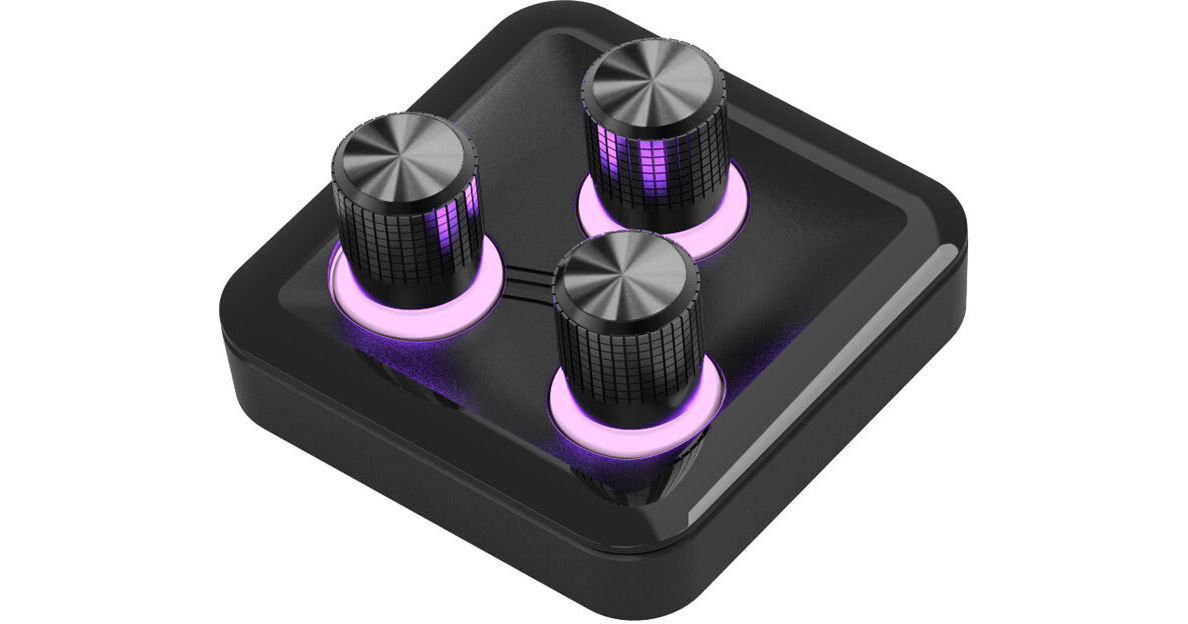
Cooler Master MasterHUB Knob Module

BH #COMASTRHUB3X • MFR #MHKB03AA22
Print
Cooler Master MasterHUB Knob Module
Key Features
  • Three Precision Knobs
  • Customizable RGB LEDs
  • Seamless and Responsive Adjustment
  • Pogo Pin Connector
Add the MasterHUB Knob Module from Cooler Master to your modular MasterHUB base module to provide precision control over selected settings on your workstation. It connects to the MasterHUB base module using magnets and a Pogo pin connection. Three precision knobs ensure smooth and responsive adjustment to lighting, audio, and other effects. Customizable RGB LEDs allow you to distinguish which knob facilitates which function.
More Details
Special Order
Expected availability: 7-14 Business Days
No Store Display
$50.57
This item cannot be canceled or returned.
Free Standard Shipping
Protect Your Gear
Add a protection plan from $6.99
Ask an Expert
866-264-7509

Cooler Master MasterHUB Overview

From Manufacturer

Add the MasterHUB Knob Module from Cooler Master to your modular MasterHUB base module to provide precision control over selected settings on your workstation. It connects to the MasterHUB base module using magnets and a Pogo pin connection. Three precision knobs ensure smooth and responsive adjustment to lighting, audio, and other effects. Customizable RGB LEDs allow you to distinguish which knob facilitates which function.

UPC: 884102125485

Cooler Master MasterHUB Specs

Controls
3x Knob
Display
3x Color LED
Inputs / Outputs
USB I/O
1x USB-A Female Input
Other I/O
1x Pogo
Power
Power Source
Proprietary Interface
Input Power
5 VDC at 200 mA
Physical
Dimensions
2.5 x 2.5 x 1.4" / 63 x 63 x 34.6 mm
Weight
2.3 oz / 64.5 g
Packaging Info
Package Weight
0.295 lb
Box Dimensions (LxWxH)
5.7 x 5.4 x 1.8"

Cooler Master MasterHUB Reviews

No longer supported

By Joel
Rated 2 out of 5
Date: 2026-05-31

Cooler Master has essentially abandoned or discontinued support for the Cooler Master MasterHUB. While the product had a highly anticipated launch, it has suffered from severe software issues, leading to widespread user frustration.If you are considering purchasing one, keep these factors in mind: Abandoned Status: The ecosystem has essentially been sidelined by the manufacturer. The product has been shifted to Cooler Master's legacy product catalog in many regions, and development has practically ceased. Software Issues: The accompanying software is notoriously buggy and has not seen meaningful updates in months, rendering the macro pads, faders, and modules functionally difficult to use. Community Consensus: The device is heavily criticized by backers and buyers who have voiced widespread disappointment over unfulfilled feature promises and lack of support.

Great Peripheral to maximize my Workflow

By Steve
Rated 5 out of 5
Date: 2026-05-08

I found this device to be very useful when it comes to having the ability to bind any macro key / function through the modular 15 Key Display Pad along with the sliders and rollers. This made it easy to better improve my creative workflow while tackling software like Adobe Photoshop, Illustrator and Figma. The software was pretty straightforward but requires a lot of time tinkering which I don't mind. I'm looking forward to programming and tinkering with this device as I see fit. I would highly recommend for users who like to spend time customizing to what is needed and expected.

See any errors on this page?

Does the Cooler Master MasterHUB work with ...

Does the Cooler Master MasterHUB work with Capture One?
Asked by: James
Yes, the Cooler Master MasterHUB can work with Capture One, but only as a USB hub; Capture One does not natively control the device, so any functionality beyond USB connectivity (like macro keys) would require separate software.
Answered by: Nick Y
Date published: 2025-11-16

Can you edit RAW files in Lightroom and/or Bridge ...

Can you edit RAW files in Lightroom and/or Bridge with the Cooler Master MasterHUB?
Asked by: Steve
Yes, the Cooler Master MasterHUB Modular Controller Stream Kit does support Lightroom via built-in preset profiles, and you can also create custom mappings for control via the Cooler Master MasterControl software.
Answered by: Elliot
Date published: 2025-10-09
  • y_2026, m_6, d_6, h_12CST
  • bvseo_bulk, prod_bvqa, vn_bulk_3.0.46
  • cp_1, bvpage1
  • co_hasquestionsanswers, tq_2
  • loc_en_US, sid_1850534, prod, sort_[SortEntry(order=HAS_STAFF_ANSWERS, direction=DESCENDING)]
  • clientName_bhphotovideo
Whatever You Need, We've Got It