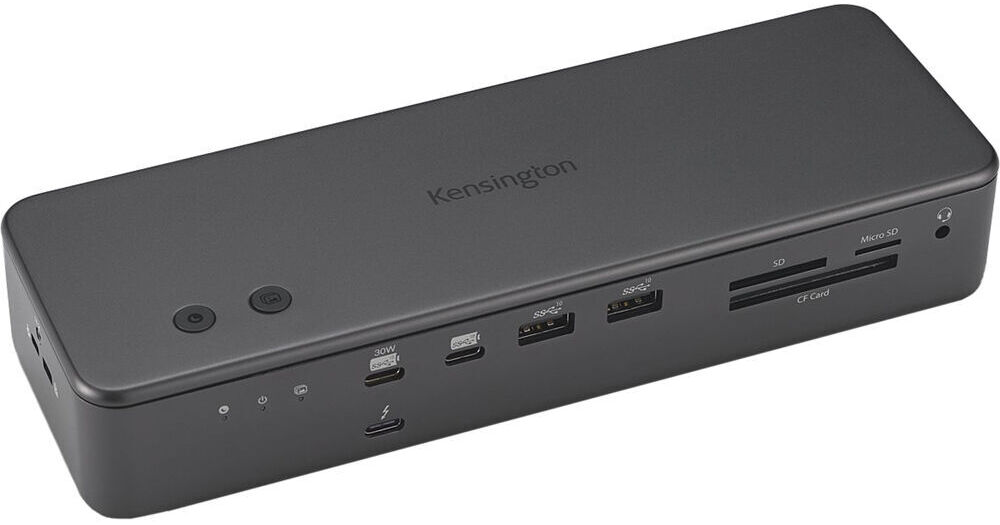
Kensington SD7100T5 EQ Pro 19-in-1 Thunderbolt 5 Docking Station

BH #KEK33611NA • MFR #K33611NA
Print
Kensington SD7100T5 EQ Pro 19-in-1 Thunderbolt 5 Docking Station
Key Features
  • 1 x Thunderbolt 5 Host Port
  • 3 x Thunderbolt 5 Ports
  • USB-C 3.2 Gen 2 | USB-A 3.2 Gen 2
  • 2.5GbE RJ45 Port
The SD7100T5 EQ Pro 19-in-1 Thunderbolt 5 Docking Station from Kensington delivers exceptional versatility for M-series MacBook models with Pro and Max chips, and high-performance Windows systems. This all-in-one solution connects with your host system using an 80 Gb/s Thunderbolt 5 port and included Thunderbolt cable, while an integrated PCIe M.2 slot allows for storage expansion. Also available are three 80 Gb/s Thunderbolt 5 ports that support up to 140W of power and up to three 4K/144 Hz displays or up to two 8K/60 Hz displays for Windows, while Mac supports up to two 6K/60 Hz displays. Other available ports include one 10 Gb/s USB-C 3.2 Gen 2 port that supports up to 30W of power, one 10 Gb/s USB-C 3.2 Gen 2 port, four 10 Gb/s USB-A 3.2 Gen 2 ports, a 3.5mm headphone/microphone combo jack, two 3.5mm headphone jacks, and a TOSLINK port. Network connectivity may be achieved using a 2.5GbE port, while dedicated UHS-II SDXC, UHS-II microSDXC, and CF card readers allow for media content to be downloaded. This dock is compatible with Windows 11 and macOS 14.5 or later.
More Details
In Stock
No Store Display
$434.99
Free Expedited Shipping
Protect Your Gear
Add a protection plan from $59.99
Ask an Expert
800-606-6969

Kensington K33611NA Overview

The SD7100T5 EQ Pro 19-in-1 Thunderbolt 5 Docking Station from Kensington delivers exceptional versatility for M-series MacBook models with Pro and Max chips, and high-performance Windows systems. This all-in-one solution connects with your host system using an 80 Gb/s Thunderbolt 5 port and included Thunderbolt cable, while an integrated PCIe M.2 slot allows for storage expansion. Also available are three 80 Gb/s Thunderbolt 5 ports that support up to 140W of power and up to three 4K/144 Hz displays or up to two 8K/60 Hz displays for Windows, while Mac supports up to two 6K/60 Hz displays. Other available ports include one 10 Gb/s USB-C 3.2 Gen 2 port that supports up to 30W of power, one 10 Gb/s USB-C 3.2 Gen 2 port, four 10 Gb/s USB-A 3.2 Gen 2 ports, a 3.5mm headphone/microphone combo jack, two 3.5mm headphone jacks, and a TOSLINK port. Network connectivity may be achieved using a 2.5GbE port, while dedicated UHS-II SDXC, UHS-II microSDXC, and CF card readers allow for media content to be downloaded. This dock is compatible with Windows 11 and macOS 14.5 or later.

Thunderbolt 5 Connectivity
The SD7100T5 offers lightning-fast data transfers up to 80 Gb/s, and Bandwidth Boost, which provides up to 120 Gb/s for video-intensive usage.
Free Kensington DockWorks Software
Free DockWorks software for Windows users delivers reliable connectivity, performance, and security for your Kensington dock.
Up to Triple 4K or Dual 8K for Windows and Dual 6K for macOS
This dock supports up to three 4K monitors at 144 Hz or two 8K monitors at 60 Hz for Windows laptops, or up to two 6K monitors at 60 Hz for MacBook models with M-Series Pro and Max chipsets. The SD7100T5 ensures uncompromised visual quality and smooth multitasking for a high-performance workspace.
Simplify Your Setup with Universal Device Compatibility
The dock offers a quick and powerful plug-and-play solution for Thunderbolt 5, Thunderbolt 4, USB4, and USB-C devices running Windows 11 (23H2 or later) or macOS (14.5 or later).
Up to 140W Dynamic Power Delivery
Great for demanding workstations, the single-cable Thunderbolt 5 solution ensures seamless power and connectivity with up to 140W Power Delivery. Thanks to KonstantCharge, connected devices will charge even when your laptop is undocked.
Productive 19-in-1 Design
  • 3 x Thunderbolt 5 downstream ports
  • 1 x Thunderbolt 5 host port
  • 4 x USB-A 3.2 Gen 2 ports
  • 2 x USB-C 3.2 Gen 2 ports (one up to 30W charging)
  • 1 x UHS-II SDXC slot
  • 1 x UHS-II microSDXC slot
  • 1 x CF slot
  • 1 x 3.5mm combo microphone & headphone port (front)
  • 1 x 3.5mm microphone port (rear)
  • 1 x 3.5mm headphone port (rear)
  • 1 x TOSLINK audio port (rear)
  • 1 x PCIe M.2 SSD slot
  • 2.5Gb Ethernet
Built-in SSD Slot and SD Card Readers
Perfect for graphic designers, video editors, and animators requiring fast and efficient data transfer speeds, the SD7100T5 includes a built-in and lockable PCIe M.2 SSD slot for quick and secure storage expansion, and dedicated CF/SD/micro SD card readers to support ultra-fast file transfers.

Please note that the SSD is not included with dock. Caution: When using a purchased M.2 SSD for data transfers, do not touch or remove it immediately after use. Allow it to cool before handling or making any changes.
Effortless iPhone Photo Backup and Focus Mode for Mac
Use Kensington Konnect software to activate dock buttons. Set one to back up iPhone photos and videos to your MacBook or SSD. Configure the 'Do Not Disturb' button to enhance focus, or customize the buttons for other functions that fit your workflow.
Customizable Hotkeys for Windows
With Kensington Konnect software, Windows users can personalize two hotkeys for quick access to applications and commands, optimizing their workspace and enhancing productivity.
Zero-Footprint Mounting Option and Security Cable Lock Slots
Maximize desktop space by mounting your docking station out of the way with a separately sold mounting bracket (K34050WW). Protect your investment with a Kensington cable lock (K65020WW or K65021WW), also sold separately.
UPC: 085896336112

Kensington K33611NA Specs

Key Specs
USB I/O
3x USB-C (Thunderbolt 5) / Supports Video Alt Mode and 140 W Power Delivery
1x USB-C 3.1/3.2 Gen 2 / Supports 30 W Power Delivery
1x USB-C 3.1/3.2 Gen 2
4x USB-A 3.1/3.2 Gen 2
Max Resolution
3 Displays Supported:
7680 x 4320 at 60 Hz (Dual)
3840 x 2160 at 144 Hz (Triple)
Audio I/O
1x 1/8" / 3.5 mm Headphone/Microphone Combo Jack
1x 1/8" / 3.5 mm Headphone Output
1x 1/8" / 3.5 mm Microphone Input
1x TOSLINK
Network I/O
1x RJ45 (2.5 GbE)
Host Connection
USB-C (Thunderbolt 5) via Detachable Cable
USB I/O
3x USB-C (Thunderbolt 5) / Supports Video Alt Mode and 140 W Power Delivery
1x USB-C 3.1/3.2 Gen 2 / Supports 30 W Power Delivery
1x USB-C 3.1/3.2 Gen 2
4x USB-A 3.1/3.2 Gen 2
Max Resolution
3 Displays Supported:
7680 x 4320 at 60 Hz (Dual)
3840 x 2160 at 144 Hz (Triple)
Audio I/O
1x 1/8" / 3.5 mm Headphone/Microphone Combo Jack
1x 1/8" / 3.5 mm Headphone Output
1x 1/8" / 3.5 mm Microphone Input
1x TOSLINK
Network I/O
1x RJ45 (2.5 GbE)
Media Card Reader
1x SDXC (UHS-II [312 MB/s])
1x microSDXC (UHS-II [312 MB/s])
1x CompactFlash Type I (UDMA 7 [167 MB/s])
Host Connection
USB-C (Thunderbolt 5) via Detachable Cable
Power Source
Included AC Adapter
Wireless Charging
No
Storage
1x PCIe M.2 Slot
OS Compatibility
Windows 11 Only / macOS 14.5 or Later
Enclosure Material
Aluminum
Lock Slot
Yes: Kensington
Dimensions
9.45 x 4.41 x 4.25" / 24 x 11.2 x 10.79 cm
Weight
4.23 lb / 1.92 kg
Packaging Info
Package Weight
3.94 lb
Box Dimensions (LxWxH)
9.9 x 5.2 x 4.3"

Kensington K33611NA Reviews

See any errors on this page?
Whatever You Need, We've Got It