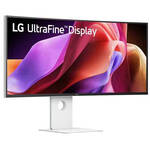
LG UltraFine 40WT95UF 39.7" 5K2K HDR 120 Hz Curved Ultrawide Monitor

BH #LG40WT95UFW • MFR #40WT95UF-W
Print
LG UltraFine 40WT95UF 39.7" 5K2K HDR 120 Hz Curved Ultrawide Monitor
Key Features
  • 39.7" 21:9 2500R Curved IPS Panel
  • HDMI | DisplayPort | Thunderbolt 5 (96W)
  • 5K2K 5120 x 2160 at 120 Hz
  • FreeSync Premium Pro
Enhance your multitasking while editing videos and creating content with the LG UltraFine 40WT95UF 39.7" 5K2K HDR 120 Hz Curved Ultrawide Monitor. With its 2500R curved design, this ultrawide display envelopes your view with a 5120 x 2160 (5K2K) resolution, giving you a large workspace while delivering rich, accurate colors and versatile connectivity.
More Details
Temporarily Out of Stock
No Store Display
Free Expedited Shipping
Ask an Expert
800-606-6969

LG 40WT95UF Overview

Enhance your multitasking while editing videos and creating content with the LG UltraFine 40WT95UF 39.7" 5K2K HDR 120 Hz Curved Ultrawide Monitor. With its 2500R curved design, this ultrawide display envelopes your view with a 5120 x 2160 (5K2K) resolution, giving you a large workspace while delivering rich, accurate colors and versatile connectivity.

With HDR10 support, the UltraFine delivers stunning visuals featuring realistically bright highlights and deep shadows. Connecting your compatible computer to the Thunderbolt 5 port allows you to transfer video, up to 80 Gb/s of data, and 96W of power over a single cable. You can also use the second Thunderbolt 5 and DisplayPort out ports to daisy chain an additional display. The USB 3.2 Gen 2 hub allows you to connect up to 10 Gb/s peripherals. There are also two HDMI 2.1 ports and one DisplayPort 2.1 input.

Exceptional Color
Framed inside thin bezels, the 39.7" Nano IPS Black panel is factory calibrated to deliver cinematic experiences with support for 1.07 billion colors, covering 99% of the DCI-P3 gamut. VESA DisplayHDR True Black 600 certified high-dynamic range support provides realistic visuals with a 2000:1 static contrast ratio and 450 nits brightness.
Smooth Graphics
The UltraFine display minimizes motion blur with a 120 Hz refresh rate while AMD FreeSync Premium support eliminates screen tearing and stuttering with compatible graphics cards.
Rich Connectivity
In addition to the Thunderbolt 5 host and passthrough ports, this display includes four USB-C and two USB-A 3.2 Gen 2 ports. The RJ45 Ethernet port allows you to connect to wired networks.
Enhanced Multitasking
Built-in KVM functionality allows you to control multiple devices using a single mouse and keyboard set in picture-by-picture or picture-in-picture mode.
Immersive Audio
The built-in speaker system is designed to deliver deep bass for rich audio. The 4-pole 3.5mm audio jack allows you to connect a headset for added privacy while chatting.
Customize Your Screen View
Use the LG Switch app to customize your image settings, split the screen into 11 different layouts, and launch video calls.
Designed for Comfort and Focus
The minimalistic L-stand helps to free up desktop space. You can optimize your view by adjusting the height, tilt, and swivel. A 100 x 100mm VESA mounting pattern allows you to attach the screen to a swivel arm or multi-monitor stand. The 178° horizontal and vertical viewing angles let you see the screen clearly from almost any position.
UPC: 195174135785

LG 40WT95UF Specs

Key Specs
Display Size
39.7"
Panel Type
IPS-Type LCD
Native Resolution
5120 x 2160
Maximum Brightness
450 nits / cd/m2
HDR Support
Yes: HDR10
Color Support
1.07 Billion Colors
Color Gamut
99% DCI-P3
Finish
Anti-Glare
Touchscreen
No
A/V Inputs
DisplayPort 2.1 / HDMI
A/V Outputs
3.5 mm (Analog Audio)
USB I/O
USB-A 3.2 Gen 2 / USB-C 3.2 Gen 2 / Thunderbolt 5
Built-In Speakers
Yes: 2x 10 W
Display
Size
39.7"
Panel Type
IPS-Type LCD
Aspect Ratio
21:9
Native Resolution
5120 x 2160
Maximum Brightness
450 nits / cd/m2
HDR Support
Yes: HDR10
Contrast Ratio
2000:1
Response Time
5 ms (GtG)
Refresh Rate
120 Hz
Variable Refresh Technology
FreeSync Premium
Color Support
1.07 Billion Colors
Color Gamut
99% DCI-P3
Viewing Angle (H x V)
178 x 178°
Curved Display
Yes: 2500R
Finish
Anti-Glare
Surface
Touchscreen
No
Connectivity
A/V Inputs
2x HDMI
1x DisplayPort 2.1
A/V Outputs
1x 1/8" / 3.5 mm (Headphone)
HDCP Support
Yes
USB I/O
2x USB-C (Thunderbolt 5) with USB PD 96 W
1x USB-C 3.1/3.2 Gen 2 with USB PD 15 W
4x USB-C 3.1/3.2 Gen 2
2x USB-A 3.1/3.2 Gen 2
Ethernet I/O
1x RJ45
Multi-Input Support (PIP/PBP)
Yes: Picture-in-Picture (PIP), Picture-by-Picture (PBP)
Speaker
Built-In Speakers
Yes: 2x 10 W
Electrical
Power Consumption
Operational: 45.0 W
Input Power
100 to 240 VAC, 50 / 60 Hz
Power Adapter Type
Internal
General
Adjustments
Adjustable
Swivel: 40°
Tilt: 25° (-5 to 20°)
Height: Up to 5.1" / 129.5 mm
VESA Mounting-Hole Pattern
100 x 100 mm
Lock Slot
No
Packaging Info
Package Weight
40.57 lb
Box Dimensions (LxWxH)
47 x 21 x 7.75"

LG 40WT95UF Reviews

Crappy UX by Design

By Nickname taken by another
Rated 3 out of 5
Date: 2026-06-27

From the spec and visually, this monitor is appealing given a very good deal. However, the UX is significantly downgraded by LG Switch: 1. The thunderbolt 5 port gets stuck super easily in a failure state for long when a TB4 or lower level cable is plugged in after LG Switch is installed. Even a live agent may not provide precise instructions to recover but suggests to return. How professional! 2. The right way to recover is to unplug everything, press and hold the power joystick for 20s or so, and then wait for longer than 15 mins for a full reset without a guarantee 3. The FW update definitely requires setting to USB Selection > USB-C and use the bottom right host port with a USB-C cable. USB A to C is totally unnecessary but suggested in the update description. So fun to baffle customers to say. TB5 should never fail but behave gracefully despite user cable varieties. That is unfortunately not the case to expect. The FW update process only adds more confusion. The combination of both simply create crappy UX by design. What a masterpiece!

An Upgrade for Coding and Content Creation

By Manuel C
Rated 4 out of 5
Date: 2026-05-26

[This review was collected as part of a promotion.] The LG UltraFine 40U990A-W has been a strong upgrade to my workflow as a software engineer. The 5K2K resolution gives me plenty of space for coding and content creation, and the curved design keeps everything easy to see. The built-in KVM switch is especially helpful since I switch between work and personal devices often. I love the white finish, the metal stand, the amount of ports, and how well the LG Switch app fits into my setup. A few things I didn’t enjoy: the fan noise is louder than expected and always on, the cable-management hole sits too low and shows the cables, and I wish there were a software way to switch inputs. Still, it improves my day-to-day workflow. Review submitted as part of a program that provides a purchase discount.

See any errors on this page?
Whatever You Need, We've Got It