Sony Global

Video Chat with a Pro Video Expert - Live

Blackmagic Design ATEM Studio Converter 2

BH #BLATEMPSTUC2 • MFR #SWRCONVRCK2
Print
Blackmagic Design ATEM Studio Converter 2
Key Features
  • 4 Bidirectional Converters in 1 RU Unit
  • Optical Fiber Signal Range 28 Miles
  • Connects up to 4 ATEM Camera Converters
  • 4 x Fiber to SDI 10-bit Converters
The Blackmagic Design Studio Converter 2 inputs video signals transmitted over optical fiber and converts the signals to SDI for use with video switchers. When used in conjunction with the Blackmagic Design ATEM Camera Converter, you can send video signals up to 28 miles between camera and switcher using available optical fiber cables. By comparison, sending an HD-SDI signal over traditional copper cable is usually limited to about 300 feet, depending on the quality of the cable.
More Details
In Stock
: Not in NYC SuperStore
No Store Display
Free Next Day Shipping
Scheduled Store Pickup
Ask an Expert
800-606-6969

Blackmagic Design ATEM Overview

The Blackmagic Design Studio Converter 2 inputs video signals transmitted over optical fiber and converts the signals to SDI for use with video switchers. When used in conjunction with the Blackmagic Design ATEM Camera Converter, you can send video signals up to 28 miles between camera and switcher using available optical fiber cables. By comparison, sending an HD-SDI signal over traditional copper cable is usually limited to about 300 feet, depending on the quality of the cable.

A typical set up using the Studio Converter 2 is to connect it between the switcher and up to four ATEM Camera Converter units. This setup allows the Converter 2 to receive the signals from the fiber cable, convert the signals to SDI using 10-bit processing, and send the signals to the switcher. The Converter 2 supports SD/HD signals, and when using the available ATEM Camera Converter you can use any camera with an SDI/HDMI output.

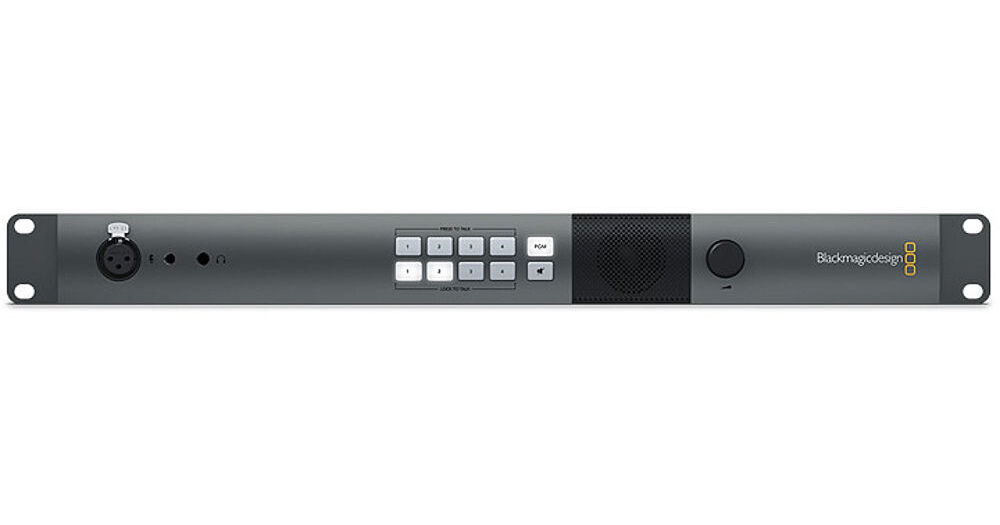
The Converter 2 can also be used as 4 independent simultaneous bidirectional SD/HD-SDI to optical converters. The Converter 2 features a built-in mic input, speaker and headphone jack that provides talkback audio for communicating with camera operators. The Converter 2 passes tally signals embedded in the SDI program stream. You can cascade multiple ATEM Studio Converter 2 units together when using more than 4 cameras. The Studio Converter 2 features a 1 RU design with built in rackmount ears for easy integration into existing studio configurations or production cases.

Optical Fiber Connectors
The ATEM Studio Converter 2 uses standard single mode optical fiber cable with standard LC connectors to allow you to transmit SD and HD video signals up to 28 miles away. Standard copper wire SDI cables have a limit of several hundred feet before the signal breaks up, converting the SDI signal to optical, and sending it along optical cable greatly increases the distance of your cable runs.
Talkback and Tally
The unit features a built-in speaker and mic inputs, as well as a headphone jack for when you need privacy, or if the area is too loud. When connected to the ATEM Camera Converter, you can talk to your camera operators no matter how far away they are, without needing to worry about walkie talkies. Using the talkback feature, the unit uses audio channels 15 and 16 of the SDI stream for talkback communication.
Camera operators can be selected individually if desired, and communication can be controlled by a push button, or locked open. Mute and un-mute buttons on the front of the unit allows you to control who hears what.
The unit passes SDI Tally signal information back to the cameras along with any SDI Program signal from available switchers.
Multiple Units
Each ATEM Studio Converter 2 connects to up to four ATEM Camera Converter units, allowing you to communicate with up to four camera operators at a time. Multiple Studio Converter 2 units can be cascaded together when more than 4 cameras are needed.
Precision Signal Processing
The unit features chips that use 10-bit processing, and are switchable between SD and HD, for a clean signal.
The unit features four independent simultaneous SDI to optical and optical to SDI converters
When used in conjunction with the ATEM Camera Converter the unit can also be used as four independent SDI or Fiber to HDMI converters

Blackmagic Design ATEM Specs

Standards
Format Support
4K
DCI 4096 x 2160p: 60/50/30/29.97/25/24/23.98
UHD 3840 x 2160p: 60/59.94/50/30/29.97/25/24/23.98

2K
2048 x 1080p: 25/24/23.98
2048 x 1080PsF: 25/24/23.98

HD
1080p: 60/59.94/50/30/29.97/25/24/23.98
1080PsF: 60/59.94/50/30/29.97/25/24/23.98
1080i: 60/59.94/50
720p: 60/59.94/50

SD
NTSC
525i: 59.94
PAL
625i: 50
Video
SDI Video Input
4 x 10-bit SD/HD switchable camera inputs
1 x 10-bit SD/HD switchable program input from switcher, including Tally information embedded in the SDI signal
SDI Compliance
SMPTE 259M, SMPTE 292M
Video Sampling
4:2:2
Color Precision
10-bit
Color Space
REC 601
REC 709
Optical Fiber Video Input
4 x single mode SD/HD switchable camera inputs with LC connector
Optical Fiber
Input
4 x single mode LC connectors for video with embedded audio
Channels 1 & 2 are camera audio
Channels 15 & 16 are talkback audio

Output
4 x single mode LC connectors for video with embedded audio
Channels 1 & 2 are camera audio
Channels 15 & 16 are talkback audio
Audio
Audio Sampling
48 kHz
24-bit A/D conversion
Analog Audio Output
4 x 3-Pin XLR Balanced Audio Pairs (1 x pair per fiber input)
2 x RCA jacks provide a L/R stereo pair
Talkback
1 x 1/4" TRS headphone jack
1 x .206" TRS mic input for use with aviation style headset
1 x 3-pin XLR connector for talkback microphone
1 x Integrated speaker
Talkback Control
8 x Front panel buttons for camera operator selection, lock, mute and un-mute
AES/EBU Talkback Loops
Input
1 x BNC mic input
1 x BNC headphone input

Output
1 x BNC mic output
1 x BNC headphone output
General
OS Compatibility
Mac
OS X 10.7 Lion and later
OS X 10.8 Mountain Lion and later

Windows
Windows 7
Windows 8
Computer Interface
1 x mini-B type USB 2.0 connector for initial setup, firmware updates and Converter Utility software control
Temperature
Operating
32 to 104°F (0 to 40°C)

Storage
-4 to 113°F (-20 to 45°C)
Power Requirements
110 - 220 VAC, 50/60 Hz
12 - 31 VDC redundant input

Note: IEC power cord is required/not included, redundant power supply not included
Dimensions
1.7 x 18.9" (44 x 482 mm)
1 RU size with built-in rackmount ears
Weight
4 lb (1.81 kg)
Packaging Info
Package Weight
4.795 lb
Box Dimensions (LxWxH)
19.35 x 7.65 x 3.45"

Blackmagic Design ATEM Reviews

Satisfied

By Erick
Rated 5 out of 5
Date: 2021-07-05

I have made one of the fastest and safest online purchases thanks to B&H.

Classic Blackmagic Quality

By Jake
Rated 5 out of 5
Date: 2021-05-01

Ordered this for our custom video production trailer. I was new to the fiber world but this piece of equipment does everything! Takes the 4 fiber optic runs into here and gives you 4 SDI. It handles com via XLR and built in speaker and the best thing is, there are XLR left and right on the back for each camera's audio. Perfect for going into a soundboard. You can also send program feed back through the fiber and get it if you use the Blackmagic ATEM camera converters.

See any errors on this page?

Does it come with SFP modules?

Does it come with SFP modules?
Asked by: chase
The Black Magic Blackmagic Design ATEM Studio Converter 2 does not include SFP modules. Optional SFP converters - https://bhpho.to/3ofyMa7 There are three options: 3G-SDI SFP Optical Module 6G-SDI SFP Optical Module 12G-SDI SFP Optical Module
Answered by: Chris H
Date published: 2023-11-22

How can I connect a 2 wire or 4 wire comms system ...

How can I connect a 2 wire or 4 wire comms system to the talkback channels on the ATEM Studio Converter?
Asked by: Sam
There is no simple way to connect a 2-wire or 4-wire comms system to the talkback channels of the Blackmagic Design ATEM Studio Converter 2. Users often connect a 4-wire interface to the microphone input and the headphone output, and doing so would require careful level adjustment.
Answered by: Michael S
Date published: 2024-06-20

Can someone explain to me the differences between ...

Can someone explain to me the differences between this product and the BMD ATEM Talkback Converter 4K? I'm trying to achieve talkback and talley with 3 URSA's and an ATEM. Trying to figure out which one I need. Thanks!
Asked by: Cole
The Black Magic Studio converter is used for Studio conversion when using Black Magic's Broadcast URSA Studio cameras. If you would like to add Talkback support to an Atem and URSA models the best choice is the Blackmagic Design ATEM Talkback Converter 4K BH #BLATEMTBC4K • MFR #SWRCONVRCKT4K8 https://bhpho.to/3A1mmd7
Answered by: Chris H
Date published: 2022-06-24

Does this come with a power cord?

Does this come with a power cord?
Asked by: Aidan
A power cord is not included but listed under the Accessories tab.
Answered by: Nick Y
Date published: 2021-07-22

Can this device send program out through one of ...

Can this device send program out through one of the four fiber channels? (3 Cameras in, 1 program out)
Asked by: Michael
Yes it can.
Answered by: jabarih
Date published: 2021-10-28

Will this device still pass CCU to cameras?

Will this device still pass CCU to cameras?
Asked by: Adam
Yes, it will pass CCU to the cameras.
Answered by: BMD Product Specialist
Date published: 2020-07-23

question

Will this unit work with the Blackmagic Studio Camera 4K?
Asked by: Anonymous
Yes, I've used it with 4 BMD Studio 4K cameras and Hyperdeck Studio Pro 2 to record in 4K
Answered by: Timothy M.
Date published: 2018-08-28

question

Can this be used with any switcher or just Atems
Asked by: Shea
It can be used with any Switcher.
Answered by: AskBMD Black magic Design Expert
Date published: 2018-08-28
  • y_2026, m_5, d_18, h_13CST
  • bvseo_bulk, prod_bvqa, vn_bulk_3.0.43
  • cp_1, bvpage1
  • co_hasquestionsanswers, tq_11
  • loc_en_US, sid_964113, prod, sort_[SortEntry(order=HAS_STAFF_ANSWERS, direction=DESCENDING)]
  • clientName_bhphotovideo
Whatever You Need, We've Got It