Chromebooks

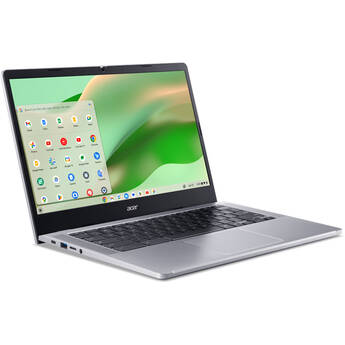
Acer 14" Chromebook 314
- 0.8 GHz Intel N100 Quad-Core
- 4GB LPDDR5 | 128GB eMMC Storage
- 14" 1920 x 1080 ComfyView Display
- Integrated Intel UHD Graphics
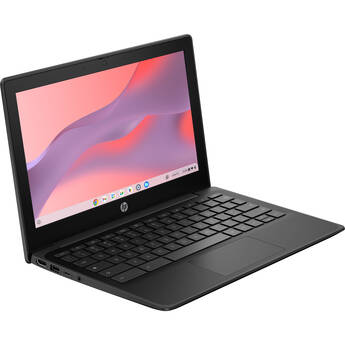
HP 11.6" Fortis Flip G1m Multi-Touch Chromebook
- 2.05 GHz MediaTek Kompanio 520 8-Core
- 4GB LPDDR5x RAM | 32GB eMMC SSD
- 11.6" 1366 x 768 BrightView Touchscreen
- Integrated ARM Mali G25 Graphics
HP 11.6" Fortis Flip G1m Multi-Touch Chromebook
- 2.05 GHz MediaTek Kompanio 520 8-Core
- 8GB LPDDR5x RAM | 64GB eMMC SSD
- 11.6" 1366 x 768 BrightView Touchscreen
- Integrated ARM Mali G25 Graphics
ASUS 14" Multi-Touch Chromebook CM14 Flip
- 2.0 GHz MediaTek Kompanio 520 8-Core
- 8GB LPDDR4X | 64GB eMMC Storage
- 14" Full HD 1920 x 1080 Touchscreen
- ARM Mali-G52 MC2 Graphics
HP 11.6" Fortis G1m Chromebook
- 2.05 GHz MediaTek Kompanio MT8186 8-Core
- 4GB LPDDR4x RAM | 32GB eMMC SSD
- 11.6" 1366 x 768 Display
- Integrated ARM Mali G52 MC2 2EE Graphics
Lenovo 11.6" Chromebook 500e Gen 5 M89 (MediaTek, 4GB, 64GB, Chrome OS)
Lenovo 12.2" Chromebook 500e Gen 5 M89 (MediaTek, 4GB, 64GB, Chrome OS)
HP 14" Fortis G1i Chromebook
- Intel N150 4-Core CPU
- 8GB LPDDR5x RAM | 64GB eMMC SSD
- 14" 1366 x 768 Anti-Glare Display
- Integrated Intel Graphics
HP 11.6" Fortis G1m Multi-Touch Chromebook
- 2.05 GHz MediaTek Kompanio MT8186 8-Core
- 8GB LPDDR4x RAM | 64GB eMMC SSD
- 11.6" 1366 x 768 IPS Touchscreen
- Integrated ARM Mali G52 MC2 2EE Graphics
Lenovo 10.95" Chromebook Duet EDU G2 Tablet
- MediaTek Kompanio 838 8-Core CPU
- 8GB LLPDDR4x | 64GB eMMC Storage
- 10.95" 1920 x 1200 IPS Touchscreen
- Integrated Arm Mali-G57 MC3 GPU
HP 14" Fortis G1i Multi-Touch Chromebook (Intel N150, 16GB, 64GB, Chrome OS)
Shopping for Chromebook Laptops
A Chromebook laptop is a mobile computer that runs Chrome OS, a lightweight alternative to Microsoft's Windows and Apple's macOS desktop operating systems. You can browse the web, create and edit documents, play casual games, watch movies, and listen to music on a Chromebook. However, its web-based operating system relies heavily upon online services and encourages you to use cloud storage to save documents.
Differences Between Windows and Chromebook Laptops
A Chromebook has a simpler interface than Windows and macOS. Its cloud-based operating system offers certain benefits, such as exceptional battery life. Furthermore, you don't have to update the computer, and it doesn't require antivirus software because Google automatically manages these features on the server end. Chrome OS also deeply integrates with Google services such as Gmail, Google Drive, and Google Docs. Therefore, you'll need a Google account to sign in and use a Chromebook.
Unlike Windows and Mac laptops, you cannot install desktop software on a Chromebook. However, it ships with some pre-installed apps and runs Android apps. There's also the Chrome Web Store, where you can find cloud-based alternatives for essential productivity apps. Although many of these apps won't work when you're offline, you can keep using some without Internet connectivity. These will sync with remote servers when you're back online.
Types of Chromebook Laptops
Most Chromebooks have a clamshell design. This form factor includes a number of lightweight Chromebook machines as well as rugged models that are ideal for students and travelers. There are also convertible Chromebooks with 180-degree flippable screens and a hybrid design that transforms them into tablets. ASUS' Chromebook Flip and Google Pixelbook are popular models in this category. You can also find convertible Dell, Samsung, and Lenovo Chromebooks. These laptops have touchscreen displays, and some enjoy stylus support. The latest Chromebook form factor is the 2-in-1 detachable laptop, such as the HP Chromebook.
Choosing the Right Chromebook
Chromebooks come in screen sizes ranging from 11.6 to 15.6 inches. An 11-inch Chromebook is the right size for students, children, or anyone looking for an ultra-portable computer. The minimum screen resolution available is 1366 x 768 pixels. For a bright and sharp display, pick a 1080p Chromebook, or higher if you're considering models 13-inch and larger.
Other key hardware specs to consider include memory, storage capacity, and processor. While entry-level models have 2GB RAM, 4GB Chromebooks are faster and preferable to many. You can find Pixelbook and ASUS Chromebooks with up to 16GB RAM. Storage options include eMMC and the faster SSDs, with capacity ranging from 16GB to 128GB. Chromebooks mostly use ARM and Intel processors. If you're looking for the fastest models, choose those equipped with Intel Core i5 and i7 CPUs.
Switch to a Chromebook laptop to enjoy all the benefits of a simple, cloud-based operating system. Check out the wide selection of Chrome OS devices at B&H Photo and Video to find the right model for you.