Desktop Computers

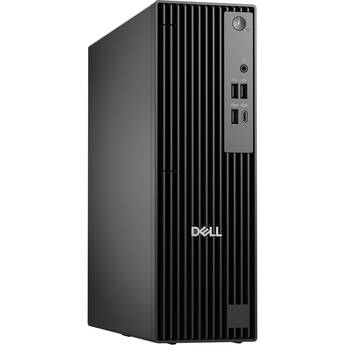
Dell Pro Slim Desktop Computer
- 2.1 GHz Intel Core i7 20-Core (14th Gen)
- 16GB 5600 MT/s DDR5 RAM
- 512GB M.2 NVMe SSD
- Integrated Intel 770 Graphics
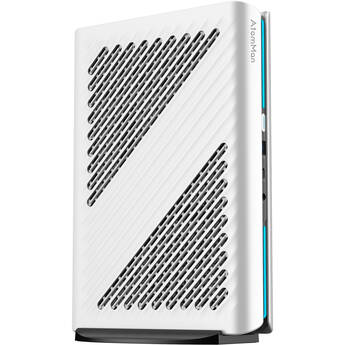
MINISFORUM AtomMan G1 PRO Mini Desktop Computer
- 2.5 GHz AMD Ryzen 9 8945HX 16-Core
- 32GB 5200 MHz DDR5 RAM
- 1TB M.2 NVMe PCIe 4.0 SSD
- NVIDIA GeForce RTX 5060 (8GB GDDR7)
Dell Pro Slim Plus Desktop Computer
- 2.4 GHz Intel Core Ultra 7 265 20-Core
- 16GB 5600 MT/s DDR5 RAM
- 512GB M.2 NVMe SSD
- Integrated Intel Graphics
HP EliteBoard G1a Next Gen AI PC
- PC in a Keyboard Form Factor
- 3.4 GHz AMD Ryzen AI 5 PRO 340 6-Core
- 24GB of 5600 MHz DDR5 RAM
- Integrated AMD Radeon 840M Graphics
ASUS NUC 14 Pro+ Mini Desktop Computer
- 2.3 GHz Intel Core Ultra 9 185H 16-Core
- 32GB 5600 MHz DDR5 RAM
- Integrated Intel Arc Graphics
- 1TB M.2 NVMe PCIe 4.0 SSD
Dell Pro Slim Plus Desktop Computer
- 2.4 GHz Intel Core Ultra 7 265 20-Core
- 16GB 5600 MT/s DDR5 RAM
- 512GB M.2 NVMe SSD
- Integrated Intel Graphics
Lenovo ThinkCentre M90q Gen 6 Tiny Desktop Computer
- 3.3 GHz Intel Core Ultra 5 225 10-Core
- 32GB 5600 MHz DDR5 RAM
- Integrated Intel Graphics
- 512GB M.2 NVMe PCIe 4.0 Opal 2.0 SSD
Dell Pro Slim Plus Desktop Computer
- 2.4 GHz Intel Core Ultra 7 265 20-Core
- 16GB 5600 MT/s DDR5 RAM
- 512GB M.2 NVMe SSD
- Integrated Intel Graphics
HP EliteDesk 8 Mini G2i Next Gen AI Desktop Computer
- Intel Core Ultra 5 336H 12-Core
- 16GB of 5600 MHz DDR5 RAM
- Integrated Intel Graphics
- 512GB NVMe PCIe M.2 SSD
Dell Pro Max Micro Desktop Computer
- Intel Core Ultra 5 235 14-Core
- 16GB of DDR5 RAM
- Integrated Intel Graphics
- 512GB M.2 NVMe PCIe 4.0 SSD
CyberPowerPC Gamer Supreme Desktop Computer
- 4.1 GHz AMD Ryzen 7 8700F 8-Core
- 32GB DDR5 RAM
- 2TB M.2 PCIe 4.0 NVMe SSD
- AMD Radeon RX 9060 XT Graphics
Acer Nitro 85 Gaming Desktop
- 4.1 GHz AMD Ryzen 7 8700F 8-Core
- 16GB DDR5 RAM
- NVIDIA RTX 5070 (12GB GDDR7)
- 1TB M.2 NVMe SSD
HP EliteDesk 8 G2a Small Form Factor Next Gen AI Desktop Computer
- 2.0 GHz AMD Ryzen AI 7 PRO 450G 8-Core
- 32GB of 5600 MHz DDR5 RAM
- Integrated AMD Radeon 860M Graphics
- 512GB NVMe PCIe M.2 SSD
Lenovo ThinkCentre M70q Gen 5 Tiny Desktop Computer
- Intel Core i5 vPro 14-Core
- 32GB of DDR5 RAM
- Intel UHD Graphics 770
- 512GB M.2 NVMe SSD
CyberPowerPC Gamer Supreme Liquid Cool Desktop Computer
- 4.1 GHz AMD Ryzen 7 8700F 8-Core
- 32GB DDR5 RAM
- 2TB M.2 PCIe 4.0 SSD
- AMD Radeon RX 9070 GRE (12GB GDDR6)
HP ProDesk 4 G1i AI Small Form Factor Desktop Computer
- Intel Core Ultra 5 235 14-Core
- 32GB of 5600 MHz DDR5 RAM
- Integrated Intel Graphics
- 512GB NVMe PCIe M.2 SSD
MSI Aegis RS2 AI 2nd Desktop Gaming Computer (Pink)
- Intel Core Ultra 7 270K Plus 24-Core
- 32GB DDR5 RAM
- 1TB M.2 NVMe PCIe 4.0 SSD
- NVIDIA GeForce RTX 5060 Ti (8GB GDDR7)
MSI Aegis RS2 AI 2nd Desktop Gaming Computer (White)
- Intel Core Ultra 7 270K Plus 24-Core
- 16GB DDR5 RAM
- 1TB M.2 NVMe PCIe 4.0 SSD
- NVIDIA GeForce RTX 5060 Ti (8GB GDDR7)
Cooler Master Sneaker X Desktop Gaming Computer
- 3.8 GHz AMD Ryzen 7 9700X 8-Core
- 32GB 6000 MHz DDR5 RAM
- 2TB M.2 NVMe PCIe 4.0 SSD
- AMD Radeon 9060 XT (16GB GDDR6)
Acer Nitro 85 Gaming Desktop
- 4.4 GHz AMD Ryzen 9 9900X 12-Core
- 16GB DDR5 RAM
- Radeon RX 9070 XT (16GB GDDR6)
- 1TB M.2 NVMe SSD
Lenovo ThinkCentre M70q Gen 5 Tiny Desktop Computer
- Intel Core i5 vPro 14-Core
- 32GB of DDR5 RAM
- Intel UHD Graphics 770
- 1TB M.2 NVMe SSD
Lenovo ThinkCentre M90q Gen 6 Tiny Desktop Computer
- 3.4 GHz Intel Core Ultra 5 235 14-Core
- 32GB 5600 MHz DDR5 RAM
- Integrated Intel Graphics
- 256GB M.2 NVMe PCIe 4.0 Opal 2.0 SSD
Waves Axis Scope Desktop Computer
- Optimized for Waves Audio Applications
- 3.3 GHz Intel Core i5 6-Core (10th Gen)
- 16GB DDR4 RAM
- Integrated Intel HD 630 Graphics
HP EliteBoard G1a Next Gen AI PC
- PC in a Keyboard Form Factor
- 3.5 GHz AMD Ryzen AI 7 PRO 350 8-Core
- 32GB of 5600 MHz DDR5 RAM
- Integrated AMD Radeon 860M Graphics
Acer Nitro 85 Gaming Desktop
- 2.4 GHz Intel Core Ultra 7 265F 20-Core
- 16GB DDR5 RAM
- NVIDIA RTX 5070 (12GB GDDR7)
- 1TB M.2 NVMe SSD
CyberPowerPC Gamer Supreme Liquid Cool Desktop Computer (Black)
- 4.1 GHz AMD Ryzen 7 8700F 8-Core
- 32GB of 6000 MHz DDR5 RAM
- 2TB M.2 PCIe 4.0 SSD
- NVIDIA GeForce RTX 5070 GPU (12GB GDDR7)
CyberPowerPC Gamer Supreme Liquid Cool Desktop Computer
- 3.9 GHz Intel Core Ultra 7 265KF 20-Core
- 32GB 6400 MHz DDR5 RAM
- 2TB M.2 PCIe 4.0 SSD
- AMD Radeon RX 9060 XT Graphics
Lenovo ThinkCentre M90q Gen 5 Tiny Desktop Computer
- 2.1 GHz Intel Core i7 20-Core (14th Gen)
- 16GB 5600 MHz DDR5 RAM
- Integrated Intel UHD 770 Graphics
- 512GB M.2 NVMe PCIe 4.0 Opal 2.0 SSD
Choosing a Desktop PC
Selecting the right desktop computer is a matter of playing to your strengths.Think about what you need the computer to do to make your day better. As a gamer, for example, you'd probably need a high-end graphics card. If you need to analyze hundreds of thousands of rows in a single spreadsheet, you'll likely want upgraded memory.
If you don't already have a monitor, look at an all-in-one desktop computer. To make your setup more minimalist, opt for a wireless keyboard and mouse. If you have a printer, you'll need to determine if it connects wirelessly or if you need a specific port on the computer to make it compatible.
What's a Desktop Computer?
Simply put, a desktop PC is any IBM-compatible computer that sits on top of a desk. Usually, laptops and Macs don't fall into this category, even though Mac does make its own desktops. A PC workstation is highly customizable. If you want to store a massive amount of photos and videos on your hard drive, the workstation is easy to upgrade and offers some additional options such as SSD. However, if customizing isn't important to you, then you'll enjoy the simplicity of an HP desktop computer or something similar that has an all-in-one design.
What's the Best Desktop Computer?
This depends on how you intend to use your desktop PC. A Windows desktop computer, for instance, can perform many tasks extremely well, and some specialize in certain jobs and also manage basic tasks. If you plan to edit video files, you'll want a machine with a large hard drive to store the raw data as well as your compilations without lag. A desktop computer with SSD is helpful if you need faster access to video files. Most long-form PC games require a machine with a faster CPU and more video memory, such as one of the many customizable Lenovo desktop computers.
What Are Wireless Desktop Computers?
There are a number of advantages to going with a wireless desktop computer. In addition to avoiding clutter, many of the all-in-one desktop computers include some unique features such as touchscreens. All-in-ones often don't have as many ports or slots for upgrades as a traditional workstation does, but the wireless machines offer simplicity of design and usage over complexity. All-in-one desktop computers also fit the needs of everyone: from kids who draw their art projects on the screen, to busy professionals who bounce between lots of tasks.
Whether you're looking for the latest gaming computer on the market or need a basic task machine for streaming or emails, pick a computer that suits your needs and will yield the right results. Check out B&H Photo and Video's selection of desktop PCs to find the equipment that works for you.