Ask Our Experts800-606-6969
Hello, Log InAccount & Orders

GPU
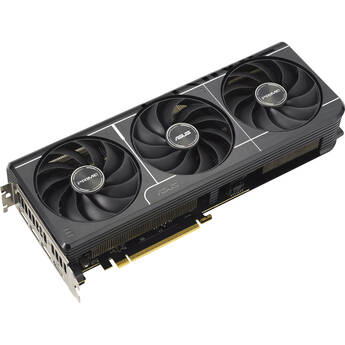
ASUS GeForce RTX 5070 Prime Graphics Card
BH # ASPTX507012G MFR # PRIME-RTX5070-12G
Key Features
- Boostable to 2542 MHz (OC)
- 6144 CUDA Cores
- Blackwell Architecture
- 12GB of GDDR7 VRAM
Available in other Styles, Configurations & Kits
Top Seller
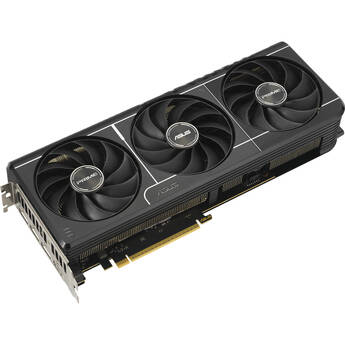
ASUS GeForce RTX 5080 PRIME Graphics Card
BH # ASPR5080G16C MFR # PRIME-RTX5080-16G
Key Features
- 10,752 CUDA Cores
- Blackwell Architecture
- 16GB of GDDR7 VRAM
- 256-Bit Memory Interface
Available in other Styles, Configurations & Kits
Top Seller
ASUS GeForce RTX 5070 Ti PRIME OC Graphics Card
BH # AS5070TIO16G MFR # PRIME-RTX5070TI-O16GING
Key Features
- Boostable to 2527 MHz (OC)
- 8960 CUDA Cores
- Blackwell Architecture
- 16GB of GDDR7 VRAM
Available in other Styles, Configurations & Kits
ASUS Radeon RX 9060 XT Dual 16G Graphics Card
BH # ASDR9060XT16 MFR # DUAL-RX9060XT-16G
Key Features
- Boostable to 3250 MHz (OC)
- 2048 Stream Processors
- RDNA 4 Architecture
- 16GB of GDDR6 VRAM
Available in other Styles, Configurations & Kits
$78999
Temporarily Out of Stock
Expected availability: 7-14 Business Days
ASUS GeForce RTX 5060 Ti PRIME 16GB Graphics Card
BH # ASPR5060TI16 MFR # PRIME-RTX5060TI-16G
Key Features
- Boostable to 2602 MHz (OC)
- 4608 CUDA Cores
- Blackwell Architecture
- 16GB of GDDR7 VRAM
Available in other Styles, Configurations & Kits
NVIDIA RTX PRO 6000 Blackwell Workstation Edition Graphics Card (OEM)
BH # NVRP6000BWWS MFR # 900-5G144-2200-000-01
Key Features
- 24,064 CUDA Cores
- Blackwell Architecture
- 96GB of ECC GDDR7 VRAM
- 512-Bit Memory Interface
NVIDIA RTX A400 Graphics Card
BH # NVRA400D484G MFR # 900-5G172-2560-000
Key Features
- 768 CUDA Cores
- Ampere Architecture
- 4GB of GDDR6 VRAM
- 64-Bit Memory Interface
Available in other Styles, Configurations & Kits
ASUS GeForce RTX 5080 TUF GAMING OC Graphics Card
BH # AST5080O16GG MFR # TUF-RTX5080-O16G-GAMING
Key Features
- 10752 CUDA Cores
- Blackwell Architecture
- 16GB of GDDR7 VRAM
- 256-Bit Memory Interface
Available in other Styles, Configurations & Kits
NVIDIA RTX PRO 4000 Blackwell Generation Graphics Card (OEM)
BH # NVRP4000BWO MFR # 900-5G147-2270-000-01
Key Features
- 8960 CUDA Cores
- Blackwell Architecture
- 24GB of ECC GDDR7 VRAM
- 192-Bit Memory Interface
PNY NVIDIA RTX A400 Graphics Card
BH # PNRA400 MFR # VCNRTXA400ATX-PB
Key Features
- 768 CUDA Cores
- Ampere Architecture
- 4GB of GDDR6 VRAM
- 64-Bit Memory Interface
NVIDIA RTX A400 Graphics Card (OEM)
BH # NVRA4004GB MFR # 900-5G172-2260-000-01
Key Features
- 768 CUDA Cores
- Ampere Architecture
- 4GB of GDDR6 VRAM
- 64-Bit Memory Interface
Available in other Styles, Configurations & Kits
ASUS GeForce RTX 5070 Ti PRIME Graphics Card
BH # ASTX5070TI16 MFR # PRIME-RTX5070TI-16G
Key Features
- Boostable to 2482 MHz (OC)
- 8960 CUDA Cores
- Blackwell Architecture
- 16GB of GDDR7 VRAM
Available in other Styles, Configurations & Kits
ASUS GeForce RTX 5080 Republic of Gamers Astral OC Graphics Card
BH # ASR5080O16GG MFR # ROG-ASTRAL-RTX5080-O16G-GAMING
Key Features
- 10,752 CUDA Cores
- Blackwell Architecture
- 16GB of GDDR7 VRAM
- 256-Bit Memory Interface
Available in other Styles, Configurations & Kits
NVIDIA RTX A1000 Graphics Card (OEM)
BH # NVRA1000OEM MFR # 900-5G172-2280-000-01
Key Features
- 2304 CUDA Cores
- Ampere Architecture
- 8GB of GDDR6 VRAM
- 128-Bit Memory Interface
NVIDIA RTX PRO 4500 Blackwell Generation Graphics Card (OEM)
BH # NVRP4500BWO MFR # 900-5G147-2250-000-01
Key Features
- 10,496 CUDA Cores
- Blackwell Architecture
- 32GB of ECC GDDR7 VRAM
- 256-Bit Memory Interface
ASUS GeForce RTX 5080 ProArt OC Graphics Card
BH # ASPAR5080O16 MFR # PROART-RTX5080-O16G
Key Features
- Boostable to 2730 MHz (OC)
- 10,752 CUDA Cores
- Blackwell Architecture
- 16GB of GDDR7 VRAM
Available in other Styles, Configurations & Kits
Intel Arc Pro B70 Graphics Card
BH # INAPB7032GB MFR # 33P01IB0BB
Key Features
- 2800 MHz Boost Clock Speed
- 32 Xe Cores | 256 XMX AI Engines
- Xe2 Architecture | 32 RT Units
- 32GB of ECC GDDR6 VRAM
ASUS GeForce RTX 5060 Ti Dual OC 16GB Graphics Card
BH # ASDR506TIO16 MFR # DUAL-RTX5060TI-O16G
Key Features
- Boostable to 2632 MHz (OC)
- 4608 CUDA Cores
- Blackwell Architecture
- 16GB of GDDR7 VRAM
Available in other Styles, Configurations & Kits
ASUS GeForce RTX 5070 Prime OC Graphics Card
BH # ASPX5070O12G MFR # PRIME-RTX5070-O12G
Key Features
- Boostable to 2587 MHz (OC)
- 6144 CUDA Cores
- Blackwell Architecture
- 12GB of GDDR7 VRAM
Available in other Styles, Configurations & Kits
MSI GeForce RTX 3050 VENTUS 2X 6G OC Graphics Card
BH # MSG3050V2X6C MFR # G3050V2X6C
Key Features
- Boostable up to 1492 MHz
- 2304 CUDA Cores
- Ampere Architecture
- 6GB of GDDR6 VRAM
Available in other Styles, Configurations & Kits
NVIDIA RTX PRO 5000 Blackwell Generation Graphics Card (OEM)
BH # NVRP5000BW MFR # 900-5G153-2250-000-01
Key Features
- 14,080 CUDA Cores
- Blackwell Architecture
- 48GB of ECC GDDR7 VRAM
- 512-Bit Memory Interface
Top Seller
NVIDIA RTX PRO 6000 Blackwell Max-Q Workstation Graphics Card (OEM)
BH # NVRP6000BW MFR # 900-5G153-2200-000-01
Key Features
- 24,064 CUDA Parallel Processing Cores
- Blackwell Architecture
- 96GB of ECC GDDR7 VRAM
- 512-Bit Memory Interface
PNY NVIDIA RTX 2000 Ada Generation Graphics Card
BH # PNR2000AG MFR # VCNRTX2000ADA-PB
Key Features
- 2816 CUDA Cores
- Ada Lovelace Architecture
- 16GB of ECC GDDR6 VRAM
- 128-Bit Memory Interface
Intel Arc Pro B50 Workstation SFF Graphics Card
BH # INB50 MFR # 33P6PEB0BB
Key Features
- 2600 MHz Boost Clock Speed
- 16 Xe Cores | 128 XMX AI Engines
- Xe2 Microarchitecture | 16 RT Units
- 16GB of GDDR6 VRAM
Available in other Styles, Configurations & Kits
Intel Arc Pro B50 Workstation SFF Graphics Card & SF750 80 PLUS Platinum 750W Power Supply Kit
BH # INB50SF750K
Key Features
- Corsair SF750 750W Fully Modular PSU
- 2600 MHz Boost Clock Speed
- 16GB of GDDR6 VRAM
- 16 Xe Cores | 128 XMX AI Engines
Available in other Styles, Configurations & Kits
NVIDIA RTX PRO 2000 Blackwell Generation Graphics Card (OEM)
BH # NVRP2000BWO MFR # 900-5G195-2250-000-01
Key Features
- 4,352 CUDA Cores
- NVIDIA Blackwell Architecture
- 16GB of ECC GDDR7 VRAM
- 128-Bit Memory Interface
AMD Radeon Pro W7500 Professional Graphics Card
BH # AMRPW7500 MFR # 100-300000078
Key Features
- 1792 Stream Processors
- RDNA 3 Architecture
- 8GB of GDDR6 VRAM
- 128-Bit Memory Interface
PNY NVIDIA RTX 2000E Ada Generation Graphics Card
BH # PNR2000EAG MFR # VCNRTX2000ADAS-LLP
Key Features
- 2816 CUDA Cores
- Ada Lovelace Architecture
- 16GB of ECC GDDR6 VRAM
- 128-Bit Memory Interface