Desktop Computer Cases

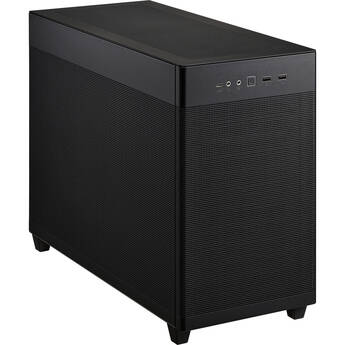
ASUS Prime AP201 Micro-ATX Case (Black, Mesh)
- Micro-ATX & Mini-ITX Support
- 1 x 2.5" & 3 x 2.5/3.5" Drive Bays
- 4 x Full Sized Expansion Slots
- USB 3.2 Gen 1 & Gen 2 Ports | 2 x 3.5mm
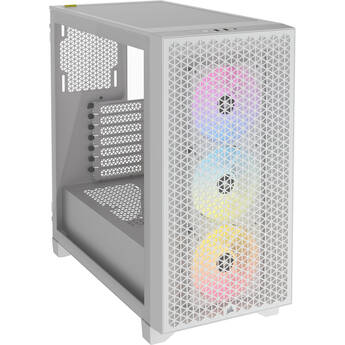
CORSAIR 3000D AIRFLOW RGB Mid-Tower Case (White)
- ATX, Micro-ATX, and Mini-ITX Support
- Steel Frame & Windowed Side Panel
- 2 x 2.5" Drive Bays
- 2 x 3.5" Drive Bays
be quiet! Pure Base 501 Mid-Tower Case (Black)
- ATX, Micro-ATX, and Mini-ITX Support
- Front & Top Panel Airflow
- Removable 2.5" / 3.5" Drive Cage
- 5 x 2.5" Drive Bays
Cooler Master Elite 690 Wood ATX Tower Case (Black)
- ATX, Micro-ATX, ITX Support
- Steel Frame with 270° Window Panel
- 1 x 3.5" Drive Bay
- 1 x 2.5" Drive Bay
be quiet! Pure Base 501 Airflow Window Mid-Tower Case (Black)
- ATX, Micro-ATX, and Mini-ITX Support
- Mesh Front & Top Panels w/ Side Window
- Removable 2.5" / 3.5" Drive Cage
- 5 x 2.5" Drive Bays
be quiet! Pure Base 501 Airflow Mid-Tower Case (Black)
- ATX, Micro-ATX, and Mini-ITX Support
- Mesh Front & Top Panels
- Removable 2.5" / 3.5" Drive Cage
- 5 x 2.5" Drive Bays
NZXT H6 (2026) Mid-Tower Case (White)
- ATX, Micro-ATX, and Mini-ITX Support
- Steel Frame & Tempered Glass Side Panel
- Dual Chamber Design
- 2 x 2.5" Drive Bay
NZXT H6 (2026) Mid-Tower Case (Black)
- ATX, Micro-ATX, and Mini-ITX Support
- Steel Frame & Tempered Glass Side Panel
- Dual Chamber Design
- 2 x 2.5" Drive Bay
MSI MAG PANO 100R PZ Mid-Tower Computer Case (Black)
- ATX, mATX & Mini-ITX Support
- Supports Back-Connect Motherboards
- 270° Panoramic Tempered Glass Panel
- 3 x 2.5" Drive Bay
Lian Li O11 Dynamic Mini V2 Flow (Black)
- ATX, Micro-ATX, and Mini-ITX Support
- Pillar-Less Tempered Glass Panels
- 2 x 2.5" or 3.5" Drive Bays
- 2 x 2.5" Drive Slots Behind MB Tray
Fractal Design Pop 2 Vision RGB Mid-Tower Case (Black)
- E-ATX, ATX, Micro-ATX, Mini-ITX Support
- Steel Frame with 270° Window Panel
- 1 x 3.5" Drive Mount
- 3 x 2.5" Drive Mounts
NZXT H6 Flow Mid-Tower Case (White)
- ATX, Micro-ATX, and Mini-ITX Support
- Steel Frame & Tempered Glass Side Panel
- 2 x 2.5" Drive Bay
- 1 x 3.5" Drive Bay
Fractal Design Epoch Mid-Tower Case (White with Clear Tempered Glass)
- ATX, Micro-ATX & Mini-ITX Support
- Steel Frame w/ Glass Side Panel
- 2 x 3.5" Drive Brackets w/ 2.5" Mount
- 2 x 2.5" Drive Mounts
CORSAIR iCUE LINK 3500X RGB Mid-Tower ATX Desktop Case (White)
- E-ATX, ATX, Micro-ATX & Mini-ITX Support
- Steel Frame & Windowed Side Panels
- 2 x 2.5" Drive Bays
- 2 x 3.5" Drive Bays
CORSAIR Frame 4500X RS-R ARGB Panoramic Glass Mid-Tower Desktop Case (White)
- Mini-ITX, Micro-ATX, ATX, E-ATX Support
- Steel Frame with Tempered Glass Panel
- 1 x 3.5" Drive Bay
- 2 x 2.5" Drive Bays
HYTE X50 Air Mid-Tower Case (Pitch Black)
- ATX, E-ATX, M-ATX and ITX Support
- Steel & ABS Frame
- 2 x 2.5" Drive Bays
- 1 x 3.5" Drive Bay
ASUS ProArt PA401 Wood Edition Mid-Tower Case with Tempered Glass Panel (Black)
- ATX Motherboard Support
- Tempered Glass Side Panel
- 2 x 2.5/3.5" Bays
- 2 x 2.5" Bays
be quiet! Pure Base 501 LX Mid-Tower Case (Black)
- ATX, Micro-ATX, and Mini-ITX Support
- Mesh Front & Top Panels w/ Side Window
- Removable 2.5" / 3.5" Drive Cage
- 5 x 2.5" Drive Bays
be quiet! Light Base 600 DX Mid-Tower Case
- ATX, mATX & Mini-ITX Support
- Rear Connector Motherboard Support
- Panoramic Tempered Glass Panels
- Removable 3.5" & 2.5" Drive Cage
Thermaltake CTE E550 TG Mid Tower E-ATX Computer Chassis (Black)
- Panoramic View with 4mm Tempered Glass
- Supports Hidden-Connector Motherboards
- Three GPU Mounting Options
- Up to 420mm Radiator on Bottom, M/B Side
be quiet! Light Base 500 LX Mid-Tower Case (Black)
- ATX, mATX & Mini-ITX Support
- Rear Connector Motherboard Support
- Panoramic Tempered Glass Panels
- 1 x 2.5" / 3.5" Drive Bay
teenage engineering Computer-1 Mini Tower Case (Silver)
- Mini-ITX Support
- Aluminum Construction
- Supports Dual-Slot GPUs up to 7.1" Long
- Supports Low-Profile CPU Coolers
Thermaltake The Tower 250 Mini Tower Mini-ITX Computer Chassis (Hydrangea Blue)
- Vertical Case with Octagonal Prism Shape
- Two CT120 Fans Preinstalled
- Supports up to Eight 120mm Fans
- Right Side Supports up to 360mm Radiator
Fractal Design Meshify 3 Mid-Tower Case (White with Clear Tempered Glass)
- E-ATX, ATX, Micro-ATX & Mini-ITX Support
- Steel Frame w/ Glass Side Panel
- 2 x 3.5" or 4 x 2.5" Drive Brackets
- 2 x 2.5" Drive Mounts
Fractal Design Meshify 3 Mid-Tower Case (Black)
- E-ATX, ATX, Micro-ATX & Mini-ITX Support
- Steel Frame
- 2 x 3.5" or 4 x 2.5" Drive Brackets
- 2 x 2.5" Drive Mounts
Fractal Design Mood Mini-ITX Small Form Factor Case (Black)
- Mini-ITX Motherboard Support
- Steel, Plastic, Cloth Materials
- 1 x 3.5" & 2 x 2.5" Drive bays
- 2 x Expansion Slots
Thermaltake The Tower 600 Mid-Tower Chassis (Black)
- ATX, Micro-ATX & Mini-ITX
- SGCC Steel & Tempered Glass
- 7 x Expansion Slots
- USB-C 3.2 Gen 2 | USB-A 3.2 Gen 1
Fractal Design Summit Walnut PC Gaming Case (Black, Tempered Glass Window)
- E-ATX, ATX, Micro-ATX, Mini-ATX Support
- 2 x 3.5" | 4 x 2.5" Drive Bays
- 2 x 2.5" Drive Mounts
- 7 x Expansion Slots
Shopping for a Desktop Computer Case
Desktop computer cases are the first step to building a customized PC. The empty chassis is waiting for you to add a hard drive, motherboard, graphics cards, and other components you desire, so your machine serves your exact needs. Many also have sleek and stylish designs, and even external lighting.
How to Choose a Desktop Computer Case
Computer cases often feature a number of ports. Make sure there are enough to serve your requirements, and that they line up with the motherboard form factor that you install. If you want to be able to see your components, choose a case with one side made of tempered glass, which serves as a durable but transparent barrier. Size also matters, so choose a tower that's large enough to hold all the components you want to include, including extra fans and other cooling systems if your goal is a gaming system. If style is important, many cases feature lighting or other cool design touches that add visual appeal.
Difference Between a Mid Tower and Full Tower Case
A mid tower case is smaller than a desktop full tower case, and accommodates smaller micro-ATX form factor motherboards. With a full tower size, you have more room for adding components, which is especially useful for building a gaming PC that uses graphic cards and sound cards to maximize performance. Mid tower cases take up less room, making them well suited for areas where space is limited. They can still house sufficient components to build a powerful PC or home server.
Parts that Comprise a Custom Computer
At a minimum, you'll need a motherboard with the right form factor to fit the case, as well as a processor, memory, and a hard drive or solid-state drive. A gaming PC should have room for a dedicated graphics card, and any additional cooling fans or lights you may want.
Installing an SSD in a Desktop Case
If you choose to add a solid-state drive to your PC case, mounting is simple and easy. Open the case and select an empty drive bay. Many SSDs require mounting brackets to fit inside a drive bay, so attach those to the drive first. Slide the drive into the bay and connect the cable. Be sure to keep yourself and the work area grounded to prevent static discharge.
How to Cool a Computer
Most desktop PC cases have space for installing fans, maintaining airflow and keeping processors and other components cool during high-demand operations. Some full tower cases even accommodate as many as a dozen fans. There are often mesh panels on the front, back, or sides of the tower. In the space provided by a full tower, there's also the option to install a liquid cooling system. This is a good solution for those who plan to overclock their processor and get the most performance possible. It dissipates the high heat generated by overclocking, and does it with a low amount of noise.
When you're building a PC to fit your specific needs, B&H Photo and Video has a wide selection of desktop computer cases to get you started.