External Hard Drives

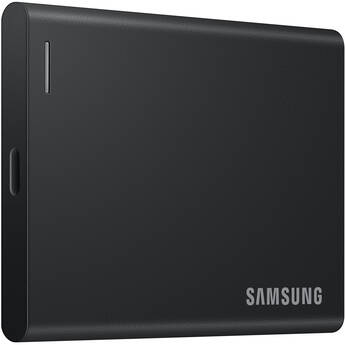
Samsung 2TB P7 USB4 Portable SSD
- 2TB Storage Capacity
- 40 Gb/s USB4
- Sequential Read Speeds up to 4000 MB/s
- Sequential Write Speeds up to 3800 MB/s
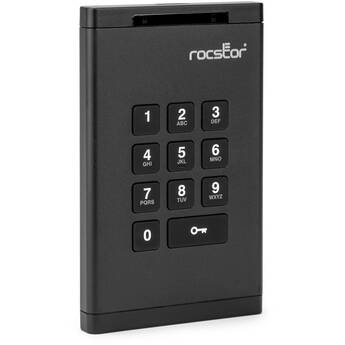
Rocstor 2TB DataSecure EX20 Encrypted USB 3.2 Gen 1 Portable SSD
- 2TB Storage Capacity
- USB-C 3.2 Gen 1 Interface
- Up to 355 MB/s Data Transfer Speed
- Bus Powered
Rocstor 10TB Rocpro D91 USB-C 3.2 Gen 2 External HDD (TAA Compliant)
- 10TB Storage Capacity
- USB-C 3.2 Gen 2 Interface
- Hot-Swappable Design
- Preformatted for Mac
Istorage 5TB diskAshur PRO3 USB 3.2 Gen1 Encrypted Portable Hard Drive
- 5TB Capacity
- AES 256-Bit Encryption
- 3 x Encryption Modes
- FIPS 140-3 Level 3 Ready
Istorage 5TB diskAshur PRO2 USB 3.1 Encrypted Portable HDD
- 5TB Storage Capacity
- USB 3.1 with Integrated Cable
- Read/Write Speeds up to 148/140 MB/s
- AES-XTS 256-Bit Hardware Encryption
Rocstor 4TB Rocpro D91 USB-C 3.2 Gen 2 External SSD (TAA Compliant)
- 4TB Storage Capacity
- USB-C 3.2 Gen 2 Interface
- Hot-Swappable Design
- Preformatted for Mac
Oyen Digital 10TB HDX Pro C USB-C 3.2 Gen 2 External Enterprise Hard Drive
- 10TB Capacity
- 2 x USB-C 3.2 Gen 2 Ports
- Up to 240 MB/s Read & Write Speeds
- Daisy-Chain Capable | AC Powered
Lexar 4TB ARMOR 700 USB 3.2 Gen 2x2 Portable SSD
- 4TB Storage Capacity
- 20 Gb/s USB-C 3.2 Gen 2x2 Interface
- Up to 2000 MB/s Data Transfer Speed
- Bus Powered
Lexar 4TB Professional Workflow Portable SSD
- Works with Lexar Professional Workflow
- 4TB Storage Capacity
- 20 Gb/s USB-C 3.2 Gen 2x2 Interface
- Up to 2000 MB/s Read and Write Speeds
Lexar 4TB SL500 USB 3.2 Gen 2x2 Portable SSD
- 4TB Storage Capacity
- USB-C 3.2 Gen 2x2 Interface
- Read Speeds up to 2000 MB/s
- Write Speeds up to 1800 MB/s
Lexar 2TB ARMOR 700 USB 3.2 Gen 2x2 Portable SSD (2-Pack)
- 2TB Storage Capacity
- 20 Gb/s USB-C 3.2 Gen 2x2 Interface
- Up to 2000 MB/s Data Transfer Speed
- Bus Powered
Apricorn 6TB Aegis Padlock DT USB 3.0 External Desktop Drive
- 6TB Capacity
- USB-B 3.2 Gen 1 Interface
- AES-XTS 256-Bit Hardware Encryption
- PIN Management
Rocstor 12TB Rocpro D90 USB 3.2 Gen 2 External Hard Drive
- 12TB Storage Capacity
- 7200 rpm
- 10 Gb/s USB-C 3.2 Gen 2 Interface
- Up to 10 Gb/s Transfer Rate
Rocstor 4TB Rocsecure EX31 USB 3.1 Encrypted Portable SSD
- 4TB Storage Capacity
- Secure Token Key Authentication
- Micro-USB 3.1 Gen 1 | Mini-USB
- AES 256-Bit Hardware Encryption
Istorage 8TB diskAshur DT3 USB 3.2 Gen 1 Encrypted External Hard Drive
- 8TB Capacity
- AES 256-Bit Encryption
- 3 x Encryption Modes
- FIPS 140-3 Level 3 Ready
Istorage 4TB diskAshur DT3 USB 3.2 Gen 1 Encrypted External Hard Drive
- 4TB Capacity
- AES 256-Bit Encryption
- 3 x Encryption Modes
- FIPS 140-3 Level 3 Ready
OWC 2TB Envoy Pro Elektron USB-C External SSD (Silver)
- 2TB Storage Capacity
- USB-C 3.2 Gen 2 Interface
- Up to 1011 MB/s Data Transfer Speed
- Bus Powered
Oyen Digital MiniPro RAID V4 10TB 2-Bay USB-C 3.2 Gen 2 Portable Hard Drive & RAID Array (2 x 5TB)
- 2 x 5TB 5400 rpm 2.5" HDDs
- 2 x 2.5" SATA III Drive Bays
- USB-C 3.2 Gen 2 Interface
- RAID 0, 1 & JBOD
Lexar 2TB SL500 USB 3.2 Gen 2x2 Portable SSD (2-Pack)
- 2TB Storage Capacity
- USB-C 3.2 Gen 2x2 Interface
- Read Speeds up to 2000 MB/s
- Write Speeds up to 1800 MB/s
OWC 2TB Envoy Ultra Thunderbolt 5 Portable SSD
- 2TB Storage Capacity
- 80 Gb/s Thunderbolt 5 Interface
- Up to 6000 MB/s Data Transfer Speeds
- Bus Powered
Glyph Technologies SecureDrive+ Professional Encrypted External Solid-State Drive with Keypad
- XTS-AES 256-bit Encryption
- 4TB Capacity
- USB-C 3.2 Gen 2 Interface
- Up to 360 MB/s Read & Write Speeds
Glyph Technologies SecureDrive+ Professional Encrypted External SSD with Bluetooth
- XTS-AES 256-Bit Encryption
- 4TB Capacity
- USB-C 3.2 Gen 2 Interface
- Up to 360 MB/s Read & Write Speeds
Rocstor 4TB Rocsecure EX32 USB 3.2 Gen 1 Encrypted Portable SSD
- 4TB Storage Capacity
- Secure Token Key Authentication
- USB-C 3.2 Gen 1 | Mini-USB
- AES 256-Bit Hardware Encryption
Rocstor 12TB Rocpro D91 USB-C 3.2 Gen 2 External HDD (TAA Compliant)
- 12TB Storage Capacity
- USB-C 3.2 Gen 2 Interface
- Hot-Swappable Design
- Preformatted for Mac
Samsung 2TB P9 USB4 Portable SSD
- 2TB Storage Capacity
- 40 Gb/s USB4
- Sequential Read Speeds up to 4000 MB/s
- Sequential Write Speeds up to 3800 MB/s
SANDISK 2TB PRO-G40 SSD Thunderbolt 3 Portable SSD
- 2TB Storage Capacity
- Thunderbolt 3 / USB-C Interface
- Read Speeds up to 3000 MB/s
- Write Speeds up to 2500 MB/s
Oyen Digital 12TB HDX Pro C USB-C 3.2 Gen 2 External Enterprise Hard Drive
- 12TB Capacity
- 2 x USB-C 3.2 Gen 2 Ports
- Up to 270 MB/s Read & Write Speeds
- Daisy-Chain Capable | AC Powered
Rocstor 14TB Rocpro D90 USB 3.2 Gen 2 External Hard Drive
- 14TB Storage Capacity
- 7200 rpm
- 10 Gb/s USB-C 3.2 Gen 2 Interface
- Up to 10 Gb/s Transfer Rate
Portable & USB Hard Drives
An external hard disk drive is a standalone storage device that provides additional space for your data. You can use it to backup important files from your computer's internal hard drive and to transfer files between computers. It has a larger storage capacity than other external storage devices, like USB drives and memory cards.
Portable vs. Desktop External Hard Drives
A portable external storage drive is smaller and lighter than a desktop model. It's a compact unit that houses a 2.5-inch hard drive in a protective enclosure. Desktop external hard disks have bigger housings, and usually use larger 3.5-inch hard drives. You can turn the internal hard disk in your old laptop (2.5-inch) or desktop PC (3.5-inch) into an external storage unit with the right hard drive enclosure.
Another difference between desktop and portable external hard drives is their power sources. Portable units are bus-powered. This means that they draw power with the same USB cable used for transferring data. Desktop units have separate AC adapters and draw more power. Hard drive arrays are another class of external storage devices. These have two or more drive bays for 2.5-inch or 3.5-inch hard disks. They serve as network-attached servers and support RAID levels that help them prioritize data redundancy, transfer speed, and storage capacity.
What's the Difference Between SSD and HDD?
A USB external hard drive can store files on a solid-state drive or a hard disk drive. While HDDs record data on spinning platters, SSDs use flash memory chips. With no moving parts, SSDs are faster and more durable. They’re also quieter and use less power. However, HDDs are more affordable and available in higher capacities.
Some brands offer SSDs in multiple form factors. For example, you can find 2.5-inch (direct replacement for laptop HDDs), M.2, and PCIe solid state drives in the HP hard drive line. Note that you need a 2.5-inch SSD and a 2.5-inch drive enclosure to build a SATA external hard drive. SATA, or Serial ATA, is a high-speed bus interface for connecting storage devices like HDDs and SSDs to computer motherboards. An external SATA (eSATA) drive enclosure connects a SATA HDD or SSD to a computer via USB.
Consider Speed When Selecting External Storage Drives
The overall data transfer speed of an external storage device depends on the speed of the drive used and the speed of the connection between the drive and your computer. Connection interface options for external drives include USB 2.0, 3.0, and 3.1, as well as eSATA and Thunderbolt. USB 3.0 external hard drives are 10 times faster than models with USB 2.0.
Most brands offer hard disks in two drive speeds: 5400 and 7200 rpm. Each type has its merits. For example, if you’re looking for a portable Toshiba hard drive, pick one with a 5400 rpm HDD. It has a lower power draw and is quick enough for everyday use. Pick a model with a 7200 rpm HDD if you regularly transfer large files and need a desktop external drive.
Keep important files safe by regularly backing them up onto an external hard disk. Find the right one, including fast SSD options, in the extensive selection of portable storage devices at B&H Photo and Video.