Internal Solid State Drives

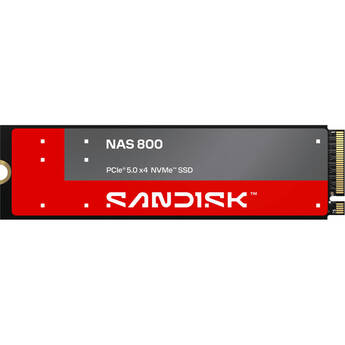
SANDISK 3.84TB NAS 800 PCIe 5.0 M.2 Internal SSD
- 3.84TB Storage Capacity
- M.2 2280 Form Factor
- PCIe 5.0 x4 / NVMe 2.0 Interface
- Sequential Reads up to 14,900 MB/s
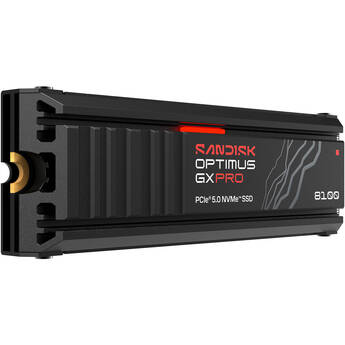
SANDISK 4TB Optimus GX PRO 8100 NVMe PCIe 5.0 M.2 Internal SSD with Heatsink
- 4TB Storage Capacity
- M.2 2280 Form Factor
- PCIe 5.0 x4 / NVMe 2.0 Interface
- Sequential Reads up to 14,900 MB/s
Panasonic 2TB FV-SF402T1M FIPS SSD (Main Drive)
- For TOUGHBOOK 40
- Compact M.2 Form Factor
- Protective Cage
- FIPS 140-2 Hardware Encryption
Samsung 4TB 9100 PRO PCIe 5.0 M.2 Internal SSD with Heatsink
- 4TB Storage Capacity
- M.2 2280 Form Factor
- PCIe 5.0 x4 / NVMe 2.0 Interface
- Sequential Reads up to 14,800 MB/s
Samsung 4TB 9100 PRO PCIe 5.0 M.2 Internal SSD
- 4TB Storage Capacity
- M.2 2280 Form Factor
- PCIe 5.0 x4 / NVMe 2.0 Interface
- Sequential Reads up to 14,800 MB/s
CORSAIR 2TB MP700 Pro XT NVMe PCIe 5.0 M.2 Internal SSD
- 2TB Storage Capacity
- M.2 2280 Form Factor
- PCIe 5.0 x4 / NVMe 2.0 Interface
- Up to 14,900 MB/s Sequential Read Speed
Samsung 4TB 870 EVO SATA III 2.5" Internal SSD
- 4TB Storage Capacity
- 2.5" Form Factor
- SATA III 6 Gb/s Interface
- 4GB LPDDR4 Cache
HighPoint 4TB RocketAIC 7505HM PCIe 4.0 x16 NVMe SSD (4 x 1TB)
- For the Mac Pro (2019 & 2023 Models)
- 4TB Storage Capacity
- 4 x 1TB Samsung 990 PRO PCIe M.2 SSDs
- Sequential Reads up to 27,210 MB/s
SANDISK 8TB Optimus GX PRO 850X NVMe PCIe 4.0 M.2 Internal SSD
- 8TB Storage Capacity
- M.2 2280 Form Factor
- PCIe 4.0 x4 / NVMe 1.4 Interface
- Sequential Reads up to 7200 MB/s
SANDISK 8TB Optimus GX PRO 850X NVMe PCIe 4.0 M.2 Internal SSD with Heatsink
- 8TB Storage Capacity
- M.2 2280 Form Factor
- PCIe 4.0 x4 / NVMe 1.4 Interface
- Sequential Reads up to 7200 MB/s
SANDISK 8TB Optimus GX PRO 8100 NVMe PCIe 5.0 M.2 Internal SSD with Heatsink
- 8TB Storage Capacity
- M.2 2280 Form Factor
- PCIe 5.0 x4 / NVMe 2.0 Interface
- Sequential Reads up to 14,900 MB/s
Transcend 4TB 830S SATA III M.2 Internal SSD
- 4TB Storage Capacity
- SATA III 6 Gb/s Interface
- M.2 2280 Form Factor
- Up to 560 MB/s Sequential Read Speed
Panasonic 1TB FV-SF401T1M FIPS SSD (Main Drive)
- For TOUGHBOOK 40
- Compact M.2 Form Factor
- Protective Cage
- FIPS 140-2 Hardware Encryption
SANDISK 7.68TB NAS 800 PCIe 5.0 M.2 Internal SSD
- 7.68TB Storage Capacity
- M.2 2280 Form Factor
- PCIe 5.0 x4 / NVMe 2.0 Interface
- Sequential Reads up to 14,900 MB/s
Lexar 8TB NM790 PCIe 4.0 x4 NVMe M.2 Internal SSD
- 8TB Storage Capacity
- M.2 2280 Form Factor
- PCIe Gen 4 / NVMe 2.0 Interface
- Sequential Read Speeds up to 7400 MB/s
OWC U2 Shuttle 8TB 4-Bay RAID Storage (4 x 2TB)
- 4 x 2TB M.2 2280 SSDs
- Fits 3.5" Drive Bays
- PCIe 3.0 x4 Interface
- Supports RAID 0, 1, 4, 5, 6, 10 & JBOD
OWC 8TB Accelsior 8M2 PCIe 4.0 Storage Card
- 8TB Capacity
- PCIe 4.0 x16 Interface
- Includes Preinstalled M.2 SSDs
- Internal Cooling Fan
HighPoint 16TB RocketAIC 7540HM PCIe 4.0 x16 NVMe SSD (8 x 2TB)
- For the Mac Pro (2019 & 2023 Models)
- 16TB Storage Capacity
- 8 x 2TB Samsung 990 PRO PCIe M.2 SSDs
- Sequential Reads up to 27,570 MB/s
HighPoint 32TB RocketAIC 7540HM PCIe 4.0 x16 NVMe SSD (8 x 4TB)
- For the Mac Pro (2019 & 2023 Models)
- 32TB Storage Capacity
- 8 x 4TB Samsung 990 PRO PCIe M.2 SSDs
- Sequential Reads up to 27,570 MB/s
OWC 16TB Accelsior 8M2 PCIe 4.0 Storage Card
- 16TB Capacity
- PCIe 4.0 x16 Interface
- Includes Preinstalled M.2 SSDs
- Internal Cooling Fan
OWC 32TB Accelsior 8M2 PCIe 4.0 Storage Card
- 32TB Capacity
- PCIe 4.0 x16 Interface
- Includes Preinstalled M.2 SSDs
- Internal Cooling Fan
Understanding Internal Solid State Drives (SSD)
An internal solid state drive is your computer's primary data storage unit. It saves and retrieves all the processes that make the computer work. Because solid state drives (SSD) are based on flash technology rather than the spinning platters used in hard disk drives (HDDs), they access information more efficiently, and make your computer run faster.
While SSDs haven't caught up with traditional hard drives in storage capacity, 1TB SSDs are available, as are even larger sizes. If you need a significant amount of storage, such as in a disk array, an SSD can provide that, too. There are solid state arrays that work on their own or in combination with hard drive arrays.
What Is the Difference Between SSDs and HDDs
An SSD is one unit of memory chips, while a traditional internal hard disc drive features a platter that spins, and an arm with a read/write head. SSDs are usually physically smaller than internal hard drives and have a variety of form factors. You've experienced them as convenient thumb drives and in your cell phone.
Advantages of SSDs
Because SSDs aren't mechanical, they have no moving parts, giving them several advantages over HDDs.
- Less wear and more reliability
- More energy efficient
- Faster data processing
- Less easily damaged
- Less noise
With an SSD, your computer will boot and load programs faster. If your computer is a laptop, the energy efficiency of this type of drive means a longer battery life.
Can I Have an SSD and an HDD in One Computer?
If you enjoy the speed advantage of an SSD, but also need the economy or size of an HDD, you really can have it all. Hybrid drives combine an SSD and HDD in one unit. The SSD has less capacity than the HDD, but works with it to improve performance. If you want more control over the size of your SSD, and your computer has extra drive bays, you can add one or more solid state drives, such as 500GB SSDs. Another option would be portable solid state drives, which are external drives with plug-and-play capability.
Choosing an SSD
What type of drive you choose depends on your budget, how you use your computer, and if you're considering a new one or merely upgrading. If you don't need blazing speed, models at the bottom of the capacity range could work for you. If you're working with large graphics files or spreadsheets, 1TB SSDs or larger are appropriate. Also, opt for the higher end of the range if you need storage for games, movies, or photos. If you're doing an upgrade yourself, be sure you have the right slot and connection for the drive of your choice. Most major brands, such as Intel SSDs and Sandisk SDDs, will be available, so you should be able to go with a favorite.
SSDs combine speed and reliability in one compact unit. Whether you want to upgrade one component, or you need an entire system improvement, head to B&H Photo and Video to see the latest in SSD technology.