Apple Lightning Cable and Adapters

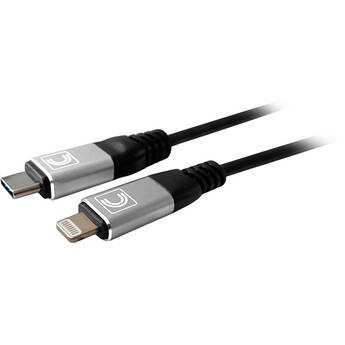
Comprehensive Pro AV/IT Specialist Series Lightning to USB-C Cable (6')
- Charge and Sync iPhone or iPad
- Apple MFi Certified
- Data Transfer Rates up to 480 Mb/s
- Reversible Lightning & USB Connectors
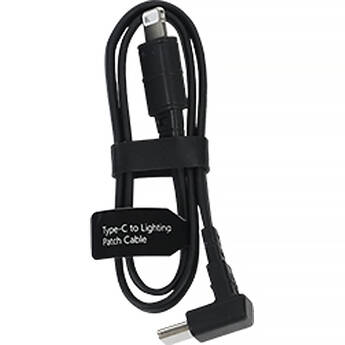
Hollyland USB-C to Lightning Male Cable (1')
- For LARK M2 & LARK MAX
- 1 x USB-C Male Connector
- 1 x Lightning Male Connector
- Compatible with Apple Devices
RODE SC21 Lightning to USB-C Cable (Red, 11.8")
RODE SC21 Lightning to USB-C Cable (Blue, 11.8")
Moshi Integra Lightning to USB-A Charge/Sync Cable (9.84", Titanium Gray)
- Reduce Excess Cabling
- Exceeds 20,000 Bend Cycles
- Supports up to 12W of Charging Power
- Supports USB 2.0 Data Transfer Rates
HYPER HyperJuice USB-C and Lightning Hybrid Silicone Cable (5', White)
- 2-in-1 USB-C/Lightning Hybrid Connector
- USB-C Connector
- Up to 60W Charging
- Apple MFi Certified
C2G USB-C Male to Lightning Male Sync and Charging Cable (3', White)
- Sync Data and Charge Lightning Devices
- MFi-Certified Rating Approved by Apple
- USB 2.0 480 Mb/s Bandwidth
- Up to 20W Power Support
C2G USB-C Male to Lightning Male Sync and Charging Cable (3', Black)
- Sync Data and Charge Lightning Devices
- MFi-Certified Rating Approved by Apple
- USB 2.0 480 Mb/s Bandwidth
- Up to 20W Power Support
Shure MoveMic USB-C to Lightning Male Cable (15")
- 1 x USB-C Male Connector
- 1 x Lightning Male Connector
- Replacement Part for MoveMic
Belkin 3.5mm Audio to Lightning Cable (6', Black)
- Connects iPhone Directly to 3.5mm Outlet
- MFi Certified
- Built-In Digital to Analog Converter
C2G USB-C Male to Lightning Male Sync and Charging Cable (6', White)
- Sync Data and Charge Lightning Devices
- MFi-Certified Rating Approved by Apple
- USB 2.0 480 Mb/s Bandwidth
- Up to 20W Power Support
C2G USB-C Male to Lightning Male Sync and Charging Cable (10', Black)
- Sync Data and Charge Lightning Devices
- MFi-Certified Rating Approved by Apple
- USB 2.0 480 Mb/s Bandwidth
- Up to 20W Power Support
Kramer Lightning to USB Sync & Charge Cable (3', White)
- Lightning Connector, Male
- USB 2.0 Type-A, Male
- Sync & Charge Cable
- Apple MFi Certified
Kramer Lightning to USB Sync & Charge Cable (3', Black)
- Lightning Connector, Male
- USB 2.0 Type-A, Male
- Sync & Charge Cable
- Apple MFi Certified
Kramer Lightning to USB Sync & Charge Cable (6', White)
- Lightning Connector, Male
- USB 2.0 Type-A, Male
- Sync & Charge Cable
- Apple MFi Certified
ChargeWorx USB-C to Lightning Cable (6', White)
- 1 x USB-C Male Connector
- 1 x Lightning Male Connector
- 20W Power Delivery
- 6' Cable Length
GOAL ZERO USB Type-A Male to Lightning Male Connector Cable (5")
Tera Grand Mobile Undead Apple MFi-Certified Lightning to USB Cable (Mummy, 5')
Tera Grand Mobile Undead Apple MFi-Certified Lightning to USB Cable (Zombie, 5')
Tera Grand Mobile Undead Apple MFi-Certified Lightning to USB Cable (Werewolf, 5')
Tera Grand Apple MFi Certified Lightning to USB Braided Cable (4', Red/Black)
Anker Bio-Braided USB-C to Lightning Cable (White, 3')
GOAL ZERO USB Type-A Male to Lightning Male Connector Cable (10")
Tera Grand C89 MFi Certified Lightning to USB Sync and Charging Cable (4', Purple/Blue)
- 1 x Lightning Male Connector
- 1 x USB-A Male Connector
- Apple MFi Certified
- 4' Cable Length
Tera Grand C89 MFi Certified Lightning to USB Sync and Charging Cable (4', Green/Silver)
- 1 x Lightning Male Connector
- 1 x USB-A Male Connector
- Apple MFi Certified
- 4' Cable Length
Tera Grand C89 MFi Certified Lightning to USB Sync and Charging Cable (4', Green)
- 1 x Lightning Male Connector
- 1 x USB-A Male Connector
- Apple MFi Certified
- 4' Cable Length
Verbatim USB-C to Lightning Sync & Charge Cable (4')
- USB-C Male Connector
- Lightning Male Connector
- Up to 60W USB Power Delivery 3.0
- USB 2.0 Interface (480 Mb/s)
Insta360 Flow 2 Pro/Flow 2 USB-C to Lightning Charge Cable (5.7")
Choosing Apple Lightning Cables and Adapters
If you're an iPhone, iPad, or any other Apple device user, you know how important and essential Apple Lightning cables and adapters are. These cables charge your devices or sync your phone or tablet to computers, televisions, tablets, and other compatible devices. There are several types of connections available to fit your needs, whether it's a set of Apple Lightning to USB cables to charge all your devices, or a specific Apple Lightning cable adapter to connect your iPad to display on a projector screen. Choosing the right kind of cable and adapter depends upon the type of device you have, as well as what you're looking to connect it with or display it on.
Charging and Syncing Cables
All portable and mobile Apple devices can use a Lightning cable for charging and syncing. You can plug these tablet and cell phone USB cables into USB-enabled devices for charging and syncing, or directly into wall outlets for charging only. If your portable Apple device was produced on or after the release of the iPhone 5 in 2012, you can use the Lightning cable without an attachment. If your device was produced before the iPhone 5 in 2012, it'll require an Apple 30-pin cable attached to a Lightning adapter.
Converter Cables and Adapters
Converter cables and adapters make it easier to connect devices without the need for extra cords. With the adaption of technology, you can connect iPhones or iPads directly to televisions, projectors, or any other device screens with HDMI ports. Lightning to digital AV converter adapters make it possible to display your Apple device screen onto a 1080p HDMI-enabled device.
Micro USB to USB-C adapters allow you to convert Android and other micro USB cords into chargers and sync cables for USB-C devices such as newer MacBook Air and Pro products, iMacs, Mac minis, and iPad Pro devices. USB-C to female USB adapters make it easier to connect any USB or USB-enabled device to USB-C devices, such as connecting an iPad Pro to a printer. Use Lightning to USB adapters to connect a camera to an iPad or iPhone to view your pictures on your Apple device through iPhotos.
Whichever cables or adapters you may need for your Apple devices, you'll find them in the large selection of accessories at B&H Photo and Video.