From Manufacturer
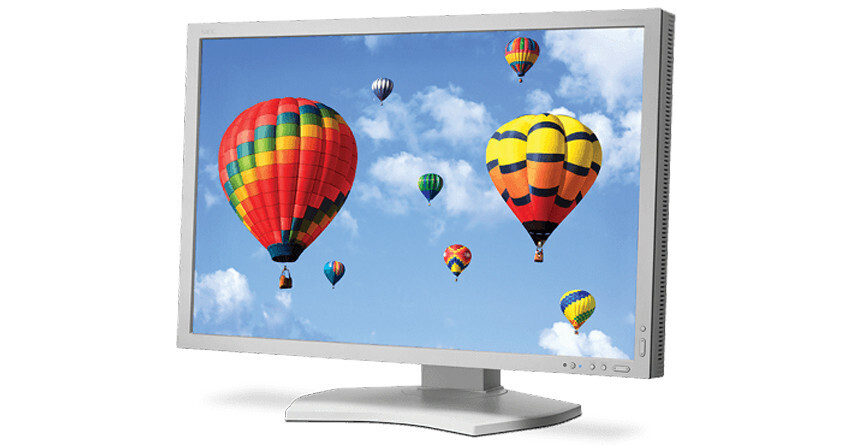
The white MultiSync PA302W 30" Wide Gamut Desktop Monitor from NEC is a benchmark desktop display for color accurate applications. The innovative GB-R LED backlight provides 99.3% coverage of the Adobe RGB color space while consuming less power than comparable CCFL backlights. Utilizing a high-performance AH-IPS LCD panel, the multisync monitor reliably delivers high quality, accurate images simply and beautifully.
The monitor features the MultiProfiler software that provides complete control over the five picture modes, including the loading of any ICC profile directly into the monitor for optimal color space matching. In addition, it features DisplaySync Pro technology, which allows you to control two computers with a single keyboard and mouse. The monitor's wide connectivity includes both regular and Mini DisplayPort with 10-bit support, 10-bit HDMI, a DVI-D input as well as a USB hub.The monitor provides 99.3% coverage of AdobeRGB color space.
It features superior screen performance with a 1000:1 contrast ratio, 2560 x 1600 native resolution, 340 cd/m2 brightness along with 14-bit 3D internal programmable lookup tables for calibration.
You can choose from five completely customizable picture modes with on-screen display user controls.
The MultiProfiler software provides complete control over the five picture modes, including the loading of any ICC profile directly into the monitor for optimal color space matching.
DisplaySync Pro allows you to control two computers with a single keyboard and mouse.
It features wide connectivity options, including both regular and Mini DisplayPort with 10-bit support, 10-bit HDMI, a DVI-D input as well as a USB hub.
The thin-frame monitor features a quick release and height-adjustable stand with locking base along with tilt and swivel angles.
Ambix4 allows up to four inputs (DisplayPort, VGA and 2 DVI-D) to be connected to a single monitor, enabling each of the four signals to be displayed with the press of a button. In addition, Digital Uniformity Compensation reduces screen uniformity errors and compensates for differences in color/grayscale and luminance using advanced signal processing circuitry.
The XtraView+ technology delivers wide viewing angles of up to 178° horizontally and vertically (up to 89° up, down, left and right) with less color shift and without any glare, reflection or distortion.
The AmbiBright technology automatically adjusts the backlight depending on the brightness of ambient lighting conditions. It also enables the monitor to enter the power saving mode whenever the ambient lighting falls below a predetermined value (like when lights are shut off at the end of the day), which can significantly reduce energy consumption.
The CableComp technology equalizes the video signal to eliminate color halos on long cable runs.
Multiprofiler Application
A variety of Monitor controls: MultiProler allows you to control the brightness, black
level and color gamut directly from the software in addition to many other settings. Changes
to settings are made instantly to the monitor.
Picture Mode preset editing: Multiple picture modes can be quickly congured using MultiProler. Choose from the simplicity of built-in sRGB, Adobe RGB, DCI, DICOM, REC-BT709 and High Brightness modes, or load an ICC prole for color matching an existing printer or display. In addition, MultiProler helps you create a completely custom Picture Mode conguration, including controlling the gamma characteristics, color gamut and white point.
Picture-in-Picture (PIP) conguration: The PIP modes can be completely congured directly in MultiProler, including the PIP mode, the video inputs and the Picture Mode for the second video input. This greatly simplies the management of multiple computer congurations.
DisplaySync Pro and USB hub conguration: The integrated USB hub in MultiSync PA Series monitors also can be managed through MultiProler to function as a keyboard/ video/mouse (KVM) switch. This feature maps the USB upstream ports to the various display inputs, which is useful for managing controlling computers attached to the display.
Quick print preview: Create a print preview Picture Mode for your printer by loading its ICC prole in MultiProler. The Picture-in-Picture or Picture-by-Picture function can then be used to view the print preview in real-time.
Automatic generation of ICC proles: MultiProler automatically generates and updates ICC proles as the color modes are selected or adjusted, reducing the need for a proling package to prole the monitor.
Picture Mode preset editing: Multiple picture modes can be quickly congured using MultiProler. Choose from the simplicity of built-in sRGB, Adobe RGB, DCI, DICOM, REC-BT709 and High Brightness modes, or load an ICC prole for color matching an existing printer or display. In addition, MultiProler helps you create a completely custom Picture Mode conguration, including controlling the gamma characteristics, color gamut and white point.
Picture-in-Picture (PIP) conguration: The PIP modes can be completely congured directly in MultiProler, including the PIP mode, the video inputs and the Picture Mode for the second video input. This greatly simplies the management of multiple computer congurations.
DisplaySync Pro and USB hub conguration: The integrated USB hub in MultiSync PA Series monitors also can be managed through MultiProler to function as a keyboard/ video/mouse (KVM) switch. This feature maps the USB upstream ports to the various display inputs, which is useful for managing controlling computers attached to the display.
Quick print preview: Create a print preview Picture Mode for your printer by loading its ICC prole in MultiProler. The Picture-in-Picture or Picture-by-Picture function can then be used to view the print preview in real-time.
Automatic generation of ICC proles: MultiProler automatically generates and updates ICC proles as the color modes are selected or adjusted, reducing the need for a proling package to prole the monitor.