Video Chat with a Pro Video Expert - Live

ikan VX17E Field Monitor Kit with Anton Bauer Battery Plate

BH #IKVX17EFKA • MFR #VX17E-FK-A
Print
ikan VX17E Field Monitor Kit with Anton Bauer Battery Plate
Key Features
  • 1440 x 900 HD Resolution TFT LCD Screen
  • SDI, HDMI, Component & Composite Inputs
  • 170° Viewing Angle
  • 250 Nit Brightness, 600:1 Contrast Ratio
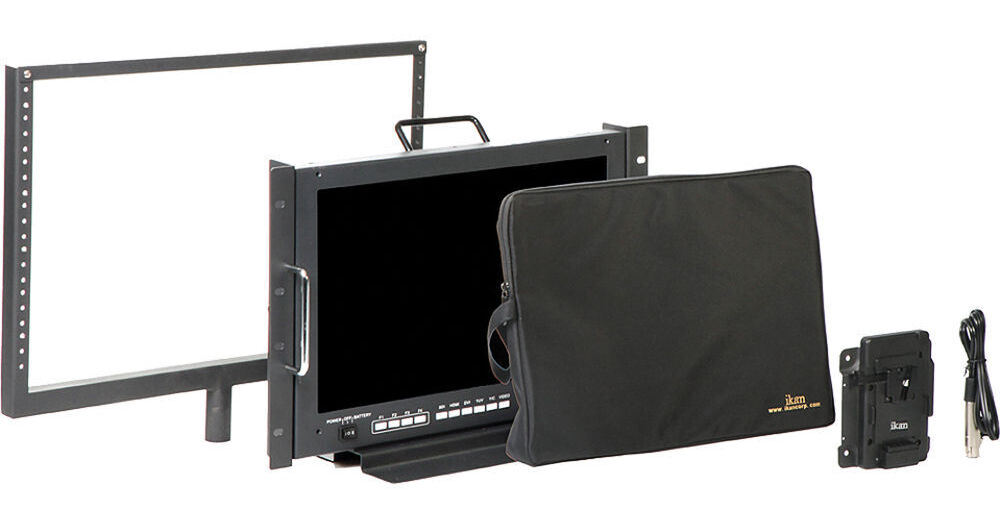
This ikan VX17E Studio/Field Monitor Kit with Anton Bauer Battery Plate features a 17" monitor with HD-SDI and HDMI connectivity, and the mounting and power accessories needed for use in the field or in the studio. For studio use, an AC power adapter, rack ears, and table stand are included. For use in the field, a battery plate kit is provided which lets you power the monitor with Anton Bauer Gold Mount batteries. Also included is a sun hood, screen protector, and monitor yoke.
More Details
No Longer Available
No Store Display
Ask an Expert
800-606-6969

ikan VX17e Overview

From Manufacturer

This ikan VX17E Studio/Field Monitor Kit with Anton Bauer Battery Plate features a 17" monitor with HD-SDI and HDMI connectivity, and the mounting and power accessories needed for use in the field or in the studio. For studio use, an AC power adapter, rack ears, and table stand are included. For use in the field, a battery plate kit is provided which lets you power the monitor with Anton Bauer Gold Mount batteries. Also included is a sun hood, screen protector, and monitor yoke.

The VX17E 17" HD-SDI, HDMI Studio/Field Monitor is equally at home in the field or the studio. It is small enough to be portable, while large enough for a small group of people to view it at the same time. It features a 17" TFT LCD screen with 1440 x 900 resolution, 250 Nit brightness, and a 600:1 contrast ratio for a sharp image. The VX17e features 170° viewing angle top to bottom and left to right, which makes it suitable to be used in situations where there is more than one person looking at the footage. It also comes equipped with loop-through HD-SDI, HDMI, component, composite, and S-Video inputs/outputs, so you can send a clean signal to an additional monitor or external recorder. Note that the monitor converts the HD-SDI signal into a component output in addition to the loop through HD-SDI output.

The VX17e features built-in advanced display functions such as, Peaking, False Color, and Clip Guides, each one a valuable tool that the camera operator can use to check focus and exposure while shooting. The monitor scales the video to fit its screen, and includes a 1:1 pixel mode for checking fine details of your image. The monitor also features an underscan mode, so you can shrink the image within the screen to make sure you are seeing the edges of the frame. The on-screen display simplifies navigating through the menu system.

The monitor features four function keys which you can assign as shortcuts to the menu system. The monitor also features a handle, rack mount ears, and a table stand, making it easy to carry, install into a rack, or set up as a desk top unit. The VX17e is powered by 12 to 24 volts DC via the 4-pin XLR connector. The VESA mounting holes on the back of the unit allow you to mount the battery adapter kit, letting you power the monitor with Anton Bauer Gold Mount batteries via the P-Tap to 4-pin XLR cable. You can also power it using the included AC adapter, making the monitor suitable for both the field and the studio.

When in the field, the Monitor Yoke allows you to fit the VX17e monitor atop any standard light stand or c-stand. When shooting in sunny or bright conditions, the sun hood easier viewing, while the screen protector offers added protection from dust, moisture, and scratches.

HD Resolution
The LCD screen features 1440 x 900 resolution, which can display 720p natively, and will scale 1080i/p to fit.
Human Interface
The monitor features four user programmable function buttons to access frequently used functions.
Display Features
Guides
The VX17e includes the following selectable guide frames.
    • Crosshair - Off / On
    • Guides Option - Off / 90% / 80% / 4:3
    • Guides Background - Normal / Half / Black
Peaking
Peaking highlights the sharpest (most in focus) areas of the image with a color outline. The VX17e features two modes, monochrome, and color. The monochrome mode shows the image in black and white with the red peaking outline and the color peaking mode shows the image in color with a red peaking outline. Both the peaking color and sensitivity can be adjusted in the monitor's menu system.
False Color
The False Color feature provides under/over luminance warning by presenting the image as a series of color values representing exposure.
Clip Guides
Set the upper IRE limit on the monitor and any part of the frame that is brighter than the set limit will flash a vivid purple. This feature is only available when viewing images via the HDMI input.
Luma Under/Over
ikan's exclusive Adjustable Under Exposure and Over Exposed Warning feature is an extension of false color. It allows the operator to set the preferred IRE exposure limits and the operator is warned when the image exposure exceeds or falling under the preset IRE limit.
DSLR Scaling
The DSLR Scaling function enables users to expand their DSLR camera's HDMI video signal to fill the monitor's screen if they wish. Users may choose from one of four scaling options: Normal, 3:2, 16:9 or Full Screen. This feature is only available when viewing images via the HDMI input.
Pixel to Pixel Mode
The monitor scales video signals to fit the LCD screen. Enabling Pixel to Pixel mode turns off scaling, displaying a 1440 x 900 window of your image. You use the scroll wheel to move the viewable window to view your image so you can see the actual detail and not be fooled by scaling artifacts.
Functions
The monitor features useful user functions:
    • Check Field - The monitor's check field function allows you to select to view the image in either monochrome, or viewing only the blue, green, or red channel.
    • Underscan
    • Window - creates two 16:9 windows on the screen, allowing you to freeze the video in one window, while it continues to play in the other.
LCD Controls
Menu controls allow you to adjust the following settings:
    • Brightness
    • Contrast
    • Chroma
    • Sharpness
    • Tint
    • Color Temp - 5600K/6500K/9300K/Manual
    • RGB Setup, R/G/B: 0:255

ikan VX17e Specs

Screen Size
17" diagonally (43.2 cm)
Resolution
1440 x 900
Brightness
250 nit
Contrast Ratio
600:1
Viewing Angle
R/L: 170°
T/B: 170°
Formats
HD-SDI
720p 50/59.94/60
1080i 50/59.94/60
1080psf 23.98/24/25/29.97/30
1080p 23.98/24/25/29.97/30

SD-SDI
720 x 480i 60
720 x 576i 50

HDMI
720 x 480i/p 59.95/60
720 x 576i/p 50
720p 50/59.94/60
1080i 50/59.94/60
1080psf 24/25/29.97/30
1080p 23.97/24/25/29.97/30/50/59.94/60

Component
720 x 480i 60
720 x 576i 50
720p 23.98/24/25/29.97/30/50/59.94/60
1080i 50/59.94/60
1080psf 24/25/29.97/30
1080p 23.98/24/25/29.97/30/50/59.94/60

S-Video/Composite
NTSC-M
NTSC-J,
NTSC 4.43
PAL B/G H I D
PAL M
Pal N
SECAM
Inputs
SD/HD-SDI: 1 x BNC
HDMI: 1 x HDMI 1.3
DVI: 1 Component: 3 x BNC
Composite: 1 x BNC
S-Video: 1 x 4-pin mini-DIN
Tally: RJ-45
Outputs
SD/HD/3G-SDI: 1 x BNC
HDMI: 1 x HDMI 1.3
Component: 3 x BNC
Composite: 1 x BNC
S-Video: 1 x 4-pin mini-DIN
Power
12 to 24VDC
110 to 220 VAC (using power supply)
Dimensions
Monitor: 15.13 x 11.75 x 1.75" (384.3 x 298.45 x 44.45 mm)
Battery adapter: 4.5 x 1.4 x 6.5" (114.3 x 34.9 x 165.1 mm)
Weight
Monitor only: 11.5 lb (5.2 kg)
Monitor with battery adapter: 12.4 lb (5.6 kg)
Packaging Info
Package Weight
28 lb
Box Dimensions (LxWxH)
24.4 x 18.5 x 16.6"

ikan VX17e Reviews

See any errors on this page?
Whatever You Need, We've Got It