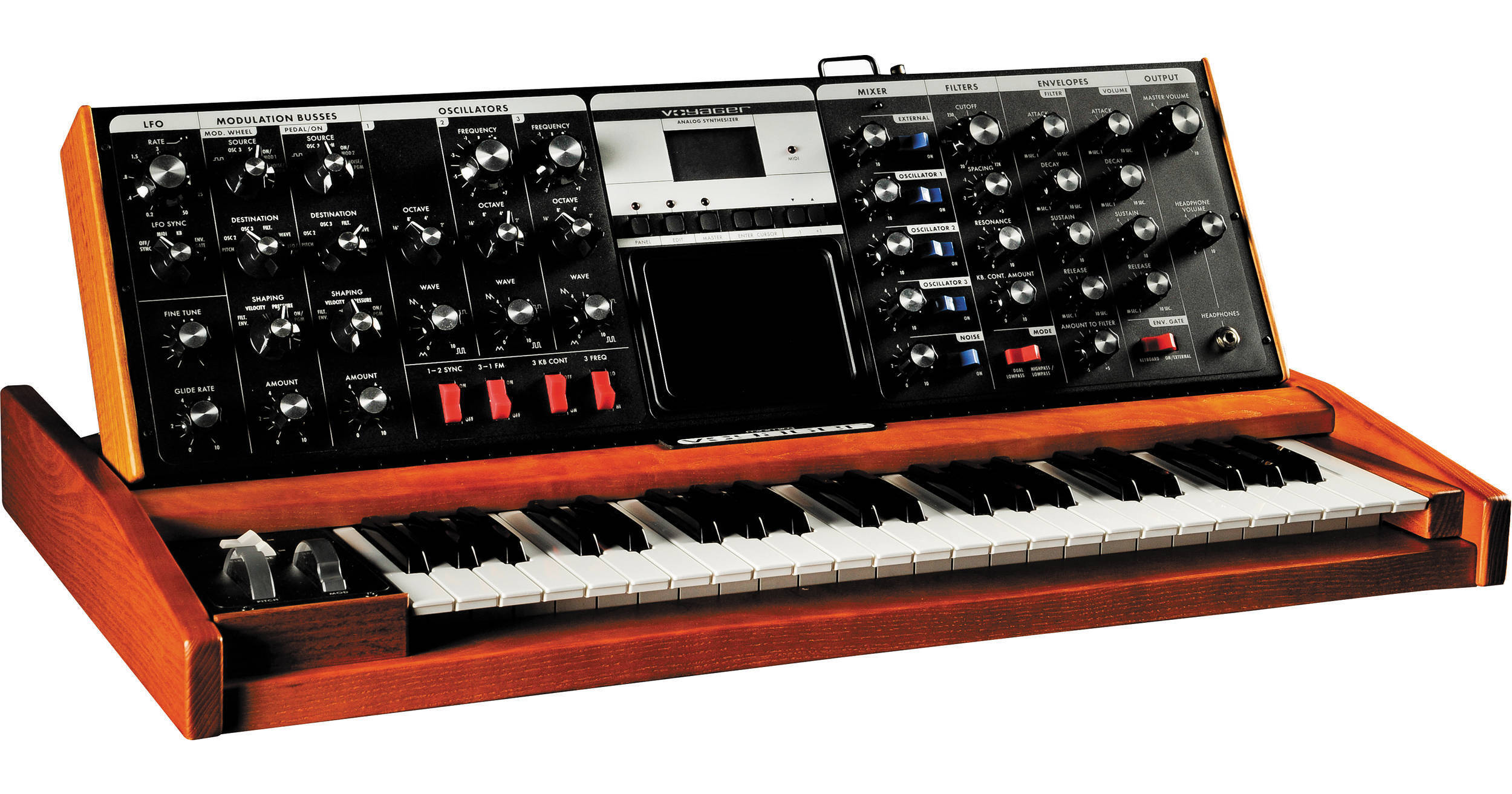
| Type | Programmable monophonic analog synthesizer |
| Sound Generator | 3x Oscillators (VCOs) with continuously variable waveform control,
1x Noise source
5-input Mixer
2x Filters
2x Envelope Generators
1x LFO
2x Programmable Modulation Sections, Glide and Fine Tune controls |
| Program Memory | 896 Presets in 7 banks, all locations are user rewritable |
| Keyboard | 44 keys (F-C)
Transmits polyphonic MIDI Note, On/Off messages along with velocity and aftertouch |
| Controls | Pitch Wheel: programmable, up to +/- 31 semitones (2 octaves and a 5th)
Modulation Wheel: 0 to 100%
Glide and Release Switches: On/Off
Touch Surface: programmable, three dimensional surface that generates continuously variable control signals based on the position of the player's finger and the amount of contact area the player's finger makes with the surface (Voyager Keyboard only).
Master Volume Control: 0 to 100%
2x Frequency controls vary the frequencies of Oscillators #2 and #3 over a +/-7 semitone range with respect to Oscillator #1.
3x Octave selectors set the frequency ranges of the oscillators in six octave steps.
3x Wave controls provide continuous control over the waveforms of the oscillators, from triangular, to sawtooth, to square, to narrow rectangular.
1-2 SYNC switch synchronizes the Oscillator #2 waveform to the frequency of Oscillator #1, for dramatic timbral effects.
3-1 FM switch provides linear frequency modulation of Oscillator #1 by Oscillator #3.
3 KB CONT switch disconnects Oscillator #3 from control by the keyboard, thereby enabling it to function as a drone.
3 FREQ switch lowers the frequency of Oscillator #3 into the sub-audio range, thereby enabling it to function as a low frequency audio or modulating oscillator. |
| Mixer | Five-input mixer for combining the audio sources prior to filtering 5x Input Level controls adjust the relative levels of the oscillator, noise, and external audio input signals.
5x Input switches enable you to quickly switch individual audio signals in and out
External Level LED enables the player to set the correct external audio signal level |
| Filters | Dual mode filter module includes dual low-pass and high-pass-/low-pass filtering. Dual low-pass mode consists of two Moog low-pass-resonant filters in parallel, one per output channel. High-pass/low-pass mode consists of Moog low-pass filter in series with a high-pass filter
Cutoff control sweeps the frequencies of both filters throughout the audio range.
Spacing control sets the spacing between the frequencies of the two filters, over a +/-3 octave range.
Resonance control adjusts the resonance of both filters, from none (pure low-pass response) to filter oscillation.
KB CONT Amount control sets how much the filters open and close as the player presses different keys on the keyboard
Dual Low-pass/High-pass/Low-pass switch selects between dual low-pass operation or high-pass/low-pass operation. |
| Envelope | The Envelopes Module generates two wide-range ADSR (Attack Decay Sustain Release) envelopes. The Filter Envelope sweeps the filter and is available for modulation shaping. The Volume Envelope shapes the overall volume.
2x Attack controls determine the attack times of the envelopes.
2x Decay controls determine the decay time constants of the envelopes.
2x Sustain controls determine the sustain levels of the envelopes.
2x Release controls determine the release time constants of the envelopes.
Amount To Filter control determines how much the filter envelope will open and close the filter, from full negative (inverted envelope) to full positive (non-inverted envelope).
Envelope Gate Switch selects whether the envelopes will be triggered by the keyboard, on, or by an externally-applied gate. |
| LFO | Low Frequency Oscillator generates triangular, square, Sample & Hold, and smoothed Sample & Hold waveforms for use as modulating signals
Rate control sets the LFO rate over the range 0.2 Hz (one cycle every five seconds) to 50 Hz (fifty times a second).
Sync selector selects LFO synchronization source to be from the keyboard gate, external envelope gate, external gate, or off (no synchronization).
Rate LED provides visual indication of the LFO rate. |
| Modulation | Modulation Busses Module: Selects the sources, destinations, and shaping signals for the Mod Wheel bus and the EXT Pedal/ON bus
2x Source selectors select the modulation source from the LFO triangle or square waveforms, Oscillator# 3, sample and hold, the external modulation input (MOD2) or noise.
2x Destination selectors select the modulation destination from all the audio oscillators, just Oscillator #2, just Oscillator #3, the filter cutoff frequencies, the oscillator waveforms, or LFO Rate.
2x Shaping selectors select the key pressure signal, filter envelope, note-on velocity or on to shape the modulation signal on that bus.
2x Amount controls set the overall modulation amount for each bus. |
| Glides | Glide and Fine Tune Module:
Glide varies the speed at which the keyboard voltage changes, from instantaneous to several seconds.
Fine Tune adjusts the overall tuning of the instrument. |
| Software | Software Capabilities:
Front Panel Storage and Recall: Except for the Fine Tuning control, the settings of all front panel controls, selectors, and switches are stored in the nonvolatile digital memory. A total of 896 front panel presets may be stored for instant recall.
Transmission and Reception Of Keyboard Data Via Midi: Polyphonic note-on and note-off with velocity can be transmitted (Note numbers 53-96).The Voyager responds to note-on (0-127) messages monophonically with user definable note priority. The Voyager's Front Panel Controls transmit and respond to MIDI CCs. Please refer to the Voyager User's Manual for a list of the Front Panel Controls and their corresponding MIDI CC#s.
Uploading and Downloading Of Presets Via Midi: Individual Presets or whole Preset banks may be uploaded and downloaded via MIDI System Exclusive.
Updating Of Operating Software Via MIDI: The instrument's operating software can be updated via MIDI files (.syx Sysex files) which will be available on Moog Music's web site in the Support Docs and Software section.
Panel Mode Features: Panel Mode features include Compare, Quick Mode (Preset changes with +/-1 buttons), Parameter Display (view stored parameter value, current parameter value), and enable/disable preset Master and Headphone Volume.
Edit Mode Features: Related to Preset Parameters not on Front Panel, these include: Compare to Preset, Recall last Sound, Real Panel Control, Pitch Bend Amount, Programmable Mod Buss Sources, Destinations and Shaping, Keyboard and Trigger Modes, Filter Pole Select, Envelope Gate Source, Touch Surface Destinations, Touch Surface Memory, Pot Mapping Mod. Matrix, LFO MIDI Clock Divider, Initialize Parameters, Preset Name, and Save Preset.
Master Mode Features: Global Settings and functions for the Voyager include: LCD Contrast, MIDI Local Kbd. On/Off, MIDI Merge, MIDI Program Change On/Off, MIDI In/Out Channel, MIDI In/Out On/Off, Send Panel Sound, Send All Presets, Receive Presets, SysEx Device ID, Transpose In/Out, MIDI Key Order, Velocity Curve, Copyright Info, Software Version, Send System ROM, Send Boot System, Receive Update. |
| Control Input | 10x Control Input Jacks: These 10 jacks have red nuts. They accept either expression pedals or control voltages, and control the following performance parameters:
Volume
Pan
Filter Cutoff
Waveform
Pitch
MOD2 - External Modulation Source
MOD1 - External Control Of The Pedal Modulation Bus
Sample and Hold In
Envelopes Rate
LFO Rate |
| Connections | LFO Sync: A footswitch or gate applied to this input will reset the LFO waveform to the beginning of its cycle.
Envelopes Gate: A footswitch or gate applied to this input will start the envelopes.
Sample and Hold Gate: A gate signal applied to this jack will trigger a new sample and hold voltage.
Release: A foot switch plugged into this jack will have the same effect as depressing the corresponding switch on the left hand controller panel.
Mixer Ext In: Plug any instrument-level or line-level audio signal in this jack to combine with the oscillator and noise signals prior to filtering.
Mix Out/Filter Audio In: The output of the audio mixer appears here, before being fed to the filter. Normally, the Mixer output is bridged directly to the filter input. If you plug something into this jack, that breaks the normal connection. Using a standard insert cable (1/4" TRS plug to two 1/4" TS plugs) this jack can be used as an effects loop for external processing of the Mix before it goes to the filter. |
| User Interface | Backlit LCD Display with contrast control
Mode Controls: Preset, Edit and Master function buttons
Selection/Navigation Controls: Cursor, Enter, and -1/ 1 buttons |
| Backlight | Variable-intensity illumination of the Voyager panel with a dedicated Brightness control |
| Back Panel I/O Ports | AC Power Inlet (universal power supply, 100-250 V AC, 50-60 Hz)
Power ON/OFF switch
Stereo Audio Output jacks (switch-selectable 4 dBM, 600 Ω balanced outputs or -2 dBM unbalanced outputs available on the Voyager RME only)
External Audio In jack
Mixer Out/Filter In jack
Pedal/Control Jacks (14 inputs that allow external control of various CV and Gate functions, Voyager Keyboard only)
Accessory Output Port
Accessory Input Port
BNC Lamp Socket: supplies 12 VDC for a standard gooseneck lamp (Voyager Keyboard only)
MIDI In, Out and Thru connections |
| Output | 2x 1/4" (6.3 mm) unbalanced jacks (L,R)
1x 1/4" (6.3 mm) TRS Headphone jack on front panel with a dedicated Volume control |
| MIDI | 1x 5-Pin DIN In
1x 5-Pin DIN Out
1x 5-Pin DIN Thru |
| Operating System | Flash upgradeable via MIDI SysEx |
| Power | 100 to 250 V AC, 50-60 Hz |
| Dimensions | Panel Flat: 30.5 x 18 x 3" (77 x 46 x 8 cm)
Panel Upright: 30.5 x 18 x 12" (77 x 46 x 30 cm) |
| Weight | 40 lb (18.2 kg) |