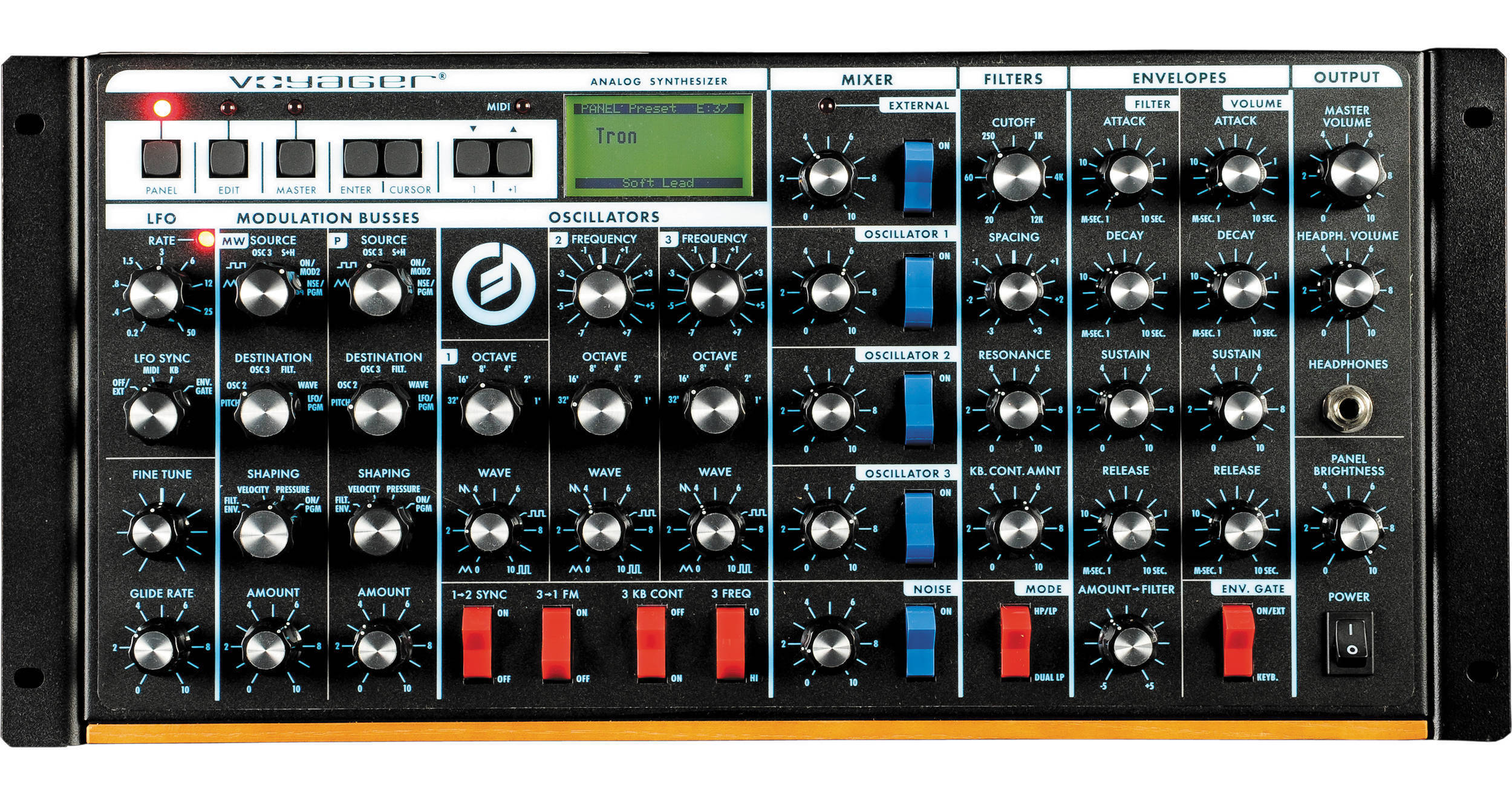
| Type | Programmable monophonic analog synthesizer |
| Sound Generator | 3x Oscillators (VCOs) with continuously variable waveform control,
1x Noise source
5-input Mixer
2x Filters
2x Envelope Generators
1x LFO
2x Programmable Modulation Sections, Glide and Fine Tune controls |
| Program Memory | 896 Presets in 7 banks, all locations are user rewritable |
| Mixer | Five-input mixer for combining the audio sources prior to filtering 5x Input Level controls adjust the relative levels of the oscillator, noise, and external audio input signals.
5x Input switches enable you to quickly switch individual audio signals in and out
External Level LED enables the player to set the correct external audio signal level |
| Filters | Dual mode filter module includes dual low-pass and high-pass/low-pass filtering. Dual low-pass mode consists of two Moog low-pass-resonant filters in parallel, one per output channel. High-pass/low-pass mode consists of Moog low-pass filter in series with a high-pass filter
Cutoff control sweeps the frequencies of both filters throughout the audio range
Spacing control sets the spacing between the frequencies of the two filters, over a +/-3 octave range
Resonance control adjusts the resonance of both filters, from none (pure low-pass response) to filter oscillation
KB CONT Amount control sets how much the filters open and close as the player presses different keys on the keyboard
Dual Low-pass/High-pass/Low-pass switch selects between dual low-pass operation or high-pass/low-pass operation |
| Envelope | The Envelopes Module generates two wide-range ADSR (Attack Decay Sustain Release) envelopes. The Filter Envelope sweeps the filter and is available for modulation shaping. The Volume Envelope shapes the overall volume.
2x Attack controls determine the attack times of the envelopes
2x Decay controls determine the decay time constants of the envelopes
2x Sustain controls determine the sustain levels of the envelopes
2x Release controls determine the release time constants of the envelopes
Amount To Filter control determines how much the filter envelope will open and close the filter, from full negative (inverted envelope) to full positive (non-inverted envelope)
Envelope Gate Switch selects whether the envelopes will be triggered by the keyboard or by an externally-applied gate |
| LFO | Low Frequency Oscillator generates triangular, square, Sample & Hold, and smoothed Sample & Hold waveforms for use as modulating signals
Rate control sets the LFO rate over the range 0.2 Hz (one cycle every five seconds) to 50 Hz (fifty times a second)
Sync selector selects LFO synchronization source to be from the keyboard gate, external envelope gate, external gate, or off (no synchronization)
Rate LED provides visual indication of the LFO rate |
| Modulation | Modulation Busses Module: Selects the sources, destinations, and shaping signals for the Mod Wheel bus and the EXT Pedal/ON bus
2x Source selectors select the modulation source from the LFO triangle or square waveforms, Oscillator #3, sample and hold, the external modulation input (MOD2) or noise
2x Destination selectors select the modulation destination from all the audio oscillators, just Oscillator #2, just Oscillator #3, the filter cutoff frequencies, the oscillator waveforms, or LFO Rate
2x Shaping selectors select the key pressure signal, filter envelope, note-on velocity or on to shape the modulation signal on that bus
2x Amount controls set the overall modulation amount for each bus |
| Glides | Glide and Fine Tune Module:
Glide varies the speed at which the keyboard voltage changes, from instantaneous to several seconds
Fine Tune adjusts the overall tuning of the instrument |
| Software | Software Capabilities:
Control Of Front Panel Parameters Through MIDI: All front panel parameters except for fine tune and headphone volume are controllable through MIDI Control Change commands
Transmission Of Front Panel Setting Via MIDI: Setting of all panel controls, selectors, and switches except for fine tune and headphone volume transmit MIDI Control Change Commands. Potentiometer controls transmit 14 bit CCs
Uploading and Downloading of Banks of Settings Via MIDI: Entire banks or individual presets may be uploaded and downloaded via MIDI
Updating of Operating Software Via MIDI: The instruments operating software can be updated via standard MIDI (.MID) or SysEx (.SYX) files which will be available on Moog Music's web site
Panel Mode Features:
Quick Mode
Parameter Display
Master/HP Volume
LCD Contrast
T.S. Reduction
Ext. Audio Pot
Glide Function
Release Function
Edit Mode Features:
Compare to Preset
Recall Last Sound
Real Panel Parameters
Pitch Bend Amount
PGM Mod Wheel Source
PGM Mod Wheel Destination
PGM Pedal Source
PGM Pedal Destination
PGM Shaping Source 1
PGM Shaping Source 2
Keyboard Modes
Trigger Modes
Filter A Poles
Filter B Poles
Filter Envelope Gate Source
Volume Envelope Gate Source
T.S. Destinations
T.S. Memory Mod Buss
T.S. Memory Global
Pot Mapping Sources/Destinations
MIDI Clock Divider
Initialize Parameters
Preset Name
Save Preset
MASTER MODE FEATURES
MIDI Program Change
MIDI Channels
MIDI Out On/Off
MIDI Merge Function
Send Panel Sound
Send Preset(s)
Receive Presets
SysEx Device ID
Key Transpose
MIDI Key Order
MIDI Running Status
Copyright Info
Software Version
Send System ROM
Send Boot System
Receive Update |
| Control Input | 10x Control Input Jacks: These 10 jacks have red nuts. They accept either expression pedals or control voltages, and control the following performance parameters:
Volume
Pan
Filter Cutoff
Waveform
Pitch
MOD2 - External Modulation Source
MOD1 - External Control Of The Pedal Modulation Bus
Sample and Hold In
Envelopes Rate
LFO Rate |
| Connections | LFO Sync: A footswitch or gate applied to this input will reset the LFO waveform to the beginning of its cycle
Envelopes Gate: A footswitch or gate applied to this input will start the envelopes
Sample and Hold Gate: A gate signal applied to this jack will trigger a new sample and hold voltage
Release: A footswitch plugged into this jack will have the same effect as depressing the corresponding switch on the left hand controller panel
Mixer Ext In: Plug any instrument-level or line-level audio signal in this jack to combine with the oscillator and noise signals prior to filtering
Mix Out/Filter Audio In: The output of the audio mixer appears here, before being fed to the filter. Normally, the Mixer output is bridged directly to the filter input. If you plug something into this jack, that breaks the normal connection. Using a standard insert cable (1/4" TRS plug to two 1/4" TS plugs) this jack can be used as an effects loop for external processing of the Mix before it goes to the filter. |
| User Interface | Backlit LCD Display with contrast control
Mode Controls: Preset, Edit and Master function buttons
Selection/Navigation Controls: Cursor, Enter, and -1/+1 buttons |
| Backlight | Variable-intensity illumination of the Voyager panel with a dedicated Brightness control |
| Back Panel I/O Ports | AC Power Inlet (universal power supply, 100-250 V AC, 50-60 Hz)
Power ON/OFF switch
Stereo Audio Output jacks (switch-selectable 4 dBm, 600 Ω balanced outputs or -2 dBm unbalanced outputs available on the Voyager RME only)
1x Male DB-25 Input Connector for Control Voltage for:
Volume
Pan
Filter Cut-Off
Oscillator Waveform
Oscillator Pitch
MOD2 (External Mod Source)
MOD1 (Controls Pedal/On Mod Bus Amount)
Sample and Hold In
Envelopes Rate
LFO Rate
T.S. X
T.S. Y
T.S. A
Gates:
LFO Sync
Envelopes Gate
Sample and Hold Gate
Release
T.S. Gate
1x Female DB-25 Output Connector for Control Voltage for:
Keyboard Gate
Keyboard CV
Keyboard Pressure CV
Keyboard Velocity CV
X, Y, AND Z CV Outputs From the T.S. Inputs
MOD 1 and MOD2M
MOD and Pitch Wheels
MOD Bus Outputs
Filter and Volume Envelopes
LFO Triangle and Square Wave
Sample and Hold Stepped and Smoothed Output
Noise |
| Output | 2x 1/4" (6.3 mm) unbalanced jacks (L,R)
1x 1/4" (6.3 mm) TRS Headphone jack on front panel with a dedicated Volume control |
| MIDI | 1x 5-Pin DIN In
1x 5-Pin DIN Out
1x 5-Pin DIN Thru |
| Power | 100 to 250 V AC, 50-60 Hz |
| Dimensions | 19 x 7.25 x 8.75" (482 x 184 x 222 mm), occupies 5 rack spaces |
| Weight | 15 lb (6.8 kg) |