Video Chat with a Pro Audio Expert - Live

IRCAM TOOLS HEar v3 - Binaural Encoding Plug-In Tool for Headphones

BH #IRHEARV3 • MFR #HEAR V3
Print
IRCAM TOOLS HEar v3 - Binaural Encoding Plug-In Tool for Headphones
Key Features
  • Monitor Surround Mixes via Headphones
  • Up to 8 Channels Input/Output
  • Up to 384 kHz Sample Rate Support
  • AAX Native
The HEar v3 from IRCAM Tools is a plug-in designed to deliver a faithful reproduction of a stereo or surround mix using a pair of conventional stereo headphones. The software was developed using a dummy head and torso simulation that provides an approximation of how a human perceives sound. The plug-in is accessible via any host software that supports the AAX Native, Audio Units or VST (2.4) formats, on both Mac and Windows based systems.
More Details
Digital
No Longer Available
No Store Display
Ask an Expert
800-606-6969

IRCAM TOOLS HEAR V3 Overview

The HEar v3 from IRCAM Tools is a plug-in designed to deliver a faithful reproduction of a stereo or surround mix using a pair of conventional stereo headphones. The software was developed using a dummy head and torso simulation that provides an approximation of how a human perceives sound. The plug-in is accessible via any host software that supports the AAX Native, Audio Units or VST (2.4) formats, on both Mac and Windows based systems.

The plug-in features virtual speakers where the audio input is routed internally through a matrix. The results represent the emulated loudspeaker setup configurations. It allows for monitoring a full surround mix in situations where a surround-capable environment is not available or practical. Another use of the plug-in is precise checking of a mix with headphones as they provide a "surgical" and detailed, microscope-like rendering of the audio.

Provides faithful reproduction of a stereo or surround mix with a pair of conventional stereo headphones
Models the various phenomena that occur when playing back audio material through a loudspeaker system
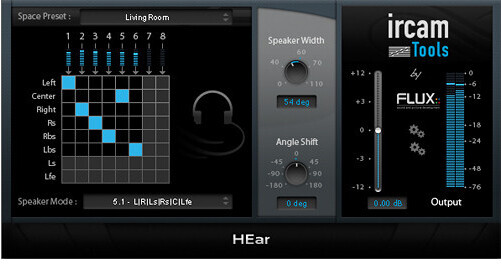
Space Presets present a range of spaces with subtly different colorations
Routing Matrix gives a view of the mapping between the plug-in inputs from a DAW track to the virtual speaker internal outputs
Speaker Mode specifies which virtual speaker configuration that should be emulated
Speaker Width controls the width between virtual speakers, expressed in degrees (the default is 60° which corresponds to the recommended setting) and allows for narrowing or broadening the stereo image
Angle Shift controls the angle between the listener and the center of the virtual speakers (the default is 0° which corresponds to the ideal listener position, giving a balanced image between channels)

IRCAM TOOLS HEAR V3 Specs

System Requirements
Mac
OS X 10.7 and 10.8 (32- and 64-bit)
Host software that supports AAX Native, Audio Units and VST (2.4) plug-in formats

PC
Windows Vista, Windows 7 and 8 (32- and 64-bit), Windows XP 2.4 / 32-bit only
Host software that supports AAX Native and VST (2.4) plug-in formats

(32-bit AAX Native support in Pro Tools 10.3.5 and 64-bit in Pro Tools 11)

Due to Avid ProTools changing over to the AAX format, RTAS is no longer supported from version 3 (v3) on

IRCAM TOOLS HEAR V3 Reviews

See any errors on this page?
Whatever You Need, We've Got It