
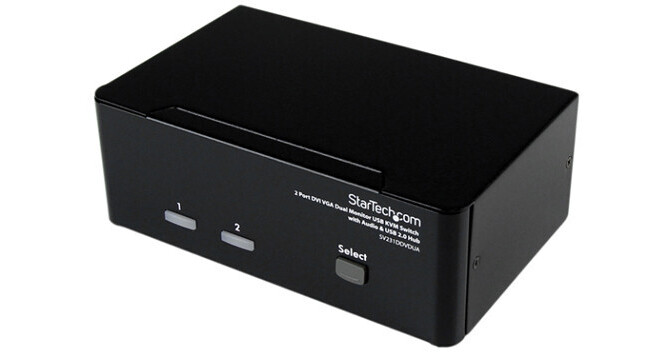
StarTech 2-Port DVI+VGA Dual Monitor KVM Switch with Audio & USB 2.0 Hub

BH #STSV231DDV2A • MFR #SV231DDVDUA
Print
StarTech 2-Port DVI+VGA Dual Monitor KVM Switch with Audio & USB 2.0 Hub
Key Features
  • 1920 x 1200 Maximum Resolution
  • Integrated 2-Port USB 2.0 Hub
  • Dual Monitor Support
  • All-Metal Chassis
The black 2-Port DVI+VGA Dual Monitor KVM Switch with Audio & USB 2.0 Hub from StarTech allows you to control two dual display computers, using a single USB mouse and keyboard peripheral set. With support for high-resolution video interfaces, this dual view KVM switch provides one VGA (analog) and one DVI-I port per computer connection, as well as audio-switching capability between connected computers.
More Details
Special Order
Expected availability: 2-4 Weeks
No Store Display
Free Standard Shipping
Protect Your Gear
Add a protection plan from $17.00
Supported Computers
Ask an Expert
800-606-6969

StarTech SV231DDVDUA Overview

The black 2-Port DVI+VGA Dual Monitor KVM Switch with Audio & USB 2.0 Hub from StarTech allows you to control two dual display computers, using a single USB mouse and keyboard peripheral set. With support for high-resolution video interfaces, this dual view KVM switch provides one VGA (analog) and one DVI-I port per computer connection, as well as audio-switching capability between connected computers.

The DVI + VGA KVM switch features an integrated 2-port USB hub that allows USB 2.0 peripherals to be shared between connected computers. It offers a compact design with a rugged metal chassis for durable performance.

Note:
The KVM switch supports DVI-D (digital) signaling only and it is recommended to use DVI-D cabling across all PC to KVM, and KVM to console connections to ensure proper functioning.
Direct channel selection and operation using front panel push-button, or keyboard hotkeys
Supports a maximum resolution of 1920 x 1200
OS independent (no drivers or software required)
Independent USB hub and audio switching
Full support for plug and play peripherals
All-metal chassis for use in harsh environments
Status LED display for port status monitoring
USB style keyboard and mouse, plus two other USB peripherals can be shared between two computers
Tone indicator for computer switching
Selectable time intervals for auto scan
Rear function key to adjust video strength
HDCP compliant
Supports DDC2B emulation and EDID pass through, which allows the display adapter to recognize and auto configure the display resolutions to match the display capabilities
Supports dual monitor/flat panel displays (1 x DVI + 1 x VGA)
Applications
For desktops, workstations and servers with both VGA and DVI-digital ports, allowing you to take advantage of the dual monitor configurations
For financial/banking industries, graphic designers, engineers, multi-media designers, and industries using CAD/CAM applications, where high-resolution dual monitor units are needed
For use in environments with electromagnetic interference, based on sturdy metal design
Provides support for setups where one machine is DVI and VGA, and the other is VGA and VGA (with available adapters)
UPC: 065030835725

StarTech SV231DDVDUA Specs

Connectors
KVM Ports
2
PC Interface
USB
PC Video Type
DVI+VGA
Multi-Monitor
Yes
Console Interfaces
1 x DVI-I (29-pin) female
1 x VGA (15-pin, high density D-Sub) female
2 x 3.5 mm mini jack (3-position) female
4 x USB A (4-pin) female
Host Connectors
2 x DVI-I (29-pin) female
2 x USB B (4-pin) female
2 x VGA (15-pin, high density D-Sub) female
4 x 3.5 mm mini jack (3-position) female
Performance
DVI Support
Single link
Maximum Digital Resolution
1920 x 1200
Maximum Number of Users
1
Port Selection
Push button and hotkeys
Selection Support MTBF
64,691 hours
Indicators
LED Indicators
Power: 1 x green
PC Detected: 2 x green
PC Indicator: 2 x red
Power
Plug Type
M
Center Tip Polarity
Positive
Input Voltage
110 ~ 240 AC
Input Current
0.8 A
Output Voltage
12 VDC
Output Current
1.5 A
Environmental
Operating Temperature
32 to 104°F (0 to 40°C)
Storage Temperature
-4 to 140°F (-20 to 60°C)
Relative Humidity
80%
OS Compatibility
OS independent (No software or drivers required)
General
Enclosure Type
Steel
Compliance
FCC, CE, RoHS
Length
6.4" (162.5 mm)
Dimensions
6.3 x 2.2 x 3.9" (160.0 x 55.8 x 99.0 mm)
Weight
26.5 oz (751.2 g)
Packaging Info
Package Weight
2.8 lb
Box Dimensions (LxWxH)
11.5 x 7.7 x 2.8"

StarTech SV231DDVDUA Reviews

Trash

By Austin
Rated 1 out of 5
Date: 2024-11-11

Came without any video cables, just the box and the power cable. Put the MF cables in the box and ship it! For $200 you can’t just include some cables. Cheap money hoarders

When you're done with KVM failures

By WilliamRyan
Rated 4 out of 5
Date: 2017-09-14

To begin, I am a reviewer that gets access to products in exchange for an unbiased review. In my case, I frequently upgrade monitors and components. Where possible I try to use Networked components and share them, but in my office I have a desktop as well as a laptop. I got really tired to flipped back and forth between them so I started with a different KVM that I got from StartTech. Based on my experience with it, I decided to try one for some of my older components. I have several monitors and components that are a little older but in great shape. I didn't want to buy additional items for newer laptops when I had existing ones that would work. This arrived and I was really pleased with it. The first thing you'll notice is the construction. This isn't a toy, it's not a beginner KVM and you don't need a lot of knowledge to use it, but if you're tired of playing with cheaper models this is for you. The only thing I'd suggest it to make sure you understand the product. If you need VGA ports, this is for you. If you have mixed monitors with VGA and DVI this is perfect. If you don't and only have HDMI, you'll need an adapter but would be better off getting their HDMI enabled model. In any case, the biggest metrics I care about other than ultimately functioning is the setup time and ease of use. Setup will take you about 2 minutes if you have the right components, if you need adapters you'll be set back by another minute or dead in the water if you're missing them - but that applies to everything. It's a few minutes to set up, not even a minute to figure out how to use. You'll have two full ports outside of the base, USB ports and shared microphone ports and headphone ports. Built well, works well, easy to use. What else can you ask for?

See any errors on this page?
Whatever You Need, We've Got It