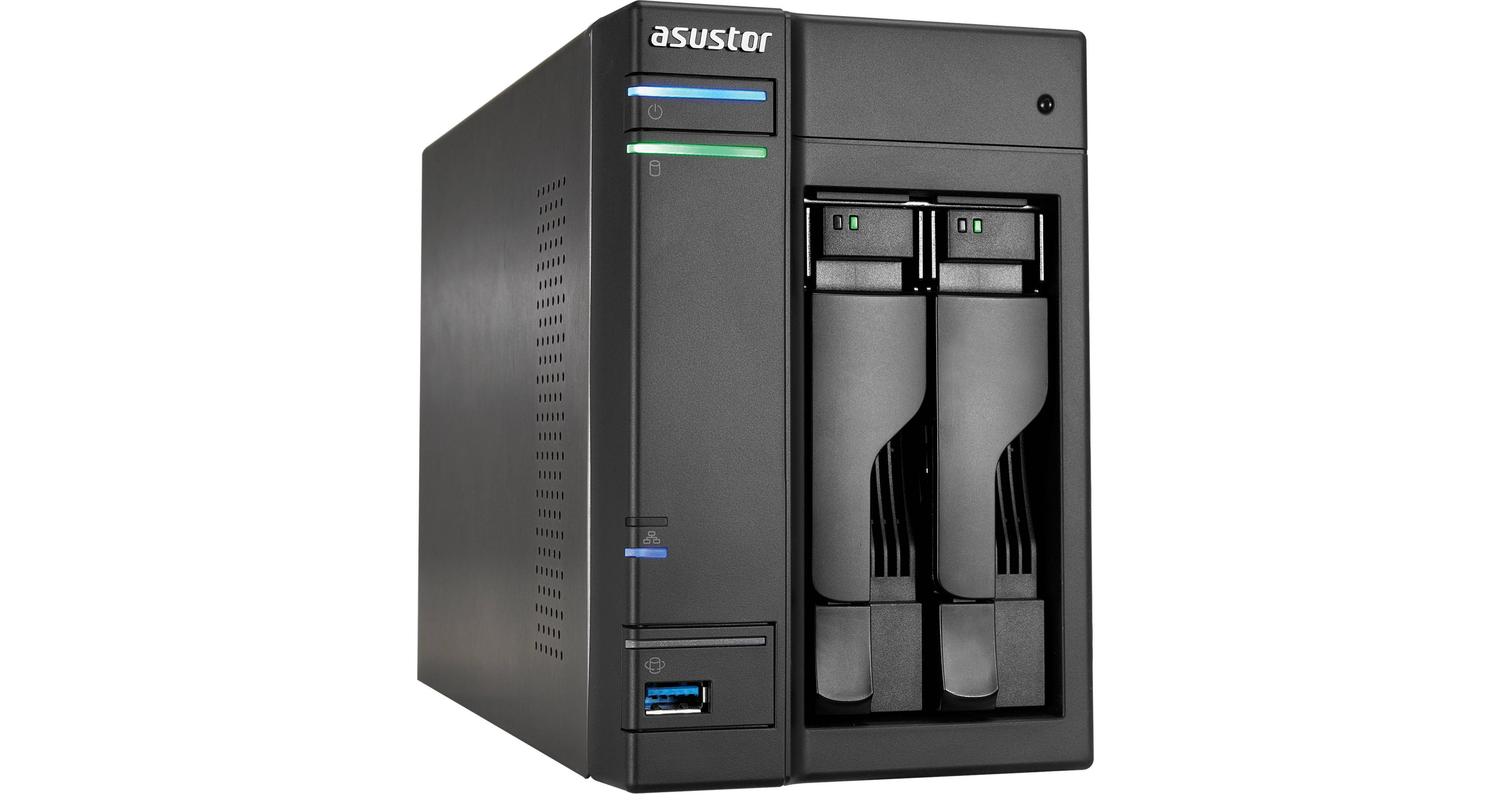
The diskless AS-202TE 2-Bay Data Storage Server from ASUSTOR is a full-featured 2-bay multimedia storage center complete with a 1.2 GHz dual-core Intel Atom processor and 1GB DDR3 RAM. The enclosure is capable of housing both 2.5" and 3.5" SATA II and SATA III hard drives in a variety of RAID formats including Single Disk, JBOD, RAID 0 and RAID 1 to suit a variety of storage needs.
In addition to hard drive compatibility, you can also take advantage of two USB 3.0 and two USB 2.0 ports to attach USB compatible peripheral devices, and one HDMI port supporting 1080p HD multimedia playback. Once configured connect this storage server to the Internet via the integrated Gigabit Ethernet port located on the back of the unit.
With an array of intuitive applications you can manage all of your data from virtually anywhere. With the built-in file explorer you can easily access your files from Internet connected web browsers including Internet Explorer, FireFox, Chrome, or Safari. The files can be viewed in a directory structure that simplifies the often tedious task of organizing a large number of files. If you intend on accessing your files on the go you can utilize the intuitive mobile apps for both Android or iOS to remotely access and manage files.
Ask Our Experts866-264-7509
Hello, Log InAccount & Orders
Key Features
- 1.2 GHz Intel Atom Processor
- 1GB DDR3 RAM
- Supports 2.5" & 3.5" SATA II/III HDDs
- 1 x Gigabit Ethernet Port
The diskless AS-202TE 2-Bay Data Storage Server from ASUSTOR is a full-featured 2-bay multimedia storage center complete with a 1.2 GHz dual-core Intel Atom processor and 1GB DDR3 RAM. The enclosure is capable of housing both 2.5" and 3.5" SATA II and SATA III hard drives in a variety of RAID formats including Single Disk, JBOD, RAID 0 and RAID 1 to suit a variety of storage needs.
More DetailsNo Longer Available
Asustor AS-202TE Overview
Simplified Management
Seamless System Integration
With ASUSTOR NAS, switching to a higher capacity NAS model is simple. When it's time to move your storage volumes to a new system, simply take out your existing hard drives and then insert them into the new system.
Dr. ASUSTOR
Dr. ASUSTOR performs general checkups on all of your settings. If certain settings are found to be compromising the security of your system or data, Dr. ASUSTOR will provide you with the appropriate set of instructions to fully restore security and protection.
Multitasking
True Multitasking
With true multitasking you can instantly switch to another application and then switch back to the previous one to pick up right where you left off. ADM allows you to simultaneously run different applications all at once while giving you the power to seamlessly switch between them.
Background Operation
ADM is able to perform tasks such as activity monitor, app central, storage manager, and more in the background, effectively freeing you up to complete other tasks.
Searchlight
Quickly Find the Items You Need
Use Searchlight to instantly find that song and send a Share Link to your friend. Developed by ASUSTOR, Searchlight is a rapid search technology that is built into ADM and provides quick and precise searches allowing you to easily find the files that you need. Searchlight also features instant file preview and fuzzy searches, substantially increasing your efficiency and productivity.
User Interface
Intuitive Controls
ADM's enhanced user interface features intuitive and familiar modern OS controls.
My Favorites
The My Favorites feature lets you quickly open your most frequently used applications by pinning them to the taskbar, increasing your productivity and efficiency.
Personalized Desktop
Customize your desktop to your liking. Whether it's organizing your Apps or changing your home screen wallpaper, ADM gives you the freedom to design the look and feel of your desktop. Furthermore, the "My Favorites" feature lets you pin frequently used applications to the taskbar allowing for easy access.
System Notifications
Real-Time System Notifications
This ASUSTOR NAS features real-time system event notifications allowing you to enjoy peace of mind knowing that you'll be notified about any major system events. Notifications can be sent via Email, SMS or push notification giving you a variety of ways to instantly stay on top of the latest developments.
External Backup
Regular Backups of Your Vital Data
The External backup function supports two-way data transfers, incremental backups and also the scheduling of your NAS to perform regular jobs. It may be used to complete tasks such as the transfer or back up of the data from your NAS to an external device, or to initialize the copying of data from an external device to your NAS.
High Speed Transfers
This ASUSTOR NAS supports the USB 3.0 interface. When you need to copy files from your NAS to an external device for sharing or exchange, you can make use of a multitude of transmission interfaces supported by ASUSTOR to quickly get the job done.
Redundant Connectivity for Backup
Mission Mode
Sometimes backup jobs may be stopped because of various connection problems with a busy server on the other end. For Rsync, FTP, external and cloud backups, ASUSTOR's Mission Mode allows you to configure the number of connection attempts and time interval for connection attempts, ensuring the successful completion of your backup mission. This also gives IT administrators a significant amount of flexibility when configuring backup jobs.
Simplified Backup
One Touch and You're Done
Plug your USB storage device or camera into the ASUSTOR NAS and push the backup button. Your data will then be copied to a location on the NAS that you specify.
2-Way Transfers
ASUSTOR's two-way transfer support allows your NAS data to be copied to a specific USB storage device, providing an effective disaster recovery solution.
Cloud Backup
Connect to the Cloud
Home and business users can backup the data from their ASUSTOR NAS to Amazon S3, further ensuring the protection of their data. This means that in the event that the data on your NAS is damaged you will be able to immediately restore it from Amazon S3. ASUSTOR NAS is able to both upload to and download from Amazon S3, letting you get backup and restoration jobs done in just a few easy steps.
Time Machine Backup
Optimized for Your Mac
You can use your Mac's built-in backup, Time Machine, to easily backup your Mac to an ASUSTOR NAS. All ASUSTOR NAS devices have been optimized for use with Time Machine, providing Mac users with a familiar and easy to use backup solution.
Multi-User Support
Different Mac users can now safely backup their computers to the same NAS device. Unlike other NAS devices, ASUSTOR NAS does not just use one group account to carry out backup jobs for all Mac users, storing all their jobs under the same directory. With ASUSTOR NAS each Mac user is able to use an independent account and backup location thereby guaranteeing privacy for all users.
FTP Backup
Backup Simplified
ASUSTOR NAS's FTP backup function may be used to complete tasks such as the transfer or backup of the data from your NAS to an FTP server or to initiate downloads of data from an FTP server to your NAS. FTP backup supports two-way data transfers, incremental backups and also the scheduling of your NAS to perform regular backup jobs.
Windows Backup
Backup Plan Software
ASUSTOR's Backup Plan software allows you to schedule a regular backup job of your PC to your NAS, and then let Backup Plan take care of the rest. Backup Plan will work in the background to ensure that your PC is always backed up.
Real-Time Synchronization
Any data that is lost between scheduled backups is unprotected. Backup Pan lets you configure real time file synchronization for those important and ever-changing file folders. Any changes that you make to your protected files and folders will be updated in real time.
Restore with Just One Click
With ASUSTOR's Backup Plan, data restoration is simple. In the unfortunate event that you lose your data, all you need to do is click on the "Restore" button and your data will be restored back to its previous location.
Windows AD
Seamless Integration
Windows Active Directory (AD) is a directory service created by Microsoft, widely used by many corporations, that allows IT administrators to centralize and manage resources over a network. ASUSTOR has ensured that this NAS device is able to seamlessly integrate with Windows AD. After an ASUSTOR NAS has been successfully added to a Windows AD domain, AD users will then be able to use their own AD accounts to log in to and access the NAS.
Easy Integration
ASUSTOR has made continuous efforts in this area to help IT staff simplify their responsibilities and reduce their burden. ADM's easy to user interface provides management tools for network users and groups, allowing IT administrators to configure different folder access rights for each Windows AD user and group.
Advanced Folder Permissions
Flexible Deployment
In addition to configuring different shared folder access rights on the ASUSTOR NAS you can also use ADM's File Explorer to configure access rights for individual folders and files. This provides improved flexibility for managing access rights to data and is particularly useful for IT staff as it gives them a myriad of convenient options when deploying the NAS in an enterprise environment.
Account Management
Efficient Management
ADM's account management function allows you to easily create, edit or remove user accounts on the ASUSTOR NAS. You also have the option of creating different user groups. Configuring access rights for a group will allow the rights to be applied to all the users in the group making for efficient management. ASUSTOR's account management features not only allow you to assign different folder access rights to each user on the NAS but also give you optimal management efficiency while ensuring the protection of your data.
AiMaster
NAS Management at Your Fingertips
AiMaster is ASUSTOR's NAS management app for mobile devices that allows you to easily control all your NAS devices no matter if you are a home user or IT administrator.
AiRemote
Your Mobile Device as Your Remote
AiRemote allows you to control all types of functionality on the ASUSTOR Portal. From the basic up, down, left, right controls used with the Boxee or XBMC interfaces to the play, pause, rewind, fast forward and volume controls used when playing videos. Additionally, AiRemote provides you with a Touchpad Mode when using the Google Chrome Web browser in the ASUSTOR Portal. Touchpad mode allows you to use your phone as a touch pa to control the cursor on the screen.
AiData
Your Mobile Cloud Data Manager
Get access to your data in the cloud and on your NAS from the convenience of your mobile device with ASUSTOR's AiData mobile app. With its intuitive interface and incorporation of well-known cloud storage services, AiData allows you to manage all the files on your NAS and across the cloud.
Convenient Features
Use your device to rename, copy, move or delete data on your NAS. Save items as favorites for quick offline browsing while on the go or upload your photos directly from your phone to your NAS. Additionally, you can email download links to your friends and family.
Dropbox / Box.net / GoogleDrive
Dropbox, Box.net, and GoogleDrive are conveniently incorporated into AiData, giving you access to all of your data from each account in the same app.
AiDownload
Download On the Go
The AiDownload app is a mobile app that interfaces with ASUSTOR's Download Center to provide you with mobile download management. No matter if it's searching, downloading, configuring settings or monitoring.
Instant Notifications
AiDownload includes a push notification feature that alerts you when downloads have been completed.
Asustor AS-202TE Specs
| Processor | |
| Memory | |
| Hard Drive Compatibility | |
| Expansion | |
| Network | |
| Output | |
| System Fan | |
| Infrared Receiver | |
| Audio Jack | |
| Input Power | |
| Certifications | |
| Operating System | |
| Supported Operating Systems | |
| Supported Languages | |
| Supported Browsers | |
| Network Protocols | |
| File System | |
| Storage Management | |
| MyArchive | |
| iSCSI | |
| Disk Management | |
| Network | |
| Backup Solutions | |
| System Administration | |
| Access Control | |
| Security | |
| External Devices | |
| Antivirus | |
| ASUSTOR Portal | |
| Boxee / XBMC (Beta) | |
| Download Center | |
| File Explorer | |
| Surveillance Center | |
| UPnP Media Server | |
| FTP Explorer | |
| VPN Client | |
| VPN Server | |
| iTunes Server | |
| SoundsGood | |
| Takeasy |
Operational Specifications
| Power Consumption | |
| Noise Level | |
| Operating Temperature | |
| Humidity | |
| Dimensions | |
| Weight |
Packaging Info
| Package Weight | |
| Box Dimensions (LxWxH) |
Asustor AS-202TE Reviews
See any errors on this page?