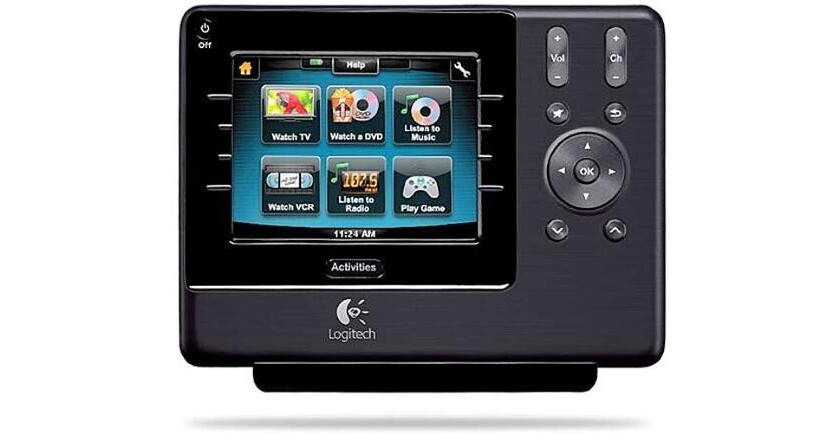
Harmony/Logitech 1100 Advanced Universal Remote

BH #HAH1100V2 • MFR #915-000076
Print
Harmony/Logitech 1100 Advanced Universal Remote
Key Features
  • 3.5" Touchscreen Color Display
  • Dual IR Transmitters
  • Up to 65' Transmission Range
  • Controls Up to 15 Components
Control your audio and video components with the 1100 Advanced Universal Remote from Harmony/Logitech. This universal remote control features a 3.5" color touch-screen display and allows you to control up to 15 components. The Harmony 1100 has two IR transmitters and can communicate with other infrared components up to 65' away with a clear line-of-sight. The computer based set-up walks you through installation and tailors the remote control to your devices.
More Details
No Longer Available
No Store Display
Ask an Expert
800-606-6969

Harmony/Logitech 1100 Overview

Control your audio and video components with the 1100 Advanced Universal Remote from Harmony/Logitech. This universal remote control features a 3.5" color touch-screen display and allows you to control up to 15 components. The Harmony 1100 has two IR transmitters and can communicate with other infrared components up to 65' away with a clear line-of-sight. The computer based set-up walks you through installation and tailors the remote control to your devices.

The Harmony 1100 features Smart State Technology so it knows what devices need to be powered-on. Activity-based control allows the remote to execute multiple commands at the push of a button. With the integrated Learn IR feature of the Harmony 1100 and the included Harmony Remote Software, you can use your device's original remote to teach commands to the Harmony 1100. This universal remote control supports over 225,000 devices and 5,000 brands.

For PC and Mac connectivity a USB cable is included. The remote control is powered by a rechargeable lithium-ion battery; a charging station is included. With a weight of 7.2 oz, this remote was designed for comfortable handling.

Smart State Technology
The Harmony 1100 uses Smart State Technology to deliver activity-based control. This technology allows the remote to control your home theater as a whole. It knows which devices need to be turned on and which inputs the devices need to be set to. Using Smart State Technology, the Harmony 1100 switches from watching a DVD to listening to music on the stereo with the touch of a button.
One-Touch Activity Control
The Activities screen is your starting point on the Harmony 1100. From this screen, you can select which activity you want to start. When you select an activity, the remote sends a series of commands to your entertainment system to turn on the necessary devices and configure them for the selected activity

When you're in an activity, the remote's screen displays all the commands you need for that activity. For example, if you're watching TV, your screen displays functions and commands for your set-top box and your AV receiver.
Favorite Channels
You can set up your favorite channels on your Harmony 1100 so that you have quick access to the channels you watch the most. Each channel can have its own custom icon to make it easier to recognize. Just press the button and the remote will change to the desired channel for you. To access this feature, press the Heart Icon from your Watch TV start screen.
Devices
The Devices screen lists all of the devices in your entertainment system. You can access the Devices screen by pressing the Settings icon (wrench) from your main Activity page, or if you are in an activity, by pressing the Custom Control icon. From there, press the Devices button.
Smart Buttons
You can customize these buttons to send other commands you use on a regular basis. To access your custom buttons, press the Custom Control icon (star).
Status Icons
The status indicator flashes whenever an IR command is being sent from your Harmony 1100. There's a battery indicator that shows the battery level or charging status, and a clock for displaying the current time.
Guided On-line Setup
When you use the Harmony Remote Software for the first time, you must create a user account. It then provides a step-by-step guide that tailors the device to match your home entertainment components. When you start the Harmony Remote Software, it automatically checks for updates and downloads them if necessary.
Customizable
The Harmony 1100 allows you to rename activities, add custom labels, change how buttons work and even add a slideshow to the screen.
Help Function
If your Harmony 1100 becomes "out of sync" with your devices, the Help feature guides you through a series of questions to help you fix the problem and bring your devices back "in sync" with your remote.
RF Wireless Compatibility
When you pair the Harmony 1100 with the optional RF Wireless Extender, you can control up to eight components that are out of sight, for example, in a cabinet or in another room.

Harmony/Logitech 1100 Specs

General
Screen Size (Diagonal)
3.5"
Screen Type
LCD
Touch Screen Type
Resistive
Screen Resolution
320 x 240 (QVGA)
Color
64,000
Keypad
White backlit
Infrared Transmitters
2x
Infrared Learning
Yes (Up to 200 KHz)
Infrared Transmission Range
Up to 65' (20 m)
Connector
1x USB
Battery Type
Rechargeable Lithium-Ion
Supported Operating Systems
Windows 8, 7, Vista, XP, 2000
Max OS X 10.3 or later
Dimensions
5.5 x 4.1 x 0.7" (14.0 x 10.4 x 1.8 cm)
Weight
With Battery: 7.2 oz (204 g)
Packaging Info
Package Weight
2.55 lb
Box Dimensions (LxWxH)
10.7 x 7.4 x 3.4"

Harmony/Logitech 1100 Reviews

See any errors on this page?
Whatever You Need, We've Got It