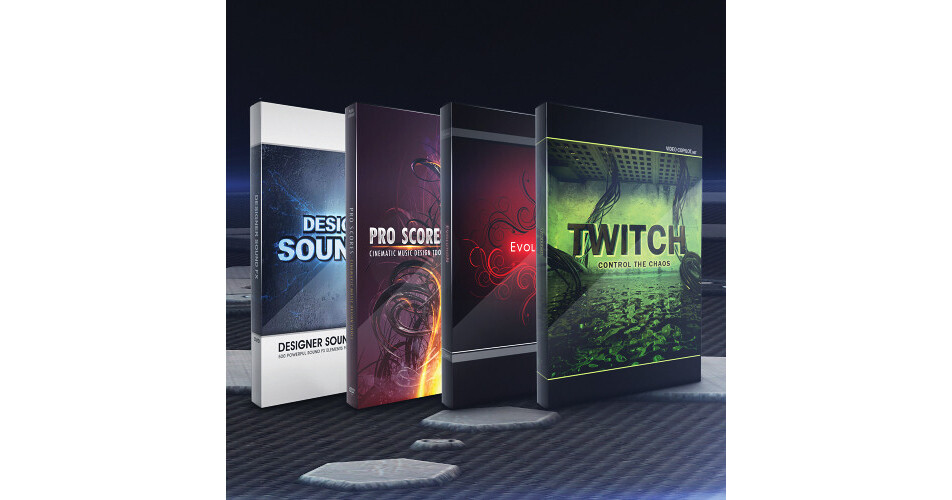


The Extreme Design Bundle from Video Copilot provides you with Twitch, an After Effects plug-in for adding stylized visual and motion effects to your footage, a collection of pre-keyed design elements, and a toolkit for adding sound effects, audio elements, and creating your own soundtracks. The bundle features Twitch, Evolution, Designer Sound FX, and Pro Scores
Twitch is a plug-in designed for use within Adobe After Effects. It comes with 6 built-in operators (blur, color, light, scale, slide, and time) for adding 'twitch' to your video. You can toggle on/off individual effects, as well as adjust the quantity and speed of each effect. It also features 10 twitch sound effects, 25 effect presets, and advanced features such as distortion FX, film shifting, and twitching to the beat of music. 7 video tutorials are included.
Evolution provides over 170 decorative designed elements, such as flourishes, objects, textures, arrows, and extension and bonus elements. The elements are pre-keyed for built-in transparency, so they are ready to use simply by dragging the clips onto your editing timeline. In addition, Evolution comes with 10 professional 720p 60fps design projects, compatible with Adobe After Effect 7 and higher, and 7 video tutorials.
Designer Sound FX builds on the visual effects of Evolution and Riot Gear by providing 500 sound effects and audio elements to accompany them. Audio files encompass categories such as Abstract, Swishes, Drums, Ambience, and Impacts. Also part of the collection is royalty-free sound, 5 pre-scored audio tracks with project files, a complete promo video project file, and 3 video tutorials.
Pro Scores contains a variety of sound elements which allow you to create your own soundtracks and scores. The collection includes orchestral music tracks, epic musical elements, layered music tracks, tension building elements, and music effects. The 500 audio tracks are encoded as 24-bit, 44.4kHz WAV files for professional quality sound. Also included are 5 in-depth tutorials and 5 layered soundtrack templates.
Please see the links below for more information on the various components of this bundle.
The Video Copilot Twitch Create Chaos is an After Effects plug-in that allows you to match random operators to make stylistic video effects for motion graphics and visual effects. You can use Twitches with multiple operators to generate unique custom effects. The Twitches can be adjusted to make them fast or slow.
The Twitch Create Chaos comes with 6 built-in operators such as blur, color, light, scale, slide, and time. The operators feature an on/off switch, and enable you to easily toggle on or off individual effects. Multiple operators can be quickly reframed with 1 parameter as the functions are controlled by a master amount and speed slider. In addition to advanced individual controls over amount and speed, the operators also offer an option to use a unique random seed value.
Featuring a Twitch Only function, the Twitch Create Chaos is an ideal tool for blending 2 separate shots with twitch, and only renders the frames that comprise twitching and keeps the rest transparent. The plug-in also comes with Freeze Twitch that allows you to hold the twitch values over a full piece of footage, using After Effects. The twitch values remain editable, and settings can be modified.
In addition to 10 twitch sound effects and 25 effects presets, the Twitch Create Chaos comes with 7 video tutorials (75 minutes) that offer training on advanced features such as distortion FX, film shifting, and twitching to the beat of music. The plug-in is suitable to be used with motion graphics, music videos, film flashbacks, transitions, and frightening effects.
- Blur Operator - contains advanced features such as a threshold slider, transfer modes, and aspect control
- Color Operator - allows you to colorize twitches and randomize color
- Light Operator - similar to an exposure function; allows you to select from adding brightness or darkness to Twitches or even both
- Scale Operator – built-in motion blur and random anchor
- Slide Operator - offers many controls over slide, motion blur, tendency, and the advanced RGB split
- Time Operator – allows you to randomly offset footage forward or backwards
The Video Copilot Evolution Decorative Design Elements offers 170 design elements such as flourishes, objects, textures, arrows, extension, and bonus elements. The elements are pre-keyed, ready to use or broadcast - built-in transparency of video files allow you to merge without removing the background, simply by dragging it on the top of the video.
Featuring 10 professional design projects (compatible with After Effects 7 - CS4 only), the Evolution Decorative Design Elements suite offers designs generated at 720p (1280 x 720) at 60 frames per second. With a high resolution about 20% higher than 720p (HD), the elements are high definition.
In addition to an advanced gallery page and 7 video tutorials, the Evolution Decorative Design Elements comes with the free Twister Preset, which is an advanced animation preset that enables you to make custom unique creations and allows animation of all the design elements. Scrupulously crafted and animated with wide-ranging detail and quality, the suite ensures that the vines grow and the leaves sprout with a trivial bounce.
The Video Copilot Designer Sound FX is a collection of 500 powerful sound effects and audio elements encompassing categories such as Abstract, Swishes, Drums, Ambience, and Impacts, and features royalty free sound. It also includes 5 pre-scored audio tracks with AE project files and a complete promo video project file and footage.
Featuring 5 video tutorials (over 80 min), the Designer Sound FX shows you ways to create audio scores. In addition to an introduction for organizing and managing sounds, it includes tutorials on creating an audio score, adding motion graphics to audio scores, creating a powerful ice shattering effect, and creating movie trailer titles. You are also provided advice and mixing tips from Video Copilot president and founder Andrew Kramer.
The Designer Sound FX is suitable for movie trailers and promos, and film scores. It can also be used by developers in Flash intros and button roll-overs. The collection is ideal for DVD menus, motion graphics, special effects studios, video games, and scary movie tones.
Impacts (sounds of slams, explosive hits, and hard impacts)
Swishes (thick whooshes and swishes)
Drums (orchestral percussion beds and build-ups and climactic drum elements and short fills)
Ambience (compelling background sounds and textures and drones and tone builds)
Abstract (effects like heart beats, liquid sounds, splats, crumbled paper, record scratches, TV noise, ice cracking, and freezing)
Introduction & Getting Started - learn to organize and effectively manage sounds
Create an Audio Score - mix sounds and musical elements to create impactful scores for promos
Add Motion Graphics to Audio Score - match up titles and effects to follow the pace of the music and sound effects
Create a Powerful Ice Shattering Effect - use After Effects to create a powerful shattering effect in 3D
Create Movie Trailer Titles - create title with light rays, similar to many popular movie trailers
Pro Scores Cinematic Music Design Tools (Download) from Video Copilot is a professionally-created toolkit that contains a variety of sound elements, allowing you to create your own soundtracks and scores, ideal for TV, gaming, film, and more. The collection includes orchestral music tracks, epic musical elements, layered music tracks, tension building elements, and editorial music effects. There are also 5 in-depth tutorials and 5 layered soundtrack templates, so you can get started right away.
The collection has 500 audio tracks, which are encoded as 24-bit/44.1kHz WAV files. The files can be used in After Effects, Premiere, Vegas, Final Cut Pro, and most other audio editing applications. The content works with AE 7, CS3, CS4, CS5, and CS5.5 to support current and legacy users.