Video Chat with a Pro Audio Expert - Live

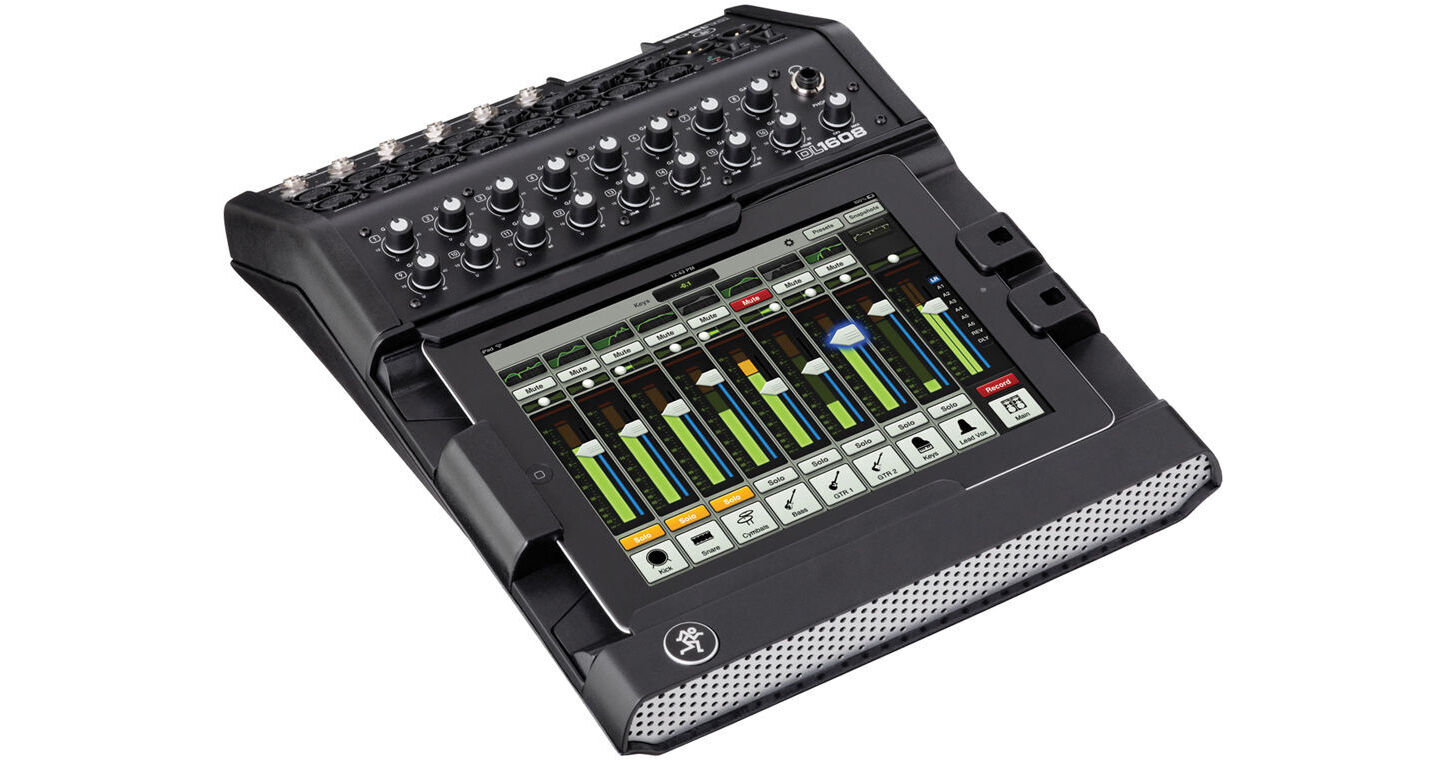
Mackie DL1608 iPad-Controlled 16-Channel Digital Live Sound Mixer with Lightning Connector

BH #MADL1608LIGH • MFR #DL1608-LIGHTNING
Print
Mackie DL1608 iPad-Controlled 16-Channel Digital Live Sound Mixer with Lightning Connector
Key Features
  • Integrated iPad Dock on Faceplate
  • iPad Mixing with Master Fader App
  • 16 Onyx Microphone Preamps
  • Cirrus Logic 24-Bit A/D & D/A Converters
The Mackie DL1608 16-Channel Digital Live Sound Mixer with Lightning Connector allows the entire process of live-sound mixing to be controlled by an iPad. The DL1608 features 16 Onyx microphone preamps, 24-bit A/D & D/A converters, powerful internal DSP processing and an iPad docking faceplate. Integrate your Lightning Apple iPad and complete the setup for a live sound mixing experience that takes advantage of the iPad's touchscreen capabilities and wireless control.
More Details
No Longer Available
No Store Display
Ask an Expert
800-952-1815

Mackie DL1608 Overview

The Mackie DL1608 16-Channel Digital Live Sound Mixer with Lightning Connector allows the entire process of live-sound mixing to be controlled by an iPad. The DL1608 features 16 Onyx microphone preamps, 24-bit A/D & D/A converters, powerful internal DSP processing and an iPad docking faceplate. Integrate your Lightning Apple iPad and complete the setup for a live sound mixing experience that takes advantage of the iPad's touchscreen capabilities and wireless control.

Use Mackie's Master Fader app to mix live audio and access the DL1608's internal processing, including 4-band EQ, compression, gate, delay, reverb and 31-band graphic EQ. Add a wireless router (not included) and mix with your iPad remotely, at various locations of a venue, hall, etc. The DL1608 takes full advantage of the iPad's flexibility, and features like Channel Images allow you to take pictures of band members and use the images as channel markers for easy referencing.

The Mackie DL1608 features a download for ProTools I First and Waveform software and The Musician's Collection plug-in package including 23 high-quality plugins with BBD Delay, Level Lite, 304E EQ, and 304C Compressor. To authorize the software, simply input the mixer's serial number on the website.

Conrol the Mix From Anywhere
With the Mackie DL1608's seamless wired to wireless mixing capabilities, you can mix in real time from anywhere in the venue on your iPad (requires wireless router, sold separately). Instantly adjust mix functions from tuning front of house trouble spots to ringing out stage monitors.
16 Onyx Preamps
The Mackie DL1608 comes loaded with 16 studio-quality Onyx mic preamps that deliver depth, headroom and immense detail to your live mix. Plus, with 12 XLR and four combo mic/line inputs, connecting mics and instruments is quick and easy.
24-Bit Cirrus Logic AD/DA Converters
The Mackie DL1608's high-end 24bit Cirrus Logic AD/DA converters offer a remarkable 114 dB dynamic range. We align our Onyx pre-amps precisely with the converters to provide you with the most headroom and the lowest noise and distortion possible-resulting in brilliant sound quality from a vocal whisper to a wailing guitar solo.
Built-In Processing (DSP)
The DL1608 is loaded with a choice of powerful plug-ins on every channel, so you won't need to set up additional racks of outboard gear. With just the touch of a finger, you have total control over 4-band EQ, compression and gate plug-ins. Plus, sweeten your sound with a full-featured reverb and tap delay or adjust your mix to the room with the 31-band graphic EQ and compressor/limiter on the main and aux outs.
Multiple iPad Support
Supporting up to 10 iPads simultaneously, the Mackie DL1608 allows multiple engineers to control the mix. Plus, it gives band members the ability to adjust their own monitors. Now, the band can dial in the mix they want to hear in real time right on stage.
Snapshot Recall
The Mackie DL1608 allows you to recall mix functions with just the touch of a finger. With Total Snapshot Recall*, you can now easily save and access sound check settings for multiple bands, complex song mixes, previous mixes from challenging venues, recall scenes for theater productions and more. You can even pre-set the mixing board and be ready to go the moment you arrive. *Mic pre-amp gains are not recallable.
Channel Presets
Quickly set up a new mix with the DL1608's Channel Presets. With simple touchscreen control, you can immediately assign a factory or your own custom channel preset for kick drum, bass, guitar, keyboard and more to any channel you choose. And when you've made the perfect settings, easily save them for later use and share them with your friends.
Record for Easy Sharing
The Mackie DL1608 lets you to record your mix from the L/R stereo outputs directly to your iPad, allowing you to upload it to your favorite application and share it with others.
Integrate Music from Any App
Whether you want to play pre-show music or add a Garage Band track to your live mix, with the Mackie DL1608 you can bring in stereo audio from any iPad application. Best of all, with the pre-assigned iPad channel, you can do it without using up one of the mixer's 16 channels.* *iPad must be docked.
Channel Images
The DL1608 lets you take a picture of band members with your iPad or choose your own picture to help you easily identify your assigned channels. There's a choice of included icons to get you up and running.
Install Friendly Features
The Mackie DL1608 is perfect for installing in venues. With its easy to use Master Fader iPad application it has never been easier to train up new sound engineers. Plus, forget the bulky racks of outboard gear, the powerfully small, low profile design lets you install it just about anywhere.
Big on Security
The DL1608 is big on security. The padlock feature locks down your iPad for permanent installs, while the Kensington lock-the industry standard in protecting technological equipment-secures the mixer to guard it from theft.
Dock Compatibility
  • Dock compatible with iPad (2017), iPad Pro 9.7-inch, iPad Air 2, iPad Air, and iPad (4th generation)
  • Optional dock available for iPad mini 3, iPad mini 2 and iPad mini
Professional Production Content
  • Content
    • Pro Tools | First and Waveform OEM professional software and plugin packages included
    • The DAW Essentials Bundle for Waveform OEM includes 16 powerful plugins like Equalizer, Compressor, Reverber8, and Limiter
  • Included Software from Avid, including Pro Tools | First
    • An industry standard for decades, Pro Tools | First is easy enough for beginners yet sophisticated enough for experienced musicians. Get many of the same tools used by your favorite artists and recording studios. And now you can collaborate online with anyone, anywhere, and create at the speed of your imagination. Available for macOS and Windows operating systems. 
    • In addition to the powerful plug-ins within Pro Tools | First, this mixer comes with the exclusive Mackie Musician Collection featuring 23 fantastic plug-ins, including:
      • Avid 304E EQ: Add musical warmth with a treble and bass equalizer with sweepable mid control
      • Avid 304C Compressor: Tweak the clarity, balance, and rhythmic feel of music with this optical-modeled compressor
      • BBD Delay: Create delay, chorus, and vibrato effects based on a classic guitar pedal
      • Black Op Distortion: Add rich distortion based on a classic distortion pedal
      • Black Shiny Wah: Achieve the famous classic tones of a respected wah wah pedal
      • Black Spring Reverb: Get the twang and space of a vintage amplifier
      • C1 Chorus: Emulates a classic chorus pedal
      • DC Distortion: Dial up a range of overdriven tones with this Avid custom distortion effect
      • Eleven Lite: Get the sound of popular guitar amps and speaker cabinets
      • Flanger: Create esoteric sounds with this homage to vintage and modern flangers
      • Graphic EQ: Sculpt frequencies with ease
      • Gray Compressor: Add warmth to tracks based on a vintage Ross compressor
      • Green JRC Overdrive: Get the coveted sounds of a classic IC overdrive pedal
      • In-Tune: Keep your instruments in tune with this digital tuner
      • Orange Phaser: Create interesting effects with this phase shifter based on a classic design
      • Roto Speaker: Recreate the sounds of a Leslie rotary speaker cabinet
      • Sci-Fi: Add analog synth-type ring and frequency modulation
      • Studio Reverb: Create natural-sounding reverb and ambient effects
      • Tape Echo: Add vintage analog delay and chorus effects
      • Tri Knob Fuzz: Get the Hendrix tone with this fuzz box based on one of the first fuzz pedals
      • Vari-Fi: Create the effect of audio changing tape speed
      • Vibe Phaser: Add phase-shift and rotary speaker effects

Mackie DL1608 Specs

Mixer
Number of Analog Input Channels
16
Number of Mic Preamps
16
Number of Analog Output Channels
12
Max I/O Capacity
16x Input / 12x Output (with Included Hardware)
Mix Routing
1x Stereo Bus
Groups
4x VCA Group
4x Mute Group
Presets
2x Preset (Factory)
Faders
No
Signal Processing
Gain/Trim Range
Mic:
0 dB to 60 dB
Line:
-20 dB to 40 dB
Dynamic Processing
Input Channels, Buses, Master:
Compressor, Limiter, Gate
EQ
Input Channels, Outputs:
4-Band Parametric
Outputs:
31-Band Graphic
Graphic EQ
Yes
Solo/Mute
No
Built-In Effects
2x Stereo Preset (Factory)
Real Time Analyzer
Yes
Audio Delay
Adjustable Up to 350 ms
Automatic Mic Mixing
No
Digital Audio
Sample Rates
48 kHz
Bit Depth
AD/DA Conversion:
24-Bit
Latency
1.5 ms
Performance
Frequency Response
20 Hz to 20 kHz +0/-1 dB
Max Input Level
XLR Input:
+21 dBu
1/4" TRS Input:
+30 dBu
Output Level
Analog Output:
+21 dBu (Max)
Analog Dynamic Range
109 dBA at Unity Gain
I/O Impedance
Aux Send:
240 Ohms (Balanced)
120 Ohms (Unbalanced)
Output:
600 Ohms
XLR Mic Input:
3 Kilohms
1/4" Input:
30 Kilohms
Crosstalk
Adjacent Inputs:
< -120 dB at 1 kHz
Adjacent Outputs:
< -105 dB at 1 kHz
CMRR
> 70 dB at +60 dB Gain
EIN
-128 dBu (2901653041)
Noise Floor
-79 dBu A-Weighted (at Unity Gain)
SNR
92 dBA at Unity Gain (+4 dBu Reference)
THD
< 0.005%
Connectivity
Analog Inputs
12x XLR Balanced Input
4x Combo XLR-1/4" TRS Input
Analog Outputs
6x 1/4" TRS Balanced Aux Send
2x XLR Balanced Output
Phantom Power
+48 V
Digital I/O
1x RJ45 (Network, 100 Mb/s)
1x iPad Dock (Lightning)
MIDI I/O
No
Compatibility
OS Compatibility
iOS 8.0 or Later
Mobile Device Compatibility
iPad 4th Gen. or Later
iPad Air 1st Gen. or Later
iPad Mini 1st Gen. or Later
iPad Pro 1st Gen., 2nd Gen.
Power
AC Input Power
100 to 240 VAC, 50 / 60 Hz at 4 A
AC Power I/O
IEC
DC Input Power
VDC
Power Consumption
48 W (Maximum)
Physical
Rackmount Size
9 U
Operating Temperature
32 to 104°F / 0 to 40°C
Dimensions
11.5 x 3.7 x 15.4" / 291 x 95 x 391 mm
Weight
6.9 lb / 3.1 kg
Packaging Info
Package Weight
13.05 lb
Box Dimensions (LxWxH)
19 x 18.4 x 6.3"

Mackie DL1608 Reviews

See any errors on this page?
Whatever You Need, We've Got It