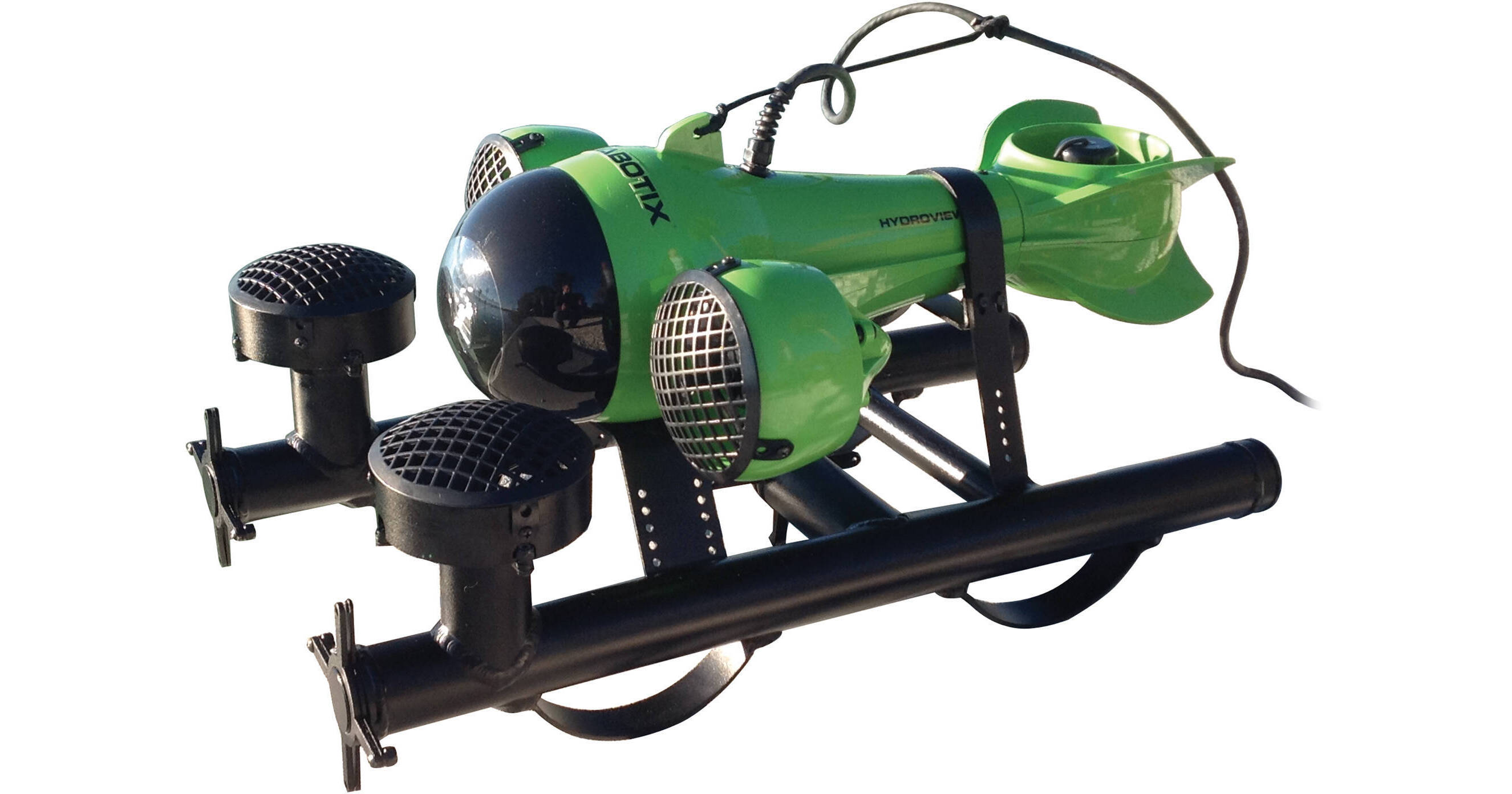
The lime green and black HydroView PRO 5M Mini Underwater ROV with Live Video from Aquabotix features a camera with a 1MP image sensor and LED lights. It provides a live video feed and captures HD 720p video at 30 fps and 1280 x 800 photos beneath the surface at a maximum depth of 330'. It has a wide-angle lens offering a 66° angle of view, and the dome port counteracts the decrease in coverage that occurs underwater by providing a wider angle. A highly useful tool for underwater exploration, the HydroView PRO allows you to study marine life and environments and perform inspections under your boat and can also be employed to carry out search-and-recovery missions and check water depths and water tanks. Additionally, it's capable of carrying a 2-lb payload.
The ROV has a 250' chemical-resistant Cat 5e to Cat 5e cable for connection to the included topside box, which generates its own Wi-Fi signal that allows you to connect your iPad or PC via the free downloadable app. Mac operating systems are not compatible. The box also has a LAN connection enabling the use of an optional Ethernet cable as an alternative to Wi-Fi. The app lets you view the vehicle's live video feed on your computer's display and remotely control its movements and functions. Optional 125' and 250' cable extensions are available separately to allow for an extended operational range of up to 500'. The vehicle's 32GB memory card means it's capable of recording up to 130 min of HD 720p video. As an alternative to a memory card, you can purchase the HydroView in a different configuration with a 128 or 256 GB solid state drive for substantially greater storage capacity.
The HydroView PRO features 5 Swiss-made, high torque motors, including 2 thrusters and 3 hovering/pitch motors, with propellers and propeller guards. The unique motor configuration gives you complete control over forward/backward and up/down motions, as well as roll, pitch, yaw and hovering. The HydroView can reach speeds up to 4 knots going forward and 2 knots in reverse. The vehicle runs on 2 rechargeable lithium-ion batteries. Two alternate versions of the HydroView are available separately: one configured with 12/24VDC topside continuous power and one configured with 110-240VAC topside continuous power.
The orientation sensor provides you with readings on yaw, pitch, roll and heading relative to true north. This sensor aids in navigation of the vehicle and is extremely useful in poor water quality conditions. There's also a depth sensor that gives you readings on the underwater depth of the vehicle, allowing you to drive it to the exact depth needed for your purposes. This is also a useful tool when you find something underwater that you want to be able to locate again. The HydroView also features a sensor that detects and indicates the temperature of the water where the vehicle is swimming. The HydroView software provides control over heading, pitch, depth, thrust, way points, and patterns.
Buoyancy is set with salt water use in mind by default, though the optional buoyancy management and landing gear system offers manual control over this attribute, allowing you to add weights in order to change the buoyancy to the preferred setting for fresh water or salt water with a lower or higher salinity level.
Ask Our Experts800-606-6969
Hello, Log InAccount & Orders
Aquabotix HydroView PRO 5M Mini Underwater ROV with Live Video (Battery Power, Lime Green and Black)
Key Features
- 330' Depth Rating, 250' Cable Length
- HD 720p Video Capture, Live Video Feed
- 1MP Image Sensor
- 32GB Memory Card for Over 2 hr HD Video
The lime green and black HydroView PRO 5M Mini Underwater ROV with Live Video from Aquabotix features a camera with a 1MP image sensor and LED lights. It provides a live video feed and captures HD 720p video at 30 fps and 1280 x 800 photos beneath the surface at a maximum depth of 330'. It has a wide-angle lens offering a 66° angle of view, and the dome port counteracts the decrease in coverage that occurs underwater by providing a wider angle. A highly useful tool for underwater exploration, the HydroView PRO allows you to study marine life and environments and perform inspections under your boat and can also be employed to carry out search-and-recovery missions and check water depths and water tanks. Additionally, it's capable of carrying a 2-lb payload.
More DetailsNo Longer Available
Aquabotix 01-HV-PRO-0005M Overview
Applications
A highly useful tool for underwater exploration, the HydroView PRO allows you to study marine life and environments and perform inspections under your boat and can also be employed to carry out search-and-recovery missions and check water depths and water tanks. Additionally, it's capable of carrying a 2-lb payload.
Depth Rating
Can safely be used at a maximum depth of 330'.
Live Video and Capture of Videos and Still Photos
Provides a live video feed that can be recorded at resolutions up to HD 720/30p video by the camera, which features a 1MP image sensor and also captures 1280 x 800 resolution still photos. It has a wide-angle lens offering a 66° angle of view, and the dome port counteracts the decrease in coverage that occurs underwater by providing a wider angle. The vehicle's 32GB memory card means it's capable of recording up to 130 min of HD 720p video. As an alternative to a memory card, you can purchase the HydroView in a different configuration with a 128 or 256 GB solid state drive for substantially greater storage capacity.
Lighting
Features 10 cool white LED lights providing an output of 80 lumens and a color temperature of 6800 K. Optional high-intensity lights deliver an output of 800 lumens at the same color temperature of 6800 K.
Motors
Features 5 Swiss-made, high torque motors, including 2 thrusters and 3 hovering/pitch motors, with propellers and propeller guards that protect against damage and debris. The unique motor configuration gives you complete control over forward/backward and up/down motions, as well as roll, pitch, yaw, and hovering. The HydroView can reach speeds up to 4 knots going forward and 2 knots in reverse.
Power
The vehicle runs on 2 rechargeable lithium-ion batteries. Two alternate versions of the HydroView are available separately: one configured with 12/24VDC topside continuous power and one configured with 110-240VAC topside continuous power. Either of these two options will enable you to run HydroView for as long as you need without worrying about loss of power.
Orientation, Depth, and Temperature Sensors
The orientation sensor provides you with readings on yaw, pitch, roll and heading relative to true north. This sensor aids in navigation of the vehicle and is extremely useful in poor water quality conditions. There's also a depth sensor that gives you readings on the underwater depth of the vehicle with +/- 0.25% accuracy, allowing you to drive it to the exact depth needed for your purposes. This is also a useful tool when you find something underwater that you want to be able to locate again. The HydroView even features a sensor that detects and indicates the temperature of the water where the vehicle is swimming, within +/- 0.2° and with a +/- 0.3% tolerance and a 1-sec response time.
Auto Controls
Autopilot controls allow settings like heading, pitch, depth, and thrust (all standard) and way points and patterns (optional) to be maintained during search-and-recovery missions.
Buoyancy
Set with salt water use in mind by default, though the optional buoyancy management and landing gear system offers manual control over this attribute, allowing you to add weights in order to change the buoyancy to the preferred setting for fresh water or salt water with a lower or higher salinity level.
Topside Box
Connects to the ROV via the supplied 250' Cat 5e to Cat 5e cable. Topside box generates its own 802.11n Wi-Fi signal, allowing you to connect your iPad or laptop PC via the free downloadable app, which lets you view the vehicle's live video feed on your computer's display and remotely control its movements and functions. Box also has a LAN connection enabling the use of an optional Ethernet cable as an alternative to Wi-Fi. An extended range topside box for use with the optional cable extensions can be purchased separately.
Waterproof Carrying Case with Extension Handle
Constructed from molded, high-strength polypropylene copolymer resin, and featuring a gasket seal for water/dust-proofing (submersible design spec MIL-C-4150J). Also corrosion and impact-resistant.
HydroView App for iPad or PC:
Introduction
Navigate through the water using your iPad or laptop PC (Windows or Linux) as a remote control via 802.11n Wi-Fi, the HydroView software, and the free HydroView App. Mac operating systems are not compatible. Either version is easily downloadable from the Aquabotix website, and the iPad version can also be downloaded from Apple's site. The app is used to view the vehicle's live video feed on your device's display and control the vehicle's movements and functions. The video is visible in the background with the control setting overlays on top. The Dashboard Panel, Depth Meter, Compass and Speed Meter are all software upgrades available at the time of purchase.
Control Panel
Control vehicle's LED dome lights, movie recorder, camera, and speed, stop and reverse functions. You can adjust LED brightness and set up the camera to take pictures at an interval you specify. Your recorded videos and photos will be stored on the HydroView, and you can use the free Media Manager app to select which ones you would like to download to your iPad or computer. The app allows you to view, delete and save photos and videos, making it possible to watch and share images without being connected to the HydroView. The iPad version can be downloaded from the Aquabotix website or Apple's store site, while the PC version requires no download and is accessible via the Internet Explorer, Google Chrome, Firefox and Safari web browsers.
There are three options for speed: 1/3 power, 2/3 power, and full power (see specifications for speeds). When you select one, the vehicle's two forward-facing motors will propel it forward--or backward if Reverse is pressed--and it will remain at that speed until you select another or press STOP. The STOP button halts forward and reverse motion, but you'll still be able to turn, dive or rise until you activate the "LOCK" feature.
Dashboard Panel
Used for manipulating motion controls with the iPad and adjusting the camera's focus with either the iPad or PC, and also gives location readings. Auto and manual focus can be selected, and a scroll bar allows you to fine-tune manual focus. With the iPad, you can switch between motion controls (tilting your iPad in the desired direction) and virtual joystick controls to make the vehicle turn left, turn right, dive or rise. The position indicator grid displays an approximation of where your vehicle is relative to you, making it easy to determine its location in low-visibility conditions.
The PC version of the app offers keyboard controls for brightness, thrust, pitch (dive/rise) and turn. Within the Configuration Settings menu, there are default settings for these keyboard controls that you can use or change if you want to customize the controls.
Heads Up Display (HUD)
Available when software has been upgraded to version 5.3 or later, the HUD makes it easy to know where your HydroView is and what it's doing, even when it's outside of visual range. It tracks compass heading, pitch, roll, depth, speed, and vehicle position. HUD components, such as the pitch indicator, depth and speed gauges, can be turned on or off.
Settings Menu
Use the Invert Steering function to make the vehicle dive and rise in response to the opposite motions. Adjust video resolution with low, medium, high and HD settings. HD delivers the highest quality images at a speed that is slightly slower than a live feed, while high, medium and low resolutions provide images of a lower quality at a faster speed. Also available in the settings menu is the ability to run a vehicle health check, which helps verify that the mechanical components of are functioning properly. If your unit has been upgraded to be equipped with the compass/INS navigation system, it is recommended that you calibrate the compass here in settings once a month, in order to ensure that your sensors are operating with the highest possible accuracy.
Optional User Control Workstation
All-inclusive viewing, control, and recording station with a 10" display screen, 8GB RAM, 128 GB storage capacity, and a Windows or Linux operating system. Benefit from a keyboard, touch pad, and joystick for control, as well as USB, HDMI video out and Cat 5e interfaces.
Aquabotix 01-HV-PRO-0005M Specs
Camera
| Image Sensor | |
| Resolution | |
| Aspect Ratio | |
| Color Depth | |
| Lens | |
| Focus | |
| Exposure Control | |
| Video Frame Rate | |
| Lights | |
| Memory |
Processing
| Processor & Memory | |
| Operating System |
Connectivity
| Wi-Fi | |
| Ethernet | |
| System Requirements |
Housing
| Depth Rating | |
| Speed | |
| Operating Temperature | |
| Connectivity | |
| Power | |
| Material of Construction | |
| Payload | |
| Dimensions | |
| Weight |
Case
| Durability | |
| Construction | |
| Carrying/Transport Options | |
| Dimensions |
Packaging Info
| Package Weight | |
| Box Dimensions (LxWxH) |
Aquabotix 01-HV-PRO-0005M Reviews
See any errors on this page?